
42.scrapy爬取数据入库mongodb
scrapy爬虫采集数据存入mongodb
采集效果如图:
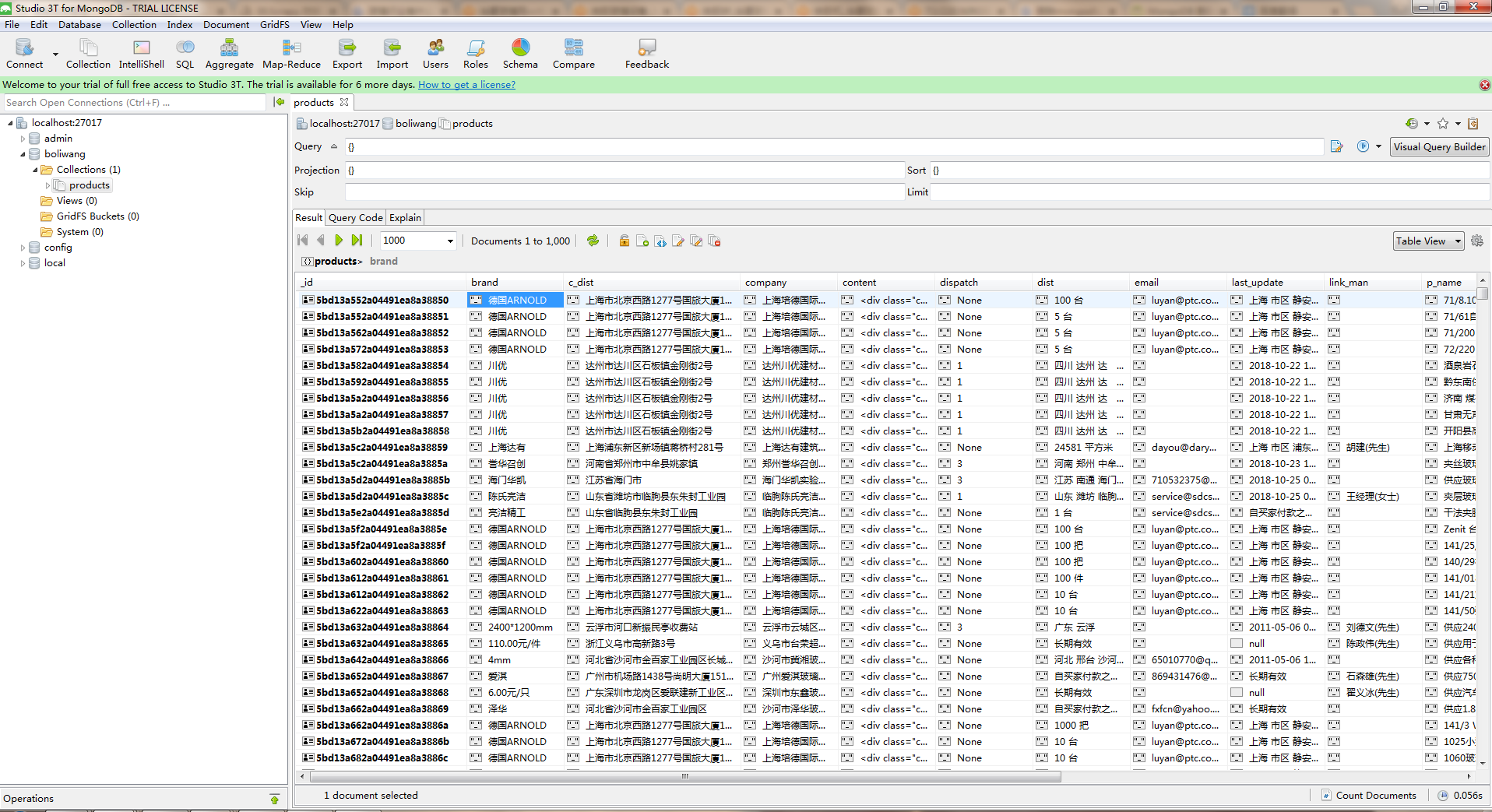
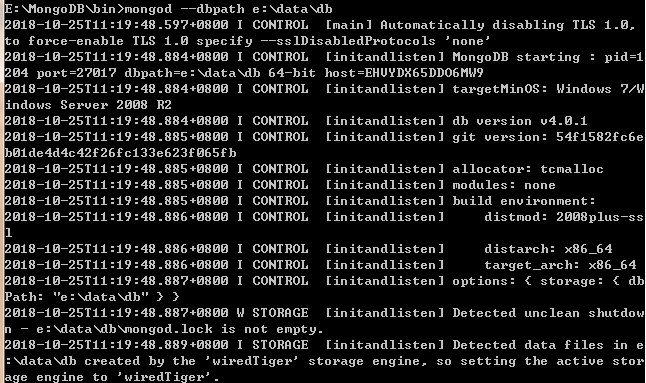
1.首先开启服务
切换到mongodb的bin目录下   命令:mongod --dbpath e:\data\db
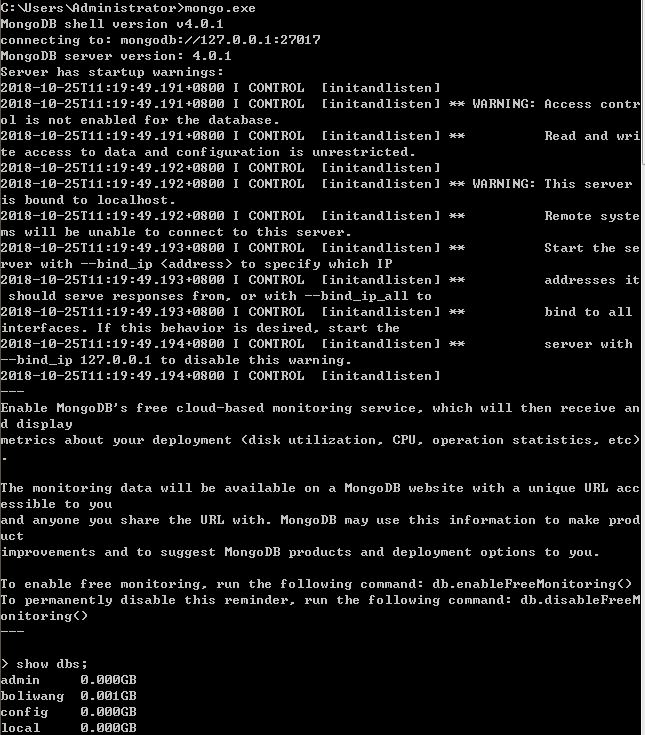
另开黑窗口 命令:mongo.exe
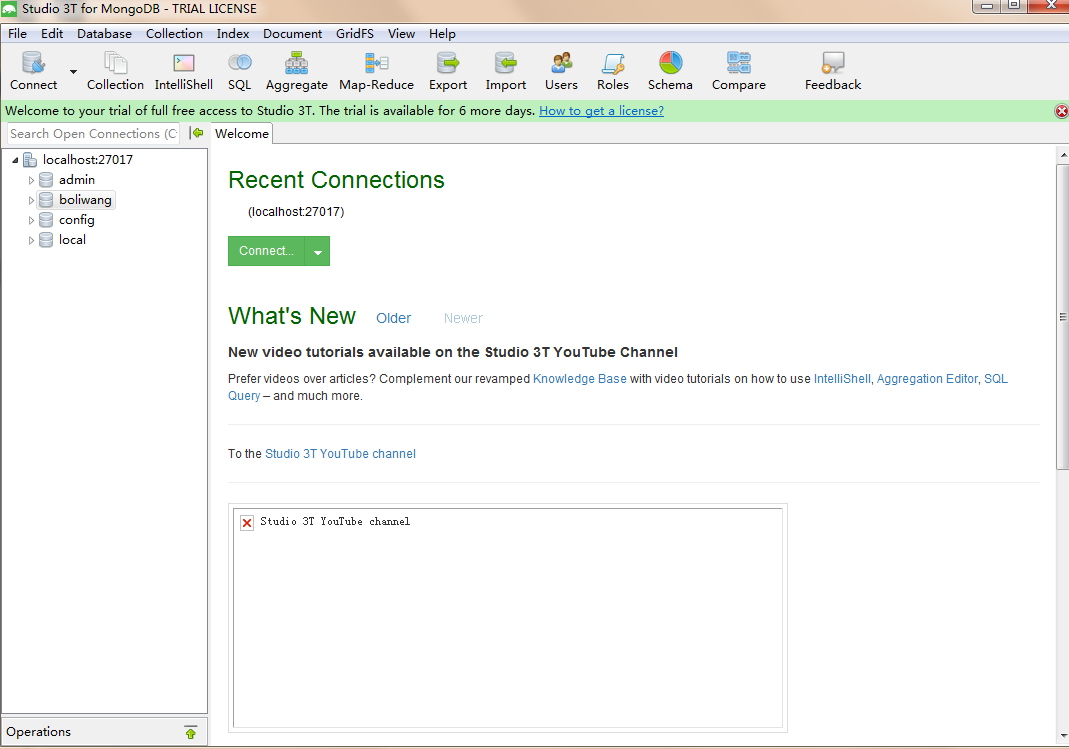
2.连接可视化工具 studio—3t 建立本地连接
如图:
3.代码如下 采集的是玻璃网站产品数据 http://www.boliwang.com.cn/
boliwang.py # -*- coding: utf-8 -*-
import scrapy
import re
from boliwang_web.items import BoliwangWebItem class BoliwangSpider(scrapy.Spider):
name = 'boliwang'
allowed_domains = ['www.boliwang.com.cn']
start_urls = ['http://www.boliwang.com.cn/gy/index-htm-page-1.html']
custom_settings = {
'DOWNLOAD_DELAY': 0.5,
"DOWNLOADER_MIDDLEWARES": {
'boliwang_web.middlewares.BoliwangWebDownloaderMiddleware': 500,
},
}
def parse(self, response):
# print(response.text)
# 获取当前页面url
link_urls = response.xpath("//table//tr/td[4]/ul/li[1]/a/@href").extract() for link_url in link_urls:
# print(link_url)
yield scrapy.Request(url=link_url, callback=self.parse_detail)
# print('*'*100)
#翻页
tag = response.xpath("//div[@class='pages']/cite/text()").extract_first()
# print(tag)
p_num = tag.split('/')[1].replace('页','')
# print(p_num)
for i in range(1, int(p_num)+1):
url = 'http://www.boliwang.com.cn/gy/index-htm-page-{}.html'.format(i)
# print(url)
yield scrapy.Request(url=url, callback=self.parse) def parse_detail(self, response):
# 获取当前页面信息 item = BoliwangWebItem()
# 产品名称
p_name = response.xpath("//table//tr[1]/td/h1[@id='title']/text()").extract_first()
item['p_name'] = p_name
# 品牌
brand = response.xpath("//table//tr[2]/td[3]/table//tr[1]/td[2]/text()").extract_first()
item['brand'] = brand
# 单价
price = response.xpath("//table//tr[2]/td[@class='f_b f_orange']/text()").extract_first()
item['price'] = price
# 起订
set_up = response.xpath("//table//tr[3]/td[@class='f_b f_orange']/text()").extract_first()
item['set_up'] = set_up
# 供货总量
summation = response.xpath("//table//tr[4]/td[@class='f_b f_orange']/text()").extract_first()
item['summation'] = summation
# 发货期限
dispatch = response.xpath("//table//tr[5]/td[2]/span[@class='f_b f_orange']/text()").extract_first()
dispatch = '{}'.format(dispatch)
item['dispatch'] = dispatch
# 所在地区
dist = response.xpath("//table//tr[6]/td[2]/text()").extract_first()
item['dist'] = dist
# 有效期
term_of_valid = response.xpath("//table//tr[7]/td[2]/text()").extract_first()
item['term_of_valid'] = term_of_valid
# 最后更新
last_update = response.xpath("//table//tr[8]/td[2]/text()").extract_first()
item['last_update'] = last_update
# 详情信息
content = response.xpath("//div[@class='box_body']/div[@id='content']").extract_first()
item['content'] = content
# 公司名称
company = response.xpath("//li[@class='f_b t_c']/a/text()").extract_first()
item['company'] = company
# 联系人
try:
link_man = re.findall("<span>联系人</span>(.*?)  ", response.text)
link_man = link_man[0]
except:
link_man = ''
item['link_man'] = link_man
# 邮件
try:
email = re.findall('<li><span>邮件</span>(.*?)</li>', response.text)
email = email[0]
except:
email = ''
item['email'] = email
# 电话
try:
tel = re.findall('<li><span>电话</span>(.*?)</li>', response.text)
tel = tel[0]
except:
tel = ''
item['tel'] = tel
# 手机
try :
phone = re.findall('<li><span>手机</span>(.*?)</li>', response.text)
phone = phone[0]
except:
phone = ''
item['phone'] = phone
# 公司地址
try:
c_dist = re.findall('<span>地址</span>(.*?)</li></ul>',response.text)
c_dist = c_dist[0]
except:
c_dist = ''
item['c_dist'] = c_dist yield item print('*'*100)
items.py

# -*- coding: utf-8 -*-

# Define here the models for your scraped items

#

# See documentation in:

# https://doc.scrapy.org/en/latest/topics/items.html

import scrapy

class BoliwangWebItem(scrapy.Item):

    # define the fields for your item here like:

    # name = scrapy.Field()

    collection = table = 'products'

    # 产品名称

    p_name = scrapy.Field()

    # 品牌

    brand = scrapy.Field()

    # 单价

    price = scrapy.Field()

    # 起订

    set_up = scrapy.Field()

    # 供货总量

    summation = scrapy.Field()

    # 发货期限

    dispatch = scrapy.Field()

    # 所在地区

    dist = scrapy.Field()

    # 有效期

    term_of_valid = scrapy.Field()

    # 最后更新

    last_update = scrapy.Field()

    # 详情信息

    content = scrapy.Field()

    # 公司名称

    company = scrapy.Field()

    # 联系人

    link_man = scrapy.Field()

    # 邮件

    email = scrapy.Field()

    # 电话

    tel = scrapy.Field()

    # 手机

    phone = scrapy.Field()

    # 公司地址

    c_dist = scrapy.Field()
items.py

# -*- coding: utf-8 -*-

# Define here the models for your spider middleware

#

# See documentation in:

# https://doc.scrapy.org/en/latest/topics/spider-middleware.html

from scrapy import signals

class BoliwangWebSpiderMiddleware(object):

    # Not all methods need to be defined. If a method is not defined,

    # scrapy acts as if the spider middleware does not modify the

    # passed objects.

    @classmethod

    def from_crawler(cls, crawler):

        # This method is used by Scrapy to create your spiders.

        s = cls()

        crawler.signals.connect(s.spider_opened, signal=signals.spider_opened)

        return s

    def process_spider_input(self, response, spider):

        # Called for each response that goes through the spider

        # middleware and into the spider.

        # Should return None or raise an exception.

        return None

    def process_spider_output(self, response, result, spider):

        # Called with the results returned from the Spider, after

        # it has processed the response.

        # Must return an iterable of Request, dict or Item objects.

        for i in result:

            yield i

    def process_spider_exception(self, response, exception, spider):

        # Called when a spider or process_spider_input() method

        # (from other spider middleware) raises an exception.

        # Should return either None or an iterable of Response, dict

        # or Item objects.

        pass

    def process_start_requests(self, start_requests, spider):

        # Called with the start requests of the spider, and works

        # similarly to the process_spider_output() method, except

        # that it doesn’t have a response associated.

        # Must return only requests (not items).

        for r in start_requests:

            yield r

    def spider_opened(self, spider):

        spider.logger.info('Spider opened: %s' % spider.name)

class BoliwangWebDownloaderMiddleware(object):

    # Not all methods need to be defined. If a method is not defined,

    # scrapy acts as if the downloader middleware does not modify the

    # passed objects.

    @classmethod

    def from_crawler(cls, crawler):

        # This method is used by Scrapy to create your spiders.

        s = cls()

        crawler.signals.connect(s.spider_opened, signal=signals.spider_opened)

        return s

    def process_request(self, request, spider):

        # Called for each request that goes through the downloader

        # middleware.

        # Must either:

        # - return None: continue processing this request

        # - or return a Response object

        # - or return a Request object

        # - or raise IgnoreRequest: process_exception() methods of

        #   installed downloader middleware will be called

        return None

    def process_response(self, request, response, spider):

        # Called with the response returned from the downloader.

        # Must either;

        # - return a Response object

        # - return a Request object

        # - or raise IgnoreRequest

        return response

    def process_exception(self, request, exception, spider):

        # Called when a download handler or a process_request()

        # (from other downloader middleware) raises an exception.

        # Must either:

        # - return None: continue processing this exception

        # - return a Response object: stops process_exception() chain

        # - return a Request object: stops process_exception() chain

        pass

    def spider_opened(self, spider):

        spider.logger.info('Spider opened: %s' % spider.name)
piplines.py

# -*- coding: utf-8 -*-

# Define your item pipelines here

#

# Don't forget to add your pipeline to the ITEM_PIPELINES setting

# See: https://doc.scrapy.org/en/latest/topics/item-pipeline.html

import pymongo

class BoliwangWebPipeline(object):

    def process_item(self, item, spider):

        return item

class MongoPipeline(object):

    def __init__(self, mongo_uri, mongo_db):

        self.mongo_uri = mongo_uri

        self.mongo_db = mongo_db

    @classmethod

    def from_crawler(cls, crawler):

        return cls(mongo_uri=crawler.settings.get('MONGO_URI'), mongo_db=crawler.settings.get('MONGO_DB'))

    def open_spider(self, spider):

        self.client = pymongo.MongoClient(self.mongo_uri)

        self.db = self.client[self.mongo_db]

    def process_item(self, item, spider):

        self.db[item.collection].insert(dict(item))

        return item

    def close_spider(self, spider):

        self.client.close()
settinngs.py

# -*- coding: utf-8 -*-

# Scrapy settings for boliwang_web project

#

# For simplicity, this file contains only settings considered important or

# commonly used. You can find more settings consulting the documentation:

#

#     https://doc.scrapy.org/en/latest/topics/settings.html

#     https://doc.scrapy.org/en/latest/topics/downloader-middleware.html

#     https://doc.scrapy.org/en/latest/topics/spider-middleware.html

BOT_NAME = 'boliwang_web'

SPIDER_MODULES = ['boliwang_web.spiders']

NEWSPIDER_MODULE = 'boliwang_web.spiders'

# Crawl responsibly by identifying yourself (and your website) on the user-agent

#USER_AGENT = 'boliwang_web (+http://www.yourdomain.com)'

# Obey robots.txt rules

ROBOTSTXT_OBEY = False

MONGO_HOST = "localhost"

MONGO_PORT = 27017

MONGO_DB = 'boliwang'

# Configure maximum concurrent requests performed by Scrapy (default: 16)

#CONCURRENT_REQUESTS = 32

# Configure a delay for requests for the same website (default: 0)

# See https://doc.scrapy.org/en/latest/topics/settings.html#download-delay

# See also autothrottle settings and docs

#DOWNLOAD_DELAY = 3

# The download delay setting will honor only one of:

#CONCURRENT_REQUESTS_PER_DOMAIN = 16

#CONCURRENT_REQUESTS_PER_IP = 16

# Disable cookies (enabled by default)

#COOKIES_ENABLED = False

# Disable Telnet Console (enabled by default)

#TELNETCONSOLE_ENABLED = False

# Override the default request headers:

#DEFAULT_REQUEST_HEADERS = {

#   'Accept': 'text/html,application/xhtml+xml,application/xml;q=0.9,*/*;q=0.8',

#   'Accept-Language': 'en',

#}

# Enable or disable spider middlewares

# See https://doc.scrapy.org/en/latest/topics/spider-middleware.html

#SPIDER_MIDDLEWARES = {

#    'boliwang_web.middlewares.BoliwangWebSpiderMiddleware': 543,

#}

# Enable or disable downloader middlewares

# See https://doc.scrapy.org/en/latest/topics/downloader-middleware.html

DOWNLOADER_MIDDLEWARES = {

   'boliwang_web.middlewares.BoliwangWebDownloaderMiddleware': 543,

}

# Enable or disable extensions

# See https://doc.scrapy.org/en/latest/topics/extensions.html

#EXTENSIONS = {

#    'scrapy.extensions.telnet.TelnetConsole': None,

#}

# Configure item pipelines

# See https://doc.scrapy.org/en/latest/topics/item-pipeline.html

ITEM_PIPELINES = {

   'boliwang_web.pipelines.MongoPipeline': 300,

}

# Enable and configure the AutoThrottle extension (disabled by default)

# See https://doc.scrapy.org/en/latest/topics/autothrottle.html

#AUTOTHROTTLE_ENABLED = True

# The initial download delay

#AUTOTHROTTLE_START_DELAY = 5

# The maximum download delay to be set in case of high latencies

#AUTOTHROTTLE_MAX_DELAY = 60

# The average number of requests Scrapy should be sending in parallel to

# each remote server

#AUTOTHROTTLE_TARGET_CONCURRENCY = 1.0

# Enable showing throttling stats for every response received:

#AUTOTHROTTLE_DEBUG = False

# Enable and configure HTTP caching (disabled by default)

# See https://doc.scrapy.org/en/latest/topics/downloader-middleware.html#httpcache-middleware-settings

#HTTPCACHE_ENABLED = True

#HTTPCACHE_EXPIRATION_SECS = 0

#HTTPCACHE_DIR = 'httpcache'

#HTTPCACHE_IGNORE_HTTP_CODES = []

#HTTPCACHE_STORAGE = 'scrapy.extensions.httpcache.FilesystemCacheStorage'
42.scrapy爬取数据入库mongodb的更多相关文章
- 如何提升scrapy爬取数据的效率
在配置文件中修改相关参数: 增加并发 默认的scrapy开启的并发线程为32个,可以适当的进行增加,再配置文件中修改CONCURRENT_REQUESTS = 100值为100,并发设置成了为100. ...
- scrapy爬取数据的基本流程及url地址拼接
说明:初学者,整理后方便能及时完善,冗余之处请多提建议,感谢! 了解内容: Scrapy :抓取数据的爬虫框架 异步与非阻塞的区别 异步:指的是整个过程,中间如果是非阻塞的,那就是异步 ...
- 将scrapy爬取数据通过django入到SQLite数据库
1. 在django项目根目录位置创建scrapy项目,django_12是django项目,ABCkg是scrapy爬虫项目,app1是django的子应用 2.在Scrapy的settings.p ...
- python之scrapy爬取数据保存到mysql数据库
1.创建工程 scrapy startproject tencent 2.创建项目 scrapy genspider mahuateng 3.既然保存到数据库,自然要安装pymsql pip inst ...
- scrapy爬取数据保存csv、mysql、mongodb、json
目录 前言 Items Pipelines 前言 用Scrapy进行数据的保存进行一个常用的方法进行解析 Items item 是我们保存数据的容器,其类似于 python 中的字典.使用 item ...
- scrapy爬取数据进行数据库存储和本地存储
今天记录下scrapy将数据存储到本地和数据库中,不是不会写,因为小编每次都写觉得都一样,所以记录下,以后直接用就可以了-^o^- 1.本地存储 设置pipel ines.py class Ak17P ...
- Python 爬取数据入库mysql
# -*- enconding:etf-8 -*- import pymysql import os import time import re serveraddr="localhost& ...
- Python使用Scrapy框架爬取数据存入CSV文件(Python爬虫实战4)
1. Scrapy框架 Scrapy是python下实现爬虫功能的框架,能够将数据解析.数据处理.数据存储合为一体功能的爬虫框架. 2. Scrapy安装 1. 安装依赖包 yum install g ...
- 爬虫必知必会(6)_提升scrapy框架爬取数据的效率之配置篇
如何提升scrapy爬取数据的效率:只需要将如下五个步骤配置在配置文件中即可 增加并发:默认scrapy开启的并发线程为32个,可以适当进行增加.在settings配置文件中修改CONCURRENT_ ...
随机推荐
- 写了一个hiero检查任务渲染结果的脚本
基本思路是写了一个时间判断函数(postSequence_check)来对比transcode任务提交时间和目标文件夹内文件的修改时间来确定渲染是否成功执行,然后通过Hiero提供的postSeque ...
- js写法【2】
1.stringobject.replace(/regex/,function(capture,index,stringob){});可 用来对每个捕获执行一段脚本,返回捕获替换值. 2.arrayo ...
- 关闭AutoCAD 2019快速访问工具栏的web和moblie保存文件功能
解决方法如下:1.先关闭CAD,再打开注册表编辑器:开始--运行--输入 regedit2.定位到 [HKEY_LOCAL_MACHINE\SOFTWARE\Autodesk\AutoCAD\R23. ...
- <亲测>阿里云centos7 挂载数据盘配置
阿里云centos7 挂载数据盘配置 2018年07月17日 15:13:53 阅读数:235更多 个人分类: linux阿里云ECS数据盘挂载 查看磁盘情况 fdisk -l 其中/dev/v ...
- 流媒体技术笔记(DarwinStreamingServer相关)
简介 Darwin Streaming Server简称DSS.DSS是Apple公司提供的开源实时流媒体播放服务器程序.整个程序使用C++编写,在设计上遵循高性能,简单,模块化等程序设计原则,务求做 ...
- python之全局安装包管理工具pip
1.curl 'https://bootstrap.pypa.io/get-pip.py' > get-pip.py 2.sudo python get-pip.py 3.sudo easy_i ...
- ASP.NET重写Render 加载CSS样式文件和JS文件(切换CSS换皮肤)
网页换皮肤的方式有很多种,最简单的通常就是切换页面CSS,而CSS通常写在外部CSS文件里.那么切换CSS其实就是更换html里的link href路径.我在网上搜索了下. 一般有两种方式: 1.页面 ...
- sudo 命令报错的解决方法
尝试着用终端打开Mac的安全权限(sudo spctl --master-disable),却显示以下提示,望高手解答. sudo: /etc/sudoers is world writablesud ...
- chrome不好用
(也是写于很久很久以前) 因为工作的某些原因,我本来想换Google chrome作为默认浏览器,真正用它的时候,才发现它一点都不好用,首先它很多网站不支持或显示不完整,比如新浪邮箱,打开新浪邮箱只显 ...
- Zabbix故障总结(持续更新)
Zabbix housekeeper processes more than 75% busy 问题原因 为了防止数据库持续增大,zabbix有个自动删除历史数据的机制,就是housekeeper,而 ...