
Simple drag and drop
In computer graphical user interfaces, drag-and-drop is the action of (or support for the action of) clicking on a virtual object and dragging it to a different location or onto another virtual object. In general, it can be used to invoke many kinds of actions, or create various types of associations between two abstract objects.
Drag and drop is part of the graphical user interface. Drag and drop operations enable users to do complex things intuitively.
Usually, we can drag and drop two things: data or some graphical objects. If we drag an image from one application to another, we drag and drop binary data. If we drag a tab in Firefox and move it to another place, we drag and drop a graphical component.
Simple drag and drop
In the first example, we have a QtGui.QLineEdit and a QtGui.QPushButton. We drag plain text from the line edit widget and drop it onto the button widget. The button's label will change.
#!/usr/bin/python

# -*- coding: utf-8 -*-

"""

ZetCode PyQt4 tutorial

This is a simple drag and

drop example.

author: Jan Bodnar

website: zetcode.com

last edited: January 2015

"""

import sys

from PyQt4 import QtGui

class Button(QtGui.QPushButton):

    def __init__(self, title, parent):

        super(Button, self).__init__(title, parent)

        self.setAcceptDrops(True)

    def dragEnterEvent(self, e):

        if e.mimeData().hasFormat('text/plain'):

            e.accept()

        else:

            e.ignore()

    def dropEvent(self, e):

        self.setText(e.mimeData().text())

class Example(QtGui.QWidget):

    def __init__(self):

        super(Example, self).__init__()

        self.initUI()

    def initUI(self):

        edit = QtGui.QLineEdit('', self)

        edit.setDragEnabled(True)

        edit.move(30, 65)

        button = Button("Button", self)

        button.move(190, 65)

        self.setWindowTitle('Simple drag & drop')

        self.setGeometry(300, 300, 300, 150)

def main():

    app = QtGui.QApplication(sys.argv)

    ex = Example()

    ex.show()

    app.exec_()

if __name__ == '__main__':

    main()
The example presents a simple drag & drop operation.
class Button(QtGui.QPushButton):

    def __init__(self, title, parent):

        super(Button, self).__init__(title, parent)
In order to drop text on the QtGui.QPushButton widget, we must reimplement some methods. Therefore, we create our own Button class which inherits from the QtGui.QPushButton class.
self.setAcceptDrops(True)
We enable drop events for the widget.
def dragEnterEvent(self, e):

    if e.mimeData().hasFormat('text/plain'):

        e.accept()

    else:

        e.ignore()
First, we reimplement the dragEnterEvent() method. We inform about the data type that we accept. In our case it is plain text.
def dropEvent(self, e):

    self.setText(e.mimeData().text())
By reimplementing the dropEvent() method we define what we will do upon the drop event. Here we change the text of the button widget.
edit = QtGui.QLineEdit('', self)

edit.setDragEnabled(True)
The QtGui.QLineEdit widget has a built-in support for drag operations. All we need to do is to callsetDragEnabled() method to activate it.
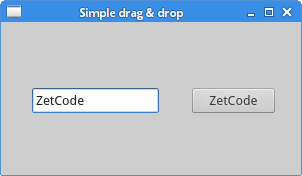 Figure: Simple drag & drop
Simple drag and drop的更多相关文章
- [Javascript + rxjs] Simple drag and drop with Observables
Armed with the map and concatAll functions, we can create fairly complex interactions in a simple wa ...
- ZetCode PyQt4 tutorial Drag and Drop
#!/usr/bin/python # -*- coding: utf-8 -*- """ ZetCode PyQt4 tutorial This is a simple ...
- 20 Best Drag and Drop jQuery Plugins--reference
reference from:http://dizyne.net/20-best-drag-drop-jquery-plugins/ jQuery has done a great job repla ...
- angularjs drag and drop
angular-dragula Drag and drop so simple it hurts 480 live demo angular-drag-and-drop-lists Angular d ...
- 『HTML5梦幻之旅』 - 仿Qt演示样例Drag and Drop Robot(换装机器人)
起源 在Qt的演示样例中看到了一个有趣的demo.截图例如以下: 这个demo的名字叫Drag and Drop Robot,简单概括而言,在这个demo中,能够把机器人四周的颜色拖动到机器人的各个部 ...
- HTML5 之拖放(drag与drop)
拖放(Drag 和 drop)是 HTML5 标准的组成部分. 拖放是一种常见的特性,即抓取对象以后拖到另一个位置. 在 HTML5 中,拖放是标准的一部分,任何元素都能够拖放. HTML5 拖放实例 ...
- 通过HTML5的Drag and Drop生成拓扑图片Base64信息
HTML5 原生的 Drag and Drop是很不错的功能,网上使用例子较多如 http://html5demos.com/drag ,但这些例子大部分没实际用途,本文将搞个有点使用价值的例子,通过 ...
- 基于HTML5的Drag and Drop生成图片Base64信息
HTML5的Drag and Drop是很不错的功能,网上使用例子较多如 http://html5demos.com/drag ,但这些例子大部分没实际用途,本文将搞个有点使用价值的例子,通过Drag ...
- Android 用户界面---拖放(Drag and Drop)(三)
设计拖放操作 本节主要内容如下: 1. 如何开始拖拽: 2. 在拖拽期间如何响应事件: 3. 如何响应落下事件: 4. 如何结束拖放操作. 开始拖拽 用户使用一个拖拽手势开始拖拽,通常是在 ...
随机推荐
- android fragment activity 区别
韩梦飞沙 韩亚飞 313134555@qq.com yue31313 han_meng_fei_sha fragment 负责一个模块 的展示. 由 活动 管理. 碎片 可以 解决 太多活动 ...
- CodeForces 602C The Two Routes(最短路)
Description In Absurdistan, there are n towns (numbered 1 through n) and m bidirectional railways. T ...
- 【UOJ #105】【APIO2014】Beads and wires
http://uoj.ac/problem/105 好神的dp啊. 确定一个点为根之后,蓝线只能是竖着的,不能横跨兄弟. 枚举每个点为根进行树形dp是\(O(n^2)\)的,\(f(x,0/1)\)表 ...
- 《python学习手册》第35章 异常的设计
嵌套异常处理器 其实我们主要需要搞清楚的问题应该是这样的,当异常发生的时候,无论是简单的异常处理还是复杂的异常处理,我们都应该能够清楚的了解到异常运行到哪里,被谁捕获了,现在控制权到了哪里了,下面我们 ...
- Intellij Idea使用及配置
1.JDK设置及修改工程JDKFile-->Project Structure: project SDK--New a jsdk默认JDKFile ->Other Settings-> ...
- POJ 3384 Feng Shui (半平面交)
Feng Shui Time Limit: 2000MS Memory Limit: 65536K Total Submissions: 3743 Accepted: 1150 Speci ...
- 1036: [ZJOI2008]树的统计Count (树链剖分)
1036: [ZJOI2008]树的统计Count Time Limit: 10 Sec Memory Limit: 162 MBSubmit: 3401 Solved: 1418[Submit] ...
- Vue.js插件开发
Vue.js插件是为应用添加全局功能的一种强大而且简单的方式.插件的用途很广泛,从全局组件,到为应用添加一些额外的功能.如路由(Vue Router),存储在应用程序里的不可变数据(Vuex). 一般 ...
- 【转】C与CPP后缀的文件在编译时的区别
本文出处连接, by Ray FAN(ielnaf@qq.com) ...
- React的第一个例子
准备: 官网:https://facebook.github.io/react/downloads.html Github地址:https://github.com/facebook/react 首先 ...