
Unity内存优化(贴图层面)
聊聊近况:
距离上一篇文章已经过了好久,主要原因是我懒了。公司项目也到了开始优化的阶段,上网找的资料,看过了就忘。还是想把它整理一下,写出来。其实我说的东西,网上都有,我只是搬运工而已。
贴图压缩:
Android平台使用ETC1格式压缩。
目前主流的Android机型基本都支持ETC1格式压缩。但ETC1只能支持非Alpha通道的图片压缩。
所以一般把RGB和ALPHA分离出来,r值,g值,b值从RGB图获取,a值从Alpha图里获取。
随着OPENGL ES 3.0的发布,etc2也出了,支持Alpha通道,但就目前的市场,支持的机型还比较少,所以可以不用考虑。
IOS平台使用PVRT压缩纹理,它支持Alpha通道。
工具准备:
TexturePacker4.1.0及破解戳这里:链接:http://pan.baidu.com/s/1qYKNIQ4 密码:s21o
我的第一篇文章也用过TexturePacker:http://www.shihuanjue.com/?p=16
实践:
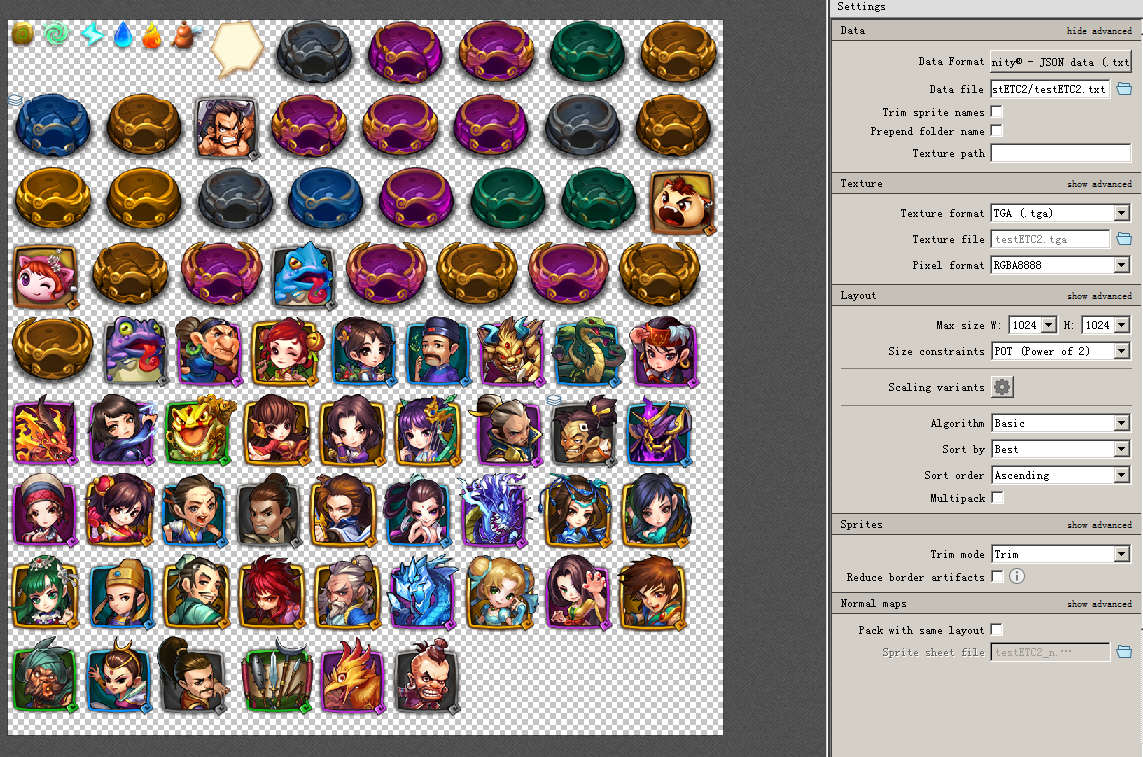
1.打开TexturePacker,选择Unity-JOSN data,把美术给过来的散图拖到TexturePacker里面,调整参数,最后Publish导出图集(.tga)和小图配置信息(.txt)。
2.打开Photoshop,拖入.tga
保存RGB图:选中Alpha 1.右键。删除该透明通道。然后将图片存储为_MainTex.png图片。
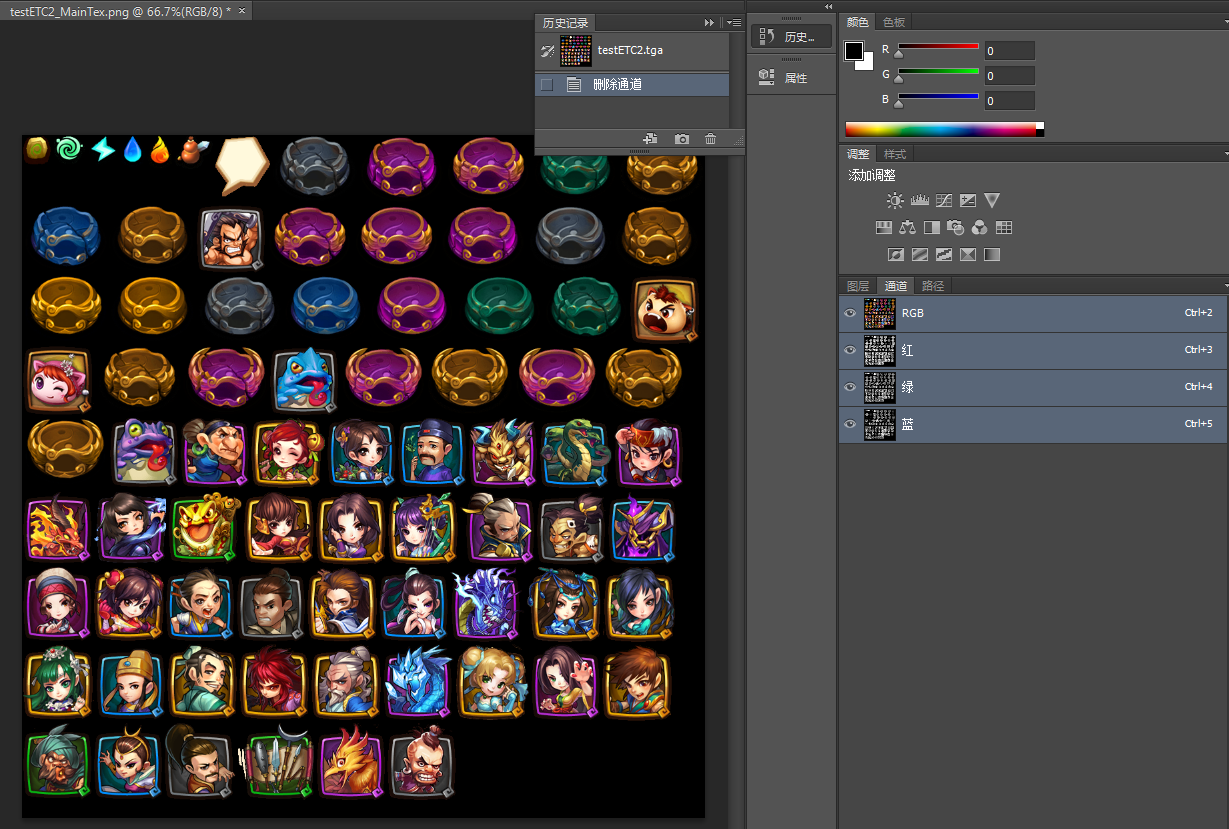
保存ALPHA图:我们可以在菜单中后退一步。或者重新打开没有删除透明通道的图片。
选中Alpha 1. 按Ctrl + A 全选 ,再按 Ctrl + C 复制透明通道。
选中RGB,Ctrl + V 粘贴。
最后删除Alpha 1 透明通道。将图片保存为_AlphaTex.png。

我们项目还是用的还是NGUI,用NGUI做UIAtlas。
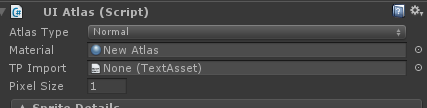
新建一个材质球,图片用的是_MainTex.png,_AlphaTex.png
NGUI的原生Shader,是从一张图上获取RGBA的,现在我们需要从_AlphaTex.png上获取a值。
所以拿来改改:
Shader "Unlit/Transparent Colored ETC1"

{

    Properties

    {

        _MainTex ("rgb tex", 2D) = "black" {}

        _AlphaTex("alpha tex",2D) = "white"{}

    }

    SubShader

    {

        LOD

        Tags

        {

            "Queue" = "Transparent"

            "IgnoreProjector" = "True"

            "RenderType" = "Transparent"

        }

        Cull Off

        Lighting Off

        ZWrite Off

        Fog { Mode Off }

        Offset -, -

        Blend SrcAlpha OneMinusSrcAlpha

        Pass

        {

            CGPROGRAM

            #pragma vertex vert

            #pragma fragment frag

            #include "UnityCG.cginc"

            struct appdata_t

            {

                float4 vertex : POSITION;

                float2 texcoord : TEXCOORD0;

                fixed4 color : COLOR;

            };

            struct v2f

            {

                float4 vertex : SV_POSITION;

                half2 texcoord : TEXCOORD0;

                fixed4 color : COLOR;

            };

            sampler2D _MainTex;

            float4 _MainTex_ST;

            sampler2D _AlphaTex;

            float4 _AlphaTex_ST;

            v2f vert (appdata_t v)

            {

                v2f o;

                o.vertex = mul(UNITY_MATRIX_MVP, v.vertex);

                o.texcoord = v.texcoord;

                o.color = v.color;

                return o;

            }

            fixed4 frag (v2f i) : COLOR

            {

                //fixed4 col = tex2D(_MainTex, i.texcoord) * i.color;

                //return col;

                fixed4 texcol = tex2D(_MainTex, i.texcoord);

                fixed4 result = texcol;

                result.a = tex2D(_AlphaTex,i.texcoord).r*i.color.a;

                return result;

            }

            ENDCG

        }

    }

    SubShader

    {

        LOD

        Tags

        {

            "Queue" = "Transparent"

            "IgnoreProjector" = "True"

            "RenderType" = "Transparent"

        }

        Pass

        {

            Cull Off

            Lighting Off

            ZWrite Off

            Fog { Mode Off }

            Offset -, -

            ColorMask RGB

            AlphaTest Greater .

            Blend SrcAlpha OneMinusSrcAlpha

            ColorMaterial AmbientAndDiffuse

            SetTexture [_MainTex]

            {

                Combine Texture * Primary

            }

        }

    }

}
把一开始TP导出的.txt拖到UIAtlas的TP Import上
效果:
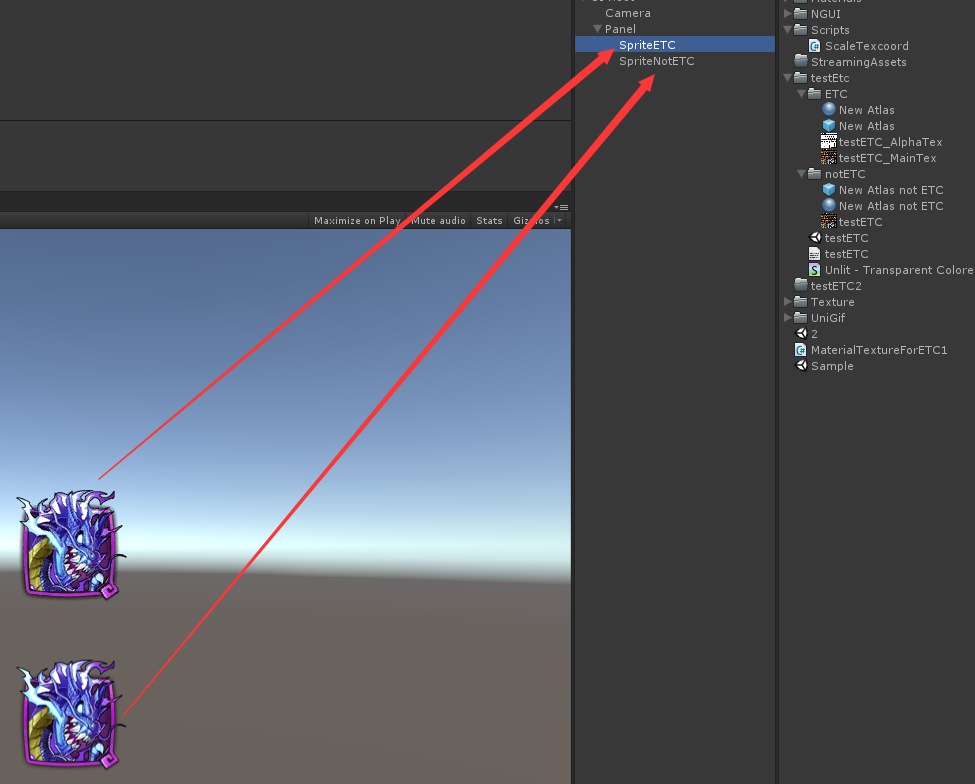

肉眼看不出明显差别,内存却减少了不少。
RGB和ALPHA分离(脚本化):
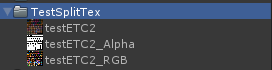
用PS去分离,太慢。尝试用脚本或者工具来自动化分离。
using UnityEngine;

using System.Collections;

using System.Collections.Generic;

using UnityEditor;

using System.IO;

using System.Reflection;

public class MaterialTextureForETC1_Old : MonoBehaviour

{

    public static float sizeScale = 0.5f;   //the size decrease scale for alphaTexture

    private static string texPath = Application.dataPath+"/TestSplitTex";

    [MenuItem("EffortForETC1/Seperate RGB and Alpha Channel for All Textures")]

    static void SeperateAllTexturesRGBandAlphaChannel()

    {

        string[] paths = Directory.GetFiles(texPath, "*.*", SearchOption.AllDirectories);

        foreach (string path in paths)

        {

            if (!string.IsNullOrEmpty(path) && IsTextureFile(path))   //full name

            {

                SeperateRGBAandlphaChannel(path);

            }

        }

    }

    #region process texture

    static void SeperateRGBAandlphaChannel(string _texPath)

    {

        string assetRelativePath = GetRelativeAssetPath(_texPath);

        SetTextureReadable(assetRelativePath);

        Texture2D sourcetex = AssetDatabase.LoadAssetAtPath(assetRelativePath, typeof(Texture2D)) as Texture2D;  //not just the textures under Resources file

        if (!sourcetex)

        {

            Debug.Log("Load Texture Failed : " + assetRelativePath);

            return;

        }

        if (!HasAlphaChannel(sourcetex))

        {

            Debug.Log("Texture does not have Alpha channel : " + assetRelativePath);

            return;

        }

        Texture2D rgbTex = new Texture2D(sourcetex.width, sourcetex.height, TextureFormat.RGB24, true);

        Texture2D alphaTex = new Texture2D((int)(sourcetex.width * sizeScale), (int)(sourcetex.height * sizeScale), TextureFormat.RGB24, true);

        for (int i = ; i < sourcetex.width; ++i)

            for (int j = ; j < sourcetex.height; ++j)

        {

            Color color = sourcetex.GetPixel(i, j);

            Color rgbColor = color;

            Color alphaColor = color;

            alphaColor.r = color.a;

            alphaColor.g = color.a;

            alphaColor.b = color.a;

            rgbTex.SetPixel(i, j, rgbColor);

            alphaTex.SetPixel((int)(i * sizeScale), (int)(j * sizeScale), alphaColor);

        }

        rgbTex.Apply();

        alphaTex.Apply();

        byte[] bytes = rgbTex.EncodeToPNG();

        File.WriteAllBytes(GetRGBTexPath(_texPath), bytes);

        bytes = alphaTex.EncodeToPNG();

        File.WriteAllBytes(GetAlphaTexPath(_texPath), bytes);

        Debug.Log("Succeed to seperate RGB and Alpha channel for texture : " + assetRelativePath);

        AssetDatabase.Refresh();

    }

    static bool HasAlphaChannel(Texture2D _tex)

    {

        for (int i = ; i < _tex.width; ++i)

            for (int j = ; j < _tex.height; ++j)

        {

            Color color = _tex.GetPixel(i, j);

            float alpha = color.a;

            if (alpha < 1.0f - 0.001f)

            {

                return true;

            }

        }

        return false;

    }

    static void SetTextureReadable(string _relativeAssetPath)

    {

        string postfix = GetFilePostfix(_relativeAssetPath);

        if (postfix == ".dds")    // no need to set .dds file.  Using TextureImporter to .dds file would get casting type error.

        {

            return;

        }

        TextureImporter ti = (TextureImporter)TextureImporter.GetAtPath(_relativeAssetPath);

        ti.isReadable = true;

        AssetDatabase.ImportAsset(_relativeAssetPath);

    }

    #endregion

    #region string or path helper

    static bool IsTextureFile(string _path)

    {

        string path = _path.ToLower();

        return path.EndsWith(".psd") || path.EndsWith(".tga") || path.EndsWith(".png") || path.EndsWith(".jpg") || path.EndsWith(".dds") || path.EndsWith(".bmp") || path.EndsWith(".tif") || path.EndsWith(".gif");

    }

    static string GetRGBTexPath(string _texPath)

    {

        return GetTexPath(_texPath, "_RGB.");

    }

    static string GetAlphaTexPath(string _texPath)

    {

        return GetTexPath(_texPath, "_Alpha.");

    }

    static string GetTexPath(string _texPath, string _texRole)

    {

        string result = _texPath.Replace(".", _texRole);

        string postfix = GetFilePostfix(_texPath);

        return result.Replace(postfix, ".png");

    }

    static string GetRelativeAssetPath(string _fullPath)

    {

        _fullPath = GetRightFormatPath(_fullPath);

        int idx = _fullPath.IndexOf("Assets");

        string assetRelativePath = _fullPath.Substring(idx);

        return assetRelativePath;

    }

    static string GetRightFormatPath(string _path)

    {

        return _path.Replace("\\", "/");

    }

    static string GetFilePostfix(string _filepath)   //including '.' eg ".tga", ".dds"

    {

        string postfix = "";

        int idx = _filepath.LastIndexOf('.');

        if (idx >  && idx < _filepath.Length)

            postfix = _filepath.Substring(idx, _filepath.Length - idx);

        return postfix;

    }

    #endregion

}
UGUI也是有办法的,去官网下载Unity内置Shader,下当前最新版本
http://unity3d.com/cn/get-unity/download/archive
里面有Image用的默认Shader:Sprites-Default
再这个shader里面加点东西,就是alpha值从alpha_tex上获取,rgb从rgb_tex上获取。其实是一样的。
注意点:
图片最好2的幂次
Read/Write Enabled 不勾
Generate Mip Maps 不勾
512×512的纹理对于显示效果已经够用,那么就不要使用1024×1024的纹理
参考:
http://www.manew.com/thread-49730-1-1.html?_dsign=9e029b68 手机游戏开发中如何选择适合的纹理格式
http://mp.weixin.qq.com/s?__biz=MzA4MDc5OTg5MA==&mid=209776006&idx=2&sn=d56d0bf4819493fa4fc452e36042890f&scene=5#rd
Unity性能优化专题—腾讯牛人分享经验
http://blog.uwa4d.com/archives/optimzation_memory_1.html 性能优化,进无止境-内存篇(上)
- 本文固定链接: http://www.shihuanjue.com/?p=326
- 转载请注明: 乔 2016年05月05日 于 是幻觉 发表
Unity内存优化(贴图层面)的更多相关文章
- Unity内存优化
[Unity内存优化] 1.在Update方法或循环中,少用string类,因为string类的每次操作都会调用new生成新字符串对象.用StringBuilder代替string,StringBui ...
- Unity内存优化技术测试案例
笔者介绍:姜雪伟,IT公司技术合伙人,IT高级讲师,CSDN社区专家,特邀编辑,畅销书作者,已出版书籍:<手把手教你架构3D游戏引擎>电子工业出版社和<Unity3D实战核心技术详解 ...
- Unity内存优化之视频讲解
视频为中文讲解,mp4格式,大小3.05GB 目录 扫码时备注或说明中留下邮箱 付款后如未回复请至https://shop135452397.taobao.com/ 联系店主
- Unity堆内存优化
unity中减少堆内存分配以减少垃圾回收处理:只有局部变量且为值类值的变量是从stack栈中分配内存,其它所有情况都是从heap堆中分配内在.* 缓存获取到的数据.* 频繁被调用的函数中尽量少的分配空 ...
- Unity性能优化专题---腾讯牛人分享经验
这里从三个纬度来分享下内存的优化经验:代码层面.贴图层面.框架设计层面. 一.代码层面. 1.foreach. Mono下的foreach使用需谨慎.频繁调用容易触及堆上限,导致GC过早触发,出现卡顿 ...
- Unity 性能优化(力荐)
开始之前先分享几款性能优化的插件: 1.SimpleLOD : 除了同样拥有Mesh Baker所具有的Mesh合并.Atlas烘焙等功能,它还能提供Mesh的简化,并对动态蒙皮网格进行了很好的支持. ...
- Unity性能优化(4)-官方教程Optimizing graphics rendering in Unity games翻译
本文是Unity官方教程,性能优化系列的第四篇<Optimizing graphics rendering in Unity games>的翻译. 相关文章: Unity性能优化(1)-官 ...
- Unity内存理解(转)
Unity3D 里有两种动态加载机制:一个是Resources.Load,另外一个通过AssetBundle,其实两者区别不大. Resources.Load就是从一个缺省打进程序包里的AssetBu ...
- Unity3D 游戏开发之内存优化
项目的性能优化主要围绕CPU.GPU和内存三大方面进行. 无论是游戏还是VR应用,内存管理都是其研发阶段的重中之重. 然而,在我们测评过的大量项目中,90%以上的项目都存在不同程度的内存使用问题.就目 ...
随机推荐
- Mac OS X 中一些常用的命令行技巧
一.网络设置相关 1.网卡的物理地址的动态重置 出于某些需求,例如网络中的 IP 地址或网络帐号与网卡物理地址绑定,使得多个设备无法切换上网,可尝试临时更改物理地址.不过,系统偏好设置是不能修改网卡物 ...
- Qtp常见问题
(1)Qtp不能识别对象 插件加载错误 IE内未加载BHOManager加载项
- C#在二维码中添加圆角logo
public class QRCodeHelper { #region 合并用户QR图片和用户头像 /// <summary> /// 合并用户QR图片和用户头像 /// </sum ...
- Redis启动多端口、运行多实例
默认Redis程序安装在/usr/local/redis目录下: 配置文件:/usr/local/redis/redis.conf,该配置文件中配置的端口为默认端口:6379: Redis的启动命令路 ...
- Anaconda 用于科学计算的 Python 发行版
用于科学计算的 Python 发行版: 1.Anaconda https://www.continuum.io/ 公司continuum. 有商业版本. Anaconda is the le ...
- Curator Zookeeper分布式锁
Curator Zookeeper分布式锁 pom.xml中添加如下配置 <!-- https://mvnrepository.com/artifact/org.apache.curator/c ...
- MFC2016.6.8
1.theApp extern声明之后不可以使用?可以用,只是需要extern之后的类名和类名称写对,不要犯得低级错误.2.怎样取出列表控件中的第某列的值?GetItemText(); CListCt ...
- 三妹,我拆了你的本-- Day One(大图赏)
从垃圾箱中捡到了三妹的笔记本,虽然显卡已烧,硬盘和内存已被掳走,但依旧很高兴的说,因为我的目的是要拆了它. 这是我的第一次,所以本文的内容完全是新手猎奇,高手勿喷~ 步骤1:拆掉塑料外壳 不要忘了硬盘 ...
- 为RecyclerView的不同item项实现不同的布局(添加分类Header)
最近在做一个应用的时候,需要为GridLayoutManager添加头部header,然后自然而然就想到了用不同的itemType去加载不同的布局. 1.实现多item布局,用不同的itemType去 ...
- Eclipse Java注释模板设置详解
设置注释模板的入口: Window->Preference->Java->Code Style->Code Template 然后展开Comments节点就是所有需设置注释的元 ...