
css3中的多列布局columns详解
columns语法:columns:[ column-width ] || [ column-count ]
设置或检索对象的列数和每列的宽度
其中:[ column-width ]:设置或检索对象每列的宽度;[ column-count ]:设置或检索对象的列数。
css代码:
body{font:14px/1.5 georgia,serif,sans-serif;}

p{margin:;padding:5px 10px;background:#eee;}

h1{margin:10px 0;font-size:16px;}

.test{

    width:628px;

    border:10px solid #000;

    -moz-columns:200px 3;

    -webkit-columns:200px 3;

    columns:200px 3;

}

.test2{

    border:10px solid #000;

    -moz-columns:200px;

    -webkit-columns:200px;

    columns:200px;

}
html代码:
<h1>列数及列宽固定:</h1>

<div class="test">

    <p>This module describes multi-column layout in CSS. By using functionality described in this document, style sheets can declare that the content of an element is to be laid out in multiple columns. </p>

    <p>On the Web, tables have also been used to describe multi-column layouts. The main benefit of using CSS-based columns is flexibility; content can flow from one column to another, and the number of columns can vary depending on the size of the viewport. Removing presentation table markup from documents allows them to more easily be presented on various output devices including speech synthesizers and small mobile devices.</p>

</div>

<h1>列宽固定,根据容器宽度液态分布列数:</h1>

<div class="test2">

    <p>This module describes multi-column layout in CSS. By using functionality described in this document, style sheets can declare that the content of an element is to be laid out in multiple columns. </p>

    <p>On the Web, tables have also been used to describe multi-column layouts. The main benefit of using CSS-based columns is flexibility; content can flow from one column to another, and the number of columns can vary depending on the size of the viewport. Removing presentation table markup from documents allows them to more easily be presented on various output devices including speech synthesizers and small mobile devices.</p>

</div>
结果如图所示: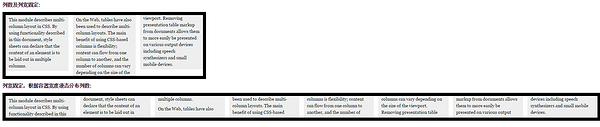
以下列出column运用的相关属性
1.column-width:<length> | auto 设置或检索对象每列的宽度
如:-moz-column-width:200px;
2.column-count:<integer> | auto 设置或检索对象的列数
如:-webkit-column-count:3;
3.column-gap:<length> | normal 设置或检索对象的列与列之间的间隙
如:column-gap:normal;column-gap:40px;
4.column-rule:[ column-rule-width ] || [ column-rule-style ] || [ column-rule-color ]设置或检索对象的列与列之间的边框。复合属性。相当于border属性
如:column-rule:10px solid #090;
5.column-span:none | all 设置或检索对象元素是否横跨所有列。
如:column-span:all;
6.column-fill:auto | balance 设置或检索对象所有列的高度是否统一。
auto:列高度自适应内容
balance:所有列的高度以其中最高的一列统一
如:column-fill:balance;
7.column-break-before:auto | always | avoid | left | right | page | column | avoid-page | avoid-column 设置或检索对象之前是否断行。
auto:既不强迫也不禁止在元素之前断行并产生新列
always:总是在元素之前断行并产生新列
avoid:避免在元素之前断行并产生新列
8.column-break-after:auto | always | avoid | left | right | page | column | avoid-page | avoid-column 设置或检索对象之后是否断行。
auto:既不强迫也不禁止在元素之后断行并产生新列
always:总是在元素之后断行并产生新列
avoid:避免在元素之后断行并产生新列
9.column-break-inside:auto | avoid | avoid-page | avoid-column 设置或检索对象内部是否断行。
auto:既不强迫也不禁止在元素内部断行并产生新列
avoid:避免在元素内部断行并产生新列
其实常用的也就前面5条。
css3中的多列布局columns详解的更多相关文章
- CSS3之多列布局columns详解
CSS3之多列布局columns详解 CSS3提供了个新属性columns用于多列布局.基本属性如下: 1. columns: <'column-width'> || <'colum ...
- CSS3布局之多列布局columns详解
columns语法:columns:[ column-width ] || [ column-count ]设置或检索对象的列数和每列的宽度 其中:[ column-width ]:设置或检索对象每列 ...
- CSS3中的弹性流体盒模型技术详解
先回顾一下CSS1 和 CSS2中都已经定义了哪些布局方面的属性,这样也会增加我们理解弹性布局. 其实我们现在有很多一部分人,你们刚刚接触CSS层叠样式表,或者接触有一段时间了,但是却没有很好的去 ...
- CSS3中-webkit-overflow-scrolling: touch 的使用方法详解
-webkit-overflow-scrolling 属性控制元素在移动设备上是否使用滚动回弹效果. auto 使用普通滚动, 当手指从触摸屏上移开,滚动会立即停止. touch 使用具有回弹效果的滚 ...
- CSS3 多列布局——Columns
CSS3 多列布局——Columns 语法: columns:<column-width> || <column-count> 多列布局columns属性参数主要就两个属性参数 ...
- 多列布局——Columns
为了能在Web页面中方便实现类似报纸.杂志那种多列排版的布局,W3C特意给CSS3增加了一个多列布局模块(CSS Multi Column Layout Module).它主要应用在文本的多列布局方面 ...
- 160427、CSS3实战笔记--多列布局
通过阅读和学习书籍<CSS3实战>总结 <CSS3实战>/成林著.—北京机械工业出版社2011.5 多列布局适合纯文字版式设计,如报纸内和杂志类网页布局,不适合做网页结构布 ...
- css3中动画(transition)和过渡(animation)详析
css3中动画(transition)和过渡(animation)详析
- ExtJs常用布局--layout详解(含实例)
序言: 笔者用的ExtJs版本:ext-3.2.0 ExtJs常见的布局方式有:border.form.absolute.column.accordion.table.fit.card.anchor ...
随机推荐
- pbfunc外部函数扩展应用-在Powerbuilder中进行Http的GET、POST操作
利用PBFunc扩展函数进行Http的操作时,需要对n_pbfunc_http的以下几个函数进行参数设置: of_set_URL(...)//要进行GET或POST的url,必须 of_set_Con ...
- .NET(Core)应用程序模型及未来
- Android 手机卫士15--程序锁
1.基本思路 ①.创建已加锁应用的数据库(字段:_id,packagename),如果应用已加锁,将加锁应用的包名维护到数据库中 ②.已加锁+未加锁 == 手机中所有应用(AppInfoProvide ...
- Chrome使用技巧(几个月的心得)
转用Chrome,不仅仅因为它的插件之丰富,更因为它的响应速度其他浏览器都望尘莫及.接着我就要写写一些心得. 如何最简易地用上谷歌搜索? 1,下载hosts文件:https://pan.baidu.c ...
- Linux 学习手记(4):Linux系统常用Shell命令
日期时间 date命令:显示当前时间日期 date -u # 显示格林威治(UTC)事件 date +%Y-%m-%d # 格式显示日期 date -s '20:25:25' # 修改系统时间,需要使 ...
- javascript Array 方法学习
原生对象Array学习 Array.from() 从类似数组的对象或可迭代的对象返回一个数组 参数列表 arraylike 类似数组的对象或者可以迭代的对象 mapfn(可选) 对对象遍历映 ...
- JavaScript一个经典问题
看下面代码 <ul id="demo"> <li></li> <li></li> <li></li&g ...
- 详解HTML5中rel属性的prefetch预加载功能使用
在HTML5中,有个很有用但常被忽略的特性,就是预先加载(prefetch),它的原理是: 利用浏览器的空闲时间去先下载用户指定需要的内容,然后缓存起来,这样用户下次加载时,就直接从缓存中取出来,效率 ...
- 解决C#导出excel异常来自 HRESULT:0x800A03EC的方法 .
解决C#导出excel异常来自 HRESULT:0x800A03EC的方法 . xlBook.SaveAs(FilePath,Microsoft.Office.Interop.Excel.XlFi ...
- iOS设计模式 - 单例
备注:只能通过类的类方法才能创建单例类的实例,[[类名 alloc]init]创建实例没有用的. 原理图 说明 1. 单例模式人人用过,严格的单例模式很少有人用过 2. 严格的单例模式指的是无法通过常 ...