
spark streaming 笔记
spark streaming项目 学习笔记

为什么要flume+kafka?
生成数据有高峰与低峰,如果直接高峰数据过来flume+spark/storm,实时处理容易处理不过来,扛不住压力。而选用flume+kafka添加了消息缓冲队列,spark可以去kafka里面取得数据,那么就可以起到缓冲的作用。
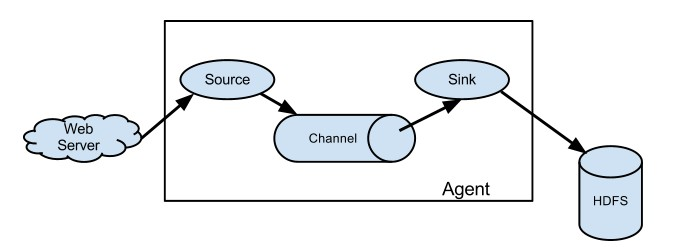
Flume架构:
参考学习:http://flume.apache.org/releases/content/1.9.0/FlumeUserGuide.html
启动一个agent:
bin/flume-ng agent --conf conf --conf-file example.conf --name a1 -Dflume.root.logger=INFO,console
添加example.conf:
|
# example.conf: A single-node Flume configuration # Name the components on this agent a1.sources = r1 a1.sinks = k1 a1.channels = c1 # Describe/configure the source a1.sources.r1.type = netcat a1.sources.r1.bind = localhost a1.sources.r1.port = 44444 # Describe the sink a1.sinks.k1.type = logger # Use a channel which buffers events in memory a1.channels.c1.type = memory a1.channels.c1.capacity = 1000 a1.channels.c1.transactionCapacity = 100 # Bind the source and sink to the channel a1.sources.r1.channels = c1 a1.sinks.k1.channel = c1 |
开一个终端测试:
|
$ telnet localhost 44444 T Trying 127.0.0.1... C Connected to localhost.localdomain (127.0.0.1). E Escape character is '^]'. H Hello world! <ENTER> O OK |
Flume将会输出:
|
12/06/19 15:32:19 INFO source.NetcatSource: Source starting 12/06/19 15:32:19 INFO source.NetcatSource: Created serverSocket:sun.nio.ch.ServerSocketChannelImpl[/127.0.0.1:44444] 12/06/19 15:32:34 INFO sink.LoggerSink: Event: { headers:{} body: 48 65 6C 6C 6F 20 77 6F 72 6C 64 21 0D Hello world!. } |
<二> kafka架构
producer:生产者
consumer:消费者
broker:缓冲代理
topic:主题
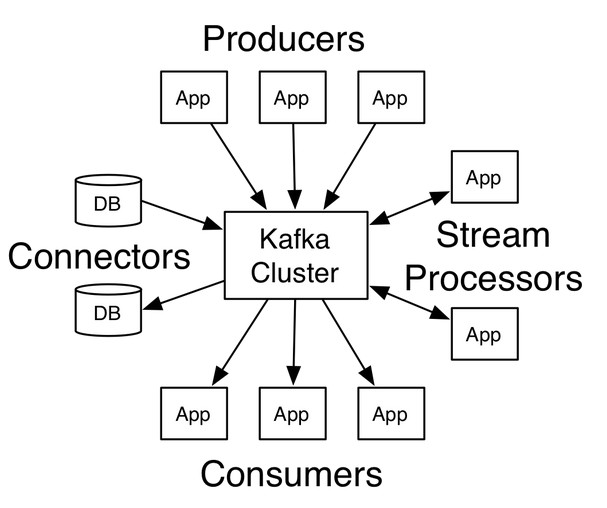
安装:
下载->解压->修改配置
添加环境变量:
|
$ vim ~/.bash_profile …… export ZK_HOME=/home/centos/develop/zookeeper export PATH=$ZK_HOME/bin/:$PATH export KAFKA_HOME=/home/centos/develop/kafka export PATH=$KAFKA_HOME/bin:$PATH |
启动zk:
zkServer.sh start
查看zk状态:
zkServer.sh status
|
$ vim config/server.properties: #需要修改配置内容 broker.id=1 listeners=PLAINTEXT://:9092 log.dirs=/home/centos/app/kafka-logs |
后台启动kafka:
nohup kafka-server-start.sh $KAFKA_HOME/config/server.properties &
创建topic:
kafka-topics.sh --create --zookeeper node1:2181 --replication-factor 1 --partitions 1 --topic halo
-- 注:这里2181是zk端口
查看topic列表:
kafka-topics.sh --list --zookeeper node1:2181
-- 注:这里2181是zk端口
生产一个主题halo:
kafka-console-producer.sh --broker-list node1:9092 --topic halo
-- 注:这里9092是kafka端口
消费主题halo数据:
kafka-console-consumer.sh --zookeeper node1:2181 --topic halo --from-beginning
 Setting up a multi-broker cluster
复制server.properties :
|
> cp config/server.properties config/server-1.properties > cp config/server.properties config/server-2.properties |
编辑内容:
|
config/server-1.properties: broker.id=1 listeners=PLAINTEXT://:9093 log.dirs=/home/centos/app/kafka-logs-1 config/server-2.properties: broker.id=2 listeners=PLAINTEXT://:9094 log.dirs=/home/centos/app//kafka-logs-2 |
现在后台启动broker:
|
>nohup kafka-server-start.sh $KAFKA_HOME/config/server-1.properties & ... >nohup kafka-server-start.sh $KAFKA_HOME/config/server-2.properties & ... |
现在我们创建一个具有三个副本的主题:
|
> bin/kafka-topics.sh --create --zookeeper node1:2181 --replication-factor 3 --partitions 1 --topic replicated-halo |
好了,我们查看下topic主题下详细信息
|
> bin/kafka-topics.sh --describe --zookeeper node1:2181 --topic replicated-halo Topic:replicated-halo PartitionCount:1 ReplicationFactor:3 Configs: Topic: replicated-halo Partition: 0 Leader: 2 Replicas: 2,1,0 Isr: 2,1,0 |
- "leader" is the node responsible for all reads and writes for the given partition. Each node will be the leader for a randomly selected portion of the partitions.
- "replicas" is the list of nodes that replicate the log for this partition regardless of whether they are the leader or even if they are currently alive.
- "isr" is the set of "in-sync" replicas. This is the subset of the replicas list that is currently alive and caught-up to the leader.
【附:jps -m显示具体的进程信息】
一个kafka生产栗子:
package com.lin.spark.kafka;

import kafka.javaapi.producer.Producer;

import kafka.producer.KeyedMessage;

import kafka.producer.ProducerConfig;

import java.util.Properties;

/**

 * Created by Administrator on 2019/6/1.

 */

public class KafkaProducer extends Thread {

    private String topic;

    private Producer<Integer, String> producer;

    public KafkaProducer(String topic) {

        this.topic = topic;

        Properties properties = new Properties();

        properties.put("metadata.broker.list", KafkaProperities.BROKER_LIST);

        properties.put("serializer.class", "kafka.serializer.StringEncoder");

        properties.put("request.required.acks", "1");

        producer = new Producer<Integer, String>(new ProducerConfig(properties));

    }

    @Override

    public void run() {

        int messageNo = 1;

        while (true) {

            String message = "message_" + messageNo;

            producer.send(new KeyedMessage<Integer, String>(topic,message));

            System.out.println("Send:"+message);

            messageNo++;

            try{

                Thread.sleep(2000);//2秒钟打印一次

            }catch (Exception e){

                e.printStackTrace();

            }

        }

    }

  //测试

    public static void main(String[] args){

        KafkaProducer producer = new KafkaProducer("halo");

        producer.run();

    }

}
测试消费的数据:
> kafka-console-consumer.sh --zookeeper node1:2181 --topic halo --from-beginning

对应的消费者代码:
package com.lin.spark.kafka;

import kafka.consumer.Consumer;

import kafka.consumer.ConsumerConfig;

import kafka.consumer.ConsumerIterator;

import kafka.consumer.KafkaStream;

import kafka.javaapi.consumer.ConsumerConnector;

import java.util.HashMap;

import java.util.List;

import java.util.Map;

import java.util.Properties;

/**

 * Created by Administrator on 2019/6/2.

 */

public class KafkaConsumer extends Thread {

    private String topic;

    public KafkaConsumer(String topic) {

        this.topic = topic;

    }

    private ConsumerConnector createConnector(){

        Properties properties = new Properties();

        properties.put("zookeeper.connect", KafkaProperities.ZK);

        properties.put("group.id",KafkaProperities.GROUP_ID);

        return Consumer.createJavaConsumerConnector(new ConsumerConfig(properties));

    }

    @Override

    public void run() {

        ConsumerConnector consumer = createConnector();

        Map<String,Integer> topicCountMap = new HashMap<String, Integer>();

        topicCountMap.put(topic,1);

        Map<String, List<KafkaStream<byte[], byte[]>>> streams = consumer.createMessageStreams(topicCountMap);

        KafkaStream<byte[], byte[]> kafkaStream = streams.get(topic).get(0);

        ConsumerIterator<byte[], byte[]> iterator = kafkaStream.iterator();

        while (iterator.hasNext()){

            String result = new String(iterator.next().message());

            System.out.println("result:"+result);

        }

    }

    public static void main(String[] args){

        KafkaConsumer kafkaConsumer = new KafkaConsumer("halo");

        kafkaConsumer.run();

    }

}
一个简单kafka与spark streaming整合例子:
启动kafka,并生产数据

> kafka-console-producer.sh --broker-list  172.16.182.97:9092 --topic halo
参数固定:
package com.lin.spark

import org.apache.spark.SparkConf

import org.apache.spark.streaming.kafka.KafkaUtils

import org.apache.spark.streaming.{Seconds, StreamingContext}

object KafkaStreaming {

  def main(args: Array[String]): Unit = {

    val conf = new SparkConf().setAppName("SparkStreamingKakfaWordCount").setMaster("local[4]")

    val ssc = new StreamingContext(conf,Seconds(5))

    val topicMap = "halo".split(":").map((_, 1)).toMap

    val zkQuorum = "hadoop:2181";

    val group = "consumer-group"

    val lines = KafkaUtils.createStream(ssc, zkQuorum, group, topicMap).map(_._2)

    lines.print()

    ssc.start()

    ssc.awaitTermination()

  }

}
参数输入:
package com.lin.spark

import org.apache.spark.SparkConf

import org.apache.spark.streaming.kafka.KafkaUtils

import org.apache.spark.streaming.{Seconds, StreamingContext}

object KafkaStreaming {

  def main(args: Array[String]): Unit = {

    if (args.length != 4) {

      System.err.println("参数不对")

    }

    //args: hadoop:2181 consumer-group halo,hello_topic 2

    val Array(zkQuorum, group, topics, numThreads) = args

    val conf = new SparkConf().setAppName("SparkStreamingKakfaWordCount").setMaster("local[4]")

    val ssc = new StreamingContext(conf, Seconds(5))

    val topicMap = topics.split(",").map((_,numThreads.toInt)).toMap

    val lines = KafkaUtils.createStream(ssc, zkQuorum, group, topicMap).map(_._2)

    lines.print()

    ssc.start()

    ssc.awaitTermination()

  }

}
spark streaming 笔记的更多相关文章
- Spark Streaming笔记
Spark Streaming学习笔记 liunx系统的习惯创建hadoop用户在hadoop根目录(/home/hadoop)上创建如下目录app 存放所有软件的安装目录 app/tmp 存放临时文 ...
- Spark Streaming笔记——技术点汇总
目录 目录 概况 原理 API DStream WordCount示例 Input DStream Transformation Operation Output Operation 缓存与持久化 C ...
- 【慕课网实战】Spark Streaming实时流处理项目实战笔记十五之铭文升级版
铭文一级:[木有笔记] 铭文二级: 第12章 Spark Streaming项目实战 行为日志分析: 1.访问量的统计 2.网站黏性 3.推荐 Python实时产生数据 访问URL->IP信息- ...
- 【慕课网实战】Spark Streaming实时流处理项目实战笔记七之铭文升级版
铭文一级: 第五章:实战环境搭建 Spark源码编译命令:./dev/make-distribution.sh \--name 2.6.0-cdh5.7.0 \--tgz \-Pyarn -Phado ...
- 学习笔记:Spark Streaming的核心
Spark Streaming的核心 1.核心概念 StreamingContext:要初始化Spark Streaming程序,必须创建一个StreamingContext对象,它是所有Spark ...
- 学习笔记:spark Streaming的入门
spark Streaming的入门 1.概述 spark streaming 是spark core api的一个扩展,可实现实时数据的可扩展,高吞吐量,容错流处理. 从上图可以看出,数据可以有很多 ...
- 【慕课网实战】Spark Streaming实时流处理项目实战笔记二十一之铭文升级版
铭文一级: DataV功能说明1)点击量分省排名/运营商访问占比 Spark SQL项目实战课程: 通过IP就能解析到省份.城市.运营商 2)浏览器访问占比/操作系统占比 Hadoop项目:userA ...
- 【慕课网实战】Spark Streaming实时流处理项目实战笔记十八之铭文升级版
铭文一级: 功能二:功能一+从搜索引擎引流过来的 HBase表设计create 'imooc_course_search_clickcount','info'rowkey设计:也是根据我们的业务需求来 ...
- 【慕课网实战】Spark Streaming实时流处理项目实战笔记十七之铭文升级版
铭文一级: 功能1:今天到现在为止 实战课程 的访问量 yyyyMMdd courseid 使用数据库来进行存储我们的统计结果 Spark Streaming把统计结果写入到数据库里面 可视化前端根据 ...
随机推荐
- 解决图片插入word文档后清晰度降低的问题
解决图片插入word文档后清晰度降低的问题 在默认情况下,word程序会自动压缩插入word文档中的图片以减小整个word文档的.当我们需要插入word文档中的图片保持原始清晰度时,可以通过设置wor ...
- (ACM模板)映射map
#include<iostream> #include<cstdio> #include<map> using namespace std; int main() ...
- SQL回顾1
1.学生表Student(SID,Sname,Sage,Ssex) --SID 学生编号,Sname 学生姓名,Sage 出生年月,Ssex 学生性别 2.课程表 Course(CID,Cname,T ...
- JS中JSON.stringify()方法,将js对象(json串)转换成字符串,传入服务器
JSON 通常用于与服务端交换数据. 在向服务器发送数据时一般是字符串. 我们可以使用 JSON.stringify() 方法将 JavaScript 对象转换为字符串. 语法 JSON.string ...
- "less is more",用"less”命令查看linux文本文件
less filename:可以方便地查看文本文件 当一条命令的输出结果较长的时候,可以通过管道传给less命令便于浏览,比如ls -al | less.
- 查完数据库order_by后跟[:9]切片取前9位的值
- 使用UncaughtExceptionHandler重启线程
先复习Java中的异常 java.lang.Throwable 顶层父类 |– Error错误:JVM内部的严重问题,如OOM,程序员无法在代码中无法处理. |–Exception异常:普通的问题.通 ...
- 阿里下一代云分析型数据库AnalyticDB入选Forrester云化数仓象限
前言 近期, 全球权威IT咨询机构Forrester发布"The Forrester Wave: CloudData Warehouse Q4 2018"研究报告,阿里巴巴分析型数 ...
- Hadoop编程调用HDFS(JAVA)
1.运行环境 开发工具:intellij idea JDK版本:1.8 项目管理工具:Maven 4.0.0 Hadoop环境: Cloudera QuickStart 2.GITHUB地址 http ...
- TP中如何用IF
将TP中这个容易忘的知识点记下来以便日后翻阅 $memberField = "ID, NAME, MOBILE, MEMBER_STATUS as status, IF (MEMBER_ST ...