
setFeatureInt、android 自定义标题栏
Android 自带的toolbar 往往不能很好的的满足我们的个性化要求。因此我们经常使用自定的的标题栏。而Android系统本身也允许我们自定以标题栏。
记录一下,自定义标题栏常遇到的问题。先上效果图:
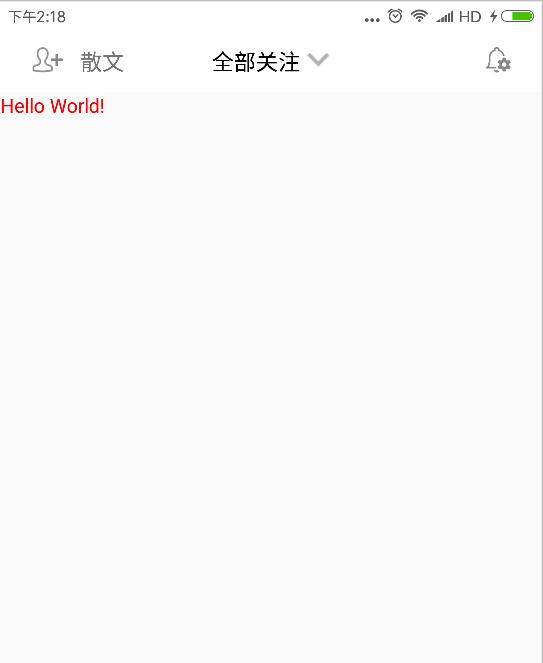
实现起来也很简单。在Activity 的 setContentView方法前添加
requestWindowFeature(Window.FEATURE_CUSTOM_TITLE);
其含义是允许用户自定义标题栏。
然后再在setContentView后添加
getWindow().setFeatureInt(Window.FEATURE_CUSTOM_TITLE, R.layout.custom_navigation_bar);
其中 R.layout.custom_navigation_bar 为我们自定义的标题栏样式,
 <?xml version="1.0" encoding="utf-8"?>

 <LinearLayout xmlns:android="http://schemas.android.com/apk/res/android"

     xmlns:tools="http://schemas.android.com/tools"

     android:layout_width="match_parent"

     android:layout_height="44dp"

     android:orientation="vertical"

     tools:context=".BaseActivity">

     <LinearLayout

         android:layout_width="match_parent"

         android:layout_height="match_parent"

         android:layout_weight="1"

         android:orientation="horizontal"

         android:padding="10dp">

         <LinearLayout

             android:layout_width="0dp"

             android:layout_height="match_parent"

             android:layout_weight="1"

             android:gravity="left|center_vertical"

             android:paddingBottom="2dp"

             android:paddingTop="2dp">

             <ImageView

                 android:id="@+id/navigation_left"

                 android:layout_width="wrap_content"

                 android:layout_height="match_parent"

                 android:src="@mipmap/rt_tianjiaguanzhu" />

             <TextView

                 android:id="@+id/navigation_left_text"

                 android:layout_width="wrap_content"

                 android:layout_height="wrap_content"

                 android:text="散文"

                 android:textSize="16sp" />

         </LinearLayout>

         <LinearLayout

             android:layout_width="wrap_content"

             android:layout_height="match_parent"

             android:gravity="center"

             android:paddingBottom="2dp"

             android:paddingTop="2dp">

             <TextView

                 android:id="@+id/navigation_center"

                 android:layout_width="wrap_content"

                 android:layout_height="wrap_content"

                 android:layout_gravity="center"

                 android:layout_marginRight="5dp"

                 android:text="全部关注"

                 android:textAlignment="center"

                 android:textColor="@color/black"

                 android:textSize="16sp" />

             <ImageView

                 android:layout_width="wrap_content"

                 android:layout_height="wrap_content"

                 android:src="@mipmap/icon_down" />

         </LinearLayout>

         <LinearLayout

             android:layout_width="0dp"

             android:layout_height="match_parent"

             android:layout_weight="1"

             android:gravity="right|center_vertical"

             android:paddingBottom="2dp"

             android:paddingTop="2dp">

             <ImageView

                 android:id="@+id/navigation_right"

                 android:layout_width="wrap_content"

                 android:layout_height="match_parent"

                 android:layout_gravity="center_vertical"

                 android:src="@mipmap/settings" />

         </LinearLayout>

     </LinearLayout>

     <View

         android:layout_width="match_parent"

         android:layout_height="0.5dp"

         android:background="@color/lightgray" />

 </LinearLayout>
最后设置主题,也只最容易出错的地方。对使用该方式添加标题栏的Activity 添加主题样式。
这是我的主题样式 应继承 android:Theme.Light 主题否则会报错。
     <!-- 标题栏样式 -->

     <style name="WindowTitleBackground" >

         <item name="android:background">@color/colordarkgray</item>

     </style>

     <style name="MyTheme" parent="android:Theme.Light">

         <item name="android:windowTitleSize">45dp</item>

         <item name="android:windowTitleBackgroundStyle">@style/WindowTitleBackground</item>

     </style>
Activity 引用代码如下。
android:theme="@style/MyTheme"

这样就可以实现自定义的效果了。

补充:上面说主题不继承 android:Theme.Light 会报错。查了一下是标题栏冲突的原因。
    我们只需要在继承的主题里添加如下属性就可以了。
    <item name="android:windowActionBar">false</item>
    <item name="android:windowNoTitle">false</item>
这样我们就可以继承别的主题使用一些高大上的效果了。如 Theme.AppCompat主题等。

有朋友问我,显示这个标题的时候同时也显示了系统自带的标题是什么原因,查看代码后发现他的Activity继承了AppCompatActivity 这里我们应继承Activity 就好了。
setFeatureInt、android 自定义标题栏的更多相关文章
- [置顶]
xamarin android自定义标题栏(自定义属性、回调事件)
自定义控件的基本要求 这篇文章就当是自定义控件入门,看了几篇android关于自定义控件的文章,了解了一下,android自定义控件主要有3种方式: 自绘控件:继承View类,所展示的内容在OnDra ...
- Android 自定义标题栏
开发 Android APP 经常会用到自定义标题栏,而有多级页面的情况下还需要给自定义标题栏传递数据. 本文要点: 自定义标题填充不完整 自定义标题栏返回按钮的点击事件 一.代码 这里先介绍一下流程 ...
- Android -- 自定义标题栏,背景颜色填充满
设置标题栏背景 1> 准备背景图片: background_pix.png 注:用背景图片比用颜色好处,可以让背景看起来有凹凸感. 2> drawable文件夹下放xml文件 bitmap ...
- (转)Android 自定义标题栏(title栏)
转:http://blog.csdn.net/jamin0107/article/details/6715678 第一步,向实现自定义标题栏,需要在onCreate方法里这样写 requestWind ...
- android 自定义标题栏 titleBar自定义
在value文件夹下添加style.xml <?xml version="1.0" encoding="utf-8"?> <resources ...
- Android—自定义标题栏的实现及遇见的问题解决
开发者设计界面时候往往不会使用系统自带的标题栏,因为不美观,所以需要自己设置标题栏. 1.根据需求在xml文件中设置标题布局 <?xml version="1.0" enco ...
- Android自定义标题栏
预览一下效果: 素材: 新建一个布局title_bar.xml,代码如下: <?xml version="1.0" encoding="utf-8"?&g ...
- Android开发-取消程序标题栏或自定义标题栏
注:本文由Colin撰写,版权所有!转载请注明原文地址,谢谢合作! 在Android开发中,跟据需要我们有时候需要自定义应用程序的标题栏或者取消程序的标题栏,下面本菜鸟在此记录与分享一下自己使用的方法 ...
- Android应用开发基础篇(14)-----自定义标题栏
一.概述 每一个应用程序默认的标题栏(注意与状态栏的区别)只有一行文字(新建工程时的名字),而且颜色.大小等都是固定的,给人的感觉比较单调.但当程序需要美化的时候,那么修改标题栏是就是其中一项内容,虽 ...
随机推荐
- oracle 执行计划查看
1) sql command窗口里explain plan for select * from emp: 2) select * from table(dbms_xplan.display);
- HA-0302 退役
2016年11月20日 上午12:00许,NOIP2016(复赛)结束. HA-0302正式退役.
- nginx 目录映射
---恢复内容开始--- 设置目录映射 ---恢复内容结束--- 设置目录映射
- 05_整理String类的Length()、charAt()、 getChars()、replace()、 toUpperCase()、 toLowerCase()、trim()、toCharArray()使用说明
Question: 整理String类的Length().charAt(). getChars().replace(). toUpperCase(). toLowerCase().trim().toC ...
- MySql分组函数-Group by与having理解
注意:select 后的字段,必须要么包含在group by中,要么包含在having 后的聚合函数里. 1. GROUP BY 是分组查询, 一般 GROUP BY 是和聚合函数配合使用 group ...
- c++中的内存空间不足和自定义处理内存不足
new操作符动态分配内存时,首先它会调用对象的operator new()函数分配相应大的内存(如果对象类没有重载operator new()函数,则默认调用<new>头文件里的opera ...
- JavaScript 消息框+特殊字符
JavaScript 中创建三种消息框:警告框.确认框.提示框: 1.警告框: 警告框经常用于确保用户可以得到某些信息. 当警告框出现后,用户需要点击确定按钮才能继续进行操作 语法:alert(&qu ...
- C段旁注工具CCC.exe
C段旁注工具CCC.exe可以进行C段的web站点批量查询 自动排除DNS错误的域名以及IP和当前服务器不符的域名 抓取bing上的所有URL,不光是域名信息,方便直接进入 自动生成html报告,方便 ...
- Quant的笑话
Q) Why was the FX quant so unlucky with the ladies?A) Because he always kept his dates short. Q) Why ...
- Spring源码学习之:FactoryBean的使用
转载:http://book.51cto.com/art/201311/419081.htm ==========个人理解========================= FactoryBean和B ...