
python 画个小猪佩奇
不知道大家小时候有没有学习过logo语言,就是操纵一只小王八,来画各种图案。博主小学微机课就学习了这个,最近发现python的turtle包就是logo语言,所以画个小猪佩奇和大家分享。
代码来自知乎,但是源码中没有缩进,博主debug之后,将可直接运行的代码发在文中。
#!/usr/bin/python

# -*- coding: utf-8 -*-

import turtle as t

def nose(x,y):#鼻子

    t.pu()

    t.goto(x,y)

    t.pd()

    t.seth(-30)

    t.begin_fill()

    a=0.4

    for i in range(120):

        if 0<=i<30 or 60<=i<90:

            a=a+0.08

            t.lt(3) #向左转3度

            t.fd(a) #向前走a的步长

        else:

            a=a-0.08

            t.lt(3)

            t.fd(a)

    t.end_fill()

    t.pu()

    t.seth(90)

    t.fd(25)

    t.seth(0)

    t.fd(10)

    t.pd()

    t.pencolor(255,155,192)

    t.seth(10)

    t.begin_fill()

    t.circle(5)

    t.color(160,82,45)

    t.end_fill()

    t.pu()

    t.seth(0)

    t.fd(20)

    t.pd()

    t.pencolor(255,155,192)

    t.seth(10)

    t.begin_fill()

    t.circle(5)

    t.color(160,82,45)

    t.end_fill()

def head(x,y):#头

    t.color((255,155,192),"pink")

    t.pu()

    t.goto(x,y)

    t.seth(0)

    t.pd()

    t.begin_fill()

    t.seth(180)

    t.circle(300,-30)

    t.circle(100,-60)

    t.circle(80,-100)

    t.circle(150,-20)

    t.circle(60,-95)

    t.seth(161)

    t.circle(-300,15)

    t.pu()

    t.goto(-100,100)

    t.pd()

    t.seth(-30)

    a=0.4

    for i in range(60):

        if 0<=i<30 or 60<=i<90:

            a=a+0.08

            t.lt(3) #向左转3度

            t.fd(a) #向前走a的步长

        else:

            a=a-0.08

            t.lt(3)

            t.fd(a)

            t.end_fill()

def ears(x,y): #耳朵

    t.color((255,155,192),"pink")

    t.pu()

    t.goto(x,y)

    t.pd()

    t.begin_fill()

    t.seth(100)

    t.circle(-50,50)

    t.circle(-10,120)

    t.circle(-50,54)

    t.end_fill()

    t.pu()

    t.seth(90)

    t.fd(-12)

    t.seth(0)

    t.fd(30)

    t.pd()

    t.begin_fill()

    t.seth(100)

    t.circle(-50,50)

    t.circle(-10,120)

    t.circle(-50,56)

    t.end_fill()

def eyes(x,y):#眼睛

    t.color((255,155,192),"white")

    t.pu()

    t.seth(90)

    t.fd(-20)

    t.seth(0)

    t.fd(-95)

    t.pd()

    t.begin_fill()

    t.circle(15)

    t.end_fill()

    t.color("black")

    t.pu()

    t.seth(90)

    t.fd(12)

    t.seth(0)

    t.fd(-3)

    t.pd()

    t.begin_fill()

    t.circle(3)

    t.end_fill()

    t.color((255,155,192),"white")

    t.pu()

    t.seth(90)

    t.fd(-25)

    t.seth(0)

    t.fd(40)

    t.pd()

    t.begin_fill()

    t.circle(15)

    t.end_fill()

    t.color("black")

    t.pu()

    t.seth(90)

    t.fd(12)

    t.seth(0)

    t.fd(-3)

    t.pd()

    t.begin_fill()

    t.circle(3)

    t.end_fill()

def cheek(x,y):#腮

    t.color((255,155,192))

    t.pu()

    t.goto(x,y)

    t.pd()

    t.seth(0)

    t.begin_fill()

    t.circle(30)

    t.end_fill()

def mouth(x,y): #嘴

    t.color(239,69,19)

    t.pu()

    t.goto(x,y)

    t. pd()

    t.seth(-80)

    t.circle(30,40)

    t.circle(40,80)

def body(x,y):#身体

    t.color("red",(255,99,71))

    t.pu()

    t.goto(x,y)

    t.pd()

    t.begin_fill()

    t.seth(-130)

    t.circle(100,10)

    t.circle(300,30)

    t.seth(0)

    t.fd(230)

    t.seth(90)

    t.circle(300,30)

    t.circle(100,3)

    t.color((255,155,192),(255,100,100))

    t.seth(-135)

    t.circle(-80,63)

    t.circle(-150,24)

    t.end_fill()

def hands(x,y):#手

    t.color((255,155,192))

    t.pu()

    t.goto(x,y)

    t.pd()

    t.seth(-160)

    t.circle(300,15)

    t.pu()

    t.seth(90)

    t.fd(15)

    t.seth(0)

    t.fd(0)

    t.pd()

    t.seth(-10)

    t.circle(-20,90)

    t.pu()

    t.seth(90)

    t.fd(30)

    t.seth(0)

    t.fd(237)

    t.pd()

    t.seth(-20)

    t.circle(-300,15)

    t.pu()

    t.seth(90)

    t.fd(20)

    t.seth(0)

    t.fd(0)

    t.pd()

    t.seth(-170)

    t.circle(20,90)

def foot(x,y):#脚

    t.pensize(10)

    t.color((240,128,128))

    t.pu()

    t.goto(x,y)

    t.pd()

    t.seth(-90)

    t.fd(40)

    t.seth(-180)

    t.color("black")

    t.pensize(15)

    t.fd(20)

    t.pensize(10)

    t.color((240,128,128))

    t.pu()

    t.seth(90)

    t.fd(40)

    t.seth(0)

    t.fd(90)

    t.pd()

    t.seth(-90)

    t.fd(40)

    t.seth(-180)

    t.color("black")

    t.pensize(15)

    t.fd(20)

def tail(x,y):#尾巴

    t.pensize(4)

    t.color((255,155,192))

    t.pu()

    t.goto(x,y)

    t.pd()

    t.seth(0)

    t.circle(70,20)

    t.circle(10,330)

    t.circle(70,30)

def setting(): #参数设置

    t.pensize(4)

    t.hideturtle()

    t.colormode(255)

    t.color((255,155,192),"pink")

    t.setup(840,500)

    t.speed(10)

if __name__ == '__main__':

    setting() #画布、画笔设置

    nose(-100,100) #鼻子

    head(-69,167) #头

    ears(0,160) #耳朵

    eyes(0,140) #眼睛

    cheek(80,10) #腮

    mouth(-20,30) #嘴

    body(-32,-8) #身体

    hands(-56,-45) #手

    foot(2,-177) #脚

    tail(148,-155) #尾巴

    t.done() #结束
运行结果如下呦~
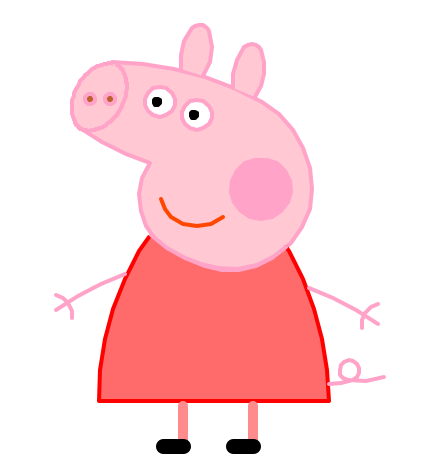
感兴趣的同学可以学习以下turtle包的用法,不仅比logo语言功能更加强大,并且操作简单。祝大家每天开心~
python 画个小猪佩奇的更多相关文章
- div+css画一个小猪佩奇
用DIV+CSS画一个小猪佩奇,挺可爱的,嘻嘻. HTML部分(全是DIV) <!-- 小猪佩奇整体容器 --> <div class="pig_container&quo ...
- python画一只佩奇
用python画一只佩奇 from turtle import* def nose(x,y):#鼻子 penup()#提起笔 goto(x,y)#定位 pendown()#落笔,开始画 sethead ...
- turtle 20秒画完小猪佩奇“社会人”
转载:https://blog.csdn.net/csdnsevenn/article/details/80650456 图片源自网络 作者 丁彦军 如需转载,请联系原作者授权. 今年社交平台上最火的 ...
- Python 实现画一个小猪佩奇
===================================== 看到 佩奇的广告片刷红,为了迎接猪年,咱们也来用Python 画板实现一个效果吧 from turtle import* ...
- 使用python画一只佩奇
打开界面: 打开python shell界面. 建立脚本: 单击"file"——"new file"来建立脚本. 编写代码: 具体的代码如下. import t ...
- python 画小猪佩奇
转自:python画个小猪佩奇 # -*- coding: utf-8 -*- """ Created on Mon May 20 11:36:03 2019 @auth ...
- 使用canvas 代码画小猪佩奇
最近不是小猪佩奇很火嘛!!! 前几天 在知乎 看见了别人大佬用python写的 小猪佩奇, 顿时想学 ,可是 自己 没学过python(自己就好爬爬图片,,,,几个月没用 又丢了) 然后 就想画一个 ...
- 【前端切图】用css画一个卡通形象-小猪佩奇
最近在腾讯云技术社区遇到了一位奇才,用css画出了一个社会人小猪佩奇,不得不服.研究了一下他的文章https://segmentfault.com/a/1190000014909658,感觉甚是有趣, ...
- 如何优雅的使用C语言绘制一只小猪佩奇
今天我们来用C语言画一只小猪佩奇---社会.社会....在画小猪佩奇之前,我们先使用带符号的距离长 (signed distance field,SDF) 来画一个圆形. 使用这个方法表示形状,但是这 ...
随机推荐
- 解决关于:TypeError: Class constructor Model cannot be invoked without 'new'
问题描述:在工作过程中出现 TypeError: Class constructor Model cannot be invoked without 'new' 这个错误 以下是报错代码: class ...
- MongoDB从入门到优化
目录 一.MongoDB 简介 二.MongoDB 的储存引擎 三.mongodb 配置参数 四.MongoDB 单节点搭建 五.MongoDB 连接 六.MongoDB 常用命令 七.MongoDB ...
- mysql字符串查找(统计客源)
如客源状态为1:2:3:5:6:9,其中6代表成交状态 如果要统计查询出有6这个状态的客源,可以用函数LOCATE(字符,搜索的字符串)来, 示例:统计每个分组下全部客源数total,成交客源数dea ...
- Perl的IO操作(2):更多文件句柄模式
open函数除了> >> <这三种最基本的文件句柄模式,还支持更丰富的操作模式,例如管道.其实bash shell支持的重定向模式,perl都支持,即使是2>&1 ...
- 基于SSM框架贺州学院校园二手交易平台设计与实现
前言 这个是我当时的毕业论文,分享出来,给同学们参考. 绪论 随着中国新四大发明的诞生,网购成了千千万万网友们购物的新方式,新的购物方式促进商业的发展,但随着人们生活水平的提高,许多新购置的物品用了没 ...
- IE的浏览器模式、文本模式
最近在部署网页的时候,发现IE下的布局完成混乱. 在改变IE的文本模式后,显示就正常了. IE的浏览器模式,用于切换IE针对该网页的默认文本模式.对不同版本浏览器的条件注释解析.决定请求头里userA ...
- Runtime详解(上)
这篇关于Runtime讲解参考https://juejin.im/post/593f77085c497d006ba389f0以及https://www.jianshu.com/p/6ebda3cd80 ...
- Redis学习笔记(1)-安装Oracle VM VirtualBox
Oracle VM VirtualBox官网网址 打开安装包网址界面,如下所示,点击截图红框. 下载完成后,点击exe文件,不停的点击下一步. 因为是使用MarkDown编辑器书写的尝试,所以写的简单 ...
- OKR20180607
OKR---目标与关键成果法 一套明确和跟踪目标及其完成情况的管理工具和方法 OKR的主要目标是明确公司和团队的“目标”以及每个目标达成的可衡量的“关键结果”. “目标”是设定一个定性的时间目标.“关 ...
- 自己用HashMap来模拟一个Session缓存(简易版)
本文记录:Hibernate中一级缓存的特点. 一级缓存的细节什么操作会向一 1.级缓存放入数据 save,update,saveOrUpdate,load,get,list,iterate,lock ...