
CIA Hive Beacon Infrastructure复现1——使用Apache mod_rewrite实现http流量分发
0x00 前言
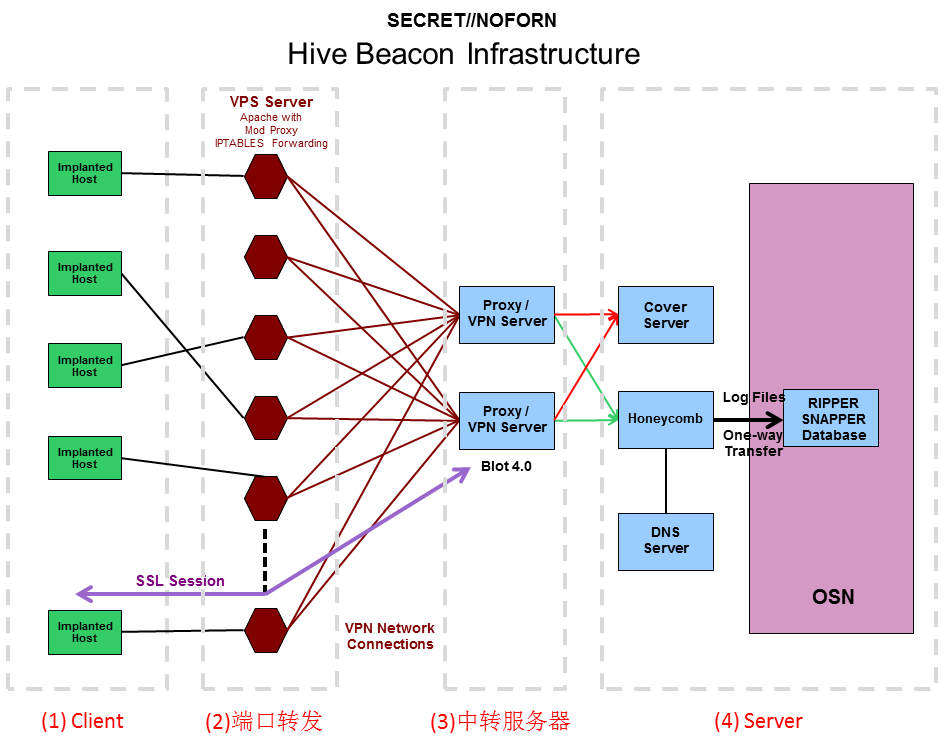
2017年11月9日维基解密公布一个代号为Vault8的文档,包含服务器远程控制工具Hive的源代码和开发文档。开发文档中的框架图显示Hive支持流量分发功能,若流量有效,转发至Honeycomb服务器,若流量存在问题,转发至Cover Server。
本文仅站在技术研究的角度,尝试使用Apache的mod_rewrite模块实现http流量分发,完成相同的目标。
标记后的框架图如下:
之前的分析文章:
0x01 简介
本文将要介绍以下内容:
- Windows系统下安装配置Apache mod_rewrite
- Ubuntu系统下安装配置Apache mod_rewrite
- 规则配置技巧与实例
- 根据判定条件实现http流量分发
0x02 Windows系统下安装配置Apache mod_rewrite
1、下载Apache
地址:
http://httpd.apache.org/download.cgi
选择需要的版本,测试版本Apache 2.4.33,下载地址:
https://www.apachehaus.com/cgi-bin/download.plx?dli=wUWZ1allWW00kej9iUG5UeJVlUGRVYRdnWzQmW
2、安装
解压后通过命令行安装:
cd Apace24bin

httpd -k install
3、开启mod_rewrite模块
编辑文件: Apace24confhttpd.conf
找到#LoadModule rewrite_module modules/mod_rewrite.so,去掉#
4、开启支持.htaccess文件
编辑文件: Apace24confhttpd.conf
定位如下位置:
DocumentRoot "${SRVROOT}/htdocs"

<Directory "${SRVROOT}/htdocs">

    #

    # Possible values for the Options directive are "None", "All",

    # or any combination of:

    #   Indexes Includes FollowSymLinks SymLinksifOwnerMatch ExecCGI MultiViews

    #

    # Note that "MultiViews" must be named *explicitly* --- "Options All"

    # doesn't give it to you.

    #

    # The Options directive is both complicated and important.  Please see

    # http://httpd.apache.org/docs/2.4/mod/core.html#options

    # for more information.

    #

    Options Indexes FollowSymLinks

    #

    # AllowOverride controls what directives may be placed in .htaccess files.

    # It can be "All", "None", or any combination of the keywords:

    #   Options FileInfo AuthConfig Limit

    #

    AllowOverride All

    #

    # Controls who can get stuff from this server.

    #

    Require all granted

</Directory>
AllowOverride None改为AllowOverride All
5、编写.htaccess文件,配置规则
保存路径为Apace24htdocs
测试规则为将1.html重定向到2.html,具体内容如下:
<IfModule mod_rewrite.c>

RewriteEngine on

RewriteRule 1.html 2.html

</IfModule>
使用记事本打开,另存为文件,文件名为".htaccess"
注:
文件名包含引号",如下图

2.html保存在Apace24htdocs,内容如下:
<html>

<body>

True page

</body>

</html>
6、开启apache服务
httpd.exe -k start
7、测试
访问http://127.0.0.1/1.html
返回内容True page,代表网页被重定向到了2.html
8、补充
apache的日志路径为Apache24logs
mod_rewrite的日志保存在error.log
文件Apace24confhttpd.conf可指定日志记录等级
0x03 Ubuntu系统下安装配置Apache mod_rewrite
1、下载安装
sudo apt-get install apache2
2、开启mod_rewrite模块
sudo a2enmod rewrite
3、开启支持.htaccess文件
编辑文件: /etc/apache2/apache2.conf
定位如下位置:
<Directory /var/www/>

        Options Indexes FollowSymLinks

        AllowOverride None

        Require all granted

</Di 大专栏  CIA Hive Beacon Infrastructure复现1——使用Apache mod_rewrite实现http流量分发rectory>
AllowOverride None改为AllowOverride All
4、编写.htaccess文件,配置规则
保存路径为varwwwhtml
测试规则为将1.html重定向到2.html,具体内容如下:
<IfModule mod_rewrite.c>

RewriteEngine on

RewriteRule 1.html 2.html

</IfModule>
2.html保存在varwwwhtml,内容如下:
<html>

<body>

True page

</body>

</html>
5、开启apache服务
sudo /etc/init.d/apache2 restart
6、测试
访问http:/IP/1.html
返回内容True page,代表网页被重定向到了2.html
7、补充
apache的日志路径为/var/log/apache2/
mod_rewrite的日志保存在error.log
文件/etc/apache2/apache2.conf可指定日志记录等级
0x04 规则配置技巧与实例
1、将所有网页重定向至 https://www.baidu.com
.htaccess文件内容如下:
<IfModule mod_rewrite.c>

RewriteEngine on

RewriteRule . https://www.baidu.com

</IfModule>
2、过滤Request Header
(1) User Agent
只针对特定User Agent的请求进行重定向
实例:
使用Mac下的Safari浏览器访问1.html,将其重定向到2.html
.htaccess文件内容如下:
<IfModule mod_rewrite.c>

RewriteEngine on

RewriteCond "%{HTTP_USER_AGENT}" "Macintosh; Intel Mac OS X 10_9_3" [NC]

RewriteRule 1.html 2.html

</IfModule>
参数说明:
RewriteCond "%{HTTP_USER_AGENT}" "Macintosh; Intel Mac OS X 10_9_3" [NC]代表判定条件,判断HTTP_USER_AGENT是否包含字符串"Macintosh; Intel Mac OS X 10_9_3"(大小写不敏感)
NC: 字符比较,大小写不敏感
详细参数说明可参考:
https://httpd.apache.org/docs/current/mod/mod_rewrite.html#rewritecond
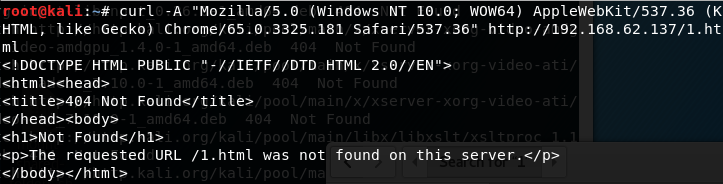
1.使用curl进行测试
模拟Chrome浏览器:
curl -A "Mozilla/5.0 (Windows NT 10.0; WOW64) AppleWebKit/537.36 (KHTML, like Gecko) Chrome/65.0.3325.181 Safari/537.36" http://192.168.62.137/1.html
并没重定向,如下图
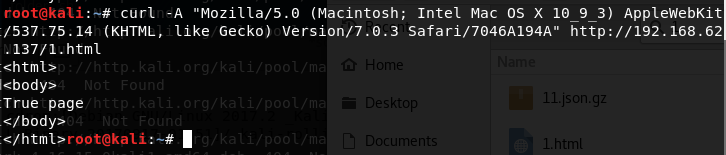
模拟Mac Safari浏览器:
curl -A "Mozilla/5.0 (Macintosh; Intel Mac OS X 10_9_3) AppleWebKit/537.75.14 (KHTML, like Gecko) Version/7.0.3 Safari/7046A194A" http://192.168.62.137/1.html
网页重定向,获得2.html的内容,如下图
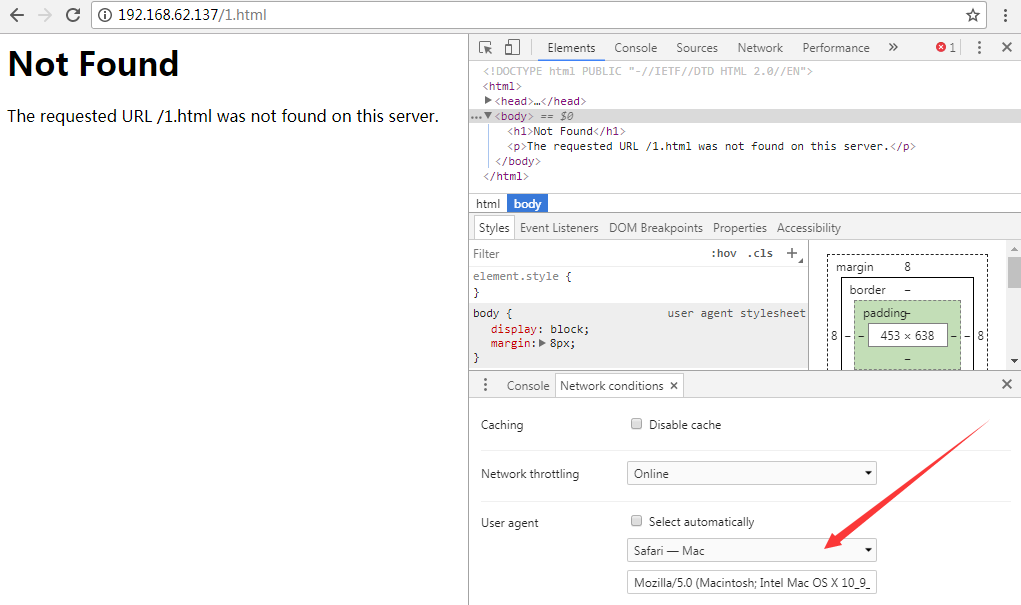
2.Chrome浏览器修改User Agent的方法
访问页面,F12 -> More tools -> Network conditions,选择User agent 为 Safari —— Mac
如下图
####(2) Peferer
只针对特定来源的请求进行重定向
实例:
如果来源为test.com,访问1.html时将其重定向到2.html
<IfModule mod_rewrite.c>

RewriteEngine on

RewriteCond "%{HTTP_REFERER}" "test.com" [NC]

RewriteRule 1.html 2.html

</IfModule>
使用curl进行测试:
curl -e "test.com" http://192.168.62.137/1.html
(3) 其他可供选择的过滤条件
如下图
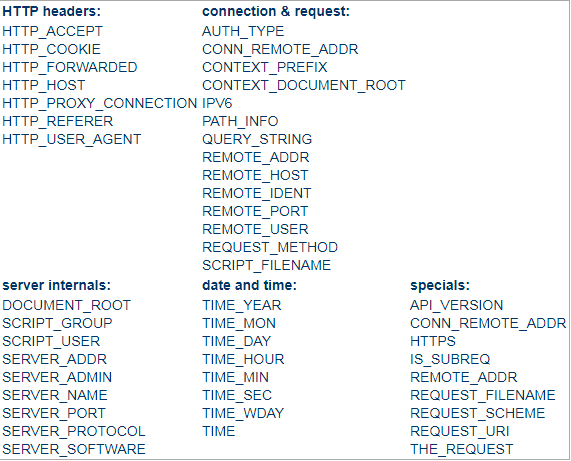
注:
图片来源于https://httpd.apache.org/docs/current/mod/mod_rewrite.html#rewritecond
补充:
Jeff Dimmock在他的博客分享了使用mod_rewrite配置规则的心得,值得学习,地址如下:
https://bluescreenofjeff.com/tags
0x05 小结
本文介绍了Windows系统和Ubuntu系统下安装配置Apache mod_rewrite的方法,分享配置技巧与实例,在技术研究的角度实现了根据请求条件进行http流量分发。
下篇文章将要介绍https的流量分发实现。
上一篇:CIA Hive Beacon Infrastructure复现2——使用Apache mod_rewrite实现https流量分发
下一篇:利用Assembly Load & LoadFile绕过Applocker的分析总结
CIA Hive Beacon Infrastructure复现1——使用Apache mod_rewrite实现http流量分发的更多相关文章
- 【原创】大叔问题定位分享(16)spark写数据到hive外部表报错ClassCastException: org.apache.hadoop.hive.hbase.HiveHBaseTableOutputFormat cannot be cast to org.apache.hadoop.hive.ql.io.HiveOutputFormat
spark 2.1.1 spark在写数据到hive外部表(底层数据在hbase中)时会报错 Caused by: java.lang.ClassCastException: org.apache.h ...
- ERROR hive.HiveConfig: Could not load org.apache.hadoop.hive.conf.HiveConf. Make sure HIVE_CONF_DIR is set correctly.
Sqoop导入mysql表中的数据到hive,出现如下错误: ERROR hive.HiveConfig: Could not load org.apache.hadoop.hive.conf.Hi ...
- 开启Apache mod_rewrite模块(解决404 Not Found)
网站搭建完成了,进入登录界面就是访问不了. 原因大概是没有开启Apache mod_rewrite模块,或者没有配置完全. 步骤1: 启用mod_rewrite模块 在conf目录的httpd.con ...
- Apache mod_rewrite实现HTTP和HTTPS重定向跳转
当你的站点使用了HTTPS之后,你可能会想把所有的HTTP请求(即端口80的请求),全部都重定向至HTTPS(即端口443).这时候你可以用以下的方式来做到:(Apache mod_rewrite) ...
- 关于Apache mod_rewrite的中文配置、使用和语法介绍(实现URL重写和防盗链功能)
以数据库后台驱动的动态内容的网站,经常会遇到这些的问题: 当在浏览器的地址栏输入一个无效的参数时,会出现数据库的错误提示,这是一个安全的隐患 搜索引擎无法收录你的所有网页 网页的链接地址是一系列的参数 ...
- openSUSE中启用apache mod_rewrite
1. 编辑 "/etc/sysconfig/apache2"文件 查找 APACHE_MODULES,你应该会找到一行像 APACHE_MODULES="actions ...
- <关于数据仓库>基于docker的Mysql与Hadoop/Hive之间的数据转移 (使用Apache Sqoop™)
原创博客,转载请联系博主! 摘要:本文介绍了如何使用docker快速搭建一个可以从外部访问的mysql服务容器,和由docker搭建的分布式Hadoop文件系统,并且使用ApacheSqoop完成将m ...
- Hive JDBC:java.lang.RuntimeException: org.apache.hadoop.ipc.RemoteException(org.apache.hadoop.security.authorize.AuthorizationException): User: root is not allowed to impersonate anonymous
今天使用JDBC来操作Hive时,首先启动了hive远程服务模式:hiveserver2 &(表示后台运行),然后到eclipse中运行程序时出现错误: java.sql.SQLExcepti ...
- 开启Apache mod_rewrite模块完全解答
启用mod_rewrite模块 在conf目录的httpd.conf文件中找到 LoadModule rewrite_module modules/mod_rewrite.so 将这一行前面的#去掉. ...
随机推荐
- 第2章 ZooKeeper安装与启动
第2章 ZooKeeper安装 2-1 JDK的安装 需要先在Linux系统下安装JDK1.8 tar -zxvf jdk-8u231-linux-x64.tar.gz rm -f jdk-8u231 ...
- PAT Advanced 1067 Sort with Swap(0,*) (25) [贪⼼算法]
题目 Given any permutation of the numbers {0, 1, 2,-, N-1}, it is easy to sort them in increasing orde ...
- cygwin下命令行下切换目录
比我们正常切换目录多个挂载的文件夹 cygdrive
- 网站的ssl证书即将过期,需要续费证书并更新
SSL这个证书的续费也挺奇怪,续费跟新购买一样. 证书这个东西,申请成功之后,每次都要重新下载,需要处理好格式之后,放在服务器的指定目录里. 大致操作如下: 首先,申请/续费证书,证书下来后,下载下来 ...
- hdu 1246
很久没有写题解了~因为懒(年纪大了就是脸皮厚,还有脸说) 这道题今天花了很长时间去推,一开始以为是规律题,没推出来,直接模拟也TLE了,接着考虑实在是没思路,看了题解. 思路大概就是这样: 先上代码( ...
- 十大经典排序算法(Javascript实现)
前言 总括: 本文结合动图详细讲述了十大经典排序算法用Javascript实现的过程. 原文博客地址:十大经典排序算法 公众号:「菜鸟学前端」,回复「666」,获取一揽子前端技术书籍 人生有情泪沾衣, ...
- Java使用Thrift,Thrift结构体定义
1.Thrift定义文件,Thrift常见的数据类型 1.基本类型(括号内为对应的Java类型): bool(boolean): 布尔类型(TRUE or FALSE) byte(byte): 8位带 ...
- 37)智能指针(就是自动delete空间)
1)问题引入: 在java或者在C++中,一旦你new一个东西,那么必然有一个delete与之对应,比如: int main() { int* p= new int(): *p=: delete p: ...
- linux 线程间发送信号
线程间通过 pthread_kill(thid,signo)给指定的thid线程发送signo信号. 创建线程与线程屏蔽字顺序 1. pthread_create(); pthread_sigm ...
- JavaScript 的 URL 对象是什么?
如果我们自己编写从URL中分析和提取元素的代码,那么有可能会比较痛苦和麻烦.程序员作为这个社会中最“懒”的群体之一,无休止的重复造轮子必然是令人难以容忍的,所以大多数浏览器的标准库中都已经内置了URL ...