
Jenkins安装部署及tomcat的入门介绍
这里我们使用的方法是用servlet容器来部署jenkins,使用的是tomcat
下载下来tomcat,解压
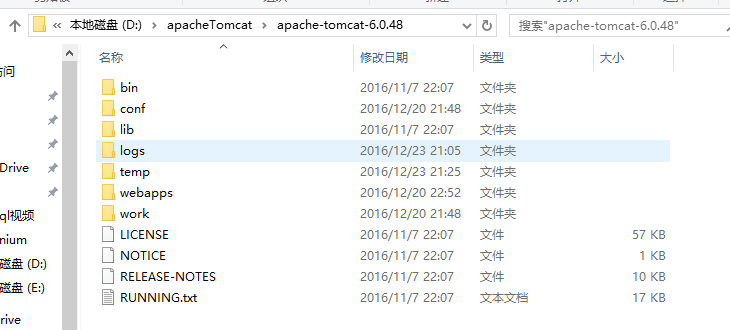
bin目录下存放的一些启动关闭批处理文件
conf目录下放的一些配置文件,配置虚拟主机之类的
lib目录下放的一些web开发用的jar包
logs目录下放的是日志文件
webapps目录下放的是web应用
---------------------------------------------------------
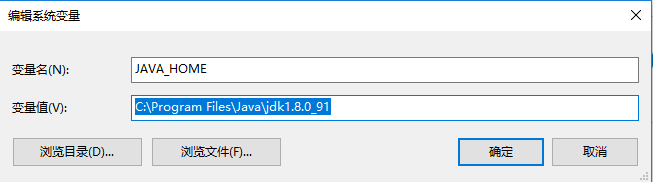
配置javahome, tomcat配置环境变量

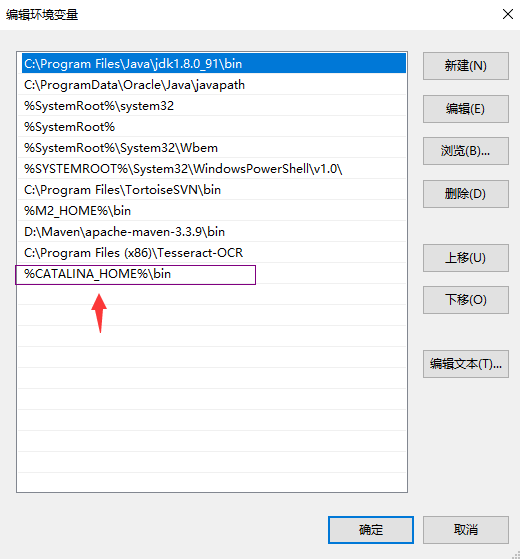
配置path路径
-------------------------------------------启动tomcat--------------------------------------
bin目录下有两个启动

startup调用的也是catalina.bat
可以在命令行中输入:startup 或者 catalina
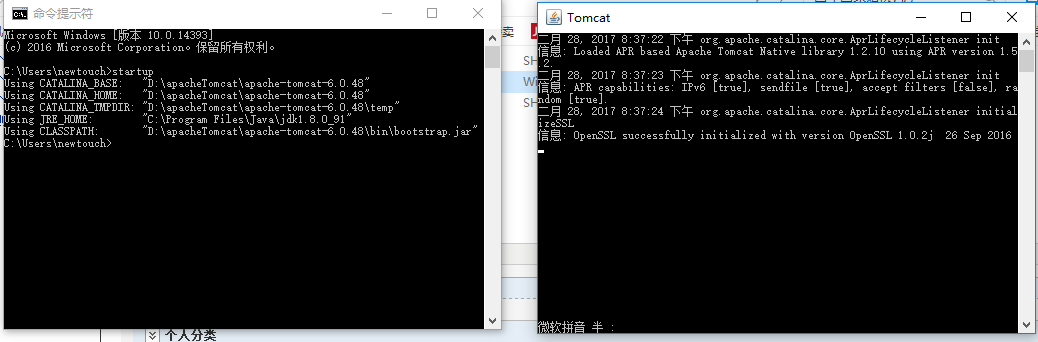
-------------------也可以通过java命令来启动--------------直接java运行bootstrap.jar文件
如何查看是否启动?
浏览器输入:http://localhost:8080/,查看是否打开tomcat页面

--------------------------------------------------------
关闭的话在命令行直接ctrl + c 就可以
—————————————————————————tomcat相关配置———————————————————————————————
打开 server.xml
<?xml version='1.0' encoding='utf-8'?>

<!--

  Licensed to the Apache Software Foundation (ASF) under one or more

  contributor license agreements.  See the NOTICE file distributed with

  this work for additional information regarding copyright ownership.

  The ASF licenses this file to You under the Apache License, Version 2.0

  (the "License"); you may not use this file except in compliance with

  the License.  You may obtain a copy of the License at

      http://www.apache.org/licenses/LICENSE-2.0

  Unless required by applicable law or agreed to in writing, software

  distributed under the License is distributed on an "AS IS" BASIS,

  WITHOUT WARRANTIES OR CONDITIONS OF ANY KIND, either express or implied.

  See the License for the specific language governing permissions and

  limitations under the License.

-->

<!-- Note:  A "Server" is not itself a "Container", so you may not

     define subcomponents such as "Valves" at this level.

     Documentation at /docs/config/server.html

 -->

<Server port="8005" shutdown="SHUTDOWN">

  <!--APR library loader. Documentation at /docs/apr.html -->

  <Listener className="org.apache.catalina.core.AprLifecycleListener" SSLEngine="on" />

  <!--Initialize Jasper prior to webapps are loaded. Documentation at /docs/jasper-howto.html -->

  <Listener className="org.apache.catalina.core.JasperListener" />

  <!-- Prevent memory leaks due to use of particular java/javax APIs-->

  <Listener className="org.apache.catalina.core.JreMemoryLeakPreventionListener" />

  <!-- JMX Support for the Tomcat server. Documentation at /docs/non-existent.html -->

  <Listener className="org.apache.catalina.mbeans.ServerLifecycleListener" />

  <Listener className="org.apache.catalina.mbeans.GlobalResourcesLifecycleListener" />

  <!-- Global JNDI resources

       Documentation at /docs/jndi-resources-howto.html

  -->

  <GlobalNamingResources>

    <!-- Editable user database that can also be used by

         UserDatabaseRealm to authenticate users

    -->

    <Resource name="UserDatabase" auth="Container"

              type="org.apache.catalina.UserDatabase"

              description="User database that can be updated and saved"

              factory="org.apache.catalina.users.MemoryUserDatabaseFactory"

              pathname="conf/tomcat-users.xml" />

  </GlobalNamingResources>

  <!-- A "Service" is a collection of one or more "Connectors" that share

       a single "Container" Note:  A "Service" is not itself a "Container",

       so you may not define subcomponents such as "Valves" at this level.

       Documentation at /docs/config/service.html

   -->

  <Service name="Catalina">

    <!--The connectors can use a shared executor, you can define one or more named thread pools-->

    <!--

    <Executor name="tomcatThreadPool" namePrefix="catalina-exec-"

        maxThreads="150" minSpareThreads="4"/>

    -->

    <!-- A "Connector" represents an endpoint by which requests are received    连接器 根据协议

         and responses are returned. Documentation at :

         Java HTTP Connector: /docs/config/http.html (blocking & non-blocking)

         Java AJP  Connector: /docs/config/ajp.html

         APR (HTTP/AJP) Connector: /docs/apr.html

         Define a non-SSL HTTP/1.1 Connector on port 8080

    -->

    <Connector port="8080" URIEncoding="UTF-8" protocol="HTTP/1.1"

               connectionTimeout="20000"

               redirectPort="8443" />

    <!-- A "Connector" using the shared thread pool-->

    <!--

    <Connector executor="tomcatThreadPool"

               port="8080" protocol="HTTP/1.1"

               connectionTimeout="20000"

               redirectPort="8443" />

    -->

    <!-- Define a SSL HTTP/1.1 Connector on port 8443

         This connector uses the JSSE configuration, when using APR, the

         connector should be using the OpenSSL style configuration

         described in the APR documentation -->

    <!--

    <Connector port="8443" protocol="HTTP/1.1" SSLEnabled="true"

               maxThreads="150" scheme="https" secure="true"

               clientAuth="false" sslProtocol="TLS" />

    -->

    <!-- Define an AJP 1.3 Connector on port 8009 -->

    <Connector port="8009" protocol="AJP/1.3" redirectPort="8443" />

    <!-- An Engine represents the entry point (within Catalina) that processes

         every request.  The Engine implementation for Tomcat stand alone

         analyzes the HTTP headers included with the request, and passes them

         on to the appropriate Host (virtual host).

         Documentation at /docs/config/engine.html -->

    <!-- You should set jvmRoute to support load-balancing via AJP ie :

    <Engine name="Catalina" defaultHost="localhost" jvmRoute="jvm1">

    -->

    <Engine name="Catalina" defaultHost="localhost">

      <!--For clustering, please take a look at documentation at:

          /docs/cluster-howto.html  (simple how to)

          /docs/config/cluster.html (reference documentation) -->

      <!--

      <Cluster className="org.apache.catalina.ha.tcp.SimpleTcpCluster"/>

      -->

      <!-- The request dumper valve dumps useful debugging information about

           the request and response data received and sent by Tomcat.

           Documentation at: /docs/config/valve.html -->

      <!--

      <Valve className="org.apache.catalina.valves.RequestDumperValve"/>

      -->

      <!-- This Realm uses the UserDatabase configured in the global JNDI

           resources under the key "UserDatabase".  Any edits

           that are performed against this UserDatabase are immediately

           available for use by the Realm.  -->

      <Realm className="org.apache.catalina.realm.UserDatabaseRealm"

             resourceName="UserDatabase"/>

      <!-- Define the default virtual host

           Note: XML Schema validation will not work with Xerces 2.2.

       -->

      <Host name="localhost"  appBase="webapps"

            unpackWARs="true" autoDeploy="true"

            xmlValidation="false" xmlNamespaceAware="false">

        <!-- SingleSignOn valve, share authentication between web applications

             Documentation at: /docs/config/valve.html -->

        <!--

        <Valve className="org.apache.catalina.authenticator.SingleSignOn" />

        -->

        <!-- Access log processes all example.

             Documentation at: /docs/config/valve.html -->

        <!--

        <Valve className="org.apache.catalina.valves.AccessLogValve" directory="logs"

               prefix="localhost_access_log." suffix=".txt" pattern="common" resolveHosts="false"/>

        -->

      </Host>

    </Engine>

  </Service>

</Server>
相关的配置在Service标签下
根据相关的协议配置Connector,
在Host标签下配置web应用,以上面那个为例:

localhost就是本机的地址,appBase是相关web应用,输入http://localhost:8080/就会访问localhost下的webapps这个web文件夹下的应用。
——————————————————————————————————————————————————————————————————————————
将下载下来的jenkins的文件放到webapps里
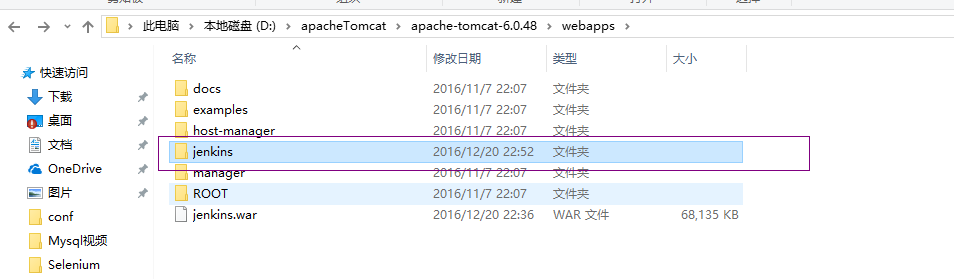
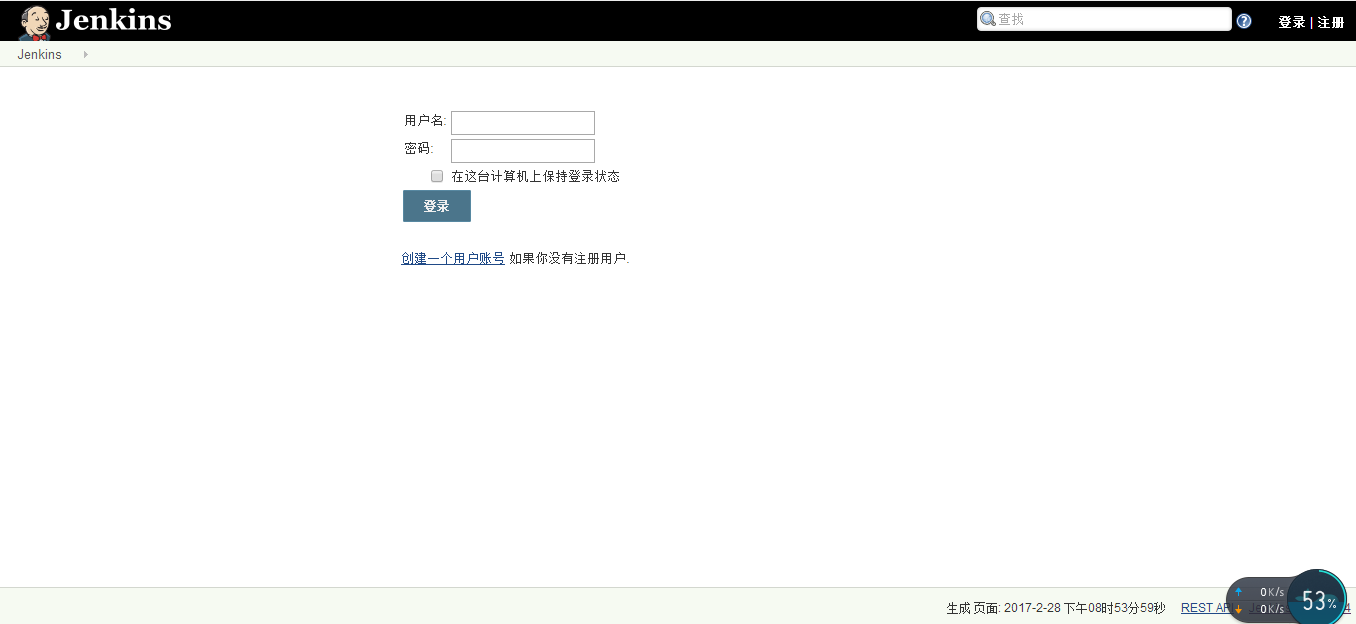
然后启动tomcat,在浏览器中输入http://localhost:8080/jenkins/就可以打开jenkins了
Jenkins安装部署及tomcat的入门介绍的更多相关文章
- Jenkins安装部署及使用
Jenkins安装部署环境如下 PS:中文官网,东西比较全.(居然有中文官网了,真好!)以下为本人自己的使用过程,仅供参考! 一.准备阶段 1.组件及版本: Jenkins版本:2.164.3 操作系 ...
- Jenkins安装部署项目
Jenkins安装部署项目 配置JDK git maven 部署到服务器 一.新建任务 二.配置jenkins 三.添加构建信息 四.应用.保存 五.踩坑填坑记录 5.1没有jar包的情况 5.2无法 ...
- DevOps实践之Jenkins安装部署
Prerequisites Minimum hardware requirements: 256 MB of RAM 1 GB of drive space (although 10 GB is a ...
- Jenkins安装部署(一)
环境准备 CentOS Linux release 7.4 1.IP:192.168.43.129 2.路径:/mnt 3.jdk版本:jdk1.8.0 4.tomcat版本:tomcat-8.5 5 ...
- 【持续集成】jenkins安装部署从git获取代码
一:持续集成的概念: 1.1:总体的概括 持续集成Continuous Integration 持续交付Continuous Delivery 持续部署Continuous Deployment 1. ...
- Jenkins安装部署与使用
一.Jenkins平台安装部署 Jenkins官网免费获取Jenkins软件,官网地址为:http://mirrors.jenkins-ci.org/下载稳定的Jenkins版本.由于Jenkins是 ...
- Jenkins——安装部署
1.部署Jdk 由于jenkins需要jdk环境,所以先部署jdk,解压并设置环境变量就行: # tar zxf jdk-8u45-linux-x64.tar.gz # mv jdk-8u45-lin ...
- 教你搞懂Jenkins安装部署!
前言:请各大网友尊重本人原创知识分享,谨记本人博客:南国以南i Jenkins介绍 Jenkins是一个开源软件项目,是基于Java开发的一种持续集成工具,用于监控持续重复的工作,旨在提供一个开放易用 ...
- Jenkins安装部署使用图文详解(非常详细)
前言 最近公司需要弄一套自动化运维部署,于是抽空学习了一下,用了两天左右完成Jenkins的安装部署和各种项目的配置化,于是整理一下进行分享. 介绍 Jenkins是一个独立的开源软件项目,是基于Ja ...
随机推荐
- 树讲解——紧急集合(lca)
大视野 1787: [Ahoi2008]Meet 紧急集合 Time Limit: 20 Sec Memory Limit: 162 MBSubmit: 3067 Solved: 1365[ ...
- Maven的构建配置文件(Build Profiles)
在命令行使用构建配置文件时,是-P,比如:mvn -Pinput 注意:这里的构建配置文件并不是一个真正的文件,而是通过指定参数来做特定的事. 以下内容引用自https://ayayui.gitboo ...
- 细说Redis持久化机制
概述 Redis不仅能够作为缓存来使用,也能够作为内存数据库. Redis作为内存数据库使用时.必需要解决一个问题:数据的持久性.有些将Redis作为缓存使用的场景也需要将缓存的数据持久化到存储介质上 ...
- treeList获取目录下的所有文件
/// <summary>/// treeList获取目录下的所有文件/// </summary>public static void InitTreeListGetFiles ...
- vue2.0 + vux (五)api接口封装 及 首页 轮播图制作
1.安装 jquery 和 whatwg-fetch (优雅的异步请求API) npm install jquery --save npm install whatwg-fetch --save 2. ...
- SqlServer查询语句中用到的锁
前段时间**公司DBA来我们这培训.讲了一大堆MYSQL的优化. QA环节一程序员问“SQL语句中的 with nolock 除了不锁表外,是否能读其他锁住的数据". 讲课的人嘟嘟了半天没解 ...
- RTMP协议规范(转载)
译序: 本文是为截至发稿时止最新 Adobe 官方公布的 RTMP 规范.本文包含 RTMP 规范的全部内容.是第一个比较全面的 RTMP 规范的中译本.由于成文时间仓促,加上作者知识面所限,翻译错误 ...
- viewState详解
作者:Infinities Loop 概述 ViewState是一个被误解很深的动物了.我希望通过此文章来澄清人们对 ViewState的一些错误认识.为了达到这个目的,我决定从头到尾详细的描述一下整 ...
- 由于扩展配置问题而无法提供您请求的页面...请添加 MIME 映射.--解决方法
http://blog.sina.com.cn/s/blog_4c78de680100quis.html HTTP 错误 404.3 - Not Found由于扩展配置问题而无法提供您请求的页面.如果 ...
- vim 寄存器的使用
1. 寄存器的格式 "[a~z] 2. 在复制时指定寄存器:"ayw 3. 剪切时使用寄存器:"add 3. 黏贴时指定从某个寄存器处获取数据:"ap 4. 几 ...