
vue2.0 + vux (五)api接口封装 及 首页 轮播图制作
1.安装 jquery 和 whatwg-fetch (优雅的异步请求API)
npm install jquery --save

npm install whatwg-fetch --save
2.api接口封装
api/index.js
/**

 * 引入 异步请求API

 */

import "whatwg-fetch"

const host_addr='http://192.168.1.110:8081/'

/**

 * 获取资讯列表

 */

export let getList = async (page, tag) => {

  let response = await fetch(host_addr + `news_list?pageIndex=${page}&pageSize=20&catalog=${tag}`, {

    method: 'GET',

    mode: 'cors'

  }).catch((error) => {

    console.log(error)

  })

  return await response.json().catch((error) => {

    console.log(error)

  })

}

/**

 * 获取资讯详情

 */

export let getNewsDetail = async (id) => {

  let response = await fetch(host_addr + `news_detail?id=${id}`, {

    method: 'GET',

    mode: 'cors'

  }).catch((error) => {

    console.log(error)

  })

  return await response.json().catch((error) => {

    console.log(error)

  })

}

/**

 * 获取博客列表

 */

export let getBlogList = async (page, tag) => {

  let response = await fetch(host_addr + `blog_list?pageIndex=${page}&pageSize=20&catalog=${tag}`, {

    method: 'GET',

    mode: 'cors'

  }).catch((error) => {

    console.log(error)

  })

  return await response.json().catch((error) => {

    console.log(error)

  })

}

/**

 * 获取问答列表

 */

export let getQuestionList = async (page, tag) => {

  let response = await fetch(host_addr + `question_list?pageIndex=${page}&pageSize=20&catalog=${tag}`, {

    method: 'GET',

    mode: 'cors'

  }).catch((error) => {

    console.log(error)

  })

  return await response.json().catch((error) => {

    console.log(error)

  })

}

/**

 * 获取活动列表

 */

export let getEventList = async (page, tag) => {

  let response = await fetch(host_addr + `event_list?pageIndex=${page}&pageSize=20&catalog=${tag}`, {

    method: 'GET',

    mode: 'cors'

  }).catch((error) => {

    console.log(error)

  })

  return await response.json().catch((error) => {

    console.log(error)

  })

}
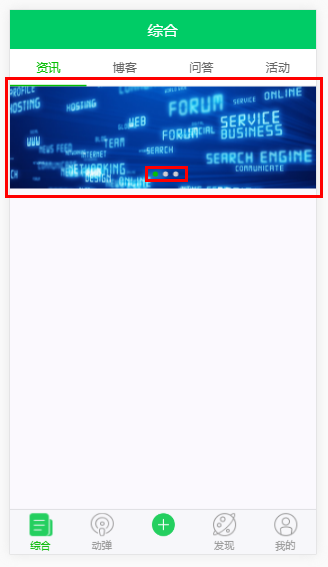
3.轮播图
<!-- 资讯 -->

<template>

  <div>

    <!-- 轮播图 -->

    <swiper :list="imgs" auto style="width:100%;height:120px;margin:0 auto;" dots-class="custom-bottom" dots-position="center"></swiper>

  </div>

</template>

<script>

  // 引入 vux 内部组件

  import { Swiper } from 'vux'

  // 引入 api接口文档

  import { getList } from '../../api'

  // 轮播图列表

  const imgList = [

    'http://file06.16sucai.com/2016/0222/17714c3b51079911760e5ef7fdb553f6.jpg',

    'http://pic.58pic.com/58pic/15/67/98/93C58PICjeM_1024.jpg',

    'http://file06.16sucai.com/2016/0315/1df566087c24a94cd9534bc9bc1871ff.jpg'

  ];

  // 轮播图图片地址列表

  const urlList = imgList.map((one, index) => ({

    url: 'javascript:',  //这里填写图片点击的链接

    img: one

  }));

  export default {

    name: 'NewsList',

    components:{

      Swiper

    },

    data(){

      return {

        imgs:urlList,

      }

    }

  }

</script>
4.效果图
vue2.0 + vux (五)api接口封装 及 首页 轮播图制作的更多相关文章
- iOS回顾笔记(05) -- 手把手教你封装一个广告轮播图框架
html,body,div,span,applet,object,iframe,h1,h2,h3,h4,h5,h6,p,blockquote,pre,a,abbr,acronym,address,bi ...
- js-BOM之offset家族、移动函数的封装升级(轮播图)
Obj.style.width/obj.style.height与obj.offsetWidth/obj.offsetHeight的区别: <style> #div1{ height: 2 ...
- 用require.js封装原生js轮播图
index.html页面: <!DOCTYPE html><html> <head> <meta charset="UTF-8"> ...
- 在Nuxt中使用react-id-swiper封装公共的轮播图组件(移动端
首先就是引入swiper import Swiper from 'react-id-swiper': 一个轮播图首先要考虑到一种情况就是当只有一张图的时候是不是需要按轮播图来处理 一般情况下,一张图是 ...
- JS —— 轮播图中的缓动函数的封装
轮播图的根本其实就是缓动函数的封装,如果说轮播图是一辆跑动的汽车,那么缓动函数就是它的发动机,今天本文章就带大家由简入繁,封装属于自己的缓动函数~~ 我们从需求的角度开始,首先给出一个简单需求: 1. ...
- vue2.0 + vux (六)NewsList 资讯页 及 NewsDetail 资讯详情页
设置代理,避免出现跨域问题 /*设置代理,避免出现跨域问题*/ proxyTable: { '/api':{ target: 'https://www.oschina.net/action/apiv2 ...
- 微信小程序API接口封装
@ 目录 一,让我们看一下项目目录 二,让我们熟悉一下这三个文件目的(文件名你看着办) 三,页面js中如何使用 今天的API的封装,我们拿WX小程序开发中,对它的API (wx.request)对这个 ...
- 05-06 Flutter JSON和序列化反序列化、创建模型类转换Json数据、轮播图数据渲染:Flutter创建商品数据模型 、请求Api接口渲染热门商品 推荐商品
Config.dart class Config{ static String domain='http://jd.itying.com/'; } FocusModel.dart class Focu ...
- 基于ionic框架封装一个图片轮播指令的几点
在这里我想在项目中封装一个图片轮播的指令 (本项目使用的是ionic框架) 1)定义指令 define(['app'],function(myapp){ myapp.directive('myslid ...
随机推荐
- selenium - 常用页面操作
# 2.常用页面操作 # 访问某一个页面url = 'http://www.baidu.com'driver.get(url) # 获取页面的标题title = driver.titleprint(t ...
- python中用exit退出程序
在python中运行一段代码,如果在某处已经完成整次任务,可以用exit退出整个运行.并且还可以在exit()的括号里加入自己退出程序打印说明.不过注意在py3中要加单引号或双引号哦!
- [python学习篇] uiautomator xiaocong
Skip to content This repository Pull requests Issues Marketplace Gist Sign out Watch103 ...
- 【转】关于AI的目标导向型行动计划
作者:Brent Owens 目标导向型行动计划(简称GOAP)是一种能够轻松呈现给你的代理选择的AI系统,也是帮助你可以无需维持一个庞大且复杂的有限状态机而做出明智的决策的机器. 演示版本 在这一演 ...
- 解决Failed with error: unable to access 'https://git.coding.net/chenmi1234/lianpos.git/': Couldn't resolve host 'git.coding.net'
代码改变世界 github push 出现问题 Failed with error: unable to access 'https://git.coding.net/chenmi1234/lianp ...
- iOS学习笔记01-APP相关
AppDelegate对象方法 # 程序第一次启动后才会执行 - (BOOL)application:(UIApplication *)application didFinishLaunchingWi ...
- LaTeX:毕设模版设计问题1 各级标题编号设为黑体
我用'titlesec'宏包设计各级标题格式指定字体为黑体,结果标题编号仍为Times New Roman .
- 群论 - Group Theory
群的定义 若非空集合\(G\)和定义在\(G\)上的二元运算\(⋅\)构成的代数结构\((G,⋅)\),满足: 封闭性:\(\forall a,b\in G\),有\(a⋅b\in G\). 结合律: ...
- (转)解决fasterxml中string字符串转对象json格式错误问题(无引号 单引号问题)
原文地址:解决fasterxml中string字符串转对象json格式错误问题 com.fasterxml.jackson.databind.ObjectMapper mapper = new com ...
- redhat安装Xvfb
1.下载xvfb的rpm包进行安装 下载rpm安装包:http://rhn.redhat.com/errata/RHBA-2013-0083.html 安装rpm包:#rpm -ivh --nodep ...