
SpringCloud之配置中心(config)的使用Git+数据库实现
一、配置中心应用(Git)
1、如果在GitHub上建立的仓库是私有的,那么还要加上spring.cloud.config.server.git.username和spring.cloud.config.server.git.password 这两个配置
2、springcloud config 的URL与配置文件的映射关系如下:
/{application}/{profile}[/{label}]

/{application}-{profile}.yml

/{label}/{application}-{profile}.yml

/{application}-{profile}.properties

/{label}/{application}-{profile}.properties
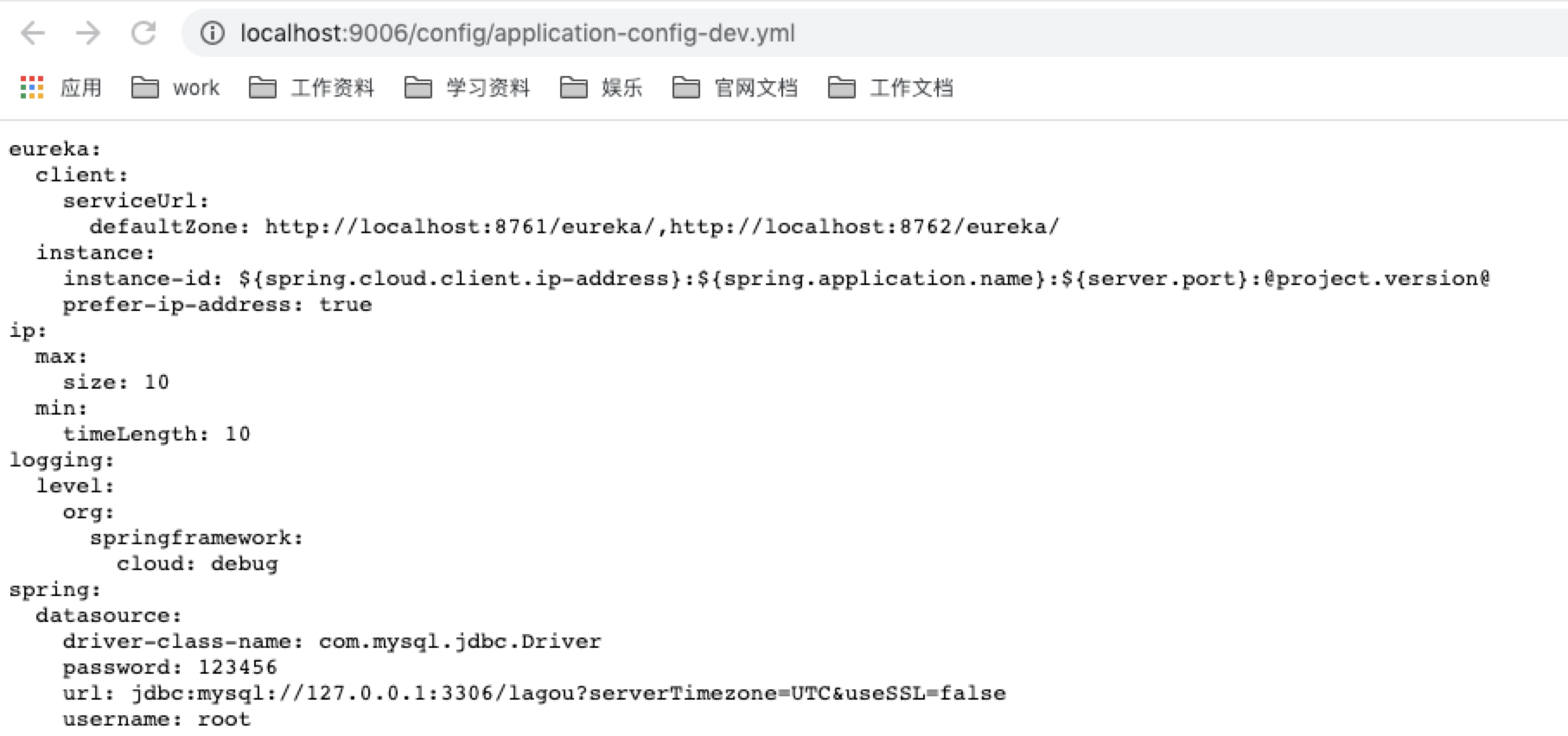
3、如果github上建立的目录下的文件为application-config-dev.yml,那么当启动配置中心服务器端时,可以通过http://localhost:9006/config/application-config-dev.yml访问配置文件,如果访问成功则表示配置中心搭建成功。这里的config是分支名称
第一步:配置中心服务端
1、依赖配置
<dependency>

    <groupId>org.springframework.cloud</groupId>

    <artifactId>spring-cloud-config-server</artifactId>

</dependency>

<dependency>

    <groupId>org.springframework.cloud</groupId>

    <artifactId>spring-cloud-starter-netflix-eureka-client</artifactId>

</dependency>
2、配置文件
spring:
  application:
    #应⽤名称,会在Eureka中作为服务的id标识(serviceId)
    name: config-server9006
  cloud:
    config:
      server:
        git:
          uri: git@gitee.com:niunafei1/springcloud.git
          username: niunafei0315@163.com
          password:
      label: config
eureka:
  client:
    #eureka server的路径
    serviceUrl:
      #注册单实例只需要写一台服务器即可
      #集群模式下,也需要写其它 http://Server其他服务地址:其他服务端口/eureka,如果多个服务需要使用逗号分隔
      defaultZone: http://localhost:8761/eureka/,http://localhost:8762/eureka/
  instance:
    #使⽤ip注册,否则会使⽤主机名注册了(此处考虑到对⽼版本的兼容,新版本经过实验都是ip)
    prefer-ip-address: true
    #⾃定义实例显示格式,加上版本号,便于多版本管理,注意是ip-address,早期版本是ipAddress
    instance-id: ${spring.cloud.client.ip-address}:${spring.application.name}:${server.port}:@project.version@
3、在启动类上添加注解,@EnableDiscoveryClient【@EnableDiscoveryClient注解可替换为@EnableEurekaClient】和@EnableConfigServer
package city.albert;

import org.springframework.boot.SpringApplication;

import org.springframework.boot.autoconfigure.SpringBootApplication;

import org.springframework.cloud.client.discovery.EnableDiscoveryClient;

import org.springframework.cloud.config.server.EnableConfigServer;

/**

 * @author niunafei

 * @function

 * @email niunafei0315@163.com

 * @date 2020/9/22  11:44 PM

 */

@SpringBootApplication

@EnableDiscoveryClient

@EnableConfigServer

public class ConfigServer9006 {

    public static void main(String[] args) {

        SpringApplication.run(ConfigServer9006.class, args);

    }

}
访问:http://localhost:9006/config/application-config-dev.yml
第二步:配置中心客户端
1、引入依赖
        <dependency>

            <groupId>org.springframework.cloud</groupId>

            <artifactId>spring-cloud-config-client</artifactId>

        </dependency>
2、配置文件设置,文件名为bootstrap.yml
在spring boot中系统文件名bootstrap.yml优先被加载使用,需要在系统加载application.yml之前初始化获取配置文件。
spring:

  application:

    #应⽤名称,会在Eureka中作为服务的id标识(serviceId)

    name: gateway-server9002

  cloud:

    config:

      name: application-config #配置⽂件名称

      profile: dev #后缀名称

      label: config #分⽀名称

      uri: http://localhost:9006 #ConfigServer配置中⼼地址
3、使用可以用@Value("${spring.port}")注入即可
二、配置中心的手动刷新
实现手动刷新不⽤重启微服务,只需要⼿动的做⼀些其他的操作(访问⼀个地址/refresh)刷新,之后再访问即可此时,客户端取到了配置中⼼的值,但当我们修改GitHub上⾯的值时,服务端(Confifig Server)能实时获取最新的值,但客户端(Confifig Client)读的是缓存,⽆法实时获取最新值。Spring Cloud已 经为我们解决了这个问题,那就是客户端使⽤post去触发refresh,获取最新数据。
        <dependency>

            <groupId>org.springframework.boot</groupId>

            <artifactId>spring-boot-starter-actuator</artifactId>

        </dependency>
management:

  endpoints:

    web:

     exposure:

       include: "*"
三、配置中心的自动刷新(Spring Cloud Confifig+Spring Cloud Bus 实现)
MQ消息代理,我们还选择使⽤RabbitMQ,ConfifigServer和ConfifigClient都添加都消息总线的⽀持以及与RabbitMq的连接信息
        <dependency>

            <groupId>org.springframework.cloud</groupId>

            <artifactId>spring-cloud-starter-bus-amqp</artifactId>

        </dependency>
spring:

  rabbitmq:

    host: 127.0.0.1

    password: guest

    port: 5672

    username: guest
        <dependency>

            <groupId>org.springframework.boot</groupId>

            <artifactId>spring-boot-starter-actuator</artifactId>

        </dependency>
b、暴露服务
management:

  endpoints:

    web:

     exposure:

       include: "*"
四、配置中心应用(数据库)
        <!--连接msql数据库相关jar包-->

        <dependency>

            <groupId>org.springframework.boot</groupId>

            <artifactId>spring-boot-starter-jdbc</artifactId>

        </dependency>

        <dependency>

            <groupId>mysql</groupId>

            <artifactId>mysql-connector-java</artifactId>

            <version>5.1.21</version>

        </dependency>
2、改动配置文件
spring:

  application:

    name: config-server-jdbc

  profiles:

    active: jdbc

  cloud:

    config:

      server:

        default-label: dev

        jdbc:

          sql: SELECT akey , avalue FROM config_server where APPLICATION=? and APROFILE=? and LABEL=?

 # mysql 属性配置

  datasource:

    driver-class-name: com.mysql.jdbc.Driver

    url: jdbc:mysql://127.0.0.1:3306/test

    username: root

    password: root
这里主要讲下连接配置信息
(1)spring.profiles.active=jdbc,自动实现JdbcEnvironmentRepository。
(2)sql语句自定义,否则会默认为“SELECT KEY, VALUE from PROPERTIES where APPLICATION=? and PROFILE=? and LABEL=?”,具体可以参考JdbcEnvironmentRepository实现。
(3)本人数据库建表为config_server,由于key,value和profile是mysql关键字,所以我都在最前面加了a。当然表名字段名都可以自定义。
(4) {application} 对应客户端的"spring.application.name"属性;
{aprofile} 对应客户端的 "spring.profiles.active"属性(逗号分隔的列表); 和
{label} 对应服务端属性,这个属性能标示一组配置文件的版本.
(5)只要select出来是两个字段,框架会自动包装到environment的map<key,value>。
SpringCloud之配置中心(config)的使用Git+数据库实现的更多相关文章
- 七、springcloud之配置中心Config(二)之高可用集群
方案一:传统作法(不推荐) 服务端负载均衡 将所有的Config Server都指向同一个Git仓库,这样所有的配置内容就通过统一的共享文件系统来维护,而客户端在指定Config Server位置时, ...
- SpringCloud分布式配置中心Config
统一管理所有配置. 1.微服务下的分布式配置中心 简介:讲解什么是配置中心及使用前后的好处 什么是配置中心: 一句话:统一管理配置, 快速切换各个环境的配置 相关产品: 百度的disconf 地址:h ...
- 六、springcloud之配置中心Config
一.配置中心提供的核心功能 Spring Cloud Config为服务端和客户端提供了分布式系统的外部化配置支持.配置服务器为各应用的所有环境提供了一个中心化的外部配置.它实现了对服务端和客户端对S ...
- springcloud(四):应用配置中心config的安全设置
springcloud应用配置中心config的安全设置 在springcloud应用开发中,为了方便在线管理我们的配置文件,通常会配一个配置中心config-server,这里托管着应用的一些配置文 ...
- Spring-cloud微服务实战【九】:分布式配置中心config
回忆一下,在前面的文章中,我们使用了spring cloud eureka/ribbon/feign/hystrix/zuul搭建了一个完整的微服务系统,不管是队内还是对外都已经比较完善了,那我们 ...
- SpringCloud配置中心config
1,配置中心可以用zookeeper来实现,也可以用apllo 来实现,springcloud 也自带了配置中心config Apollo 实现分布式配置中心 zookeeper:实现分布式配置中心, ...
- 学习一下 SpringCloud (五)-- 配置中心 Config、消息总线 Bus、链路追踪 Sleuth、配置中心 Nacos
(1) 相关博文地址: 学习一下 SpringCloud (一)-- 从单体架构到微服务架构.代码拆分(maven 聚合): https://www.cnblogs.com/l-y-h/p/14105 ...
- SpringCloud 分布式配置中心
SpringCloud 分布式配置中心 服务端 创建工程并完善结构 国际惯例,把maven工程创建完善 pom.xml <?xml version="1.0" encodin ...
- (七)Spring Cloud 配置中心config
spring cloud config是一个基于http协议的远程配置实现方式. 通过统一的配置管理服务器进行配置管理,客户端通过http协议主动的拉取服务的的配置信息,完成配置获取. 下面我们对 ...
随机推荐
- windows上传ipa文件到苹果开发者中心的教程
转: windows上传ipa文件到苹果开发者中心的教程 我们在苹果开发者中心上架ios app的时候,需要使用xcode或transporter先上传ipa文件到开发者中心. 但是假如我们只是H5开 ...
- 剑指 Offer 31. 栈的压入、弹出序列 + 入栈顺序和出栈顺序的匹配问题
剑指 Offer 31. 栈的压入.弹出序列 Offer_31 题目详情: 解析: 这里需要使用一个栈来模仿入栈操作. package com.walegarrett.offer; /** * @Au ...
- PAT-1119(Pre- and Post-order Traversals)+前序和后序遍历确定二叉树+判断二叉树是否唯一
Pre- and Post-order Traversals PAT-1119 这题难度较大,主要需要考虑如何实现根据前序遍历和后序遍历来确定一颗二叉树 一篇好的文章: 题解 import java. ...
- POJ-1458(LCS:最长公共子序列模板题)
Common Subsequence POJ-1458 //最长公共子序列问题 #include<iostream> #include<algorithm> #include& ...
- POJ-2406(KMP+字符串压缩)
Power String POJ-2406 字符串压缩模板题,但是是求有多少个这样最短的子串可以组成s. #include<iostream> #include<cstring> ...
- [UNP] IO 复用
UNP Part-2: Chapter 6. I/O Multiplexing: The select and poll Functions 的读书笔记. 在 这篇博客 的最后,我们对文章中的服务器- ...
- Linux增删改查移文件、文件夹
关于Linux中文件基本处理命令 (1)添加文件.文件夹(图例):touch Demo命令创建文件(Demo)为文件名. 即mkdir Temp命令为创建文件夹(Temp)为文件夹名. 创建文件.文件 ...
- WAV16T VPX国产化千兆交换板
WAV16T是基于盛科CTC5160设计的国产化3U三层千兆VPX交换板,提供16路千兆电口,采用龙芯 2K1000处理器.支持常规的L2/L3协议,支持Telnet.SNMP.WEB,CLI等多 ...
- 【odoo14】第二章、管理odoo实例
本章主要介绍肖odoo实例添加用户自定义的模块.你可以从多个路径载入模块.但是建议你将自己的模块儿放在特定的目录当中,避免与odoo的核心模块混淆. 在这一章节,中我们主要涉及以下内容: 配置插件路径 ...
- 【LeetCode】2020-04 每日一题
8. 字符串转换整数 (atoi)(中等) [分类]:模拟.正则表达式 [题解]: 解法1:直接模拟,但是在判断INT_MAX和INT_MIN上需要注意,因为直接判断会超出范围,所以可以将式子转换一下 ...