
tab页
图片:
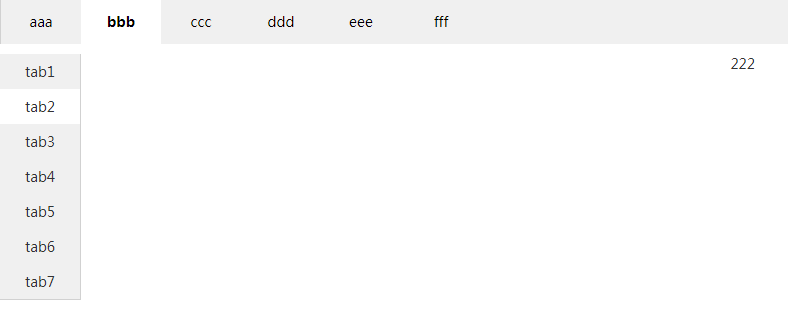
代码:
<!DOCTYPE html>

<html>

<head>

<meta charset="utf-8">

<title></title>

<style type="text/css">

/*         上边tab */

html {

    font-size: 14px

}

body {

    margin: 0;

    padding: 0;

    font-family: "Hiragino Sans GB", "Microsoft Yahei", SimSun, Arial,

        "Helvetica Neue", Helvetica;

    color: #333;

    word-wrap: break-word;

    -webkit-font-smoothing: antialiased;

    background: #FFF;

}

ul {

    margin: 0;

    padding: 0

}

li {

    list-style: none

}

.aui-nav-list-box {

    overflow: hidden;

    zoom: 1;

    border-bottom: none;

    z-index: 110;

    background: #F0F0F0;

    width: 100%;

    display: block;

    border-top: solid 1px #d1d1d1;

    border-left: solid 1px #d1d1d1;

}

.aui-nav-list-box ul li a {

    color: #000;

}

.aui-nav-list-box ul li {

    float: left;

    color: #000;

    height: 45px;

    cursor: pointer;

    line-height: 45px;

    width: 80px;

    text-align: center;

    font-size: 14px;

}

.aui-nav-list-box ul .aui-current {

    background: white;

    font-weight: bold;

}

.aui-nav-list-item {

    display: none;

    background: #FFF;

}

/*         左边tab */

* {

    margin: 0;

    padding: 0;

}

ul {

    list-style: none;

}

.tab {

    width: 100%;

    background: #F0F0F0;

}

.tab .box {

    width: 100%;

    position: relative;

    margin: 0 auto;

    height: auto;

}

.tab .box .menus {

    width: 80px;

    height: auto;

    background: white;

    float: left;

    overflow: hidden;

    border-right: solid 1px #d1d1d1;

    border-bottom: solid 1px #d1d1d1;

}

.tab .box .menus li {

    cursor: pointer;

    width: 80px;

    height: 35px;

    background: #F0F0F0;

    font-size: 14px;

    text-align: center;

    line-height: 35px;

    transition: all 0.3s;

    -moz-transition: all 0.3s;

    -o-transition: all 0.3s;

    -webkit-transition: all 0.3s;

}

.tab .box .menus li:nth-child(7) {

    border-bottom: none;

}

.tab .box .bg {

    background: white !important;

}

.tab .right {

    float: left;

    width: 93%;

    height: 800px;

    overflow: hidden;

    background: white;

}

.tab .tab_right {

    width: 100%;

    height: 800px;

    text-align: center;

    position: relative;

}

.tab .scroll {

    transition: all 0.5s;

    -moz-transition: all 0.5s;

    -o-transition: all 0.5s;

    -webkit-transition: all 0.5s;

}

</style>

</head>

<body>

    <div class="aui-nav-content-box">

        <div class="aui-nav-list-box">

            <ul>

                <li class="aui-current">aaa</li>

                <li>bbb</li>

                <li>ccc</li>

                <li>ddd</li>

                <li>eee</li>

                <li>fff</li>

            </ul>

        </div>

        <div class="aui-nav-list-tab">

            <div class="aui-nav-list-item" style="display: block">aaa</div>

            <div class="aui-nav-list-item">

                <div>

                    <div class="tab" style="margin-top: 10px;">

                        <div class="box">

                            <ul class="menus">

                                <li class="bg">tab1</li>

                                <li>tab2</li>

                                <li>tab3</li>

                                <li>tab4</li>

                                <li>tab5</li>

                                <li>tab6</li>

                                <li>tab7</li>

                            </ul>

                            <div class="right">

                                <div class="scroll">

                                    <div class="tab_right">111</div>

                                    <div class="tab_right">222</div>

                                    <div class="tab_right">333</div>

                                    <div class="tab_right">444</div>

                                    <div class="tab_right">555</div>

                                    <div class="tab_right">666</div>

                                    <div class="tab_right">777</div>

                                </div>

                            </div>

                        </div>

                        <div class="clear"></div>

                    </div>

                </div>

            </div>

            <div class="aui-nav-list-item">ccc</div>

            <div class="aui-nav-list-item">ddd</div>

            <div class="aui-nav-list-item">eee</div>

            <div class="aui-nav-list-item">fff</div>

        </div>

    </div>

    <script type="text/javascript" src="jquery-1.11.1.min.js"></script>

    <script type="text/javascript">

 // 上面tab切换

    $('.aui-nav-list-box ul li').click(

            function() {

                $(this).addClass('aui-current').siblings().removeClass(

                        'aui-current');

                $('.aui-nav-list-tab>div:eq(' + $(this).index() + ')').show()

                        .siblings().hide();

            })

    // 左边tab切换

    $('.tab .menus li').each(function() {

        $('.tab .menus li').click(function() {

            $('.tab .menus li').removeClass('bg');

            $(this).addClass('bg');

            var index = $(this).index();

            $('.tab .scroll').css('margin-top', -index * 800 + 'px');

        })

    })

 </script>

</body>

</html>
tab页的更多相关文章
- JS组件系列——基于Bootstrap Ace模板的菜单和Tab页效果分享(你值得拥有)
前言:最近园子里多了许多谈语言.谈环境.谈逼格(格局)的文章,看看笑笑过后,殊不知其实都是然并卵.提升自己的技术才是王道.之前博主分享过多篇bootstrap组件的文章,引起了很多园友的关注和支持,看 ...
- 使用CSS和jQuery实现tab页
使用jquery来操作DOM是极大的方便和简单,这儿只是简单的用一个使用css和jquery来实现的tab页来简单介绍一些jQuery的一些方便使用的方法,下面是html文件: <!DOCTYP ...
- 在bootstrap ace样式框架上修改的后台管理型模板(Tab页后台管理模板)
后台管理模板开始用frameset布局,但是有时候会遮挡比如上面导航或者左边导航的二级三级弹出菜单,因为宽度被限制了,所以有时候就用easyui或者ext的,但是样式不好看,然后看到了bootstra ...
- jquery实现tab页切换显示div
1.jQuery实现tab切换显示代码实现 <!DOCTYPE html PUBLIC "-//W3C//DTD HTML 4.01 Transitional//EN" &q ...
- 自制tab页
没事自己弄着玩,写了个tab页.不要当真.想看就看看.希望相互学习. 效果预览:html源码: <!DOCTYPE html> <html lang="en"&g ...
- Android下实现tab页个人比较推崇的方法
使用fragment实现tab页的效果: 三个页面是单独的三个Fragment 主Activity的实现: package com.hsx.tab; import android.os.Bundle; ...
- 多tab页框架的使用场合
多tab页框架适合应用于功能较少的场合,例如邮箱后台之类的. 对于一些业务功能多且复杂的场合就不适用.打开过多的tab页容易给用户造成混乱,页面的跳转也存在一定的难度. 一种新技术不能完全取代旧技术, ...
- Android 常用UI控件之TabHost(5)Tab栏在底部且在最上层也不盖tab页
tab栏在底部 <TabHost android:id="@android:id/tabhost" android:layout_width="match_pare ...
- ECSHOP:首页实现显示子分类商品,并实现点击Tab页切换分类商品
例子:首页实现显示子分类商品,并实现点击Tab页切换分类商品(非AJAX) 开始: 1. 打开调试开关 文件地址:include/cls_template.php 找到 : functi ...
- 使用原生js与jQuery分别实现一个简单的tab页签
tab页签通常适用于空间有限而内容较多同时兼顾页面美观度不给用户一种信息过量视觉疲劳的情形.使用面非常广,下面我们用两种方法简单实现之. 首先,构建页面元素.页签的可点击部分我们通常用列表来承载,包括 ...
随机推荐
- Linux双线双网卡双IP双网关设置方法
机房上架了一台测试机,系统是Ubuntu 9.04 X64的系统,母机IBM X336机器.用户需求是双线,故采用一个网卡配置电信地址,另一个网卡配置联通地址,安装好系统后配置好IP发现联通地址和电信 ...
- 引入public文件目錄下js/css文件
<link href="{{ URL::asset('css/ySelect.css') }}" rel="stylesheet" type=" ...
- Centos7 下的SVN安装与配置
Centos7 下的SVN安装与配置 1.关闭防火墙 临时关闭防火墙 systemctl stop firewalld 永久防火墙开机自关闭 systemctl disable firewalld 临 ...
- sql server 作业收缩数据库
USE[master] GO ALTER DATABASE PayFlow2 SET RECOVERY SIMPLE WITH NO_WAIT GO ALTER DATABASE PayFlow2 S ...
- C++Primer第五版——习题答案详解(九)
习题答案目录:https://www.cnblogs.com/Mered1th/p/10485695.html 第10章 泛型算法 练习10.1 #include<iostream> #i ...
- Kettle从excel导入数据到sql server
从excel工作表中读取数据逐行执行insert语句插入到sqlserver 为了简单起见只选取了三个个字段作为参数,日期,字符类型的需要加上'' Spoon是作业配置的GUI界面,配置好后可以通过控 ...
- C#委托防止事件多次注册
示例代码如下: class NodeInf { public delegate void mydelegate(ProcessContent processContent); private myde ...
- Runtime 解读
首先,第一个问题, 1>runtime实现的机制是什么,怎么用,一般用于干嘛? 这个问题我就不跟大家绕弯子了,直接告诉大家, runtime是一套比较底层的纯C语言API, 属于1个C语言库, ...
- (转)SQLServer查询数据库各种历史记录
原文地址https://www.cnblogs.com/seusoftware/p/4826958.html 在SQL Server数据库中,从登陆开始,然后做了什么操作,以及数据库里发生了什么,大多 ...
- 表单enctype不对导致action中无法接受数据
表单enctype不对导致action中无法接受数据 描述:在用ssh开发项目的时候,可能会遇到一个问题, 那就是明明我的表单字段和JavaBean类中的字段都是一一对应的,而且action也实现了模 ...