
【MongoDB】5.MongoDB与java的简单结合
1.首先 你的清楚你的MongoDB的版本是多少 就下载对应的架包
下载地址如下:
http://mongodb.github.io/mongo-java-driver/
2.新建一个项目 把架包扔进去,并Build path到你的项目下【如果用于测试,请如下 多用一个架包】
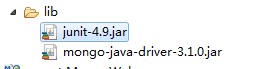
3.新建一个MongoConnection类 用来获取MongoDB的连接对象:
 package com.mongo.util;

 import java.util.ArrayList;

 import java.util.List;

 import com.mongodb.MongoClient;

 import com.mongodb.MongoCredential;

 import com.mongodb.ServerAddress;

 import com.mongodb.client.MongoDatabase;

 public class MongoConnection {

     /**

      * 需要验证用户名  密码的 MongoDB的连接方式   com.mongodb.MongoClient.getDatabase("数据库名")

      * @return

      */

     public MongoDatabase getConnection() {

          try {

                 //连接到MongoDB服务 如果是远程连接可以替换“localhost”为服务器所在IP地址

                 //ServerAddress()两个参数分别为 服务器地址 和 端口

                 ServerAddress serverAddress = new ServerAddress("localhost",27017);

                 List<ServerAddress> addrs = new ArrayList<ServerAddress>();

                 addrs.add(serverAddress);

                 //MongoCredential.createScramSha1Credential()三个参数分别为 用户名 数据库名称 密码

                 MongoCredential credential = MongoCredential.createScramSha1Credential("username", "databaseName", "password".toCharArray());

                 List<MongoCredential> credentials = new ArrayList<MongoCredential>();

                 credentials.add(credential);

                 //通过连接认证获取MongoDB连接

                 MongoClient mongoClient = new MongoClient(addrs,credentials);

                 //连接到数据库

                 MongoDatabase mongoDatabase = mongoClient.getDatabase("databaseName");

                 System.out.println("连接成功");

                 return mongoDatabase;

             } catch (Exception e) {

                 System.err.println( e.getClass().getName() + ": " + e.getMessage() );

             }

          return null;

     }

     /**

      * 不需要验证  用户名+密码  的获取连接的方式 com.mongodb.MongoClient.getDatabase("数据库名")

      * @return

      */

     public MongoDatabase getConnectionBasis(){

         try {

             //连接到mongodb服务

             MongoClient mongoClient = new MongoClient("localhost",27017);

             MongoDatabase mongoDatabase = mongoClient.getDatabase("databaseName");

             System.out.println("连接成功");

             return mongoDatabase;

         } catch (Exception e) {

             System.out.println(e.getClass().getName()+":"+e.getMessage());

         }

         return null;

     }

 }
4.再建一个类 用来测试 你的增删改查
 package com.mongo.test;

 import java.text.SimpleDateFormat;

 import java.util.ArrayList;

 import java.util.List;

 import org.bson.Document;

 import org.junit.Test;

 import com.mongo.util.MongoConnection;

 import com.mongodb.client.FindIterable;

 import com.mongodb.client.MongoCollection;

 import com.mongodb.client.MongoCursor;

 import com.mongodb.client.MongoDatabase;

 import com.mongodb.client.model.Filters;

 public class MongoTest {

     MongoConnection connection = new MongoConnection();

     //连接到数据库

     MongoDatabase mongoDatabase = connection.getConnectionBasis();

     @Test

     public void test(){

         //createCollection();//创建   集合 一次就好

         MongoCollection<Document> collection = getCollection();

         insertDomcument(collection);

         findAll(collection);

         //delete(collection);

     }

     /**

      * 创建  集合【对应RDBMS 中的数据表】 com.mongodb.client.MongoDatabase.createCollection("集合名")

      */

     public void createCollection(){

         mongoDatabase.createCollection("testConllection");

         System.out.println("创建集合成功");

     }

     /**

      * 获取  集合【对应RDBMS 中的数据表】com.mongodb.client.MongoDatabase.getCollection("集合名")

      */

     public MongoCollection<Document> getCollection(){

         MongoCollection<Document>  collection = mongoDatabase.getCollection("testConllection");

         System.out.println("转换到指定集合");

         return collection;

     }

     /**

      * 插入  文档【对应RDBMS 中的一条数据】com.mongodb.client.MongoCollection<Document>.insertOne()/insertMany()

      */

     public void insertDomcument(MongoCollection<Document> collection){

         /**

         * 1. 创建文档 org.bson.Document 参数为key-value的格式

         * 2. 创建文档集合List<Document>

         * 3. 将文档集合插入数据库集合中 mongoCollection.insertMany(List<Document>) 插入单个文档可以用 mongoCollection.insertOne(Document)

         * */

         Document document = new Document();

         document.append("name", "走四方");

         document.append("age", 23);

         document.append("url", "www.baidu.com");

         List<Document> list = new ArrayList<Document>();

         list.add(document);

         collection.insertMany(list);

         System.out.println("插入文档成功");

         //插入 单条数据

         Document  t = new Document();

         t.append("name", "走什么");

         t.append("age", 26);

         t.append("url", "www.agen.cn");

         collection.insertOne(t);

         System.out.println("插入单条数据成功");

     }

     /**

      * 查询  所有文档【表内 数据】com.mongodb.client.MongoCollection<Document>.find()

      * 查询  本条数据的时间节点   _id采用ObjectId格式

      *

      * ObjectId 是一个12字节 BSON 类型数据,有以下格式:

             前4个字节表示时间戳

             接下来的3个字节是机器标识码

             紧接的两个字节由进程id组成(PID)

             最后三个字节是随机数。

      */

     public void findAll(MongoCollection<Document> collection){

         /**

         * 1. 获取迭代器FindIterable<Document>

         * 2. 获取游标MongoCursor<Document>

         * 3. 通过游标遍历检索出的文档集合

         * */

          FindIterable<Document> findIterable = collection.find();

          MongoCursor<Document> mongoCursor = findIterable.iterator();

          while(mongoCursor.hasNext()){

              Document document = mongoCursor.next();

              System.out.println("MongoDB数据:"+document);

              System.out.println("本地时间:"+new SimpleDateFormat().format(document.getObjectId("_id").getDate()));

          }

     }

     /**

      * 更新   所有文档【表内  数据】com.mongodb.client.MongoCollection<Document>.updateMany()

      */

     public void update(MongoCollection<Document> collection){

         collection.updateMany(Filters.eq("age", 26), new Document("$set",new Document("age",100)));

         FindIterable<Document> findIterable = collection.find();

         MongoCursor<Document> cursor = findIterable.iterator();

         while (cursor.hasNext()) {

             System.out.println("更新后的MongoDB数据:"+cursor.next());

         }

     }

     /**

      * 删除  文档 com.mongodb.client.MongoCollection<Document>.deleteMany()/deleteOne()

      */

     public void delete(MongoCollection<Document> collection){

         // 删除符合条件的 第一个文档

         collection.findOneAndDelete(Filters.eq("age", 26));

         //删除符合条件的  所有文档

         collection.deleteMany(Filters.gte("age", 20));

         FindIterable<Document> findIterable = collection.find();

         MongoCursor<Document> cursor = findIterable.iterator();

         while(cursor.hasNext()){

             System.out.println("删除后的MongoDB数据:"+cursor.next());

         }

     }

 }
5.完成 自行研究
【MongoDB】5.MongoDB与java的简单结合的更多相关文章
- Mongodb系列- java客户端简单使用(CRUD)
Mongodb提供了很多的客户端: shell,python, java, node.js...等等. 以 java 为例实现简单的增删改查 pom文件: <dependencies> & ...
- Mongodb入门并使用java操作Mongodb
转载请注意出处:http://blog.csdn.net/zcm101 最近在学习NoSql,先从Mongodb入手,把最近学习的总结下. Mongodb下载安装 Mongodb的下载安装就不详细说了 ...
- mongodb 按照时间聚类 java
当存储到mongodb中的是string类型的时间,小tips: 1. 那么在对此域按照时间聚类(每周,每月)时就不能直接使用mongodb的time关键字了,因为mongodb有自己的时间类型,且目 ...
- MongoDB 副本集和C#交互,简单测试
MongoDB 副本集和C#交互,简单测试 primary节点宕机: 模拟primary节点宕机的情况,这时查看监控: 可以看到37018已经成了primary节点.主界面宕机导致了整个集群发生一次e ...
- MongoDB学习-在.NET中的简单操作
1.新建MVC项目, 管理NuGet包,进入下载MongDB.net库文件 2.新增项目DAL数据访问层,引用以下库文件: 3.C# 访问MongoDB通用方法类: using MongoDB.Dri ...
- mongodb数据库连接池(java版)
mongodb数据库接口的设计 package storm.db; import java.util.ArrayList; import com.mongodb.DB; import com.mong ...
- mongoDB介绍、安装、搭建简单的mongoDB服务器(一)
相关网站 1. http://www.mongodb.org/ 官网,可以下载安装程序,和doc,和驱动等. 2. http://www.mongoing.com/ 国内官方网站,博客,问题谈论等 ...
- C# 对MongoDB 进行增删改查的简单操作
C# 对MongoDB 进行增删改查的简单操作 下面演示下C#操作MongoDB驱动的简单的增删改查代码 运用到的MongoDB支持的C#驱动,当前版本为1.6.0 1,连接数据库 /// & ...
- python操作三大主流数据库(7)python操作mongodb数据库①mongodb的安装和简单使用
python操作mongodb数据库①mongodb的安装和简单使用 参考文档:中文版:http://www.mongoing.com/docs/crud.html英文版:https://docs.m ...
- 【MongoDB学习-在.NET中的简单操作】
1.新建MVC项目, 管理NuGet包,进入下载MongDB.net库文件 2.新增项目DAL数据访问层,引用以下库文件: 3.C# 访问MongoDB通用方法类: using MongoDB.Dri ...
随机推荐
- Photon服务器进阶&一个新游戏的出产(一)
许久没写了,今日闲来无事随性一些,总结一下最近的游戏经历(写游戏) Photon服务器的进阶~ 距离上一篇估计也过去一个多月了,对于Photon真是又爱又恨. 爱着它的书写方便. 恨着它的教程稀少总走 ...
- '0000-00-00 00:00:00' can not be represented as java.sql.Timestamp error
'0000-00-00 00:00:00' can not be represented as java.sql.Timestamp error 异常现象 ### Cause: java.sql.SQ ...
- 负载均衡的几种算法Java实现代码
轮询 package class2.zookeeper.loadbalance; import java.util.ArrayList; import java.util.HashMap; impor ...
- bandicam如何录制视频
我们一般都很熟悉这类软件:屏幕录制专家和kk录制等,这些都是国内比较优秀的作品.不过exe的封装格式以及录制的清晰度让人很纠结.所以这里要为大家分享的是一款韩国人写录制软件Bandicam.Bandi ...
- 【原创】Weblogic 反序列化远程命令执行漏洞GetShell&Cmd Exploit
这工具写到半夜四点,做个记录. 已发布至freebuf,链接:http://www.freebuf.com/vuls/90802.html
- 开发unity DLL插件
最近开发一款设备的SDK,想着要开发unity版本,怎么做呢?首先想到的就是在外部编写相关的驱动程序然后集成成几个dll作为unity的SDK使用了.So,我就开始了unity外部插件的研究之旅了. ...
- FineUI常见问题
常见问题解答(必读) http://fineui.com/bbs/forum.php?mod=viewthread&tid=655
- [转] Unity Mathf 数学运算(C#)
Mathf.Abs 绝对值 计算并返回指定参数 f 绝对值. Mathf.Acos 反余弦 static function Acos (f : float) : float 以弧度为单位计算并返回参数 ...
- 【09-23】js原型继承学习笔记
js原型继承学习笔记 function funcA(){ this.a="prototype a"; } var b=new funcA(); b.a="object a ...
- Bash 4.4 中新增的 ${parameter@operator} 语法
Bash 4.4 中新增了一种 ${...} 语法,长这样:${parameter@operator}.根据不同的 operator,它展开后的值可能是 parameter 这个参数的值经过某种转换后 ...