
JAVA NIO学习三:NIO 的非阻塞式网络通信
紧接着上一章,我们继续来研究NIO,上一章中我们讲了NIO 中最常见的操作即文件通道的操作,但实际上NIO的主要用途还是在于网络通信,那么这个时候就会涉及到选择器,这一章我们就会对其进行讲解操作。
一、阻塞和非阻塞
传统的 IO 流都是阻塞式的。也就是说,当一个线程调用 read() 或 write()时,该线程被阻塞,直到有一些数据被读取或写入,该线程在此期间不能执行其他任务。因此,在完成网络通信进行 IO 操作时,由于线程会阻塞,所以服务器端必须为每个客户端都提供一个独立的线程进行处理,当服务器端需要处理大量客户端时,性能急剧下降。
Java NIO 是非阻塞模式的。当线程从某通道进行读写数据时,若没有数据可用时,该线程可以进行其他任务。线程通常将非阻塞 IO 的空闲时间用于在其他通道上执行 IO 操作,所以单独的线程可以管理多个输入和输出通道。因此, NIO 可以让服务器端使用一个或有限几个线程来同时处理连接到服务器端的所有客户端。
下面我看个例子来使用NIO 演示下阻塞式,即不采用选择器情况下:
import java.io.IOException;

import java.net.InetSocketAddress;

import java.nio.ByteBuffer;

import java.nio.channels.FileChannel;

import java.nio.channels.ServerSocketChannel;

import java.nio.channels.SocketChannel;

import java.nio.file.Paths;

import java.nio.file.StandardOpenOption;

import org.junit.Test;

/*

 * 一、使用 NIO 完成网络通信的三个核心:

 *

 * 1. 通道(Channel):负责连接

 *

 *        java.nio.channels.Channel 接口:

 *             |--SelectableChannel

 *                 |--SocketChannel

 *                 |--ServerSocketChannel

 *                 |--DatagramChannel

 *

 *                 |--Pipe.SinkChannel

 *                 |--Pipe.SourceChannel

 *

 * 2. 缓冲区(Buffer):负责数据的存取

 *

 * 3. 选择器(Selector):是 SelectableChannel 的多路复用器。用于监控 SelectableChannel 的 IO 状况

 *

 */

public class TestBlockingNIO {

    //客户端

    @Test

    public void client() throws IOException{

        //1. 获取通道

        SocketChannel sChannel = SocketChannel.open(new InetSocketAddress("127.0.0.1", 9898));

        FileChannel inChannel = FileChannel.open(Paths.get("1.jpg"), StandardOpenOption.READ);

        //2. 分配指定大小的缓冲区

        ByteBuffer buf = ByteBuffer.allocate(1024);

        //3. 读取本地文件,并发送到服务端

        while(inChannel.read(buf) != -1){

            buf.flip();

            sChannel.write(buf);

            buf.clear();

        }

        //4. 关闭通道

        inChannel.close();

        sChannel.close();

    }

    //服务端

    @Test

    public void server() throws IOException{

        //1. 获取通道

        ServerSocketChannel ssChannel = ServerSocketChannel.open();

        FileChannel outChannel = FileChannel.open(Paths.get("2.jpg"), StandardOpenOption.WRITE, StandardOpenOption.CREATE);

        //2. 绑定连接

        ssChannel.bind(new InetSocketAddress(9898));

        //3. 获取客户端连接的通道

        SocketChannel sChannel = ssChannel.accept();

        //4. 分配指定大小的缓冲区

        ByteBuffer buf = ByteBuffer.allocate(1024);

        //5. 接收客户端的数据,并保存到本地

        while(sChannel.read(buf) != -1){

            buf.flip();

            outChannel.write(buf);

            buf.clear();

        }

        //6. 关闭通道

        sChannel.close();

        outChannel.close();

        ssChannel.close();

    }

}
那么解决上面的方法,以前没有选择器的时候,对于阻塞情况,我们可以采用下面的方法:(发送完成,自动自己关闭告知已发送完成)
import java.io.IOException;

import java.net.InetSocketAddress;

import java.nio.ByteBuffer;

import java.nio.channels.FileChannel;

import java.nio.channels.ServerSocketChannel;

import java.nio.channels.SocketChannel;

import java.nio.file.Paths;

import java.nio.file.StandardOpenOption;

import org.junit.Test;

public class TestBlockingNIO2 {

    //客户端

    @Test

    public void client() throws IOException{

        SocketChannel sChannel = SocketChannel.open(new InetSocketAddress("127.0.0.1", 9898));

        FileChannel inChannel = FileChannel.open(Paths.get("1.jpg"), StandardOpenOption.READ);

        ByteBuffer buf = ByteBuffer.allocate(1024);

        while(inChannel.read(buf) != -1){

            buf.flip();

            sChannel.write(buf);

            buf.clear();

        }

        sChannel.shutdownOutput();

        //接收服务端的反馈

        int len = 0;

        while((len = sChannel.read(buf)) != -1){

            buf.flip();

            System.out.println(new String(buf.array(), 0, len));

            buf.clear();

        }

        inChannel.close();

        sChannel.close();

    }

    //服务端

    @Test

    public void server() throws IOException{

        ServerSocketChannel ssChannel = ServerSocketChannel.open();

        FileChannel outChannel = FileChannel.open(Paths.get("2.jpg"), StandardOpenOption.WRITE, StandardOpenOption.CREATE);

        ssChannel.bind(new InetSocketAddress(9898));

        SocketChannel sChannel = ssChannel.accept();

        ByteBuffer buf = ByteBuffer.allocate(1024);

        while(sChannel.read(buf) != -1){

            buf.flip();

            outChannel.write(buf);

            buf.clear();

        }

        //发送反馈给客户端

        buf.put("服务端接收数据成功".getBytes());

        buf.flip();

        sChannel.write(buf);

        sChannel.close();

        outChannel.close();

        ssChannel.close();

    }

}
二、选择器(Selector)
选择器(Selector) 是 SelectableChannle 对象的多路复用器, Selector 可以同时监控多个 SelectableChannel 的 IO 状况,也就是说,利用 Selector可使一个单独的线程管理多个 Channel。 Selector 是非阻塞 IO 的核心。
SelectableChannle 的结构如下图:
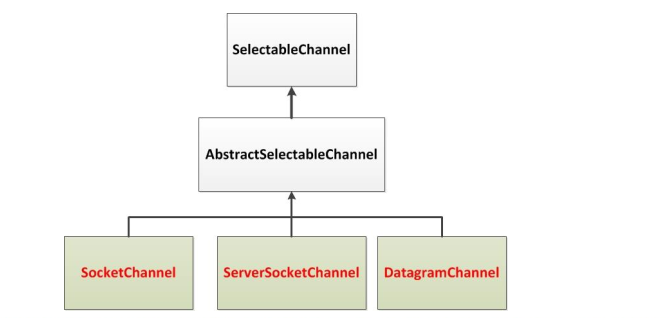
选择器(Selector)的应用
创建 Selector :通过调用 Selector.open() 方法创建一个 Selector。

向选择器注册通道: SelectableChannel.register(Selector sel, int ops)

选择器(Selector)的应用
当调用 register(Selector sel, int ops) 将通道注册选择器时,选择器对通道的监听事件,需要通过第二个参数 ops 指定。
可以监听的事件类型(可使用 SelectionKey 的四个常量表示):
读 : SelectionKey.OP_READ (1)
写 : SelectionKey.OP_WRITE (4)
连接 : SelectionKey.OP_CONNECT (8)
接收 : SelectionKey.OP_ACCEPT (16)
若注册时不止监听一个事件,则可以使用“位或”操作符连接
例:

SelectionKey
SelectionKey: 表示 SelectableChannel 和 Selector 之间的注册关系。每次向选择器注册通道时就会选择一个事件(选择键)。 选择键包含两个表示为整数值的操作集。操作集的每一位都表示该键的通道所支持的一类可选择操作 。
| 方 法 | 描 述 |
| int interestOps() | 获取感兴趣事件集合 |
| int readyOps() | 获取通道已经准备就绪的操作的集合 |
| SelectableChannel channel() | 获取注册通道 |
| Selector selector() | 返回选择器 |
| boolean isReadable() | 检测 Channal 中读事件是否就绪 |
| boolean isWritable() | 检测 Channal 中写事件是否就绪 |
| boolean isConnectable() | 检测 Channel 中连接是否就绪 |
| boolean isAcceptable() | 检测 Channel 中接收是否就绪 |
Selector 的常用方法
| 方 法 | 描 述 |
| Set<SelectionKey> keys() | 所有的 SelectionKey 集合。代表注册在该Selector上的Channel |
| selectedKeys() | 被选择的 SelectionKey 集合。返回此Selector的已选择键集 |
| int select() | 监控所有注册的Channel,当它们中间有需要处理的 IO 操作时, 该方法返回,并将对应得的 SelectionKey 加入被选择的 SelectionKey 集合中,该方法返回这些 Channel 的数量。 |
| int select(long timeout) | 可以设置超时时长的 select() 操作 |
| int selectNow() | 执行一个立即返回的 select() 操作,该方法不会阻塞线程 |
| Selector wakeup() | 使一个还未返回的 select() 方法立即返回 |
| void close() | 关闭该选择器 |
SocketChannel
Java NIO中的SocketChannel是一个连接到TCP网络套接字的通道。
操作步骤:
打开 SocketChannel
读写数据
关闭 SocketChannel
Java NIO中的 ServerSocketChannel 是一个可以监听新进来的TCP连接的通道,就像标准IO中的ServerSocket一样
代码样例;
package com.atguigu.nio;

import java.io.IOException;

import java.net.InetSocketAddress;

import java.nio.ByteBuffer;

import java.nio.channels.SelectionKey;

import java.nio.channels.Selector;

import java.nio.channels.ServerSocketChannel;

import java.nio.channels.SocketChannel;

import java.util.Date;

import java.util.Iterator;

import java.util.Scanner;

import org.junit.Test;

/*

 * 一、使用 NIO 完成网络通信的三个核心:

 *

 * 1. 通道(Channel):负责连接

 *

 *        java.nio.channels.Channel 接口:

 *             |--SelectableChannel

 *                 |--SocketChannel

 *                 |--ServerSocketChannel

 *                 |--DatagramChannel

 *

 *                 |--Pipe.SinkChannel

 *                 |--Pipe.SourceChannel

 *

 * 2. 缓冲区(Buffer):负责数据的存取

 *

 * 3. 选择器(Selector):是 SelectableChannel 的多路复用器。用于监控 SelectableChannel 的 IO 状况

 *

 */

public class TestNonBlockingNIO {

    //客户端

    @Test

    public void client() throws IOException{

        //1. 获取通道

        SocketChannel sChannel = SocketChannel.open(new InetSocketAddress("127.0.0.1", 9898));

        //2. 切换非阻塞模式

        sChannel.configureBlocking(false);

        //3. 分配指定大小的缓冲区

        ByteBuffer buf = ByteBuffer.allocate(1024);

        //4. 发送数据给服务端

        Scanner scan = new Scanner(System.in);

        while(scan.hasNext()){

            String str = scan.next();

            buf.put((new Date().toString() + "\n" + str).getBytes());

            buf.flip();

            sChannel.write(buf);

            buf.clear();

        }

        //5. 关闭通道

        sChannel.close();

    }

    //服务端

    @Test

    public void server() throws IOException{

        //1. 获取通道

        ServerSocketChannel ssChannel = ServerSocketChannel.open();

        //2. 切换非阻塞模式

        ssChannel.configureBlocking(false);

        //3. 绑定连接

        ssChannel.bind(new InetSocketAddress(9898));

        //4. 获取选择器

        Selector selector = Selector.open();

        //5. 将通道注册到选择器上, 并且指定“监听接收事件”

        ssChannel.register(selector, SelectionKey.OP_ACCEPT);

        //6. 轮询式的获取选择器上已经“准备就绪”的事件

        while(selector.select() > 0){

            //7. 获取当前选择器中所有注册的“选择键(已就绪的监听事件)”

            Iterator<SelectionKey> it = selector.selectedKeys().iterator();

            while(it.hasNext()){

                //8. 获取准备“就绪”的是事件

                SelectionKey sk = it.next();

                //9. 判断具体是什么事件准备就绪

                if(sk.isAcceptable()){

                    //10. 若“接收就绪”,获取客户端连接

                    SocketChannel sChannel = ssChannel.accept();

                    //11. 切换非阻塞模式

                    sChannel.configureBlocking(false);

                    //12. 将该通道注册到选择器上

                    sChannel.register(selector, SelectionKey.OP_READ);

                }else if(sk.isReadable()){

                    //13. 获取当前选择器上“读就绪”状态的通道

                    SocketChannel sChannel = (SocketChannel) sk.channel();

                    //14. 读取数据

                    ByteBuffer buf = ByteBuffer.allocate(1024);

                    int len = 0;

                    while((len = sChannel.read(buf)) > 0 ){

                        buf.flip();

                        System.out.println(new String(buf.array(), 0, len));

                        buf.clear();

                    }

                }

                //15. 取消选择键 SelectionKey

                it.remove();

            }

        }

    }

}
DatagramChannel
Java NIO中的DatagramChannel是一个能收发UDP包的通道。
操作步骤:
打开 DatagramChannel
接收/发送数据
样例;
package com.atguigu.nio;

import java.io.IOException;

import java.net.InetSocketAddress;

import java.nio.ByteBuffer;

import java.nio.channels.DatagramChannel;

import java.nio.channels.SelectionKey;

import java.nio.channels.Selector;

import java.util.Date;

import java.util.Iterator;

import java.util.Scanner;

import org.junit.Test;

public class TestNonBlockingNIO2 {

    @Test

    public void send() throws IOException{

        DatagramChannel dc = DatagramChannel.open();

        dc.configureBlocking(false);

        ByteBuffer buf = ByteBuffer.allocate(1024);

        Scanner scan = new Scanner(System.in);

        while(scan.hasNext()){

            String str = scan.next();

            buf.put((new Date().toString() + ":\n" + str).getBytes());

            buf.flip();

            dc.send(buf, new InetSocketAddress("127.0.0.1", 9898));

            buf.clear();

        }

        dc.close();

    }

    @Test

    public void receive() throws IOException{

        DatagramChannel dc = DatagramChannel.open();

        dc.configureBlocking(false);

        dc.bind(new InetSocketAddress(9898));

        Selector selector = Selector.open();

        dc.register(selector, SelectionKey.OP_READ);

        while(selector.select() > 0){

            Iterator<SelectionKey> it = selector.selectedKeys().iterator();

            while(it.hasNext()){

                SelectionKey sk = it.next();

                if(sk.isReadable()){

                    ByteBuffer buf = ByteBuffer.allocate(1024);

                    dc.receive(buf);

                    buf.flip();

                    System.out.println(new String(buf.array(), 0, buf.limit()));

                    buf.clear();

                }

            }

            it.remove();

        }

    }

}
管道 (Pipe)
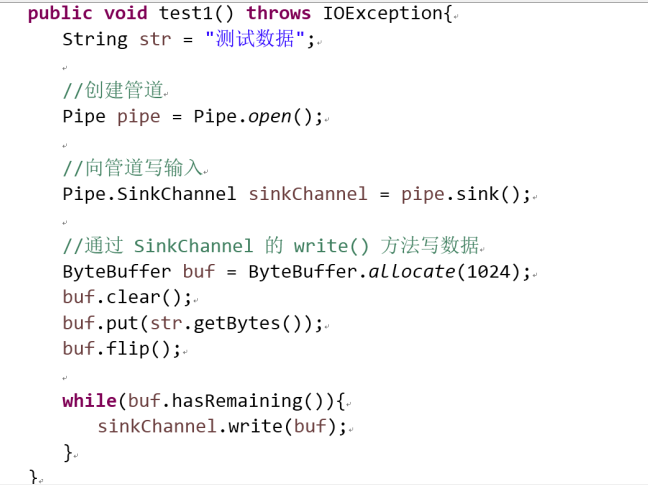
Java NIO 管道是2个线程之间的单向数据连接。Pipe有一个source通道和一个sink通道。数据会被写到sink通道,从source通道读取。

向管道写数据
从管道读取数据
从读取管道的数据,需要访问source通道。

调用source通道的read()方法来读取数据

代码样例:
import java.io.IOException;

import java.nio.ByteBuffer;

import java.nio.channels.Pipe;

import org.junit.Test;

public class TestPipe {

    @Test

    public void test1() throws IOException{

        //1. 获取管道

        Pipe pipe = Pipe.open();

        //2. 将缓冲区中的数据写入管道

        ByteBuffer buf = ByteBuffer.allocate(1024);

        Pipe.SinkChannel sinkChannel = pipe.sink();

        buf.put("通过单向管道发送数据".getBytes());

        buf.flip();

        sinkChannel.write(buf);

        //3. 读取缓冲区中的数据

        Pipe.SourceChannel sourceChannel = pipe.source();

        buf.flip();

        int len = sourceChannel.read(buf);

        System.out.println(new String(buf.array(), 0, len));

        sourceChannel.close();

        sinkChannel.close();

    }

}
参考资料:
《尚硅谷》视频
JAVA NIO学习三:NIO 的非阻塞式网络通信的更多相关文章
- Java基础——NIO(二)非阻塞式网络通信与NIO2新增类库
一.NIO非阻塞式网络通信 1.阻塞与非阻塞的概念 传统的 IO 流都是阻塞式的.也就是说,当一个线程调用 read() 或 write() 时,该线程被阻塞,直到有一些数据被读取或写入,该线程在 ...
- 4.NIO的非阻塞式网络通信
/*阻塞 和 非阻塞 是对于 网络通信而言的*/ /*原先IO通信在进行一些读写操作 或者 等待 客户机连接 这种,是阻塞的,必须要等到有数据被处理,当前线程才被释放*/ /*NIO 通信 是将这个阻 ...
- NIO 的非阻塞式网络通信
1.阻塞与非阻塞 ① 传统的 IO 流都是阻塞式的.也就是说,当一个线程调用 read() 或 write()时, 该线程被阻塞,直到有一些数据被读取或写入,该线程在此期间不能执行其他任务. 因 ...
- Java IO(3)非阻塞式输入输出(NIO)
在上篇<Java IO(2)阻塞式输入输出(BIO)>的末尾谈到了什么是阻塞式输入输出,通过Socket编程对其有了大致了解.现在再重新回顾梳理一下,对于只有一个“客户端”和一个“服务器端 ...
- JAVA NIO学习记录2-非阻塞式网络通信
一.阻塞与非阻塞 传统的IO 流都是阻塞式的.也就是说,当一个线程调用read() 或write() 时,该线程被阻塞,直到有一些数据被读取或写入,该线程在此期间不能执行其他任务.因此,在完成网络通信 ...
- Socket-IO 系列(三)基于 NIO 的同步非阻塞式编程
Socket-IO 系列(三)基于 NIO 的同步非阻塞式编程 缓冲区(Buffer) 用于存储数据 通道(Channel) 用于传输数据 多路复用器(Selector) 用于轮询 Channel 状 ...
- 基于NIO写的阻塞式和非阻塞式的客户端服务端
由于功能太过简单,就不过多阐述了,直接上阻塞式代码: package com.lql.nio; import org.junit.Test; import java.io.IOException; i ...
- NIO非阻塞式编程
/** * NIO非阻塞式编程<p> * 服务端和客户端各自维护一个管理通道的对象,我们称之为selector,该对象能检测一个或多个通道 (channel) 上的事件. * 我们以服务端 ...
- Linux NIO 系列(03) 非阻塞式 IO
目录 一.非阻塞式 IO 附:非阻塞式 IO 编程 Linux NIO 系列(03) 非阻塞式 IO Netty 系列目录(https://www.cnblogs.com/binarylei/p/10 ...
随机推荐
- shell自动化巡检
#!/bin/bash#主机信息每日巡检 IPADDR=$(ifconfig eth0|grep 'inet addr'|awk -F '[ :]' '{print $13}')#环境变量PATH没设 ...
- 百度OCR文字识别-身份证识别
简介 一.介绍 身份证识别 API 接口文档地址:http://ai.baidu.com/docs#/OCR-API/top 接口描述 用户向服务请求识别身份证,身份证识别包括正面和背面. 请求说明 ...
- jQuery开发自定义插件 $.extend()与$.fn.extend()
jQuery extend()和jQuery.fn.extend() jQuery提供两个用于封装扩展的方法: 1.$.extend(); 扩展jQuery类方法,即jQuery全局方法 (在全局可直 ...
- mysql基础知识点
/* 启动MySQL */net start mysql /* 连接与断开服务器 */mysql -h 地址 -P 端口 -u 用户名 -p 密码 /* 跳过权限验证登录MySQL */mysqld ...
- 《Clean Code》 代码简洁之道
作者介绍 原文作者: Robert C. Martin, Object Mentor公司总裁,面向对象设计.模式.UML.敏捷方法学和极限编程领域的资深顾问,是<敏捷软件开发:原则.模式.与实践 ...
- day1 python基础知识
一:python发展 python2.6与python3.0区别: 源码不标准,混乱,重复代码过多 二:python所属类型 (1)编译型:一次性将程序全部编译成二进制 优点:运行速度快 缺点:不能跨 ...
- Linux下实现CAD数据的导出
近期公司项目涉及到CAD的导出,而且部署服务器申请不到Windows下的,所以技术上的解决方案就是寻求如何在Linux下实现CAD数据的导出. 于是百度了一下,找了几个相关库和软件. 1.dxflib ...
- svn服务器的搭建与使用一
转载出处 Subversion是优秀的版本控制工具,其具体的的优点和详细介绍,这里就不再多说. 首先来下载和搭建SVN服务器. 现在Subversion已经迁移到apache网站上了,下载地址: ht ...
- IP协议和网络传输中的封装与分用。
关于七层模型和四层模型可以参考这个:http://www.cnblogs.com/xcywt/p/5027277.html 因为四层模型用的比较多,这里只拿四层模型来分析. 1.四层模型中的最下层是链 ...
- oracle用户被锁定
sqlplus sys/password@localhost:1521/cmsx as sysdba SQL*Plus: Release 11.2.0.1.0 Production on 星期一 7月 ...