
小白都能看懂的Linux系统下安装配置Zabbix
实验环境:
操作系统:Centos 7.6
服务器ip:192.168.10.100
运行用户:root
网络环境:Internet
Zabbix是一个基于web界面的提供分布式系统监控及网络功能的企业级的开源监控工具,做为一个企业运维人员来说,zabbix可以给企业和运维人员带来很大的帮助,zabbix是一个功能非常强大、跨平台、开源的企业级运维管理系统,由2部分构成:zabbix服务端和客户端(agentd),也可以通过系统自带的SNMP来采集数据。

Zabbix可以部署在Windows、Linux、unix、MAC OS等平台上,可以监控任何网络设备、操作系统、中间件、数据库等,做为一个企业的运维技术人来说,监控是非常重要的,确保线上业务能够稳定运行,企业线上运行的和服务器网络设备等多不少,所以,我们可以通过监控发现服务器故障,方便运维人员技术发现问题和解决问题,并且可以通过企业微信、企业QQ、企业钉钉、短信实现报警功能,有故障可以及时的通过管理员;开源的监控系统还有nagios、cacti、ganglia,我们在这里只详细的介绍zabbix监控,不过要想搭建zabbix监控系统还是需要有Linux技术,要有对Linux有所了解并且熟悉一些常见的命令及配置,现在企业运维也是必不可少的,如果想往运维方向发展的可以去了解下《Linux就该这么学》这边教程,里面的内容非常详细,比较适合初学者,如果觉得自己有Linux基础可以参考下面的安装步骤,通过源码来编译部署并配置zabbix企业运维监控系统。
1、install php //通过yum源安装php及一些与php相关的库
# yum install php.x86_64 php-cli.x86_64 php-fpm php-gd php-json php-ldap php-mbstring php-mysqlnd php-xml php-xmlrpc php-opcache php-simplexml php-bcmath.x86_64 -y
2、install database //yum源安装MySQL(Mariadb)数据库服务端和客户端
# yum install mariadb.x86_64 mariadb-devel.x86_64 mariadb-server.x86_64 -y
# systemctl start mariadb.service //启动数据库
3、初始化数据库
[root@localhost ~]# mysql_secure_installation
NOTE: RUNNING ALL PARTS OF THIS SCRIPT IS RECOMMENDED FOR ALL MariaDB
SERVERS IN PRODUCTION USE! PLEASE READ EACH STEP CAREFULLY!
In order to log into MariaDB to secure it, we'll need the current
password for the root user. If you've just installed MariaDB, and
you haven't set the root password yet, the password will be blank,
so you should just press enter here.
Enter current password for root (enter for none):
OK, successfully used password, moving on...
Setting the root password ensures that nobody can log into the MariaDB
root user without the proper authorisation.
Set root password? [Y/n] y
New password:
Re-enter new password:
Password updated successfully!
Reloading privilege tables..
... Success!
By default, a MariaDB installation has an anonymous user, allowing anyone
to log into MariaDB without having to have a user account created for
them. This is intended only for testing, and to make the installation
go a bit smoother. You should remove them before moving into a
production environment.
Remove anonymous users? [Y/n] y
... Success!
Normally, root should only be allowed to connect from 'localhost'. This
ensures that someone cannot guess at the root password from the network.
Disallow root login remotely? [Y/n] n
... skipping.
By default, MariaDB comes with a database named 'test' that anyone can
access. This is also intended only for testing, and should be removed
before moving into a production environment.
Remove test database and access to it? [Y/n] n
... skipping.
Reloading the privilege tables will ensure that all changes made so far
will take effect immediately.
Reload privilege tables now? [Y/n] y
... Success!
Cleaning up...
All done! If you've completed all of the above steps, your MariaDB
installation should now be secure.
Thanks for using MariaDB!
3、install apache //yum源安装apache
# yum install httpd.x86_64 -y
4、install zabbix_server //源码安装zabbix服务端和客户端
# tar -zxvf zabbix-3.4.9.tar.gz && cd zabbix-3.4.9
# groupadd zabbix && useradd -g zabbix Zabbix //创建zabbix用户及组
#./configure --prefix=/usr/local/zabbix user=zabbix group=zabbix --enable-server --enable-agent --enable-proxy --with-mysql --enable-ipv6 --with-net-snmp --with-libcurl --with-libxml2 //配置编译
# make install //编译通过后安装zabbix server
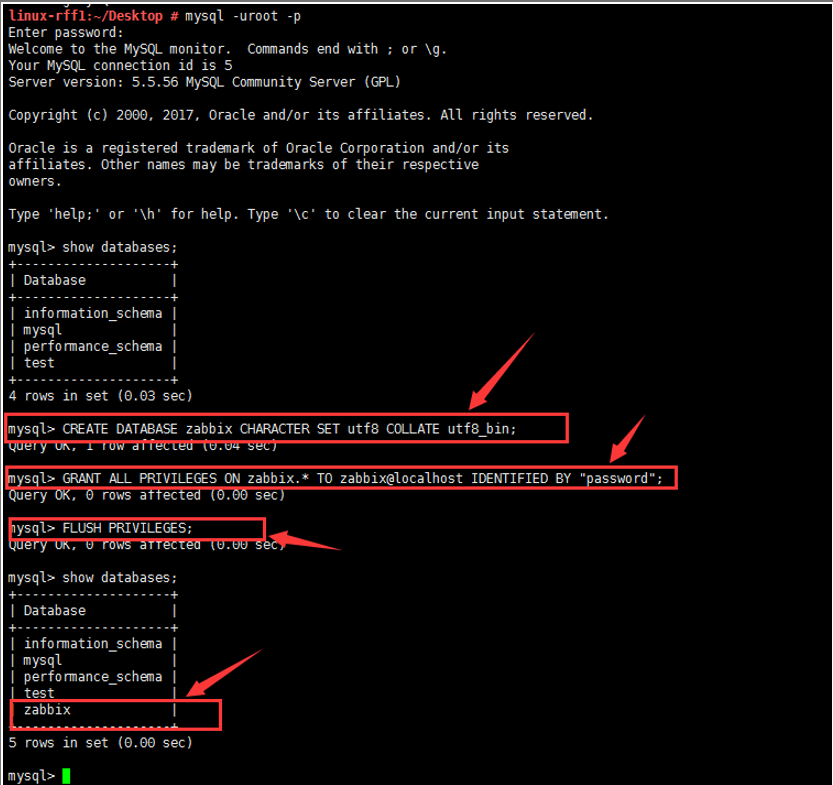
5、创建zabbix数据库及zabbix数据库用户并授权
[root@zabbix ~]# mysql -u root -p Enter password: Welcome to the MariaDB monitor. Commands end with ; or \g. Your MariaDB connection id is 10 Server version: 5.5.47-MariaDB MariaDB Server Copyright (c) 2000, 2015, Oracle, MariaDB Corporation Ab and others. Type 'help;' or '\h' for help. Type '\c' to clear the current input statement.MariaDB [(none)]> CREATE DATABASE zabbix CHARACTER SET utf8 COLLATE utf8_bin;
Query OK, 1 row affected (0.00 sec)
MariaDB [(none)]> GRANT ALL PRIVILEGES ON zabbix.* TO zabbix@localhost IDENTIFIED BY "password";
Query OK, 0 rows affected (0.00 sec)
MariaDB [(none)]> FLUSH PRIVILEGES;Q
uery OK, 0 rows affected (0.00 sec)
MariaDB [(none)]> exit Bye
6、导入zabbix默认数据库:
#cd /root/zabbix-3.4.9/database/mysql
# mysql -uroot -p zabbix < schema.sql && mysql -uroot -p zabbix < images.sql && mysql -uroot -p zabbix < data.sql
7、编辑默认安装配置文件
# vim /usr/local/etc/zabbix_server.conf
# vim /usr/local/zabbix/etc/zabbix_server.conf
ListenPort=10051 //监听端口
DBHost=localhost //数据库服务器
DBName=Zabbix //数据库名
DBUser=Zabbix //数据库用户名
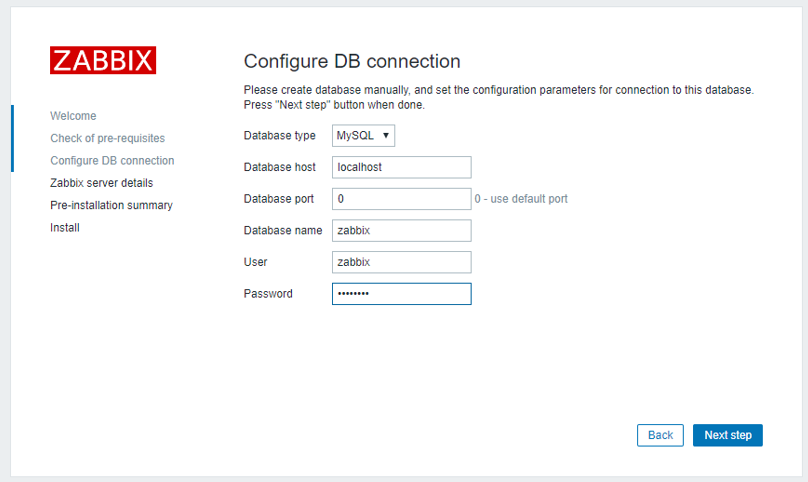
DBPassword=password //数据库密码
8、编辑并配置zabbix启动脚本,并设置开机自动启动
#cd /root/zabbix-3.4.9/misc/init.d/tru64
# cp -r /root/zabbix-3.4.9/misc/init.d/tru64/zabbix_* /etc/init.d/
# chmod +x /etc/init.d/zabbix*
#chown -R zabbix:zabbix /usr/local/zabbix
# cp -r /usr/local/zabbix/sbin/zabbix_* /usr/local/sbin/
#/etc/init.d/zabbix_server restart
#/etc/init.d/zabbix_agentd restart
9、拷贝zabbix web端文件到apache根目录下面
#cd /root/zabbix-3.4.9/frontends/
# mkdir -p /var/www/html/zabbix/
#cp -ra php/* /var/www/html/zabbix/
10、访问web端
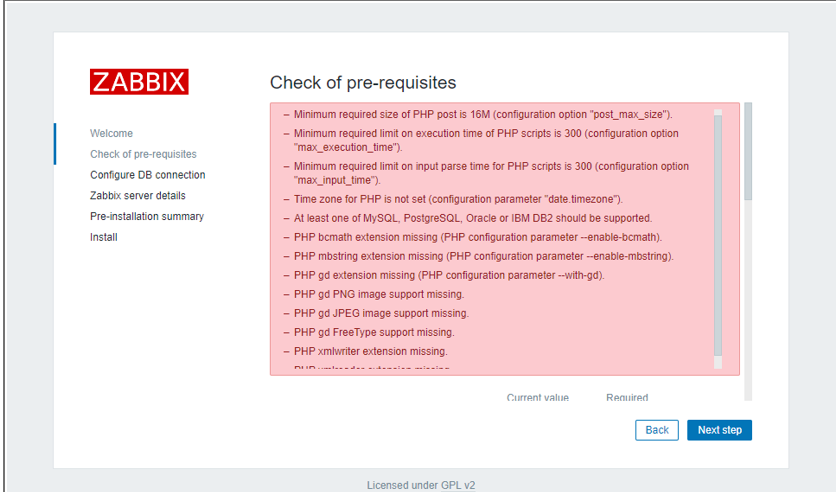
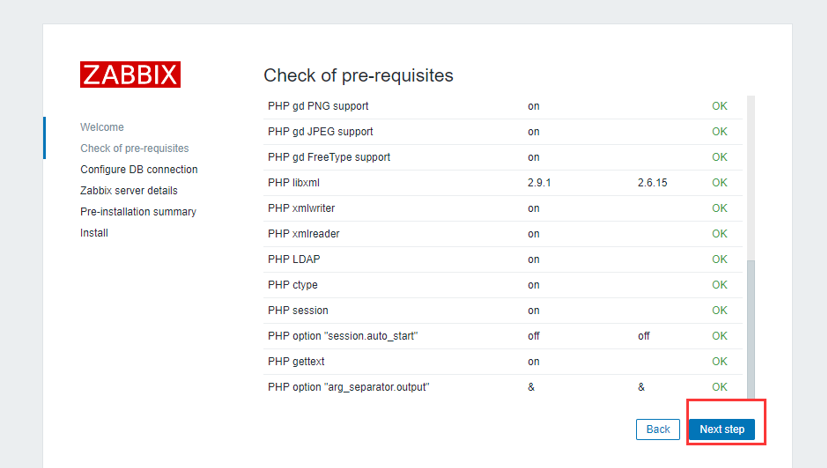
错误如下:
l Minimum required size of PHP post is 16M (configuration option "post_max_size").
l Minimum required limit on execution time of PHP scripts is 300 (configuration option "max_execution_time").
l Minimum required limit on input parse time for PHP scripts is 300 (configuration option "max_input_time").
l Time zone for PHP is not set (configuration parameter "date.timezone").
l At least one of MySQL, PostgreSQL, Oracle or IBM DB2 should be supported.
l PHP bcmath extension missing (PHP configuration parameter --enable-bcmath).
l PHP mbstring extension missing (PHP configuration parameter --enable-mbstring).
l PHP gd extension missing (PHP configuration parameter --with-gd).
l PHP gd PNG image support missing.
l PHP gd JPEG image support missing.
l PHP gd FreeType support missing.
l PHP xmlwriter extension missing.
l PHP xmlreader extension missing.
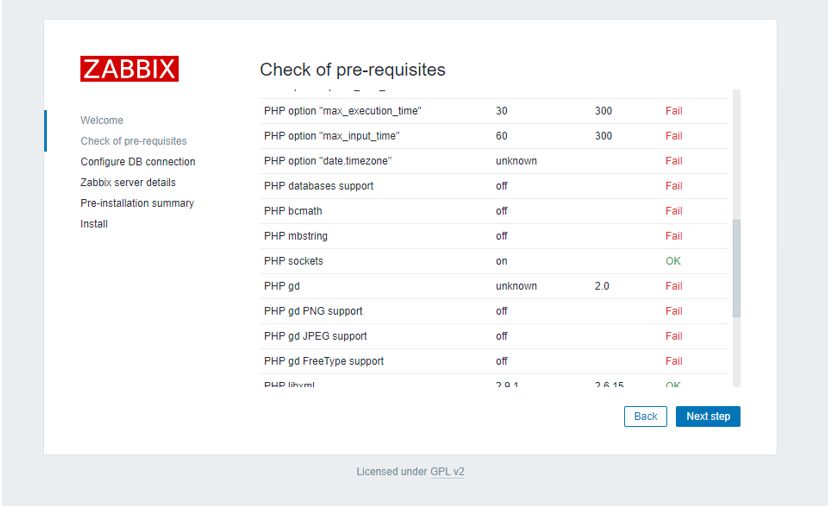
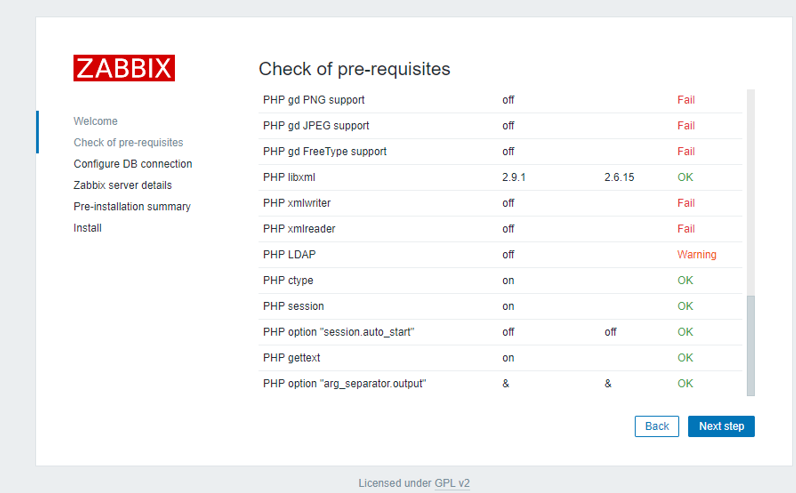
解决步骤:
#vim /etc/php.ini
post_max_size8M16M
max_execution_time30300
max_input_time60300
date.timezone = Asia/Shanghai
#systemctl restart httpd.service


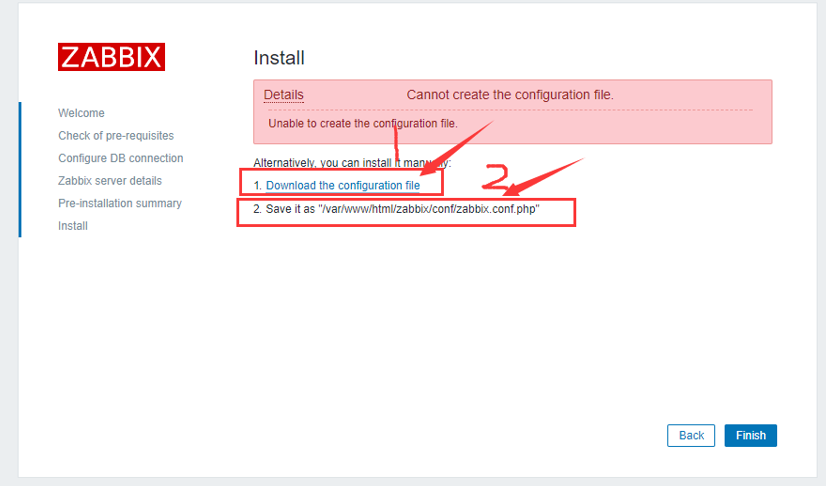
先下载zabbix.conf.php配置文件,再把下载的zabbix.conf.php配置的配置文件上传到/var/www/html/zabbix/conf/目录下。
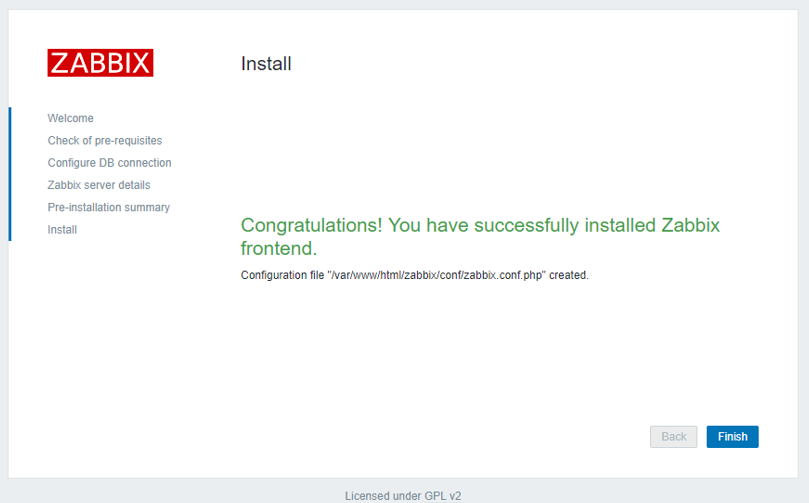
#systemctl restart httpd.service //重启apache 服务
11、管理员信息
user/password:Admin/Zabbix //Zabbix 前端默认用户名和密码,如果是企业使用搭建成功后一定要修改密码,也可以把用户名修改这样安全些。
12、client install zabbix_agentd //源码编译安装zabbix_agentd客户端
#./configure --prefix=/usr/local/zabbix --enable-agent
# make install
13、修改agentd配置文件
# vim /usr/local/zabbix/etc/zabbix_agentd.conf
LogFile=/usr/local/zabbix/log/zabbix_agentd.log
EnableRemoteCommands=0
Server=192.168.10.100
ServerActive=192.168.10.100
Hostname=192.168.10.100
Timeout=30
小白都能看懂的Linux系统下安装配置Zabbix的更多相关文章
- Linux系统下安装配置JDK(rpm方式及tar.gz方式)
以前都是在Windows环境进行开发的,最近因工作需要:学习在Linux系统下搭建开发环境,自此记录搭建过程,以方便查阅. 本文借鉴了 Angel挤一挤 .小五 两位的博客. 准备材料: JDK下载链 ...
- Linux系统下安装配置 OpenLDAP + phpLDAPadmin
实验环境: 操作系统:Centos 7.4 服务器ip:192.168.3.41 运行用户:root 网络环境:Internet LDAP(轻量级目录访问协议)是一个能实现提供被称为目录服务的信息服务 ...
- 在linux系统下安装配置apacheserver
我所用的是centos linux系统,但apache的服务在linux系统都大同小异.像ubuntu redhat等等. now let us go! 如有问题, 欢迎直邮: zhe ...
- linux系统下安装配置解压版的MySQL数据库
一.解压文件到当前目录 命令:tar -zxvf mysql....tar.gz 二.移动解压完成的文件夹到目标目录并更名mysql 命令:mv mysql-版本号 /usr/local/mysql ...
- Linux学习---linux系统下安装配置Jenkins
1.首先准备java环境,安装JDK 2.下载jenkins至Linux服务器 下载地址:https://wiki.jenkins-ci.org/display/JENKINS/Installing+ ...
- linux系统下安装配置Jenkins
准备java 环境 安装java sdk yum -y install java 验证是否安装成功 java -version 下载安装jenkins 官网:https://wiki.jenkins- ...
- 搭建分布式事务组件 seata 的Server 端和Client 端详解(小白都能看懂)
一,server 端的存储模式为:Server 端 存 储 模 式 (store-mode) 支 持 三 种 : file: ( 默 认 ) 单 机 模 式 , 全 局 事 务 会 话 信 息 内 存 ...
- Linux系统下安装Redis和Redis集群配置
Linux系统下安装Redis和Redis集群配置 一. 下载.安装.配置环境: 1.1.>官网下载地址: https://redis.io/download (本人下载的是3.2.8版本:re ...
- 在虚拟机的Linux系统下安装wineqq
| 版权声明:本文为博主原创文章,未经博主允许不得转载. 本文参考教程:http://www.ubuntukylin.com/ukylin/forum.php?mod=viewthread& ...
随机推荐
- BZOJ 1835 [ZJOI2010]基站选址 (线段树优化DP)
题目大意:略 洛谷题面传送门 BZOJ题面传送门 注意题目的描述,是村庄在一个范围内去覆盖基站,而不是基站覆盖村庄,别理解错了 定义$f[i][k]$表示只考虑前i个村庄,一共建了$k$个基站,最后一 ...
- SurgingFunction
- 通过腾讯地图api获取用户位置限制在指定位置区域
<!--在微信中获取用户位置--><script src="http://res.wx.qq.com/open/js/jweixin-1.0.0.js">& ...
- 告诉你 SQL 数据库与 NoSQL 数据库的区别
简单来说 SQL 数据库和 NoSQL 数据库有着共同的目标:存储数据,但存储的方式不同 一. 表 SQL中的表结构具有严格的数据模式约束: 存储数据很难出错. NoSQL存储数据更加灵活自由:可能导 ...
- js cookie 设置
(function () { function getCookie(name) { var start = document.cookie.indexOf(name + "="); ...
- nodejs-基础大杂烩(待整理)
优点:安装简易,能自动配置环境变量 缺点:更新和更换版本需重新安装(这个可以用包管理器解决,不是问题) 高手推荐使用开源的NVM包管理器来更新和安装node,可能这个包在linux平台上比较好用吧 g ...
- POJ 3177--Redundant Paths【无向图添加最少的边成为边双连通图 && tarjan求ebc && 缩点构造缩点树】
Redundant Paths Time Limit: 1000MS Memory Limit: 65536K Total Submissions: 10798 Accepted: 4626 ...
- [JAVA]比毫秒System.currentTimeMillis()更精确的时间戳(纳米级时间戳)
纳秒 ns(nanosecond):纳秒, 时间单位.一秒的10亿分之中的一个,即等于10的负9次方秒. 经常使用作 内存读写速度的单位,其前面数字越小则表示速度越快. 1纳秒=1000 皮秒 ...
- 非阻塞IO函数
关于效率的优化:
- Cocos2d-x 2.2.3 使用NDK配置安卓编译环境问题之 Cannot find module with tag 'CocosDenshion/android' in import path
1.当做安卓移植的时候遇到例如以下问题: Android NDK: jni/Android.mk: Cannot find module with tag 'CocosDenshion/android ...