
canves应用
canves用得好可以有好多效果:
html:<canvas id="myCanvas" width="700" height="300"></canvas>
效果一:js代码
function drawTop(ctx, fillStyle){

    ctx.fillStyle = fillStyle;

    ctx.beginPath();

    ctx.arc(0, 0, 30, 0,Math.PI,true);

    ctx.closePath();

    ctx.fill();

}

function drawGrip(ctx){

    ctx.save();

    ctx.fillStyle = "blue";

    ctx.fillRect(-1.5, 0, 1.5, 40);

    ctx.beginPath();

    ctx.strokeStyle="blue";

    ctx.arc(-5, 40, 4, Math.PI,Math.PI*2,true);

    ctx.stroke();

    ctx.closePath();

    ctx.restore();

}

function draw(){

    var ctx = document.getElementById('myCanvas').getContext("2d");

    // 注意:所有的移动都是基于这一上下文。

    ctx.translate(80,80);

    for (var i=1;i<10;i++){

        ctx.save();

        ctx.translate(60*i, 0);

        drawTop(ctx,"rgb("+(30*i)+","+(255-30*i)+",255)");

        drawGrip(ctx);

        ctx.restore();

    }

}

window.onload=function(){

    draw();

}
效果图: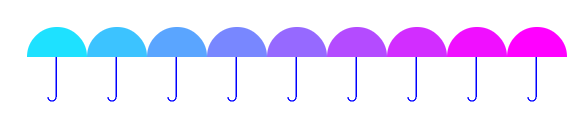
效果二:js代码
function drawTop(ctx, fillStyle){

    ctx.fillStyle = fillStyle;

    ctx.beginPath();

    ctx.arc(0,0,30,0,Math.PI,true);

    ctx.closePath();

    ctx.fill();

}

function drawGrip(ctx){

    ctx.save();

    ctx.fillStyle = "blue";

    ctx.fillRect(-1.5, 0, 1.5, 40);

    ctx.beginPath();

    ctx.strokeStyle="blue";

    ctx.arc(-5, 40, 4, Math.PI,Math.PI*2,true);

    ctx.stroke();

    ctx.closePath();

    ctx.restore();

}

function draw(){

    var ctx = document.getElementById('myCanvas').getContext("2d");

    ctx.translate(150,150);

    for (var i=1;i<9;i++)

    {

        ctx.save();

        ctx.rotate(Math.PI*(2/4+i/4));

        ctx.translate(0,-100);

        drawTop(ctx,"rgb("+(30*i)+","+(255-30*i)+",255)");

        drawGrip(ctx);

        ctx.restore();

    }

}

window.onload=function(){

    draw();

}
效果图: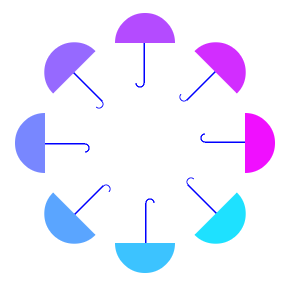
效果三:js代码
function draw(){

    var ctx = document.getElementById('myCanvas').getContext("2d");

    ctx.translate(200,20);

    for (var i=1;i<80;i++){

        ctx.save();

        ctx.translate(30,30);

        ctx.scale(0.95,0.95);

        ctx.rotate(Math.PI/12);

        ctx.beginPath();

        ctx.fillStyle="red";

        ctx.globalAlpha="0.4";

        ctx.arc(0,0,50,0,Math.PI*2,true);

        ctx.closePath();

        ctx.fill();

    }

}

window.onload=function(){

    draw();

}
效果图: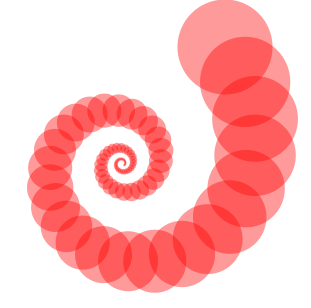
效果四:js代码
function draw(){

    var ctx = document.getElementById('myCanvas').getContext("2d");

    ctx.translate(200,20);

    for (var i=1;i<90;i++){

        ctx.save();

        ctx.transform(0.95,0,0,0.95,30,30);

        ctx.rotate(Math.PI/12);

        ctx.beginPath();

        ctx.fillStyle="red";

        ctx.globalAlpha="0.4";

        ctx.arc(0,0,50,0,Math.PI*2,true);

        ctx.closePath();

        ctx.fill();

    }

    ctx.setTransform(1,0,0,1,10,10);

    ctx.fillStyle="blue";

    ctx.fillRect(0,0,50,50);

    ctx.fill();

}

window.onload=function(){

    draw();

}

canves应用的更多相关文章
- HTML学习之canves元素
1:绘制画布 和在画布上绘制矩形 <!DOCTYPE html> <html> <head lang="en"> <meta charse ...
- 谈一谈java中的Canves机制
0--写在前面: 很多初学java的童鞋,常常很苦恼,一天天的都跟命令行较劲,好像很无聊的样子,如果能跳出命令行做出界面甚至一个画图界面,那将是一件很兴奋的事情:也可以让编程变的有趣:有脑洞的同学还可 ...
- canves绘制北京地铁线路图,包括线路绘制,优先路线,单路径选择。
canves绘制北京地铁线路图,包括线路绘制,优先路线,单路径选择. 即将推出,后台涵盖各种语言,php,C#,java,nodejs等.
- 新年第一个目标一张表盘串讲所有canves的知识点
我们的目标 首先是canves的坐标系统,基于浏览器的左上角为原点,x,y轴为正方向的坐标系统. 首先初始化,打标签 <canvas id="canvas" height=& ...
- canves图形变换
canves用得好可以有好多效果: html:<canvas id="myCanvas" width="700" height="300&quo ...
- canves做的时钟目前已经开源
canves做的时钟目前已经开源 git地址: https://github.com/jidanji/canves-clock/tree/1.0.1 项目截图 时流过的时间变得有颜色,其他的没有颜色.
- 今天我们要说的画一个三角形,恩,画一个三角形,第一种呢是利用我们的html标签结合css来实现;而第二种方法就就是我们的html5新增的一个标签canves,这个canves就是网页画幕,那么顾名思义就是在网页里建造一个画板,用来画画,好,那接下来就和我一起去看看吧!
第一种方法:利用我们的html标签结合css来实现 span{ width:0px; height:0px; border-width:7px; border-style:solid; border- ...
- 使用HTML5中的Canves标签制作时钟特效
<!DOCTYPE html > <html> <head> </head> <body> <canvas id="cloc ...
- canves 图片旋转 demo
<!DOCTYPE htmls> <html> <head> <title></title> <style> </styl ...
随机推荐
- HUD——1286 找新朋友
思路: 裸的欧拉函数 代码: #include<cstdio> #include<cstring> #include<cstdlib> #include<io ...
- jd-eclipse插件的安装
一,资源 jd-eclipse-site-1.0.0-RC2.zip 百度网盘链接:https://pan.baidu.com/s/1GTFFY_1jg4k9vjZNE4JliQ 提 ...
- 为什么Java使用System.getenv()获取刚刚设置的环境变量时为空
场景: 在Ubuntu下已经启动了Eclipse,然后通过终端设置了环境变量(export $ENV=123),然后通过System.getenv()获取时显示为空. 解释: 环境变量仅在进程树下方, ...
- WebDev.WebServer40.EXE
http://www.cnblogs.com/tong-tong/archive/2013/05/02/3049428.html 大学玩asp.net时就发现VS在Debug时会起一个web服务,这东 ...
- 编程算法 - 求1+2+...+n(函数继承) 代码(C++)
求1+2+...+n(函数继承) 代码(C++) 本文地址: http://blog.csdn.net/caroline_wendy 题目: 求1+2+...+n, 要求不能使用乘除法\for\whi ...
- Python网络爬虫(一):初步认识网络爬虫
不管你是因为什么原因想做一个网络爬虫,首先做的第一件事情就是要了解它. 在了解网络爬虫之前一定要牢记下面4个要点,这是做网络爬虫的基础: 1.抓取 py的urllib不一定去用.可是要学.假设你还没用 ...
- Unity3d PBR海水渲染
三层水 博主近期渲染:近期用unity5弄的一些渲染 ---- by wolf96 http://blog.csdn.net/wolf96
- CSS中的BFC解析
CSS的BFC BFC 即块级格式上下文(Block Formatting Context),它是指一个独立的块级渲染区域,只有block-level的box参与,该区域拥有一套渲染规则来约束块级盒子 ...
- Ip获取请求ip
public class IPAdress { public static bool isIP(string str1) { || str1.Length > ) return false; s ...
- Bing Maps进阶系列三:使用地图图像服务(ImageryService)
Bing Maps进阶系列三:使用地图图像服务(ImageryService) 地图图像服务(ImageryService)提供了根据地理位置(经度和纬度)坐标和地图的缩放级别解析出对应于地图图片系统 ...