
python机器学习——使用scikit-learn训练感知机模型
这一篇我们将开始使用scikit-learn的API来实现模型并进行训练,这个包大大方便了我们的学习过程,其中包含了对常用算法的实现,并进行高度优化,以及含有数据预处理、调参和模型评估的很多方法。
我们来看一个之前看过的实例,不过这次我们使用sklearn来训练一个感知器模型,数据集还是Iris,使用其中两维度的特征,样本数据使用三个类别的全部150个样本
%matplotlib inline
import numpy as np
from sklearn import datasets
iris = datasets.load_iris()
X = iris.data[:, [2, 3]]
y = iris.targetnp.unique(y)array([0, 1, 2])为了评估训练好的模型对新数据的预测能力,我们这里将Iris数据集分为训练集和测试集,这里我们通过调用trian_test_split方法来将数据集分为两部分,其中测试集占30%,训练集占70%
from sklearn.model_selection import train_test_split
X_train, X_test, y_train, y_test = train_test_split(X, y, test_size=0.3, random_state=0)
我们再将特征进行缩放操作,这里调用StandardScaler来对特征进行标准化:
from sklearn.preprocessing import StandardScaler
sc = StandardScaler()
sc.fit(X_train)
X_train_std = sc.transform(X_train)
X_test_std = sc.transform(X_test)
新对象sc使用fit方法对数据集中每一维的特征计算出样本平均值和标准差,然后调用transform方法对数据集进行标准化,我们这里使用相同的标准化参数对待训练集和测试集。接下来我们训练一个感知器模型
from sklearn.linear_model import Perceptronppn = Perceptron(max_iter=40, eta0=0.1, random_state=0)ppn.fit(X_train_std, y_train)
Perceptron(alpha=0.0001, class_weight=None, early_stopping=False, eta0=0.1,
           fit_intercept=True, max_iter=40, n_iter_no_change=5, n_jobs=None,
           penalty=None, random_state=0, shuffle=True, tol=0.001,
           validation_fraction=0.1, verbose=0, warm_start=False)
y_pred = ppn.predict(X_test_std)
print('Misclassified samples: %d' % (y_test != y_pred).sum())
Misclassified samples: 5可以看出测试集中有5个样本被分错类了,因此错误分类率是0.11,则分类准确率为1-0.11=0.89,我们也可以直接计算分类准确率:
from sklearn.metrics import accuracy_score
print('Accuracy: %.2f' % accuracy_score(y_test, y_pred))
Accuracy: 0.89最后我们画出分界区域,这里我们将plot_decision_regions函数进行一些修改,使我们可以区分训练集和测试集的样本
from matplotlib.colors import ListedColormap
import matplotlib.pyplot as plt
def plot_decision_regions(X, y, classifier, test_idx=None, resolution=0.02):
    # setup marker generator and color map
    markers = ('s', 'x', 'o', '^', 'v')
    colors = ('red', 'blue', 'lightgreen', 'gray', 'cyan')
    cmap = ListedColormap(colors[:len(np.unique(y))])

    # plot the decision surface
    x1_min, x1_max = X[:, 0].min() - 1, X[:, 0].max() + 1
    x2_min, x2_max = X[:, 1].min() - 1, X[:, 1].max() + 1
    xx1, xx2 = np.meshgrid(np.arange(x1_min, x1_max, resolution),
                          np.arange(x2_min, x2_max, resolution))
    Z = classifier.predict(np.array([xx1.ravel(), xx2.ravel()]).T)
    Z = Z.reshape(xx1.shape)
    plt.contourf(xx1, xx2, Z, slpha=0.4, cmap=cmap)
    plt.xlim(xx1.min(), xx1.max())
    plt.ylim(xx2.min(), xx2.max())

    # plot all samples
    X_test, y_test = X[test_idx, :], y[test_idx]
    for idx, cl in enumerate(np.unique(y)):
        plt.scatter(x=X[y == cl, 0], y=X[y == cl, 1], alpha=0.8,
                   c=cmap(idx), marker=markers[idx], label=cl)

    # highlight test samples
    if test_idx:
        X_test, y_test = X[test_idx, :], y[test_idx]
        plt.scatter(X_test[:, 0], X_test[:, 1], c='',alpha=1.0,
                   linewidth=1, marker='o', s=55, label='test set')
X_combined_std = np.vstack((X_train_std, X_test_std))
y_combined = np.hstack((y_train, y_test))
plot_decision_regions(X=X_combined_std, y=y_combined, classifier=ppn,
                     test_idx=range(105, 150))
plt.xlabel('petal length [standardized]')
plt.ylabel('petal width [standardized]')
plt.legend(loc='upper left')
plt.show()
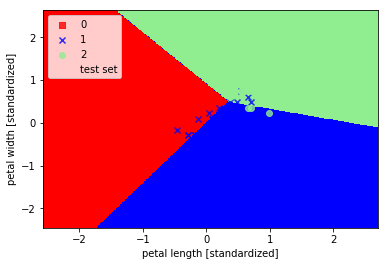
可以看出三个类别并没有被完美分类,这是由于这三类花并不是线性可分的数据。
python机器学习——使用scikit-learn训练感知机模型的更多相关文章
- 吴裕雄 python 机器学习——人工神经网络与原始感知机模型
import numpy as np from matplotlib import pyplot as plt from mpl_toolkits.mplot3d import Axes3D from ...
- (原创)(三)机器学习笔记之Scikit Learn的线性回归模型初探
一.Scikit Learn中使用estimator三部曲 1. 构造estimator 2. 训练模型:fit 3. 利用模型进行预测:predict 二.模型评价 模型训练好后,度量模型拟合效果的 ...
- 机器学习框架Scikit Learn的学习
一 安装 安装pip 代码如下:# wget "https://pypi.python.org/packages/source/p/pip/pip-1.5.4.tar.gz#md5=83 ...
- 使用SKlearn(Sci-Kit Learn)进行SVR模型学习
今天了解到sklearn这个库,简直太酷炫,一行代码完成机器学习. 贴一个自动生成数据,SVR进行数据拟合的代码,附带网格搜索(GridSearch, 帮助你选择合适的参数)以及模型保存.读取以及结果 ...
- 吴裕雄 python 机器学习——集成学习AdaBoost算法回归模型
import numpy as np import matplotlib.pyplot as plt from sklearn import datasets,ensemble from sklear ...
- 吴裕雄 python 机器学习——集成学习AdaBoost算法分类模型
import numpy as np import matplotlib.pyplot as plt from sklearn import datasets,ensemble from sklear ...
- 吴裕雄 python 机器学习——支持向量机SVM非线性分类SVC模型
import numpy as np import matplotlib.pyplot as plt from sklearn import datasets, linear_model,svm fr ...
- 吴裕雄 python 机器学习——等度量映射Isomap降维模型
# -*- coding: utf-8 -*- import numpy as np import matplotlib.pyplot as plt from sklearn import datas ...
- 吴裕雄 python 机器学习——多维缩放降维MDS模型
# -*- coding: utf-8 -*- import numpy as np import matplotlib.pyplot as plt from sklearn import datas ...
随机推荐
- navicat for mysql ;连接数据库报错1251,解决办法。
转载 改密码方式:用管理员身份打开cmd mysql -uroot -p(输入密码) 进入mysql执行下面三个命令 use mysql: ALTER USER 'root'@' ...
- [NOIp2014] luogu P2296 寻找道路
不知道是因为我菜还是别的,最近老是看错题. 题目描述 在有向图 GGG 中,每条边的长度均为 1,现给定起点和终点,请你在图中找一条从起点到终点的路径,该路径满足以下条件: 路径上的所有点的出边所指向 ...
- Spring Cloud Alibaba (nacos 注册中心搭建)
[nacos下载地址](https://github.com/alibaba/nacos/releases) ### 什么是 Nacos? - nacos主要起到俩个作用一个是注册中心,另外一个是配置 ...
- 热烈祝贺达孚电子(NDF)网站上线
尊敬的客户: 您们好! 为适应公司发展的需要,树立公司的良好形象,满足大家更多的了解电容器系列产品及公司的服务,经过1个多月的筹备,在2019年10月21日公司网站正式上线啦,这标志着NDF(达孚电子 ...
- SpringBoot 配置提示功能
目的 配置自动提示的辅助功能可以让配置写起来更快,准确率大大提高. springboot jar 包含提供所有支持的配置属性细节的元数据文件.文件的目的是为了让 IDE 开发者在用户使用 applic ...
- Java socket Tcp协议 实现文件传输
1.文件加密上传后发现文件已损坏: 原因:使用 read(byte[]) 方法不能够准确的获取到正确的字节数,有可能比 byte[].length 小,所以在解密的时候出现错误. 解决办法: 判断读取 ...
- MacOs mysql 安装
1. 去官网下载mysql镜像:https://dev.mysql.com/downloads/file/?id=475582 2. 双击镜像文件 - > 双击.pkg文件 -> 出现 ...
- 双系统开机引导菜单修复方法 进win7无须重启|metro引导|双系统菜单名字修改
此文转自互联网,一部分是原创. 主要内容 1.修复双系统菜单(win7与win8双系统),进入win7不再需要重启,普通菜单样式(普通引导,非metro界面),更加简洁,实用,开机即可选择操作系统 2 ...
- 数据结构(三十三)最小生成树(Prim、Kruskal)
一.最小生成树的定义 一个连通图的生成树是一个极小的连通子图,它含有图中全部的顶点,但只有足以构成一棵树的n-1条边. 在一个网的所有生成树中,权值总和最小的生成树称为最小代价生成树(Minimum ...
- django-Views之装饰器(四)
1.选择支持的请求方式 from django.views.decorators.http import require_http_methods from django.shortcuts impo ...