
spark thriftserver
spark可以作为一个分布式的查询引擎,用户通过JDBC的形式无需写任何代码,写写sql就可以实现查询啦,spark thriftserver的实现也是相当于hiveserver2的方式,并且在测试时候,即可以通过hive的beeline测试也可以通过spark bin/下的beeline,不管通过哪个beeline链接,都要指定spark thriftserver的主机和端口(默认是10000),比如
beeline> !connect jdbc:hive2://host_ip:port
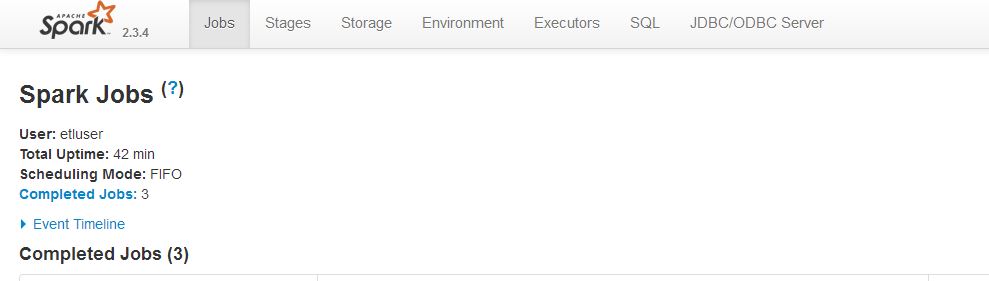
spark thriftserver启动之后实质上就是一个Spark的应用程序,并且也可以通过4040端口来查看web ui界面,但是这个应用程序它支持JDBC/ODBC的连接,如下:
配置
接上文编译spark支持thriftserver编译完成的spark包,在sbin目录下可以看到有start-thriftserver.sh和stop-thriftserver.sh脚本

默认情况下,可以这样启动thriftserver
./sbin/start-thriftserver.sh
另外可以像使用spark-submit一样输入一些相关的参数,比如--master <master-uri>之类的,此外还可以通过--hiveconf 选项来指定hive的相关属性,比如:
./sbin/start-thriftserver.sh \
  --hiveconf hive.server2.thrift.port=<listening-port> \
  --hiveconf hive.server2.thrift.bind.host=<listening-host> \
  --master <master-uri>
  ...
如果集群资源管理为yarn的话,--master设置为yarn,需要配置spark-env.sh脚本,增加hadoop的配置目录等,比如:
# Options read in YARN client/cluster mode
# - SPARK_CONF_DIR, Alternate conf dir. (Default: ${SPARK_HOME}/conf)
# - HADOOP_CONF_DIR, to point Spark towards Hadoop configuration files
# - YARN_CONF_DIR, to point Spark towards YARN configuration files when you use YARN
# - SPARK_EXECUTOR_CORES, Number of cores ).
# - SPARK_EXECUTOR_MEMORY, Memory per Executor (e.g. 1000M, 2G) (Default: 1G)
# - SPARK_DRIVER_MEMORY, Memory for Driver (e.g. 1000M, 2G) (Default: 1G)

HADOOP_CONF_DIR=/home/etluser/kong/spark/spark--bin/spark--bin-hadoop2./conf
SPARK_CONF_DIR=/home/etluser/kong/spark/spark--bin/spark--bin-hadoop2./conf
YARN_CONF_DIR=/home/etluser/kong/spark/spark--bin/spark--bin-hadoop2./conf
启动thriftserver
[etluser@master01 spark--bin-hadoop2.]$ /home/etluser/kong/spark/spark--bin/spark--bin-hadoop2./sbin/start-thriftserver.sh \
> --master yarn \
> --driver-memory 2G \
> --executor-memory 2G \
> --num-executors  \
> --executor-cores
starting org.apache.spark.sql.hive.thriftserver.HiveThriftServer2, logging to /home/etluser/kong/spark/spark--bin/spark--bin-hadoop2./logs/spark-etluser-org.apache.spark.sql.hive.thriftserver.HiveThriftServer2--master01.hadoop.dtmobile.cn.out
启动之后查看日志,看是否有报错。日志如下:
// :: INFO Client: Uploading resource file:/tmp/spark-0b2c2488-9bb3-44d5-bb1d-2d8f815dfc5f/__spark_libs__2287999641897109745.zip -> hdfs://master01.hadoop.dtmobile.cn:8020/user/etluser/.sparkStaging/application_1570496850779_0362/__spark_libs__2287999641897109745.zip
// :: INFO Client: Uploading resource file:/tmp/spark-0b2c2488-9bb3-44d5-bb1d-2d8f815dfc5f/__spark_conf__8007288391370765190.zip -> hdfs://master01.hadoop.dtmobile.cn:8020/user/etluser/.sparkStaging/application_1570496850779_0362/__spark_conf__.zip
// :: INFO SecurityManager: Changing view acls to: etluser
// :: INFO SecurityManager: Changing modify acls to: etluser
// :: INFO SecurityManager: Changing view acls groups to:
// :: INFO SecurityManager: Changing modify acls groups to:
// :: INFO SecurityManager: SecurityManager: authentication disabled; ui acls disabled; users  with view permissions: Set(etluser); groups with view permissions: Set(); users  with modify permissions: Set(etluser); groups with modify permissions: Set()
// :: INFO Client: Submitting application application_1570496850779_0362 to ResourceManager
// :: INFO YarnClientImpl: Submitted application application_1570496850779_0362
// :: INFO SchedulerExtensionServices: Starting Yarn extension services with app application_1570496850779_0362 and attemptId None
// :: INFO Client: Application report for application_1570496850779_0362 (state: ACCEPTED)
// :: INFO Client:
     client token: N/A
     diagnostics: N/A
     ApplicationMaster host: N/A
     ApplicationMaster RPC port: -
     queue: root.users.etluser
     start
     final status: UNDEFINED
     tracking URL: http://master01.hadoop.dtmobile.cn:8088/proxy/application_1570496850779_0362/
     user: etluser
// :: INFO Client: Application report for application_1570496850779_0362 (state: ACCEPTED)
// :: INFO Client: Application report for application_1570496850779_0362 (state: ACCEPTED)
// :: INFO Client: Application report for application_1570496850779_0362 (state: ACCEPTED)
// :: INFO YarnClientSchedulerBackend: Add WebUI Filter. org.apache.hadoop.yarn.server.webproxy.amfilter.AmIpFilter, Map(PROXY_HOSTS -> master01.hadoop.dtmobile.cn, PROXY_URI_BASES -> http://master01.hadoop.dtmobile.cn:8088/proxy/application_1570496850779_0362), /proxy/application_1570496850779_0362
// :: INFO JettyUtils: Adding filter org.apache.hadoop.yarn.server.webproxy.amfilter.AmIpFilter to /jobs, /jobs/json, /jobs/job, /jobs/job/json, /stages, /stages/json, /stages/stage, /stages/stage/json, /stages/pool, /stages/pool/json, /storage, /storage/json, /storage/rdd, /storage/rdd/json, /environment, /environment/json, /executors, /executors/json, /executors/threadDump, /executors/threadDump/json, /static, /, /api, /jobs/job/kill, /stages/stage/kill.
// :: INFO Client: Application report for application_1570496850779_0362 (state: RUNNING)
// :: INFO Client:
     client token: N/A
     diagnostics: N/A
     ApplicationMaster host: 172.30.5.213
     ApplicationMaster RPC port:
     queue: root.users.etluser
     start
     final status: UNDEFINED
     tracking URL: http://master01.hadoop.dtmobile.cn:8088/proxy/application_1570496850779_0362/
     user: etluser
// :: INFO YarnClientSchedulerBackend: Application application_1570496850779_0362 has started running.
// :: INFO Utils: Successfully started service .
// :: INFO NettyBlockTransferService: Server created on worker01.hadoop.dtmobile.cn:
// :: INFO BlockManager: Using org.apache.spark.storage.RandomBlockReplicationPolicy for block replication policy
// :: INFO BlockManagerMaster: Registering BlockManager BlockManagerId(driver, worker01.hadoop.dtmobile.cn, , None)
// :: INFO BlockManagerMasterEndpoint: Registering block manager worker01.hadoop.dtmobile.cn: with , None)
// :: INFO YarnSchedulerBackend$YarnSchedulerEndpoint: ApplicationMaster registered as NettyRpcEndpointRef(spark-client://YarnAM)
// :: INFO BlockManagerMaster: Registered BlockManager BlockManagerId(driver, worker01.hadoop.dtmobile.cn, , None)
// :: INFO BlockManager: Initialized BlockManager: BlockManagerId(driver, worker01.hadoop.dtmobile.cn, , None)
// :: INFO JettyUtils: Adding filter org.apache.hadoop.yarn.server.webproxy.amfilter.AmIpFilter to /metrics/json.
// :: INFO YarnSchedulerBackend$YarnDriverEndpoint: Registered executor NettyRpcEndpointRef(spark-client://Executor) (172.30.5.212:36832) with ID 1
// :: INFO YarnSchedulerBackend$YarnDriverEndpoint: Registered executor NettyRpcEndpointRef(spark-client://Executor) (172.30.5.212:36834) with ID 2
// :: INFO YarnClientSchedulerBackend: SchedulerBackend is ready for scheduling beginning after reached minRegisteredResourcesRatio: 0.8
// :: INFO BlockManagerMasterEndpoint: Registering block manager worker03.hadoop.dtmobile.cn: with , worker03.hadoop.dtmobile.cn, , None)
// :: INFO SharedState: loading hive config -bin/spark--bin-hadoop2./conf/hive-site.xml
// :: INFO BlockManagerMasterEndpoint: Registering block manager worker03.hadoop.dtmobile.cn: with , worker03.hadoop.dtmobile.cn, , None)
// :: INFO SharedState: spark.sql.warehouse.dir is not set, but hive.metastore.warehouse.dir is set. Setting spark.sql.warehouse.dir to the value of hive.metastore.warehouse.dir ('/user/hive/warehouse').
// :: INFO SharedState: Warehouse path is '/user/hive/warehouse'.
// :: INFO JettyUtils: Adding filter org.apache.hadoop.yarn.server.webproxy.amfilter.AmIpFilter to /SQL.
// :: INFO JettyUtils: Adding filter org.apache.hadoop.yarn.server.webproxy.amfilter.AmIpFilter to /SQL/json.
// :: INFO JettyUtils: Adding filter org.apache.hadoop.yarn.server.webproxy.amfilter.AmIpFilter to /SQL/execution.
// :: INFO JettyUtils: Adding filter org.apache.hadoop.yarn.server.webproxy.amfilter.AmIpFilter to /SQL/execution/json.
// :: INFO JettyUtils: Adding filter org.apache.hadoop.yarn.server.webproxy.amfilter.AmIpFilter to /static/sql.
// :: INFO HiveUtils: Initializing HiveMetastoreConnection version  using Spark classes.
// :: INFO metastore: Trying to connect to metastore with URI thrift://worker03.hadoop.dtmobile.cn:9083
// :: INFO metastore: Connected to metastore.
// :: INFO SessionState: Created local directory: /tmp/a8f6b1e4-5ada-4c34-aba6-80d7c6d6f021_resources
// :: INFO SessionState: Created HDFS directory: /tmp/hive/etluser/a8f6b1e4-5ada-4c34-aba6-80d7c6d6f021
// :: INFO SessionState: Created local directory: /tmp/etluser/a8f6b1e4-5ada-4c34-aba6-80d7c6d6f021
// :: INFO SessionState: Created HDFS directory: /tmp/hive/etluser/a8f6b1e4-5ada-4c34-aba6-80d7c6d6f021/_tmp_space.db
// :: INFO HiveClientImpl: Warehouse location ) is /user/hive/warehouse
// :: INFO StateStoreCoordinatorRef: Registered StateStoreCoordinator endpoint
// :: INFO HiveUtils: Initializing execution hive, version
// :: INFO HiveMetaStore: : Opening raw store with implemenation class:org.apache.hadoop.hive.metastore.ObjectStore
// :: INFO ObjectStore: ObjectStore, initialize called
// :: INFO Persistence: Property hive.metastore.integral.jdo.pushdown unknown - will be ignored
// :: INFO Persistence: Property datanucleus.cache.level2 unknown - will be ignored
// :: INFO ObjectStore: Setting MetaStore object pin classes with hive.metastore.cache.pinobjtypes="Table,StorageDescriptor,SerDeInfo,Partition,Database,Type,FieldSchema,Order"
// :: INFO Datastore: The class "org.apache.hadoop.hive.metastore.model.MFieldSchema" is tagged as "embedded-only" so does not have its own datastore table.
// :: INFO Datastore: The class "org.apache.hadoop.hive.metastore.model.MOrder" is tagged as "embedded-only" so does not have its own datastore table.
// :: INFO Datastore: The class "org.apache.hadoop.hive.metastore.model.MFieldSchema" is tagged as "embedded-only" so does not have its own datastore table.
// :: INFO Datastore: The class "org.apache.hadoop.hive.metastore.model.MOrder" is tagged as "embedded-only" so does not have its own datastore table.
// :: INFO MetaStoreDirectSql: Using direct SQL, underlying DB is DERBY
// :: INFO ObjectStore: Initialized ObjectStore
// :: WARN ObjectStore: Version information not found
// :: WARN ObjectStore: Failed to get database default, returning NoSuchObjectException
// :: INFO HiveMetaStore: Added admin role in metastore
// :: INFO HiveMetaStore: Added public role in metastore
// :: INFO HiveMetaStore: No user is added in admin role, since config is empty
// :: INFO HiveMetaStore: : get_all_databases
// :: INFO audit: ugi=etluser    ip=unknown-ip-addr    cmd=get_all_databases
// :: INFO HiveMetaStore: : get_functions: db=default pat=*
// :: INFO audit: ugi=etluser    ip=unknown-ip-addr    cmd=get_functions: db=default pat=*
// :: INFO Datastore: The class "org.apache.hadoop.hive.metastore.model.MResourceUri" is tagged as "embedded-only" so does not have its own datastore table.
// :: INFO SessionState: Created local directory: /tmp/6b9ea521-f369-45c7--4fdc6134ad51_resources
// :: INFO SessionState: Created HDFS directory: /tmp/hive/etluser/6b9ea521-f369-45c7--4fdc6134ad51
// :: INFO SessionState: Created local directory: /tmp/etluser/6b9ea521-f369-45c7--4fdc6134ad51
// :: INFO SessionState: Created HDFS directory: /tmp/hive/etluser/6b9ea521-f369-45c7--4fdc6134ad51/_tmp_space.db
// :: INFO HiveClientImpl: Warehouse location ) is /user/hive/warehouse
// :: WARN SessionManager: Unable to create operation log root directory: /var/log/hive/operation_logs
// :: INFO SessionManager: HiveServer2: Background operation thread pool size:
// :: INFO SessionManager: HiveServer2: Background operation thread
// :: INFO SessionManager: HiveServer2: Background operation thread keepalive  seconds
// :: INFO AbstractService: Service:OperationManager is inited.
// :: INFO AbstractService: Service:SessionManager is inited.
// :: INFO AbstractService: Service: CLIService is inited.
// :: INFO AbstractService: Service:ThriftBinaryCLIService is inited.
// :: INFO AbstractService: Service: HiveServer2 is inited.
// :: INFO AbstractService: Service:OperationManager is started.
// :: INFO AbstractService: Service:SessionManager is started.
// :: INFO AbstractService: Service:CLIService is started.
// :: INFO ObjectStore: ObjectStore, initialize called
// :: INFO Query: Reading in results for query "org.datanucleus.store.rdbms.query.SQLQuery@0" since the connection used is closing
// :: INFO MetaStoreDirectSql: Using direct SQL, underlying DB is DERBY
// :: INFO ObjectStore: Initialized ObjectStore
// :: INFO HiveMetaStore: : get_databases: default
// :: INFO audit: ugi=etluser    ip=unknown-ip-addr    cmd=get_databases: default
// :: INFO HiveMetaStore: : Shutting down the object store...
// :: INFO audit: ugi=etluser    ip=unknown-ip-addr    cmd=Shutting down the object store...
// :: INFO HiveMetaStore: : Metastore shutdown complete.
// :: INFO audit: ugi=etluser    ip=unknown-ip-addr    cmd=Metastore shutdown complete.
// :: INFO AbstractService: Service:ThriftBinaryCLIService is started.
// :: INFO AbstractService: Service:HiveServer2 is started.
// :: INFO HiveThriftServer2: HiveThriftServer2 started
// :: INFO JettyUtils: Adding filter org.apache.hadoop.yarn.server.webproxy.amfilter.AmIpFilter to /sqlserver.
// :: INFO JettyUtils: Adding filter org.apache.hadoop.yarn.server.webproxy.amfilter.AmIpFilter to /sqlserver/json.
// :: INFO JettyUtils: Adding filter org.apache.hadoop.yarn.server.webproxy.amfilter.AmIpFilter to /sqlserver/session.
// :: INFO JettyUtils: Adding filter org.apache.hadoop.yarn.server.webproxy.amfilter.AmIpFilter to /sqlserver/session/json.
// :: INFO ThriftCLIService: Starting ThriftBinaryCLIService on port  with ... worker threads
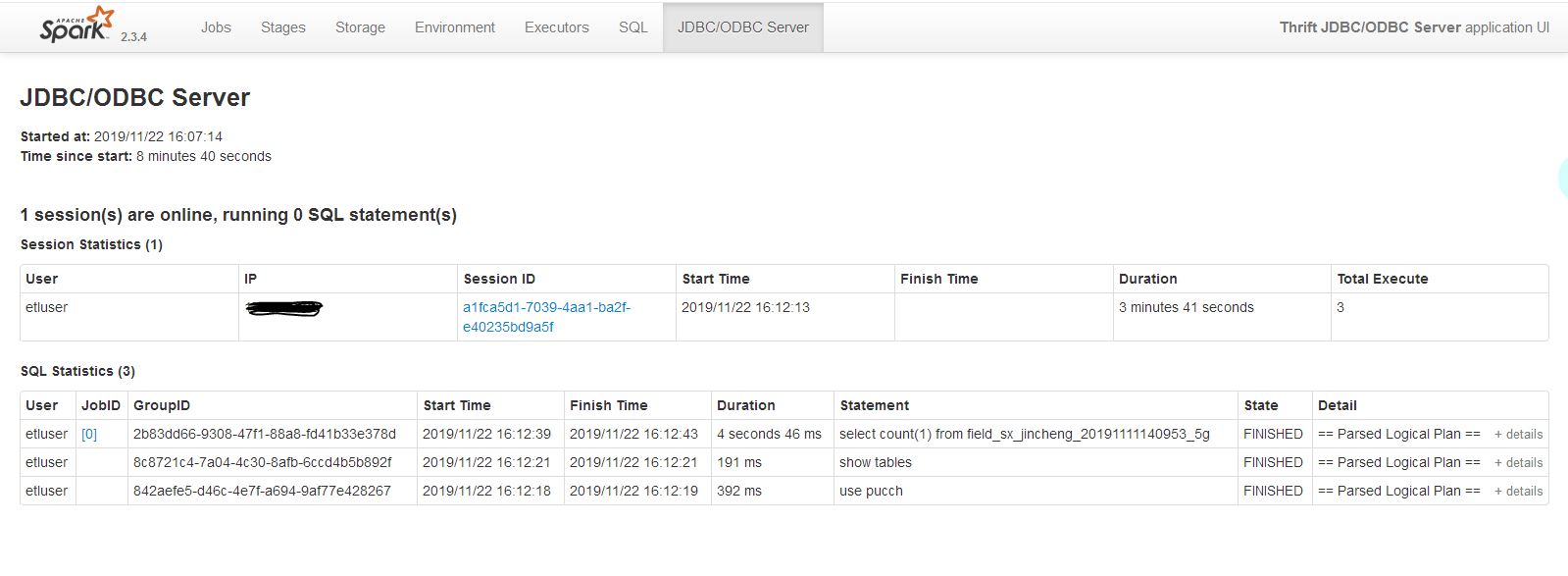
启动成功之后,就可以通过beeline来测试并且到4040界面来查看执行的状态
在使用beeline的时候,会要求输入用户名和密码,如果集群没有做什么安全认证,随意输入账号密码即可;如果设置了安全认证,比如增加了sentry认证,那么就让平台给你分配一个用户吧
简单测试:
[etluser@worker01 spark--bin-hadoop2.]$ bin/beeline
Beeline version .spark2 by Apache Hive
beeline> !connect jdbc:hive2://worker01.hadoop.dtmobile.cn:10000
Connecting to jdbc:hive2://worker01.hadoop.dtmobile.cn:10000
Enter username for jdbc:hive2://worker01.hadoop.dtmobile.cn:10000: etluser
Enter password for jdbc:hive2://worker01.hadoop.dtmobile.cn:10000: *******
log4j:WARN No appenders could be found for logger (org.apache.hive.jdbc.Utils).
log4j:WARN Please initialize the log4j system properly.
log4j:WARN See http://logging.apache.org/log4j/1.2/faq.html#noconfig for more info.
Connected to: Spark SQL (version )
Driver: Hive JDBC (version .spark2)
Transaction isolation: TRANSACTION_REPEATABLE_READ
: jdbc:hive2://worker01.hadoop.dtmobile.cn:1> use pucch;
+---------+--+
| Result  |
+---------+--+
+---------+--+
No rows selected (0.725 seconds)
: jdbc:hive2://worker01.hadoop.dtmobile.cn:1> show tables;
+-----------+--------------------------------------------+--------------+--+
| database  |                 tableName                  | isTemporary  |
+-----------+--------------------------------------------+--------------+--+
| pucch     | cell_lusun_datasx_jincheng20191111140953   | false        |
| pucch     | dw_sinr_rlt_sx_jincheng20191111140953      | false        |
| pucch     | dwsinr_prb_rlt_sx_jincheng20191111140953   | false        |
| pucch     | field_sx_jincheng_20191111140953_5g        | false        |
| pucch     | gongcantbl_sx_jincheng20191111140953       | false        |
| pucch     | pucch_rsrp_rlt_sx_jincheng20191111140953   | false        |
| pucch     | pucch_sys_conf_hb_wuhan201907161354        | false        |
| pucch     | pucch_sys_conf_sx_jincheng20191111140953   | false        |
| pucch     | random_grid_sx_jincheng20191111140953      | false        |
| pucch     | random_grid_tmp_sx_jincheng20191111140953  | false        |
| pucch     | test_ultraedit                             | false        |
| pucch     | test_ultraedit2                            | false        |
| pucch     | up_dw_sinr_rlt_sx_jincheng20191111140953   | false        |
| pucch     | up_sinr_rlt_sx_jincheng20191111140953      | false        |
+-----------+--------------------------------------------+--------------+--+
 rows selected (0.224 seconds)
: jdbc:hive2://worker01.hadoop.dtmobile.cn:1> select count(1) from field_sx_jincheng_20191111140953_5g;
+-----------+--+
| count()  |
+-----------+--+
|     |
+-----------+--+
4040界面:
spark thriftserver的更多相关文章
- Spark ThriftServer使用的大坑
当用beeline连接default后,通过use xxx切换到其他数据库,再退出, 再次使用beeline -u jdbc:hive2://hadoop000:10000/default -n sp ...
- 理解Spark SQL(一)—— CLI和ThriftServer
Spark SQL主要提供了两个工具来访问hive中的数据,即CLI和ThriftServer.前提是需要Spark支持Hive,即编译Spark时需要带上hive和hive-thriftserver ...
- Hive On Spark hiveserver2方式使用
启动hiveserver2: hiveserver2 --hiveconf hive.execution.engine=spark spark.master=yarn 使用beeline连接hives ...
- Spark UI界面原理
当Spark程序在运行时,会提供一个Web页面查看Application运行状态信息.是否开启UI界面由参数spark.ui.enabled(默认为true)来确定.下面列出Spark UI一些相关配 ...
- 【自动化】基于Spark streaming的SQL服务实时自动化运维
设计背景 spark thriftserver目前线上有10个实例,以往通过监控端口存活的方式很不准确,当出故障时进程不退出情况很多,而手动去查看日志再重启处理服务这个过程很低效,故设计利用Spark ...
- spark技术总结(1)
1. 请描述spark RDD原理与特征 RDD为Resilient Distributed Datasets缩写,译文弹性分布式数据集. 他是spark系统中的核心数据模型之一,另外一个是DAG模型 ...
- spark sql 的metastore 对接 postgresql
本教程记录 spark 1.3.1 版本的thriftserver 的metastore 对接 postgresql postgresql 的编译,参考:http://www.cnblogs.com/ ...
- 记一次有关spark动态资源分配和消息总线的爬坑经历
问题: 线上的spark thriftserver运行一段时间以后,ui的executor页面上显示大量的active task,但是从job页面看,并没有任务在跑.此外,由于在yarn mode下, ...
- spark动态资源(executor)分配
spark动态资源调整其实也就是说的executor数目支持动态增减,动态增减是根据spark应用的实际负载情况来决定. 开启动态资源调整需要(on yarn情况下) 1.将spark.dynamic ...
随机推荐
- 关于Mapper.xml生效的问题
昨天在新建Springboot启动后,发现执行相关的SQL报错,具体报错信息如下: org.apache.ibatis.binding.BindingException: Invalid bound ...
- Linux下mqttServer搭建
1.apache-apollo 创建服务 tar -zxvf apache-apollo-1.7-unix-distro.tar.gz cd /home/bk/apache-apollo-/bin . ...
- vue —— 监听
vue的监听用途很大 比如:通过数据的值的变化,执行某个方法 首先:data中要有个变量初始值 finalTotalAmount的初始值是0 我们想当finalTotalAmount值发生变化时,执行 ...
- 微信小程序之页面引用utils中的js文件
/* 只可使用相对路径 */const utils = require('../../../utils/util.js') Page({})
- abp(net core)+easyui+efcore实现仓储管理系统——EasyUI之货物管理六(二十四)
abp(net core)+easyui+efcore实现仓储管理系统目录 abp(net core)+easyui+efcore实现仓储管理系统——ABP总体介绍(一) abp(net core)+ ...
- kmp算法,求重复字符串
public class Demo { public static void main(String[] args) { String s1 = "ADBCFHABESCACDABCDABC ...
- Centos7 基础命令与软件的安装
本人小白一枚正在老男孩培训,所以从现在开始把我学到的知识都分享给大家,该随笔会一直更新 centos7基础命令与软件 ps:命令与参数之间必须加上空格,安装成功时最后一行会有 Complete! ...
- element 自定义 el-loading
前言 虽说,el-loading 自带的loading效果已经满足日常的需求看 但是,美术大大觉得太low 我要我设计的,我不要你觉得我要我觉得 需求 自定义el-loading 正文 从官方需求文 ...
- ABAP中时间戳的处理
UTC(UTC, Universal Time Coordinated,通用协调时)时间戳,分为长时间戳和段时间戳,其中长时间戳餐开始的系统的数据元素TIMESTAMPL,类型为DEC(21,7):而 ...
- 搭建邮件服务器,使用Postfix与Dovecot收发电子邮件
小知识: 我们为什么要搭建邮件服务器呢?有时候我们处于一个局域网内,不能及时的分享各自的研究成果,迫切的需要一种能够借助于网络且建立在计算机之间的传输数据的方法.所以我们需要搭建邮件服务器,这样的话既 ...