
[翻译] USING GIT IN XCODE [6] 在XCODE中使用GIT[6]
USING GIT IN XCODE

KEEPING IN SYNC WITH REMOTE REPOSITORIES
As you make changes in your local working copy you will want to keep them in sync with the remote repository. Xcode offers support for pulling from and pushing to a remote repository, and for tracking remote branches.
There are two ways to pull from a remote repository. The first is from the project window. Select File | Source Control | Pull from the Xcode menu when viewing a project window. If there are no uncommitted changes in the working copy, Xcode will present a dialog to select which remote and branch to pull from. (Note that a pull can be completed using command line Git when changes are present, but Xcode will not pull with uncommitted changes in the working directory.)
也许你想在本地备份上修改代码的时候,同步到服务器端当中。Xcode提供了pulling一级pushing操作,以及追踪远程版本。
有两种方式来从服务器端pull代码。第一种方式就是直接在工程的window菜单中操作。选择File | Source Control | Pull from the Xcode menu,如果本地没有进行修改的操作,Xcode将会提供一个菜单供你选择从哪一个分支上pull代码。
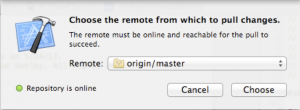
Alternatively, the Pull button from the Organizer Repositories view can be used when a working copy is selected.
另外一种方法是,这个Pull的按钮可以从Organizer Repositories中点选。
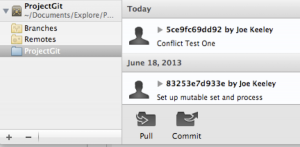
If a conflict is detected on the pull, Xcode will present the merge viewer to resolve the conflict. Just like resolving a conflict between branches, the merge viewer can be used to select which change(s) should be kept and in what order they should be if both are desired. If you do not want to resolve the conflict, click the Cancel button in the merge view and the pull will not take place.
如果在pull过程中检测到了冲突,Xcode会显示出merge工具来帮你解决冲突。如果不想解决冲突,点击取消按钮也行。

If the conflict is resolved, the working copy will be modified and will need to be committed and pushed.
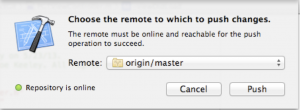
To push changes to the remote repository, select File | Source Control | Push from the Xcode menu when viewing a project window.
如果冲突被解决了,你又写了代码并想提交代码。
你可以通过File | Source Control | Push from the Xcode menu来提交代码。
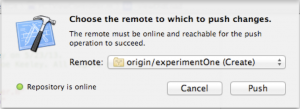
A branch can also be pushed to the remote repository. Xcode will detect if the branch does not yet exist in the remote, and will indicate if the branch will be created by a push.
当然你也可以提交代码到一个新的分支中去,Xcode会检测有没有你想要的那个分支,如果没有,他会帮你创建那个分支。
Once a branch has been created on the remote repository, other working copies can track that branch. To track a branch, visit Organizer, Repositories, and select Remotes for the project repository. Expand the remote name to see the available branches. (In my testing, I was not able to get Xcode to refresh remote branches without restarting Xcode).
一旦一个分支在服务器上被创建了,其他的版本都能够跟踪那个分支。要跟踪一个分支,访问Organizer,Repositories,选择Remotes for the project repository,然后选择展开的那个分支的名字。
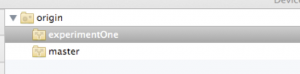
Select a remote branch and click the Track Branch button at the bottom of the view. This will pull down the branch from the remote repository to the local repository, will allow you to switch to the branch in Xcode, and will allow pulls and pushes to take place from it.
选择了那个分支后点击Track Branch按钮,你就会从服务器更新到那个分支的代码,你可以随意的在不同的分支中切换来切换去。
SUMMARY
As we have seen here, Xcode has very usable support for common Git tasks, including setting up Git for a new project, cloning an existing project, handling modifications and commits, viewing history, using branches, and pushing and pulling from remote repositories. Xcode does not have direct support for stashing, tags, or more advanced topics like rebasing or submodules. However, all of the items that Xcode does not support can be performed using the command line tools or using a third party tool. In my day to day work with a distributed development team, I am frequently able to perform all of my Git tasks in Xcode, and only rarely need to resort to the command line. Take a second look at Xcode’s Git support if you have not done so before, and give feedback to the Xcode team so they can keep enhancing and improving Git support in Xcode.
在这里,我们可以看出,Xcode支持Git很到位,包括创建一个Git项目、拷贝一个Git项目,操作修改,提交代码,浏览历史记录,使用版本分支以及从服务器进行push或者pull操作。Xcode并没有直接支持诸如隐藏、标记、或者一些更高级更热门的功能。然而,那些更高级的功能都能够通过命令行工具或者是第三方工具来实现。在我日复一日的分布式团队工作当中,我频繁的使用者Xcode自带的git工具,只有极少数情况会用到命令行。如果您没用过Xcode自带的git工具,你可以试验一把,并给Xcode团队反馈使用上不方便的地方,帮助Xcode提升Git的使用便利性^_^。
[翻译] USING GIT IN XCODE [6] 在XCODE中使用GIT[6]的更多相关文章
- git篇之二----团体项目中使用git
上篇说了git的简单入门,本篇来说一下在团体项目中我们该如何简单使用git 一般来说,当我们进入公司之后,就前端项目而言,若是有多个同事共同开发一个系统,我们可能会每个人去负责各自的模块. 若是人员较 ...
- [.net 面向对象程序设计进阶] (27) 团队开发利器(六)分布式版本控制系统Git——在Visual Studio 2015中使用Git
[.net 面向对象程序设计进阶] (26) 团队开发利器(六)分布式版本控制系统Git——在Visual Studio 2015中使用Git 本篇导读: 接上两篇,继续Git之旅 分布式版本控制系统 ...
- (转载)在Visual Studio 2015中使用Git
原文:http://blog.csdn.net/damon316/article/details/51885802 1. VS2015在对Git的支持 VS2015是微软IDE集成开发环境的重量级升级 ...
- Git权威指南学习笔记(二)Git暂存区
例如以下图所看到的: 左側为工作区,是我们的工作文件夹. 右側为版本号库,当中: index标记的是暂存区(stage),所处文件夹为.git/index,记录了文件的状态和变更信息. master标 ...
- 如何在cmd中集成git
1.要在cmd中集成git,要解决在cmd中输入git命令时不提示git不是内部或外部命令: 即需要将git添加到path变量中,即将D:\Git\mingw64\bin和D:\Git\mingw64 ...
- 不懂Git,别说自己是程序猿–20分钟git快速上手(转)
在Git如日中天的今天,不懂git都不好意思跟人说自己是程序猿.你是不是早就跃跃欲试了,只是苦于没有借口(契机). 好吧,机会就在今天. 给我20分钟,是的,只要20分钟, 让你快速用上git. 我们 ...
- [翻译] USING GIT IN XCODE [5] 在XCODE中使用GIT[5]
USING GIT IN XCODE USING BRANCHES Branches can be a very effective tool to isolate new features or e ...
- [翻译] USING GIT IN XCODE [3] 在XCODE中使用GIT[3]
USING GIT IN XCODE MAKING AND COMMITTING CHANGES Once you have a working copy of your project, it’s ...
- [翻译] USING GIT IN XCODE [1] 在XCODE中使用GIT[1]
USING GIT IN XCODE http://www.cimgf.com/2013/12/10/using-git-in-xcode/ Git has become a very popular ...
- 在Xcode中使用Git进行源码版本控制
http://www.cocoachina.com/ios/20140524/8536.html 资讯 论坛 代码 工具 招聘 CVP 外快 博客new 登录| 注册 iOS开发 Swift Ap ...
随机推荐
- 查看本机的ip
1.Windows 1.1.查看ip地址 ipconfig 1.2.查看MAC地址 ipconfig /all 2.Linux 2.1.查看ip地址 ifconfig 2.2.查看MAC地址 ip l ...
- 求最短路径的三种算法: Ford, Dijkstra和Floyd
Bellman-Ford算法 Bellman-Ford是一种容易理解的单源最短路径算法, Bellman-Ford算法需要两个数组进行辅助: dis[i]: 存储顶点i到源点已知最短路径 path[i ...
- Asp.Net 天气 WebService 使用
本文使用Asp.Net (C#)调用互联网上公开的WebServices(http://www.webxml.com.cn/WebServices/WeatherWebService.asmx)来实 ...
- Java基础教程(9)--流程控制
一.分支结构 1.if语句 if语句会与其后的第一条语句或代码块结合,且只有当判断条件为true时才执行语句或代码块.例如,自行车只有在运动的时候才可以减速,就像下面这样: void applyB ...
- 零基础学C#算法(零基础学算法——C#版)
今天本人正在看算法方面的书.作为高中数学忘得差不多的渣渣,实在无力.无奈找了本书,c语言写的,哎.我就把其中代码翻译成C#版好了.此坑能否填平,看我耐性和网络支持条件吧.有生之年能看完的话我会把整个项 ...
- 对io进行分流
package org.richin.io.Stream.util; import java.io.BufferedInputStream; import java.io.Buffer ...
- python数据类型之简单数据类型
变量使用注意事项 慎用小写字母l和大写字母O,因为它们可能被人看成数值1和0. 应使用小写的python变量名. 字符串 在python中,用引号括起来的都是字符串,其中的引号可以是单引号和双引号. ...
- Python 正则 re.sub替换
# 正则将匹配到的两个字段,都替换成某个值import re s0 = 'BOY and GIRL' s1 = re.sub(r'BOY|GIRL', 'HUMAN', s0) print s1 # ...
- 【学习笔记】--- 老男孩学Python,day18 面向对象------继承
继承 继承是一种创建新类的方式,在python中,新建的类可以继承一个或多个父类, 父类又可称为基类或超类,新建的类称为派生类或子类 python中类的继承分为:单继承和多继承 class Fathe ...
- Fastify 系列教程一 (路由和日志)
Fastify 系列教程: Fastify 系列教程一 (路由和日志) Fastify 系列教程二 (中间件.钩子函数和装饰器) Fastify 系列教程三 (验证.序列化和生命周期) Fastify ...