
android 常用
1:常用之动画(View Animation,Drawable Animation,Property Animation)
http://blog.csdn.net/huxueyan521/article/details/8179036
http://www.360doc.com/content/13/0102/22/6541311_257754535.shtml
http://blog.csdn.net/yanbober/article/details/46481171
http://blog.csdn.net/lmj623565791/article/details/38067475 (Property Animation)
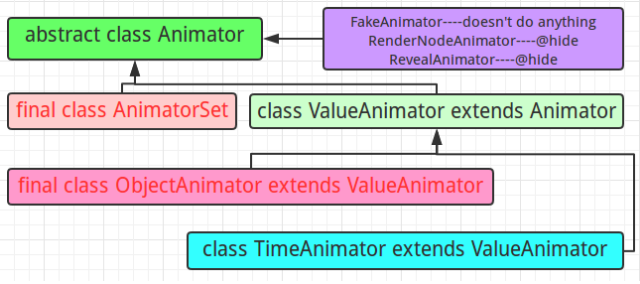
Property Animation概述:
ValueAnimator<animator> 放置在res/animator/目录下 在一个特定的时间里执行一个动画
TimeAnimator 时序监听回调工具
ObjectAnimator<objectAnimator> 放置在res/animator/目录下 一个对象的一个属性动画
AnimatorSet<set> 放置在res/animator/目录下 动画集合
2:shape 自定义
自定义各种详细属性的描述
<?xml version="1.0" encoding="utf-8"?>

<!--

    shape drawable xml文件中定义的一个几何图形,定义在res/drawable/目录下,文件名filename称为访问的资源ID

    在代码中通过R.drawable.filename进行访问,在xml文件中通过@[package:]drawable/filename进行访问。

 -->

 <!--

     android:shape=["rectangle" | "oval" | "line" | "ring"]

     shape的形状,默认为矩形,可以设置为矩形(rectangle)、椭圆形(oval)、线性形状(line)、环形(ring)

      下面的属性只有在android:shape="ring时可用:

      android:innerRadius         尺寸,内环的半径。

      android:innerRadiusRatio    浮点型,以环的宽度比率来表示内环的半径,

      例如,如果android:innerRadiusRatio,表示内环半径等于环的宽度除以5,这个值是可以被覆盖的,默认为9.

      android:thickness            尺寸,环的厚度

      android:thicknessRatio        浮点型,以环的宽度比率来表示环的厚度,例如,如果android:thicknessRatio="2",

      那么环的厚度就等于环的宽度除以2。这个值是可以被android:thickness覆盖的,默认值是3.

      android:useLevel            boolean值,如果当做是LevelListDrawable使用时值为true,否则为false.

  -->

<shape

    xmlns:android="http://schemas.android.com/apk/res/android"

    android:shape="rectangle">

    <!--

         圆角

         android:radius              整型 半径

        android:topLeftRadius          整型 左上角半径

        android:topRightRadius      整型 右上角半径

        android:bottomLeftRadius     整型 左下角半径

        android:bottomRightRadius     整型 右下角半径

     -->

     <corners

        android:radius="8dp"

        android:topLeftRadius="5dp"

        android:topRightRadius="15dp"

        android:bottomLeftRadius="20dp"

        android:bottomRightRadius="25dp"

        />

     <!--

         渐变色

         android:startColor  颜色值                             起始颜色

        android:endColor    颜色值                             结束颜色

        android:centerColor 整型                               渐变中间颜色,即开始颜色与结束颜色之间的颜色

        android:angle       整型                               渐变角度(PS:当angle=0时,渐变色是从左向右。 然后逆时针方向转,当angle=90时为从下往上。angle必须为45的整数倍)

        android:type        ["linear" | "radial" | "sweep"] 渐变类型(取值:linear、radial、sweep)

                            linear 线性渐变,这是默认设置

                            radial 放射性渐变,以开始色为中心。

                            sweep 扫描线式的渐变。

       android:useLevel       ["true" | "false"]                 如果要使用LevelListDrawable对象,就要设置为true。设置为true无渐变。false有渐变色

       android:gradientRadius 整型                             渐变色半径.当 android:type="radial" 时才使用。单独使用 android:type="radial"会报错。

       android:centerX        整型                               渐变中心X点坐标的相对位置

       android:centerY       整型                               渐变中心Y点坐标的相对位置

    -->

    <gradient

        android:startColor="#FFFF0000"

        android:endColor="#80FF00FF"

        android:angle="45"

        />

    <!--

         内边距,即内容与边的距离

         android:left      整型 左内边距

        android:top       整型 上内边距

        android:right      整型 右内边距

        android:bottom     整型 下内边距

      -->

     <padding

         android:left="10dp"

         android:top="10dp"

         android:right="10dp"

         android:bottom="10dp"

         />

    <!--

        size 大小

        android:width     整型 宽度

        android:height     整型 高度

    -->

    <size

        android:width="600dp"

        />

    <!--

        内部填充

        android:color     颜色值 填充颜色

    -->

    <solid

        android:color="#ffff9d77"

        />

     <!--

         描边

         android:width         整型     描边的宽度

        android:color         颜色值     描边的颜色

        android:dashWidth     整型     表示描边的样式是虚线的宽度, 值为0时,表示为实线。值大于0则为虚线。

        android:dashGap      整型     表示描边为虚线时,虚线之间的间隔 即“ - - - - ”

     -->

     <stroke

        android:width="2dp"

        android:color="#dcdcdc"

        />

</shape>
3:selector
android:state_pressed=["true" | "false"]//是否触摸
android:state_focused=["true" | "false"]//是否获取到焦点
android:state_hovered=["true" | "false"]//光标是否经过
android:state_selected=["true" | "false"]//是否选中
android:state_checkable=["true" | "false"]//是否可勾选
android:state_checked=["true" | "false"]//是否勾选
android:state_enabled=["true" | "false"]//是否可用
android:state_activated=["true" | "false"]//是否激活
android:state_window_focused=["true" | "false"] />//所在窗口是否获取焦点(对话框显示时对应false状态)
<?xml version="1.0" encoding="utf-8" ?>

<selector xmlns:android="http://schemas.android.com/apk/res/android">

    <!-- 默认时的背景图片-->

    <item android:drawable="@drawable/pic1" />

    <!-- 没有焦点时的背景图片-->

    <item android:state_window_focused="false" android:drawable="@drawable/pic1" />

    <!-- 非触摸模式下获得焦点并单击时的背景图片-->

    <item android:state_focused="true" android:state_pressed="true"

        android:drawable="@drawable/pic2" />

    <!-- 触摸模式下单击时的背景图片-->

    <item android:state_focused="false" android:state_pressed="true"

        android:drawable="@drawable/pic3" />

    <!--选中时的图片背景-->

    <item android:state_selected="true" android:drawable="@drawable/pic4" />

    <!--获得焦点时的图片背景-->

    <item android:state_focused="true" android:drawable="@drawable/pic5" />

</selector>
android 常用的更多相关文章
- Android 常用开发工具以及Mac常用软件
Android 常用的开发工具记录.其中包括AndroidStudio(IDEA)插件.Mac 上好用的软件以及国内知名Android开发者博客等. Android Studio 插件 codota ...
- Android 常用数据适配器SimpleAdapter
在<Android 常用数据适配器ArrayAdapter>中介绍了ArrayAdapter数据适配器.但是存在一个缺陷,那就是条目的图标都固定相同,要显示每个条目的图标都不相同,那么使用 ...
- Android常用设计模式(二)
Android常用设计模式之观察者模式 观察者设计模式在Android应用中会经常用到,模式原理类似于这样的场景: 用户订报纸,然后在报社登记,报社来统计用户(添加用户),用户也可以取消订阅,报社删除 ...
- Android 常用 adb 命令
查看原文:http://blog.csdn.net/u010818425/article/details/52266593 (一)基础操作 安装app adb install -r xxx.apk / ...
- 【风马一族_Android】第4章Android常用基本控件
第4章Android常用基本控件 控件是Android用户界面中的一个个组成元素,在介绍它们之前,读者必须了解所有控件的父类View(视图),它好比一个盛放控件的容器. 4.1View类概述 对于一个 ...
- Android常用组件
UI相关 图片 Android-Universal-Image-Loader:com.nostra13.universalimageloader:异步加载.缓存.显示图片 ImageLoader:co ...
- Android常用组件【转】
UI相关 图片 Android-Universal-Image-Loader:com.nostra13.universalimageloader:异步加载.缓存.显示图片 ImageLoader:co ...
- Android常用的物理按键及其触发事件
Activity和View都能接收触摸和按键,如果响应事件只需要在继承类里复写事件函数即可:当一个视图(如一个按钮)被触摸时,该对象上的 onTouchEvent() 方法会被调用.不过,为了侦听这个 ...
- Android常用URI以及URI简介
Android常用URI android管理联系人的URI: ContactsContract.Contacts.CONTENT_URI 管理联系人的Uri ContactsContract.Comm ...
- Android 常用 adb 命令总结
Android 常用 adb 命令总结 针对移动端 Android 的测试, adb 命令是很重要的一个点,必须将常用的 adb 命令熟记于心, 将会为 Android 测试带来很大的方便,其中很多命 ...
随机推荐
- how to check if you have TURNIN successfully?
For example, if I want to check if I have turnin my proj1 of cs130a successfully, I just use this co ...
- 1张图看懂RAID功能,6张图教会配置服务器【转】
RAID 包含一组或者一个集合甚至一个阵列.使用一组磁盘结合驱动器组成 RAID 阵列或 RAID 集.将至少两个磁盘连接到一个 RAID 控制器,而成为一个逻辑卷,也可以将多个驱动器放在一个组中.一 ...
- linux: 几个常用makefile模板
不才,总结个人常用makefile模板,以备后用. 1.编译动态库 ############################################################# # Ma ...
- python安装pip
pip类似RedHat里面的yum,安装Python包非常方便.本节详细介绍pip的安装.以及使用方法. 1.pip下载安装 1.1 pip下载 # wget "https://pypi.p ...
- jquery 学习笔记 (2)--write less,do more
$(window).load(function(){ }) window.onload=function(){ } toggle()方法 toggle()方法的语法结构: ...
- hadoop MapReduce - 从作业、任务(task)、管理员角度调优
Hadoop为用户作业提供了多种可配置的参数,以允许用户根据作业特点调整这些参数值使作业运行效率达到最优. 一 应用程序编写规范 1.设置Combiner 对于一大批MapReduce ...
- mac安装软件系列
1,mac安装homebrew,注意不能用root权限安装 #ruby -e "$(curl -fsSL https://raw.githubusercontent.com/Homebrew ...
- android设置组件透明度
textremind.setBackgroundColor(Color.argb(178, 0, 0, 0)); //背景透明度 textremind.setTextColor(Color.argb ...
- Javaweb 第5天 mysql 数据库课程
MySQL数据库课程 两日大纲 ● 数据库的概念.MySQL快速入门.SQL语言简介 ● 数据库操作.表操作.数据记录操作.数据类型和约束 ● 查询 ● 多表关系.多表连接查询 ● 视图 ● 数据备份 ...
- ZS and The Birthday Paradox
ZS and The Birthday Paradox 题目链接:http://codeforces.com/contest/711/problem/E 数学题(Legendre's formula) ...