
文本切换器(TextSwitcher)的功能和用法
TextSwitcher继承了ViewSwitcher,因此它具有与ViewSwitcher相同的特征:可以在切换View组件的同时使用动画效果。与ImageSwitcher相似的是,使用TextSwitcher也需要设置一个ViewFactory。与ImageSwitcher不同的是,TextSwitcher所需的ViewFactory的makeView()方法必须返回一个TextView组件。
实例:文本切换器TextSwitccher
界面布局文件如下:
<LinearLayout xmlns:android="http://schemas.android.com/apk/res/android"

    android:layout_width="match_parent"

    android:layout_height="match_parent"

  >

  <!-- 定义一个TextSwitcher,并指定了文本切换时的动画效果 -->

   <TextSwitcher android:id="@+id/textSwitcher"

       android:layout_width="match_parent"

       android:layout_height="wrap_content"

       android:inAnimation="@android:anim/slide_in_left"

       android:outAnimation="@android:anim/slide_out_right"

       android:onClick="next"/>

</LinearLayout>
上面的布局文件中定义了一个TextSwitcher,并为该文本切换器指定了文本切换时的动画效果。接下来Activity只要为该TextSwitcher设置ViewFactory,该TextSwitcher即可正常工作。
下面是该Activity的代码:
package org.crazyit.helloworld;

import android.os.Bundle;

import android.app.Activity;

import android.graphics.Color;

import android.view.Menu;

import android.view.View;

import android.widget.TextSwitcher;

import android.widget.TextView;

import android.widget.ViewSwitcher;

public class TextSwitcherTest extends Activity {

    TextSwitcher textSwitcher;

    String[] strs=new String[]{

            "疯狂Java讲义",

            "轻量级Java EE企业应用实战",

            "疯狂Android讲义",

            "疯狂Ajax讲义"

    };

    int curStr;

    @Override

    protected void onCreate(Bundle savedInstanceState) {

        super.onCreate(savedInstanceState);

        setContentView(R.layout.text_switcher_test);

        textSwitcher=(TextSwitcher)findViewById(R.id.textSwitcher);

        textSwitcher.setFactory(new ViewSwitcher.ViewFactory() {

            @Override

            public View makeView() {

                // TODO Auto-generated method stub

                TextView tv=new TextView(TextSwitcherTest.this);

                tv.setTextSize(40);

                tv.setTextColor(Color.MAGENTA);

                return tv;

            }

        });

        next(null);

    }

    //事件处理函数,控制显示下一个字符串

    public void next(View source)

    {

        textSwitcher.setText(strs[curStr++%strs.length]);

    }

    @Override

    public boolean onCreateOptionsMenu(Menu menu) {

        // Inflate the menu; this adds items to the action bar if it is present.

        getMenuInflater().inflate(R.menu.text_switcher_test, menu);

        return true;

    }

}
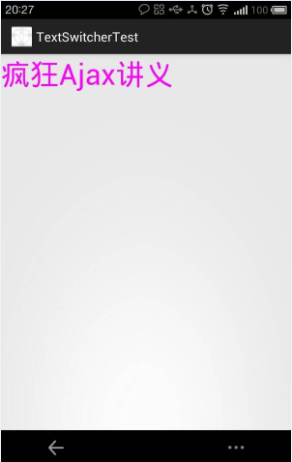
上面的代码重写了ViewFactory的makeView()方法,该方法返回一个TextView,这样即可让TextSwitcher正常工作。当程序要切换TextSwitcher显示文本时,调用TextSwitcher的setText()方法修改文本即可。
运行上面的Activity代码可以考到如下效果:
文本切换器(TextSwitcher)的功能和用法的更多相关文章
- TextSwitcher 文本切换器的功能与用法
TextSwitcher集成了ViewSwitcher, 因此它具有与ViewSwitcher相同的特性:可以在切换View组件时使用动画效果.与ImageSwitcher相似的是,使用TextSwi ...
- 文本切换器(TextSwitcher)的功能与用法
TextSwitcher继承了ViewSwitcher,因此它具有与ViewSwitcher相同的特征:可以在切换View组件时使用动画效果.与ImageSwitcher相似的是,使用TextSwit ...
- TextSwitcher(文本切换器)和ViewFlipper
1.TextSwitcher 使用: 应用分为三步: 1.得到 TextSwitcher 实例对象 TextSwitcher switcher = (TextSwitcher) findViewB ...
- Android 自学之网格试图(GridView)和图片切换器(ImageSwitcher)功能和用法
网格试图(GridView)用于在界面上按行,列分布的方式来显示多个组件. GridView和ListView有共同的父类:AbsListView,因此GridView和ListView具有一定的相似 ...
- Android 自学之画廊视图(Gallery)功能和用法
Gallery与之前讲的Spinner有共同的父类:AbsSpinner,表明Gallery和Spinner都是一个列表框.他们之间的区别在于Spinner显示的是一个垂直的列表框,而Gallery显 ...
- C# 方法调用的切换器 Update 2015.02.02
在编写应用程序时,我们经常要处理这样的一组对象,它们的类型都派生自同一个基类,但又需要为每个不同的子类型应用不同的处理方法. 通常的做法,最简单的就是用很多 if-else 去判断各自的类型,如下面的 ...
- KVM切换器
所谓KVM,就是Keyboard.Video.Mouse的缩写,正式的名称为多计算机切换器.简单的说,就是一组键盘.显示器和鼠标,控制2台.4 台.8台.16台甚至到4096台以上的计算机主机. KV ...
- 搜索框(SearchView)的功能与用法
SearchView是搜索框组件,它可以让用户在文本框内输入汉字,并允许通过监听器监控用户输入,当用户用户输入完成后提交搜索按钮时,也通过监听器执行实际的搜索. 使用SearchView时可以使用如下 ...
- vue2 3d 切换器
空闲时写了一个3d切换器,灵感来自于转行前画3d工程图,效果如图: 功能:按住鼠标中间,变为3d模式,点击6个页面中的某一个页面,页面旋转放大,恢复到2d图形,3d图消失.再次点击鼠标中间,恢复为3d ...
随机推荐
- SDAU课程练习--problemC
题目描述 Here is a famous story in Chinese history. "That was about 2300 years ago. General Tian Ji ...
- 转:Web 测试的创作与调试技术
摘要:学习有关 Visual Studio 2005 Web 测试的更多知识,包括 Web 测试引擎和记录器如何工作,以及如何创建有效的 Web 测试. 本页内容 读者 简介 记录一个 Web 测试 ...
- codeforces 665A Buses Between Cities
简单题 #include<cstdio> #include<cstring> #include<cmath> #include<vector> #inc ...
- [转]Qt5.0 连接 webkit 错误解决
新版的qt5.0把webkit拆分为webkit和webkitwidgets两个部分,所以如果遇到错误: Undefined symbols for architecture x86_64:“QWeb ...
- 英语学习/词典app行业top5简要分析
综述 根据豌豆夹上的下载量如下图所示,我们组确定的国内行业top5分别是:有道词典(黄明帅负责),金山词霸(黄珂锐负责),百度翻译(刘馨负责),百词斩(贾猛负责),英语流利说(亢建强负责)(时间有限, ...
- Struts2--Dynamic Result动态结果集
${r} : 表示配置文件xml可以读取action的valuestack的内容 1. jsp显示文件: <body> 动态结果 一定不要忘了为动态结果的保存值设置set get方法 &l ...
- 轻量级别的Cache和反向代理软件---Varnish
1.Varnish描述 1.1 Varnish的结构与特点 Varnish是一个轻量级别的Cache和反向代理软件,先进的设计理念和成熟的设计框架是Varnish的主要特点: 基于内存进行缓存,重启后 ...
- iOS面向对象的建模:MVC(OC基础)
本文转发至:http://www.cnblogs.com/tmf-4838/p/5294036.html 实例化一个类:从plist文件抽取出类 @interface Person : NSObjec ...
- 方法的标签_With携带
方法中参数的标签: 标签的由来:1.标签也是方法名的一部分:2.为了提高程序的阅读性:OC方法允许我们给每个参数添加一个标签来说明当前参数的含义: 标签的作用:标签是为了标识变量的,因此标签名和变量名 ...
- 转:css中overflow:hidden 不起作用了吗?
css中overflow:hidden 不起作用了吗? 有同学遇到这样的问题,现象是给元素设置了overflow:hidden,但超出容器的部分并没有被隐藏,难道是设置的hidden失效了吗?其实看似 ...