
jquery ajax调用WCF,采用System.ServiceModel.WebHttpBinding
Jquery ajax调用WCF服务
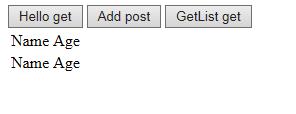
例子效果如下:原界面
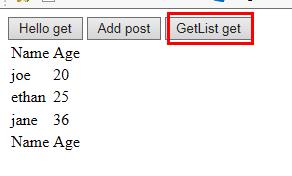
点击按钮GetList get后,通过指定的Url获取数据添加到table
新建一个控制台项目,添加IContract.cs,DBService.cs(为了简单,契约和服务都建在一个项目里面)
一、服务的发布
1、定义 契约接口
using System;

using System.Collections.Generic;

using System.Linq;

using System.Text;

using System.ServiceModel;

using System.ServiceModel.Web;

using System.Data;

namespace IContract //注意:如果命名空间为WCFHost,则在采用配置文件寄宿服务的时候会不认配置文件,不知道为什么

{

    [ServiceContract]

    public interface IContract

    {

        [OperationContract]  //通过post方法调用

        [WebInvoke( RequestFormat = WebMessageFormat.Json, ResponseFormat = WebMessageFormat.Json)]

        double Add(double x, double y);

        [OperationContract]  //通过get方法调用

        [WebGet( RequestFormat = WebMessageFormat.Json, ResponseFormat = WebMessageFormat.Json)]

        string Hello(string mes);

        [OperationContract]  //通过get方法调用

        [WebGet(RequestFormat = WebMessageFormat.Json, ResponseFormat = WebMessageFormat.Json)]

        IList<User> getlist();

    }

    public class User

    {

        public string Name{get;set;}

        public int Age { get; set; }

    }

}
2、服务的实现
using IContract;

using System;

using System.Collections.Generic;

using System.Data;

using System.Linq;

using System.Reflection;

using System.ServiceModel.Activation;

using System.Text;

namespace DBService  //注意:如果命名空间为WCFHost,则在采用配置文件寄宿服务的时候会不认配置文件,不知道为什么

{
    //注意此处一定要设置,为了支持ajax调用

    [AspNetCompatibilityRequirements(RequirementsMode = AspNetCompatibilityRequirementsMode.Allowed)]

    public class DBService:IContract.IContract

    {

        public double Add(double x, double y)

        {

            return x+y;

        }

        public string Hello(string mes)

        {

            return "holle word:" + mes;

        }

        public IList<User> getlist()

        {

            DataTable dt = new DataTable();

            dt.Columns.Add("Name");

            dt.Columns.Add("Age",typeof(System.Int32));

            dt.Rows.Add("joe", "20");

            dt.Rows.Add("ethan", "25");

            dt.Rows.Add("jane", "36");

            IList<User> lst = dt.ToList<User>();

            return lst;

        }

    }

    public static class Extension

    {

        public static IList<T> ToList<T>(this DataTable dt)

        {

            var lst = new List<T>();

            var plist = new List<System.Reflection.PropertyInfo>(typeof(T).GetProperties());

            foreach (DataRow item in dt.Rows)

            {

                T t = System.Activator.CreateInstance<T>();

                for (int i = 0; i < dt.Columns.Count; i++)

                {

                    PropertyInfo info = plist.Find(p => p.Name == dt.Columns[i].ColumnName);

                    if (info != null)

                    {

                        if (!Convert.IsDBNull(item[i]))

                        {

                            info.SetValue(t, item[i], null);

                        }

                    }

                }

                lst.Add(t);

            }

            return lst;

            ///throw new NotImplementedException();

        }

    }

}
3、 启动服务
3.1、方式一:以代码方式发布服务(不使用配置文件),寄宿到控制台程序。
using System;

using System.Collections.Generic;

using System.Linq;

using System.Text;

using System.ServiceModel;

using System.ServiceModel.Web;

using System.ServiceModel.Description;

namespace WCFHost

{

    class Program

    {

        static void Main(string[] args)

        {

            open();

        }

        static void host_Opened(object sender, EventArgs e)

        {

            Console.WriteLine("DBService opened successful");

        }

        //代码方式开启服务,此时要删除配置文件

        static void open()

        {

            //Uri uri = new Uri("http://127.0.0.1:8883/DBServer"); //和下面一句等价

            Uri uri = new Uri("http://localhost:8883/DBServer");

            using (ServiceHost host = new ServiceHost(typeof(DBService.DBService), uri))

            {

                //定义元数据发布方式,此处  通过在服务所在的URL后加“?wsdl”的方式公布WSDL,可直接通过HTTP访问得到。

                System.ServiceModel.Description.ServiceMetadataBehavior behavior = new System.ServiceModel.Description.ServiceMetadataBehavior();

                //此处没有定义mex终结点,必须设置HttpGetEnabled为true,否则客户端无法访问服务

                behavior.HttpGetEnabled = true;

                host.Description.Behaviors.Add(behavior);

                //添加终结点

                ServiceEndpoint endpoint = host.AddServiceEndpoint(typeof(IContract.IContract), new WebHttpBinding(), string.Empty);

                //设置wcf支持ajax调用,仅适用于WebHttpBinding
//System.ServiceModel.Description.WebScriptEnablingBehavior' is only intended for use with WebHttpBinding or similar bindings.
                endpoint.Behaviors.Add(new WebScriptEnablingBehavior());

                host.Opened += host_Opened;

                host.Open();

                Console.ReadLine();

            }

        }

    }

}
3.2、方式二:使用配置文件进行配置,启动服务,寄宿到控制台程序。
新建一个配置文件App.config
<?xml version="1.0" encoding="utf-8" ?>

<configuration>

  <system.serviceModel>

    <!--可不配置-->

    <!--同服务里面的设置[AspNetCompatibilityRequirements(RequirementsMode = AspNetCompatibilityRequirementsMode.Allowed)]-->

    <!--<serviceHostingEnvironment aspNetCompatibilityEnabled="true"></serviceHostingEnvironment>-->

    <behaviors>

      <serviceBehaviors>

        <behavior name="metadataBehavior">

          <serviceMetadata httpGetEnabled="true" />  <!--以wsdl方式发布,因为没有mex终结点,此处必须设置为true,-->

        </behavior>

      </serviceBehaviors>

    <endpointBehaviors>

      <behavior name="endpointbehavior">

        <enableWebScript/>

      </behavior>

    </endpointBehaviors>

    </behaviors>

    <services>

      <!--注意此处name必须与第三步服务的命名空间一致-->

      <service behaviorConfiguration="metadataBehavior" name="DBService.DBService">

        <endpoint address="" binding="webHttpBinding"  contract="IContract.IContract"

                  behaviorConfiguration="endpointbehavior"/>

        <host>

          <baseAddresses>

            <add baseAddress="http://127.0.0.1:8883/DBServer"/>

          </baseAddresses>

        </host>

      </service>

    </services>

  </system.serviceModel>

</configuration>
代码开启服务,寄宿到控制台程序。
using System;

using System.Collections.Generic;

using System.Linq;

using System.Text;

using System.ServiceModel;

using System.ServiceModel.Web;

using System.ServiceModel.Description;

namespace WCFHost

{

    class Program

    {

        static void Main(string[] args)

        {

            StartService();

        }

        private static void StartService()

        {

            try

            {

                ServiceHost host1 = new ServiceHost(typeof(DBService.DBService));

                host1.Opened += host_Opened;

                host1.Open();

                Console.ReadLine();

            }

            catch (Exception e)

            {

                throw e;

            }

        }

        static void host_Opened(object sender, EventArgs e)

        {

            Console.WriteLine("DBService opened successful");

        }

    }

}
二、验证服务是否发布成功
1、F5运行控制台程序,界面显示:DBService opened successful说明服务成功开启。
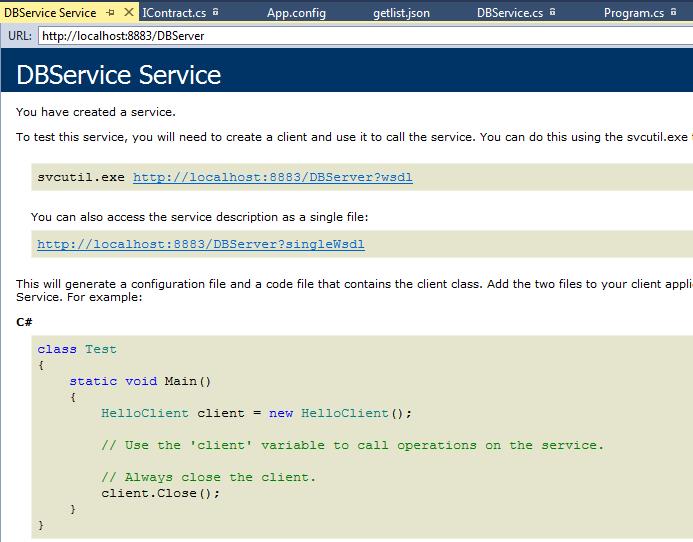
2、在浏览器中输入http://localhost:8883/DBServer,出现如下界面,服务寄宿成功。
3、服务中定义的get方法可以直接通过浏览器验证
3.1、验证不带参数的方法: service地址+方法名称
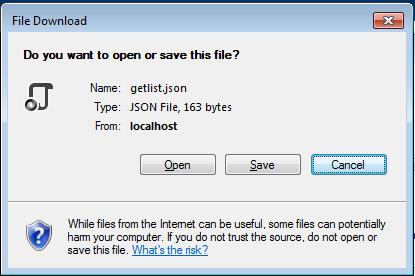
在浏览器输入http://localhost:8883/DBServer/getlist 回车,会出现下面类似的提示

打开后文件内容为:
{"d":[{"__type":"User:#IContract","Age":20,"Name":"joe"},{"__type":"User:#IContract","Age":25,"Name":"ethan"},{"__type":"User:#IContract","Age":36,"Name":"jane"}]}
是 IList<User>的json格式数据。
3.2 带参数的方法,service地址+方法名称 + ? 参数1名称=值 & 参数2名称=值
在浏览器输入http://127.0.0.1:8883/DBServer/hello?mes=nihao
或者:http://127.0.0.1:8883/DBServer/hello?mes=”nihao“
会弹出是否打开or保存json文件,打开后内容为:{"d":"holle word:nihao"}
如果Add也标记为get,那么可以用此地址调用:http://127.0.0.1:8883/DBServer/Add?x=1&y=2
三、jquery调用
1、ajax调用WCF的代码(新建一个empty web项目,添加一个webform,添加文件夹js,添加jquery-1.8.3.min.js文件)
<%@ Page Language="C#" AutoEventWireup="true" CodeBehind="WebForm1.aspx.cs" Inherits="WebAjax.WebForm1" %>

<!DOCTYPE html>

<html xmlns="http://www.w3.org/1999/xhtml">

<head runat="server">

    <title></title>

    <script src="js/jquery-1.8.3.min.js"></script>

    <script>

        //1、Hello

        function Hello() {

            var mes = "ninhao";

            $.ajax({

                type: "get",

                //type: "POST",

                url: "http://localhost:8883/DBServer/hello?mes=" + mes,

                //url: "http://localhost:8883/DBServer/hello",  //post方式时的地址

                dataType: "json",

                //data: '{"mes":"nihao"}',  //post方式是传递的输入参数

                contentType: 'text/json',

                success: function (data) {

                    alert("successful to get data:" + data.d);

                },

                error: function (data) {

                    alert(data.statusText);

                },

            });

        }

        //2、Add

        function Add() {

            $.ajax({

                type: "POST",

                url: "http://localhost:8883/DBServer/Add",

                dataType: "json",

                contentType: 'text/json',

                data: '{"x":1,"y":2}',

                success: function (data) {

                    alert("successful:" + data.d);

                },

                error: function (data) {

                    alert(data.statusText);

                },

            });

        }

        //3、获取用户list,添加到table后面

        function getlist() {

            $.ajax({

                type: "get",

                url: "http://localhost:8883/DBServer/getlist",

                dataType: "json",

                contentType: 'text/json',

                success: function (data) {

                    var html = "";

                    $.each(data.d, function (index, item) {

                        var name = item.Name;

                        var age = item.Age;

                        html += "<tr><td>" + name + "</td><td>" + age + "</td></tr>";

                    });

                    //三种形式等价

                    //$("#mytable").after(html);

                    //$("#mytable tr").eq(0).after(html);

                    $("table tr:eq(0)").after(html);

                },

                error: function (data) {

                    alert(data.statusText);

                },

            });

        }

    </script>

</head>

<body>

    <%--<form id="form1" runat="server">--%>   <%--特别注意此处要注释掉,不然getlist看不到效果,table添加新行后立马就消失了--%>

    <div>

        <button onclick="Hello()">Hello get</button>

        <button onclick="Add()">Add post</button>

        <button onclick="getlist()">GetList get</button>

    </div>

    <table id="mytable">

        <tr>

            <td>Name</td>

            <td>Age</td>

        </tr>

        <tr>

            <td>Name</td>

            <td>Age</td>

        </tr>

    </table>

    <%--</form>--%>

</body>

</html>
四 jQuery调用WCF的要点:
1. 契约方法加属性[WebInvoke(RequestFormat = WebMessageFormat.Json, ResponseFormat = WebMessageFormat.Json, BodyStyle = WebMessageBodyStyle.WrappedRequest)]
2.服务类加属性 [AspNetCompatibilityRequirements(RequirementsMode = AspNetCompatibilityRequirementsMode.Allowed)]
3. binding="webHttpBinding"
4. <enableWebScript/> 或者
     //设置wcf支持ajax调用

     endpoint.Behaviors.Add(new WebScriptEnablingBehavior());
5. contentType: 'text/json'
五、使用System.ServiceModel.WebHttpBinding协议注意点
1、采用System.ServiceModel.WebHttpBinding协议,客户端不需要配置终结点,只需要指定一个Url即可使用ajax方法调用服务。
2、而且采用在客户端添加服务的办法是行不通的,添加服务后不会自动生成终结点配置,用客户端代理调用服务一直提示服务内部错误。
3. host.Open();报错The communication object, System.ServiceModel.ServiceHost, cannot be used for communication because it is in the Faulted state.
必须以管理员身份打开解决方案。
六 源代码
七、参考:
jquery ajax调用WCF,采用System.ServiceModel.WSHttpBinding协议
webHttpBinding、basicHttpBinding和wsHttpBinding区别
jquery ajax调用WCF,采用System.ServiceModel.WebHttpBinding的更多相关文章
- WCF入门教程(四)通过Host代码方式来承载服务 一个WCF使用TCP协议进行通协的例子 jquery ajax调用WCF,采用System.ServiceModel.WebHttpBinding System.ServiceModel.WSHttpBinding协议 学习WCF笔记之二 无废话WCF入门教程一[什么是WCF]
WCF入门教程(四)通过Host代码方式来承载服务 Posted on 2014-05-15 13:03 停留的风 阅读(7681) 评论(0) 编辑 收藏 WCF入门教程(四)通过Host代码方式来 ...
- jquery ajax调用WCF,采用System.ServiceModel.WSHttpBinding协议
采用System.ServiceModel.WSHttpBinding或者basicHttpBinding 协议.客户端就不能直接在前端通过url直接访问服务了 它是基于SOAP协议的bing,会采用 ...
- JQuery Ajax调用WCF实例以及遇到的问题
1.遇到的最多的问题就是跨域问题,这个时间需要我们添加如下代码解决跨域的问题 第一步:在服务类加Attribute [AspNetCompatibilityRequirements(Requireme ...
- Jquery Ajax调用aspx页面方法
Jquery Ajax调用aspx页面方法 在asp.net webform开发中,用jQuery ajax传值一般有几种玩法 1)普通玩法:通过一般处理程序ashx进行处理: 2)高级玩法:通过as ...
- Jquery Ajax调用aspx页面实例
目前,我会的几种asp.net界面与后台代码交互方式有几种: 1.webform+服务器控件交互: 2.webform+jquery+ajax+一般处理程序交互: 3.webform+jquery+a ...
- jquery.ajax请求aspx和ashx的异同 Jquery Ajax调用aspx页面方法
1.jquery.ajax请求aspx 请求aspx的静态方法要注意一下问题: (1)aspx的后台方法必须静态,而且添加webmethod特性 (2)在ajax方法中contentType必须是“a ...
- Jquery ajax调用webservice总结
jquery ajax调用webservice(C#)要注意的几个事项: 1.web.config里需要配置2个地方 <httpHandlers> <remove verb ...
- Jquery Ajax 调用 WebService
原文:http://www.cnblogs.com/andiki/archive/2010/05/17/1737254.html jquery ajax调用webservice(C#)要注意的几个事项 ...
- JQuery ajax调用asp.net的webMethod
本文章转载:http://www.cnblogs.com/zengxiangzhan/archive/2011/01/16/1936938.html 在vs2010中,用JQuery ajax调用as ...
随机推荐
- Informatica 常用组件Expression之二 创建EXP组件
在 Mapping Designer 中选择"转换-创建".选择表达式转换.为它输入一个名称(惯例为 EXP_TransformationName)并单击"确定" ...
- iOS开发-图片查看(ScrollView+UIPageControl)
上周没事写了一个简单的图片查看,上次的查看只用到了一个UIImageView,不断的替换背景图片,实现图片之间的切换.通过ScrollView可以很简单的是实现图片之间的查看,设置setPagingE ...
- WF4.0(3)----变量与参数
已经写了两篇关于WF4.0的博客,算是基础博客,如果是WF比较熟悉就直接跳过吧,如果你对工作流不是很熟悉,或者想了解一下基础的东西,本文还是比较适合你的.工作流中变量,参数,表达式属于数据模型中概念, ...
- hdu 4491 Windmill Animation
A windmill animation works as follows: A two-dimensional set of points, no three of which lie on a l ...
- POJ--2449--Remmarguts' Date【dijkstra_heap+A*】第K短路
链接:http://poj.org/problem?id=2449 题意:告诉你有n个顶点,m条边.并把这些边的信息告诉你:起点.终点.权值.再告诉你s.t.k.需求出s到t的第k短路,没有则输出-1 ...
- GP开发示例:数据库去重
这个例子专业讲解基于ArcEngine使用GP开发的过程及遇到的问题.更多GP使用方法:GP使用心得 功能需求:现在外业第一次数据(简称调绘.mdb)和第二次数据(简称检查.mdb)有重复.第二次是在 ...
- web开发学习之旅
过段时间要去实习,提前问了下老师我要准备哪些知识. 2015年3月19日,老师告诉我的,ionic Framework,Yii Framework,AngularJS,还有一些前端开发知识. 我除了听 ...
- JavaScript 之 parseInt
首先还是从很热门的实例parseInt("09")==0说起. parseInt(numString, [radix])这个函数后面如果不跟第2个参数来表示进制的话,默认是10进制 ...
- wine的使用
ubuntu-ubuntu10.04使用wine安装SourceInsight http://www.cnblogs.com/eddy-he/archive/2012/03/08/ubuntu_win ...
- iOS禁用系统休眠
[UIApplicationsharedApplication].idleTimeDisabled= YES