
005 爬虫(requests与beautifulSoup库的使用)
一:知识点
1.安装requests库

2.Brautiful soup
可以提供一些简单的,python式的函数来处理导航,搜索,修改分析树等功能。
她是一个工具箱,通过解析文档为用户提供需要抓去的数据。
自动将输入文档转换为Unicode编码,输出文档转换为utf-8编码。
现在是使用Beautiful Soup4,不过现在已经被移植到BS4了,即导入需要导入bs4。
3.导入
pip install beautifulsoup4
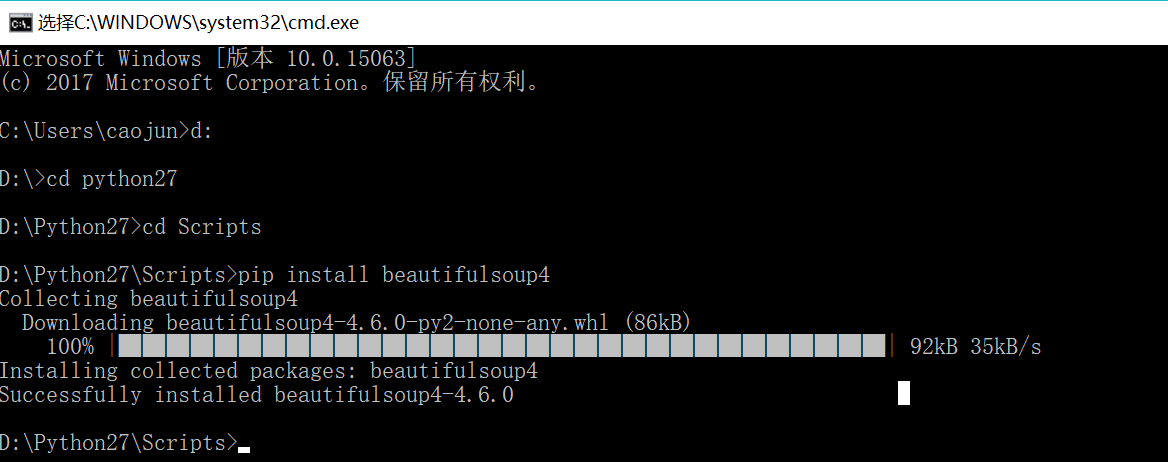
4.创建Beautiful Soup对象
导入bs4库
from bs4 import BeautifulSoup
创建:
soup=BeautifulSoup(html)
5.程序
 import requests

 from bs4 import BeautifulSoup

 r=requests.get("http://www.baidu.com",headers={'User-Agent':'Mozilla/4.0'})

 soup=BeautifulSoup(r.text,"html.parser")

 print soup.prettify()
6.打印soup的内容
print soup.prettify()
7.四大对象种类
Beautiful Soup将复杂的HTML文档转换成一个复杂的树形结构,每个节点都是Python对象,将所有的对象归纳为四种。
BeautifulSoup
Tag
NavigableString
Comment
8.BeautifulSoup
对象表示是一个文档的全部内容,大部分的时候,可以将它当作Tag对象,是一个特殊的Tag,我们可以获取它的类型,名称,以及属性。
soup.name
soup.attrs
9.Tag的使用
找到的是第一个,后面的都没显示。
soup.title.name
soup.title.attrs
soup.meta['content']
soup.meta.get('content')
 import requests

 from bs4 import BeautifulSoup

 r=requests.get("http://www.baidu.com",headers={'User-Agent':'Mozilla/4.0'})

 soup=BeautifulSoup(r.text,"html.parser")

 print soup.title

 print soup.meta
效果:
<title>百度一下,你就知道</title>
<meta content="text/html;charset=utf-8" http-equiv="content-type"/>
10.NavigableString
获取标签内部的文字。
soup.标签名.string
 import requests

 from bs4 import BeautifulSoup

 r=requests.get("http://www.baidu.com",headers={'User-Agent':'Mozilla/4.0'})

 soup=BeautifulSoup(r.text,"html.parser")

 print soup.title.string
效果:
百度一下,你就知道
11.Comment
是一个特殊类型的NavigableString对象,其实输出的内容仍然不包含注释符号。
12.常用方法(过滤)
name
attrs
text
limit
recursive:要不要搜索子孙节点。
13.常用方法
find_all
find
.contents .children
.descendants
.string
.parent
.next_sibling
next_elements .previous_elements
14.程序
 import requests

 from bs4 import BeautifulSoup

 r=requests.get("http://www.baidu.com",headers={'User-Agent':'Mozilla/4.0'})

 soup=BeautifulSoup(r.text,"html.parser")

 print soup.script.parent

 print soup.title.string
二:案例
1.网址
https://movie.douban.com/top250?start=0&filter=
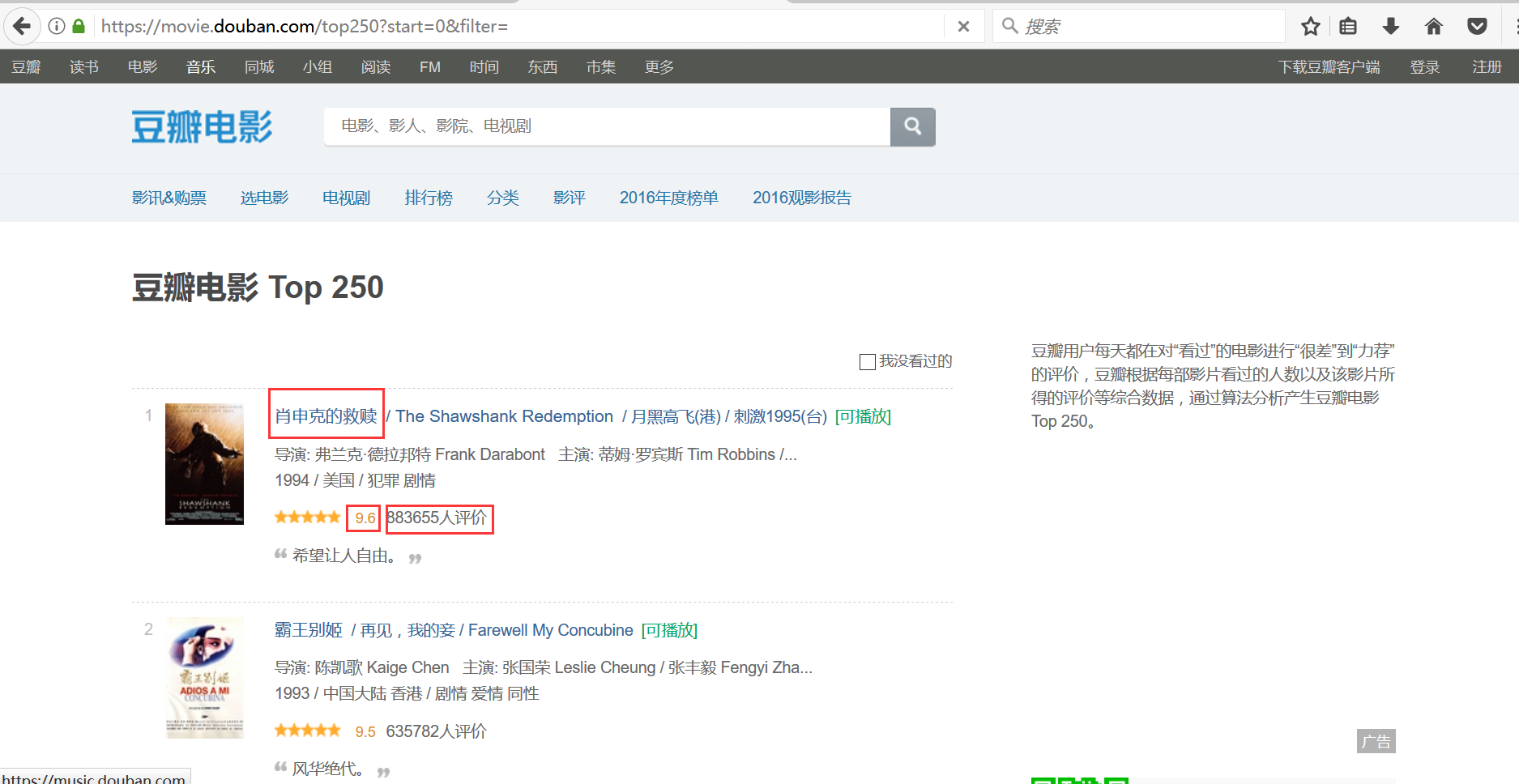
2.程序
 #encoding=utf-8

 import requests

 from bs4 import BeautifulSoup

 import re

 import xlwt

 #创建全局变量,保存电影信息

 dataList=[]

 #根据地址和开始行获取网页的文本内容

 def getHtmlTest(url,startRow):

     #头部筛选函数

     if(startRow==0):

         param={}

     else:

         param={'start':startRow,'filter':''}

     #获取网页

     r=requests.get(url,params=param,headers={'User-Agent':'Mozilla/4.0'})

     return r.text

 #创建函数将传入的文本解析获取所需要的数据

 def getData(html):

     soup=BeautifulSoup(html,'html.parser')

     #获取class为grid_view的ol下面的所有列表

     movieList=soup.find('ol',attrs={'class':'grid_view'})

     #遍历查找内容

     for movieLi in movieList.find_all('li'):

         data=[]

         #获取电影名称

         movieHd=movieLi.find('div',attrs={'class':'hd'})

         movieName=movieHd.find('span',attrs={'class':'title'}).getText()

         data.append(movieName)

         #电影分数

         movieScore=movieLi.find('span',attrs={'class':'rating_num'}).getText()

         data.append(movieScore)

         #电影评价人数

         movieEval=movieLi.find('div',attrs={'class':'star'})

         movieEvalNum=re.findall(r'\d+',str(movieEval))[-1]

         data.append(movieEvalNum)

         #电影评价

         movieQuote=movieLi.find('span',attrs={'class','inq'})

         if(movieQuote):

             data.append(movieQuote.getText())

         else:

             data.append("无影评信息")

         #添加到全局变量中

         dataList.append(data)

     return

 #保存到excel

 def saveData(savePath):

     book=xlwt.Workbook(encoding='utf-8')

     sheet=book.add_sheet('前250名的电影信息')

     col=(u'电影名称',u'电影评分',u'评论人数',u'短评')

     for i in range(0,4):

         sheet.write(0,i,col[i])

     for i in range(0,250):

         data=dataList[i]

         for j in range(0,4):

             sheet.write(i+1,j,data[j])

     book.save(savePath)

     return

 #创建主函数

 def mainFunc():

     url='https://movie.douban.com/top250'

     startRow=0

     while startRow<250:

         html=getHtmlTest(url,startRow)

         getData(html)

         startRow += 25

     saveData('movieData.xls')

     return

 #测试

 mainFunc()
3.效果
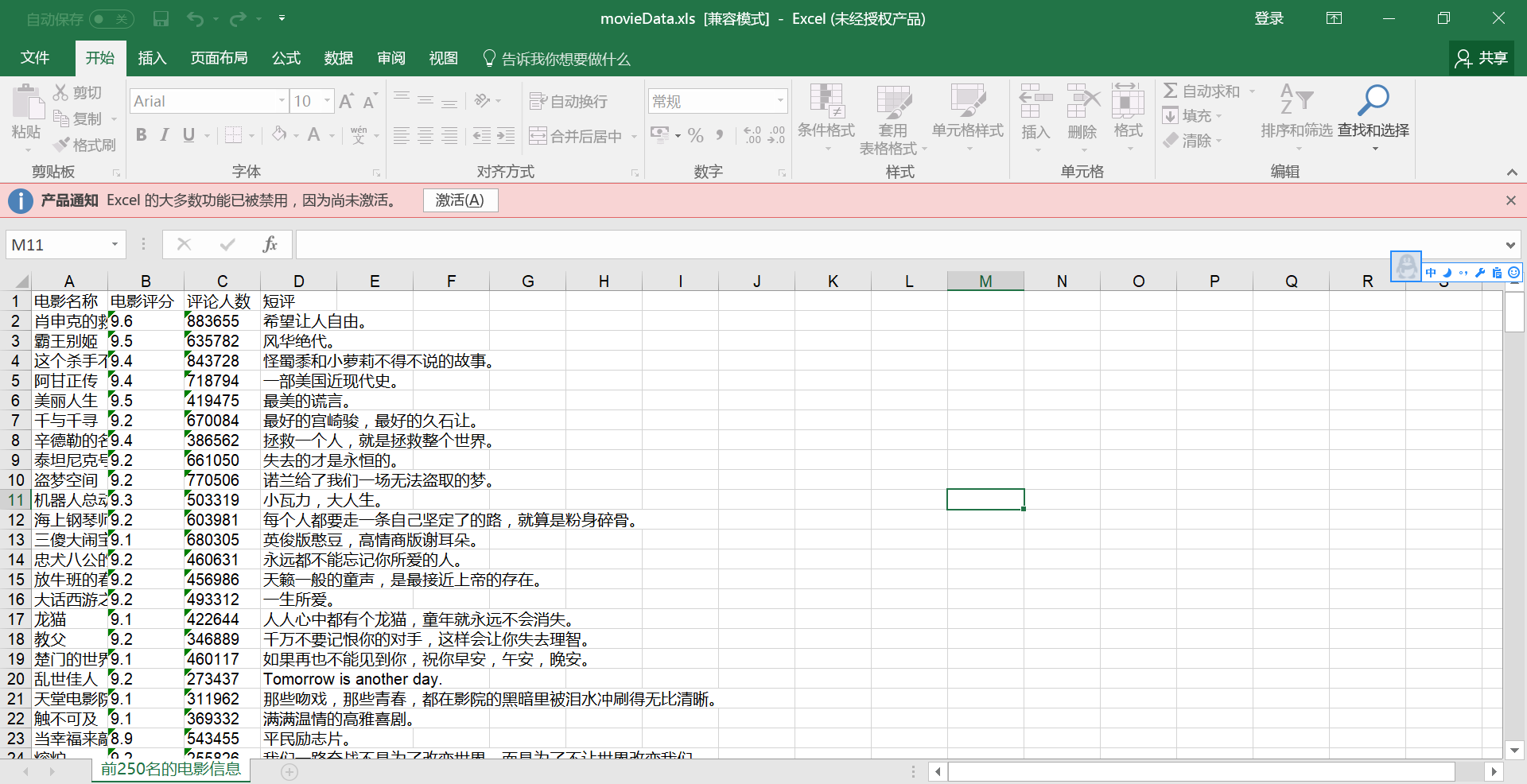
·
005 爬虫(requests与beautifulSoup库的使用)的更多相关文章
- $python爬虫系列(2)—— requests和BeautifulSoup库的基本用法
本文主要介绍python爬虫的两大利器:requests和BeautifulSoup库的基本用法. 1. 安装requests和BeautifulSoup库 可以通过3种方式安装: easy_inst ...
- Python爬虫利器:BeautifulSoup库
Beautiful Soup parses anything you give it, and does the tree traversal stuff for you. BeautifulSoup ...
- PYTHON 爬虫笔记五:BeautifulSoup库基础用法
知识点一:BeautifulSoup库详解及其基本使用方法 什么是BeautifulSoup 灵活又方便的网页解析库,处理高效,支持多种解析器.利用它不用编写正则表达式即可方便实现网页信息的提取库. ...
- 利用python的requests和BeautifulSoup库爬取小说网站内容
1. 什么是Requests? Requests是用Python语言编写的,基于urllib3来改写的,采用Apache2 Licensed 来源协议的HTTP库. 它比urllib更加方便,可以节约 ...
- python爬虫系列(2)—— requests和BeautifulSoup
本文主要介绍python爬虫的两大利器:requests和BeautifulSoup库的基本用法. 1. 安装requests和BeautifulSoup库 可以通过3种方式安装: easy_inst ...
- Python爬虫小白入门(三)BeautifulSoup库
# 一.前言 *** 上一篇演示了如何使用requests模块向网站发送http请求,获取到网页的HTML数据.这篇来演示如何使用BeautifulSoup模块来从HTML文本中提取我们想要的数据. ...
- python 3.x 爬虫基础---常用第三方库(requests,BeautifulSoup4,selenium,lxml )
python 3.x 爬虫基础 python 3.x 爬虫基础---http headers详解 python 3.x 爬虫基础---Urllib详解 python 3.x 爬虫基础---常用第三方库 ...
- 爬虫不过如此(python的Re 、Requests、BeautifulSoup 详细篇)
网络爬虫(又被称为网页蜘蛛,网络机器人,在FOAF社区中间,更经常的称为网页追逐者),是一种按照一定的规则,自动地抓取万维网信息的程序或者脚本. 爬虫的本质就是一段自动抓取互联网信息的程序,从网络获取 ...
- python爬虫学习(一):BeautifulSoup库基础及一般元素提取方法
最近在看爬虫相关的东西,一方面是兴趣,另一方面也是借学习爬虫练习python的使用,推荐一个很好的入门教程:中国大学MOOC的<python网络爬虫与信息提取>,是由北京理工的副教授嵩天老 ...
随机推荐
- 遇到can not resolve app 依赖包的问题
1.第一种解决方式:build->sdkmannger->sdk tool ->安装android support responsitory和google responsitory ...
- spring框架学习(六)AOP事务及spring管理事务方式之Template模板
概念 1.事务 1)事务特性:ACID 原子性 :强调事务的不可分割. 一致性 :事务的执行的前后数据的完整性保持一致. 隔离性 :一个事务执行的过程中,不应该受到其他事务的干扰. 持久性 :事务一旦 ...
- Windows系统环境下Solr之Java实战(三)使用solrJ管理索引库
https://www.cnblogs.com/zhuxiaojie/p/5764680.html https://www.cnblogs.com/xieyupeng/p/9317158.html
- just test css
沃尔沃而 public void Commit() { if (_disposed) throw new InvalidOperationException(); if (_transaction = ...
- IE10下 FormsAuthentication.SetAuthCookie无效的问
问题是这样的,我在本地测试设置身份验证票据都没问题,发布到服务器后访问地址添加了一些特殊的字符,看起来像加过密的,如下: http://www.example.com/(F(1xe9eXIxPzMAL ...
- 微信小程序开发教程(六)配置——app.json、page.json详解
全局配置:app.json 微信小程序的全局配置保存在app.json文件中.开发者通过使用app.json来配置页面文件(pages)的路径.窗口(window)表现.设定网络超时时间值(netwo ...
- php魔术函数 __clone()
原文地址: http://www.nowamagic.net/librarys/posts/php/32 PHP4面向对象功能一个很大的缺点,是将对象视为另一种数据类型,这使得很多常见的OOP方法无法 ...
- 【Tomcat】Tomcat配置与优化(内存、并发、管理)【自己配置】
一.JVM内存配置优化 主要通过以下的几个jvm参数来设置堆内存的: -Xmx512m 最大总堆内存,一般设置为物理内存的1/4 -Xms512m 初始总堆内存,一般将它设置的和最大堆内存一样大,这样 ...
- Spring4笔记5--基于注解的DI(依赖注入)
基于注解的DI(依赖注入): 对于 DI 使用注解,将不再需要在 Spring 配置文件中声明 Bean 实例.只需要在 Spring 配置文件中配置组件扫描器,用于在指定的基本包中扫描注解. < ...
- java 面试算法题
/** * 设有n个人依围成一圈,从第1个人开始报数,数到第m个人出列,然后从 * 出列的下一个人开始报数,数到第m个人又出列,…,如此反复到所有的人全部出列为 * 止.设n个人的编号分别为1,2,… ...