
python学习,使用requests库来模拟登录github,post请求。
这次我们要模拟登录的页面是

首先我们先尝试着登陆一遍分析一下请求,
打开开发者工具下的network选项,
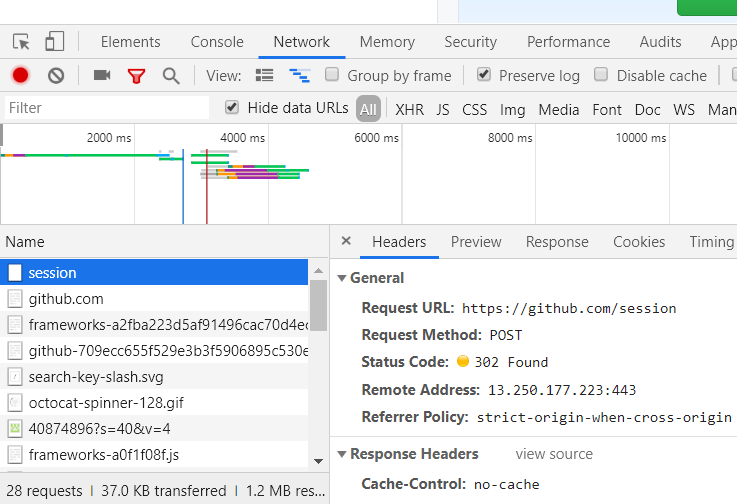
可以很清楚的看到这个会话session,而且是post请求,这多半是我们刚才登录是所发出去的请求,我们往下拉查看form data

这里要注意,这个authenticity_token的值该怎么获取,我们从网页的源代码中查找这个关键字,

发现这个值就在页面中,而且每次刷新之后这个value总是会不断地变化,好,分析完毕后,我们开始构建代码
 import requests

 from bs4 import BeautifulSoup

 import time

 #自己写的,模块化一哈,舒服一哈,2019.5.6  22.22

 #模拟登陆练习,登录github

 class login(object):

     def __init__(self):

         self.headers={

                     'User-Agent':'Mozilla/5.0 (Windows NT 10.0; Win64; x64) AppleWebKit/537.36 (KHTML, like Gecko) Chrome/74.0.3729.131 Safari/537.36'

                 }

         self.first_url='https://github.com/login'

         self.second_url='https://github.com/session'

         self.test_url='https://github.com/?tab=stars' #可以设置成你的个人主页url

         self.session=requests.Session()

     def get_log(self):#这个方法是把token信息解析找到后传递

         html=requests.get(url=self.first_url,headers=self.headers)

         soup=BeautifulSoup(html.text,'lxml')

         tokens=soup.find_all('input',type="hidden")[1]

         at=tokens.attrs['value']

         return at

     def post_log(self,login,password):
       #这是要提交的表单

         data={

                 'commit':'Sign in',

                 'utf8':' ✓',

                 'authenticity_token':self.get_log(),

                 'login':login,

                 'password':password,

                 'webauthn-support':' supported'

             }

         res=self.session.post(url=self.second_url,data=data,headers=self.headers)

         self.test_func()

     def test_func(self):       #这个方法用来模拟登陆后请求我们的个人主页,然后把源码保存到文件里,以此来确定是否模拟登录成功。

         res2=self.session.get(url=self.test_url,headers=self.headers)

         with open('gitstar.html','wb') as f:

             f.write(res2.content)

 if __name__=='__main__':

     jessus=login()

     jessus.post_log('你的用户名','你的密码')
运行一下,我们把保存的html文件打开
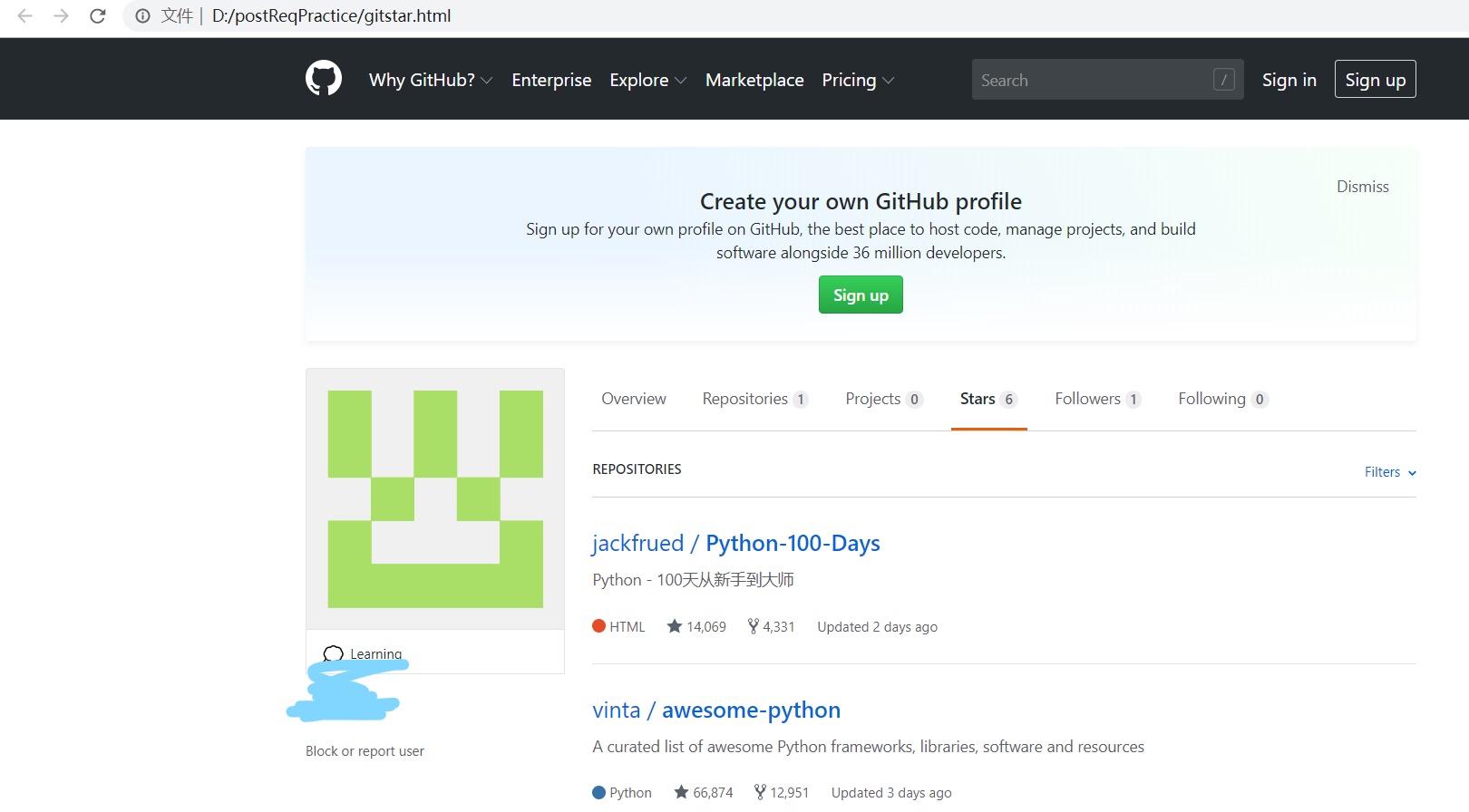
成功了,确实是我们的github主页!
希望能给你提供思路,主要是requests post 请求,还有维持一个会话session很重要,如果你觉得文章还不错,点个赞吧,谢谢!
python学习,使用requests库来模拟登录github,post请求。的更多相关文章
- python学习(23)requests库爬取猫眼电影排行信息
本文介绍如何结合前面讲解的基本知识,采用requests,正则表达式,cookies结合起来,做一次实战,抓取猫眼电影排名信息. 用requests写一个基本的爬虫 排行信息大致如下图 网址链接为ht ...
- [Python] Python 模拟登录,并请求
Python 模拟登录,并请求 # encoding: utf- import requests import socket import time socket.setdefaulttimeout( ...
- Python学习day45-数据库(总结)
figure:last-child { margin-bottom: 0.5rem; } #write ol, #write ul { position: relative; } img { max- ...
- Python学习day42-数据库的基本操作(1)
figure:last-child { margin-bottom: 0.5rem; } #write ol, #write ul { position: relative; } img { max- ...
- Python学习day41-数据库(1)
figure:last-child { margin-bottom: 0.5rem; } #write ol, #write ul { position: relative; } img { max- ...
- python下载安装requests库
一.python下载安装requests库 1.到git下载源码zip源码https://github.com/requests/requests 2.解压到python目录下: 3.“win+R”进 ...
- Python学习day44-数据库(单表及多表查询)
figure:last-child { margin-bottom: 0.5rem; } #write ol, #write ul { position: relative; } img { max- ...
- Python学习day43-数据库(多表关系)
figure:last-child { margin-bottom: 0.5rem; } #write ol, #write ul { position: relative; } img { max- ...
- 使用requests库提交multipart/form-data 格式的请求
前言: Requests是用Python语言编写,基于urllib,采用Apache2 Licensed开源协议的HTTP库.它比urllib更加方便,可以节约我们大量的工作,完全满足HTTP测试需求 ...
随机推荐
- POJ 3734 Blocks 矩阵递推
POJ3734 比较简单的递推题目,只需要记录当前两种颜色均为偶数, 只有一种颜色为偶数 两种颜色都为奇数 三个数量即可,递推方程相信大家可以导出. 最后来个快速幂加速即可. #include< ...
- 杂项:MySQL
ylbtech-杂项:MySQL 1.返回顶部 2.返回顶部 3.返回顶部 4.返回顶部 5.返回顶部 0. https://www.mysql.com/ 1. https://bai ...
- Linux的文件搜索命令(locate ,find,grep,find命令和)
刚开始学Linux,这是关于Linux文件搜索命令,就目前,尽我所能把他写全一点,后期随时补充 文件搜索命令 一.locate命令 二.find命令 三.grep命令 四.find命令和grep命令的 ...
- CSS实现居中的方式
在介绍居中方式之前,简单介绍一下行内元素和块级元素. 行内元素 和其他元素都在同一行 高,行高及外边距和内边距部分可以改变 宽度只与内容有关 行内元素只能容纳文本或者其他行内元素 常用内联元素:a,i ...
- 读懂mysql慢查询日志
我们来看一下如何去读懂这些慢查询日志.在跟踪慢查询日志之前,首先你得保证最少发生过一次慢查询.如果你没有可以自己制造一个:root@server# mysql -e 'SELECT SLEEP(8); ...
- 洛谷 P1037 产生数
题目描述 给出一个整数n(n<10^30)和k个变换规则(k≤15). 规则: 一位数可变换成另一个一位数: 规则的右部不能为零. 例如:n=234.有规则(k=2): 2->53-> ...
- [NOI2004]cashier 郁闷的出纳员
Description OIER公司是一家大型专业化软件公司,有着数以万计的员工.作为一名出纳员,我的任务之一便是统计每位员工的工资.这本来是一份不错的工作,但是令人郁闷的是,我们的老板反复无常,经常 ...
- ZOJ-3960 What Kind of Friends Are You?
What Kind of Friends Are You? Time Limit: 1 Second Memory Limit: 65536 KB Japari Park is a larg ...
- DFS HDU 5305 Friends
题目传送门 /* 题意:每个点都要有偶数条边,且边染色成相同的两部分,问能有多少种染色方法 DFS+剪枝:按照边数来DFS,每种染色数为该点入度的一半,还有如果点不是偶数边就不DFS 这是别人的DFS ...
- 【ZT】在微信上有哪些高情商的说话方式 | M周刊(听语音需要60秒,看文字只需10秒)
https://baijiahao.baidu.com/s?id=1590547145580792217&wfr=spider&for=pc https://yuedu.baidu.c ...