
scikit-learn画ROC图
1.使用sklearn库和matplotlib.pyplot库
import sklearn

import matplotlib.pyplot as plt
2.准备绘图函数的传入参数1.预测的概率值数组2.预测的labels值数组
for i in range(len(y_labeles)):

    a = np.argmax(y_labeles[i])

    y_pred.append(y_conv.eval(feed_dict={x: np.reshape(mnist.test.images[i], [1, 784]),  keep_prob: 0.5}, session=sess)[0][a])

    y_labeles_d1.append(correct_prediction.eval(feed_dict={x: np.reshape(mnist.test.images[i], [1, 784]), y_: np.reshape(y_labeles[i], [1, 10]), keep_prob: 0.5}, session=sess))
3.调用sklearn.metrics.roc_curve();
fpr, tpr, thresholds = sklearn.metrics.roc_curve(y_labeles_d1, y_pred)

plt.plot(fpr, tpr, 'b')#生成ROC曲线

plt.legend(loc='lower right')

plt.plot([0, 1], [0, 1], 'r--')

plt.xlim([0, 1])

plt.ylim([0, 1])

plt.ylabel('TP')

plt.xlabel('FP')

plt.show()
4.例子
import tensorflow as tf

from tensorflow.examples.tutorials.mnist import input_data

import numpy as np

import sklearn

import matplotlib.pyplot as plt

mnist = input_data.read_data_sets('data/', one_hot=True)

def weight_variable(shape, name):

    initial = tf.truncated_normal(shape, stddev=0.1, name=name)

    return tf.Variable(initial)

def bias_variable(shape, name):

    initial = tf.constant(0.1, shape=shape, name=name)

    return tf.Variable(initial)

def conv2d(x, W):

    return tf.nn.conv2d(x, W, strides=[1, 1, 1, 1], padding='SAME')

def max_pool_2x2(x):

    return tf.nn.max_pool(x, ksize=[1, 2, 2, 1], strides=[1, 2, 2, 1], padding='SAME')

x = tf.placeholder(tf.float32, [None, 784])

y_ = tf.placeholder(tf.float32, [None, 10])

x_image = tf.reshape(x, [-1, 28, 28, 1])

W_conv1 = weight_variable([5, 5, 1, 32], name='W_conv1')

b_conv1 = bias_variable([32], name='b_conv1')

h_conv1 = tf.nn.relu(conv2d(x_image, W_conv1) + b_conv1)

h_pool1 = max_pool_2x2(h_conv1)

W_conv2 = weight_variable([5, 5, 32, 64], name='W_conv2')

b_conv2 = bias_variable([64], name='b_conv2')

h_conv2 = tf.nn.relu(conv2d(h_pool1, W_conv2) + b_conv2)

h_pool2 = max_pool_2x2(h_conv2)

W_fc1 = weight_variable([7*7*64, 1024], name='W_fc1')

b_fc1 = bias_variable([1024], name='b_fc1')

h_pool2_flat = tf.reshape(h_pool2, [-1, 7*7*64])

h_fc1 = tf.nn.relu(tf.matmul(h_pool2_flat, W_fc1) + b_fc1)

keep_prob = tf.placeholder(tf.float32)

h_fc1_drop = tf.nn.dropout(h_fc1, keep_prob)

W_fc2 = weight_variable([1024, 10], name='W_fc2')

b_fc2 = bias_variable([10], name='b_fc2')

y_conv = tf.nn.softmax(tf.matmul(h_fc1_drop, W_fc2) + b_fc2)

cross_entropy = tf.reduce_sum(tf.nn.softmax_cross_entropy_with_logits(logits=y_conv, labels=y_))

# cross_entropy = tf.reduce_mean(-tf.reduce_sum(y_ * tf.log(y_conv), reduction_indices=[1]))

train_step = tf.train.AdamOptimizer(1e-4).minimize(cross_entropy)

correct_prediction = tf.equal(tf.argmax(y_conv, 1), tf.argmax(y_, 1))

accuracy = tf.reduce_mean(tf.cast(correct_prediction, tf.float32))

sess = tf.Session()

sess.run(tf.global_variables_initializer())

for i in range(500):

    batch = mnist.train.next_batch(100)

    train_step.run(session=sess, feed_dict={x: batch[0], y_: batch[1], keep_prob: 0.5})

    if i % 500 == 0 and i != 0:

        train_accuracy = accuracy.eval(session=sess, feed_dict={x: batch[0], y_: batch[1], keep_prob: 1.0})

        print('step %d, training accuracy %g' % (i, train_accuracy))

print("!!!!!")

print('test accuracy %g' % accuracy.eval(session=sess, feed_dict={

    x: mnist.test.images, y_: mnist.test.labels, keep_prob: 1.0

}))

saver = tf.train.Saver()

saver.save(sess, './trained_variables.ckpt', global_step=1000)

y_labeles = mnist.test.labels

y_pred = []

y_labeles_d1 = []

for i in range(len(y_labeles)):

    a = np.argmax(y_labeles[i])

    y_pred.append(y_conv.eval(feed_dict={x: np.reshape(mnist.test.images[i], [1, 784]),  keep_prob: 0.5}, session=sess)[0][a])

    y_labeles_d1.append(correct_prediction.eval(feed_dict={x: np.reshape(mnist.test.images[i], [1, 784]), y_: np.reshape(y_labeles[i], [1, 10]), keep_prob: 0.5}, session=sess))

fpr, tpr, thresholds = sklearn.metrics.roc_curve(y_labeles_d1, y_pred)

plt.plot(fpr, tpr, 'b')#生成ROC曲线

plt.legend(loc='lower right')

plt.plot([0, 1], [0, 1], 'r--')

plt.xlim([0, 1])

plt.ylim([0, 1])

plt.ylabel('TP')

plt.xlabel('FP')

plt.show()

# with tf.Session() as sess:

#   new_saver = tf.train.import_meta_graph('my_test_model-1000.meta')

#   new_saver.restore(sess, tf.train.latest_checkpoint('./'))

# print(sess.run(W_conv1))
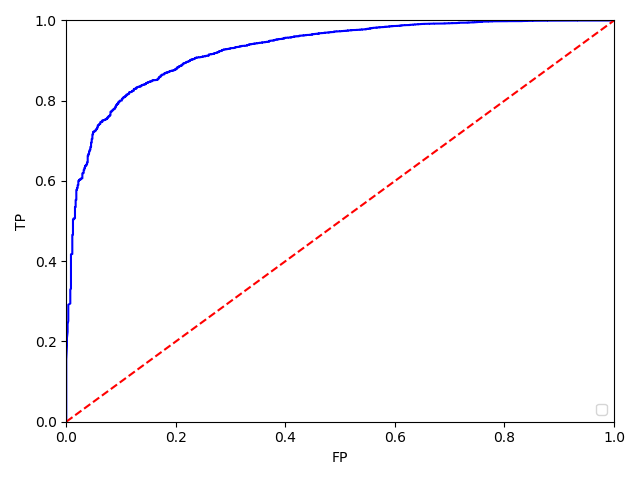
5.效果:
scikit-learn画ROC图的更多相关文章
- (原创)(三)机器学习笔记之Scikit Learn的线性回归模型初探
一.Scikit Learn中使用estimator三部曲 1. 构造estimator 2. 训练模型:fit 3. 利用模型进行预测:predict 二.模型评价 模型训练好后,度量模型拟合效果的 ...
- MATLAB画ROC曲线,及计算AUC值
根据决策值和真实标签画ROC曲线,同时计算AUC的值 步骤: 根据决策值和真实标签画ROC曲线,同时计算AUC的值: 计算算法的决策函数值deci 根据决策函数值deci对真实标签y进行降序排序,得到 ...
- 使用Mysql Workbench 画E-R图
MySQL Workbench 是一款专为MySQL设计的ER/数据库建模工具.你可以用MySQL Workbench设计和创建新的数据库图示,建立数据库文档,以及进行复杂的MySQL 迁移.这里介绍 ...
- 用rose画UML图(用例图,活动图)
用rose画UML图(用例图,活动图) 首先,安装rose2003,电脑从win8升到win10以后,发现win10并不支持rose2003的安装,换了rose2007以后,发现也不可以. 解决途径: ...
- python中matplotlib画折线图实例(坐标轴数字、字符串混搭及标题中文显示)
最近在用python中的matplotlib画折线图,遇到了坐标轴 "数字+刻度" 混合显示.标题中文显示.批量处理等诸多问题.通过学习解决了,来记录下.如有错误或不足之处,望请指 ...
- 相机拍的图,电脑上画的图,word里的文字,电脑屏幕,手机屏幕,相机屏幕显示大小一切的一切都搞明白了!
相机拍的图,电脑上画的图,word里的文字,电脑屏幕,手机屏幕,相机屏幕显示大小一切的一切都搞明白了! 先说图片X×dpi=点数dotX是图片实际尺寸,简单点,我们只算图片的高吧,比如说拍了张图片14 ...
- SAS 画折线图PROC GPLOT
虽然最后做成PPT里的图表会被要求用EXCEL画,但当我们只是在分析的过程中,想看看数据的走势,直接在SAS里画会比EXCEL画便捷的多. 修改起来也会更加的简单,,不用不断的修改程序然后刷新EXCE ...
- Windows8.1画热度图 - 坑
想要的效果 如上是silverlight版本.原理是设定一个调色板,为256的渐变色(存在一个png文件中,宽度为256,高度为1),然后针对要处理的距离矩阵图形,取图片中每个像素的Alpha值作为索 ...
- 使用网站websequencediagrams在线画时序图
在线画时序图的网站:https://www.websequencediagrams.com/ 该网站提供拖拉图形和编写脚本代码2个方式来制作时序图,同时提供多种显示风格. 实例: 1.脚本代码: ti ...
随机推荐
- 谈一谈对MySQL InnoDB的认识及数据库事物处理的隔离级别
介绍: InnoDB引擎是MySQL数据库的一个重要的存储引擎,和其他存储引擎相比,InnoDB引擎的优点是支持兼容ACID的事务(类似于PostgreSQL),以及参数完整性(有外键)等.现在Inn ...
- 09-01 Java final,多态,抽象类,接口
final /* final可以修饰类,方法,变量 特点: final可以修饰类,该类不能被继承. final可以修饰方法,该方法不能被重写.(覆盖,复写) final可以修饰变量,该变量不能被重新赋 ...
- odoo开发笔记 -- 模型一对多tree视图弹窗效果实现
实现效果参考: 1. 开发者模式 -- 设置 -- 工作流 -- 编辑 -- 添加项目 2. 会计模块 -- 管理 -- 付款条款 -- 编辑/创建 实现方式,很简单.只要视图界面写个一对多关联字段就 ...
- Oracle 查看当前数据库版本的方法
常用的有三种方法: 方法一:v$version SQL> select * from v$version; BANNER ---------------------------------- ...
- java.lang.ClassCastException: java.math.BigDecimal cannot be cast to java.lang.String错误的解决方法
mmobjectid是在Oracle数据库中对应的是Number类型的,在JavaBean中定义的是Long类型的. List<BigDecimal> mmobjidAllFromMars ...
- 在商城系统中使用设计模式----策略模式之在spring中使用策略模式
1.前言: 这是策略模式在spring中的使用,对策略模式不了解对同学可以移步在商城中简单对使用策略模式. 2.问题: 在策略模式中,我们创建表示各种策略的对象和一个行为,随着策略对象改变而改变的 c ...
- j2ee高级开发技术课程第四周
分析hello.java,在hello1项目中.下载链接:https://github.com/javaee/tutorial-examples/tree/master/web/jsf/hello1 ...
- Maven3路程(一)环境搭建
好长时间不用Java,今天看了下,Maven集成成主流了,在技术水平与日俱进的同时,感叹下IT行业必须有活到老学到老的精神. 先说下环境: Maven:Maven 3.0.5 解压后路径:F:\Mav ...
- Spring cloud的Maven插件(二):run目标
简介 Spring Boot Maven Plugin插件提供spring boot在maven中的支持.允许你打包可运行的jar包或war包. 插件提供了几个maven目标和Spring Boot ...
- mysql 获取自增主键
MyBatis 3.2.6插入时候获取自增主键方法有二 以MySQL5.5为例: 方法1: <insert id="insert" parameterType="P ...