
nim_duilib(4)之CheckBox
introduction
xml文件添加代码
基于上一篇, 继续向basic.xml中添加下面关于CheckBox的代码。 xml完整源码在文末。
<!--checkbox-->

<VBox>

  <CheckBox class="checkbox_font12" name="checkbox1" text="checkbox1" margin="0,5,0,10" selected="true"/>

  <CheckBox class="checkbox_font12" name="checkbox2" text="checkbox2" margin="0,5,0,10"/>

  <CheckBox class="checkbox_font12" name="checkbox3" text="checkbox3" margin="0,5,0,10"/>

</VBox>
class属性来自global.xml中设置的样式,name是代码中使用该空间用的,text是控件展示的文字,margin从左到右分别是当前控件距左、上、右、下的距离,selected为true,设置为选中状态。 可以调用函数IsSelected获取是否选中。
代码中关联
BasicForm.h
- 打开BasicForm.h,类中添加下面的代码用于关联界面控件。
	// 关联3个checkbox

	ui::CheckBox	*pcb_arr_[count_3];
同时,类中再额外添加两个函数,用于监听CheckBox的选中和反选。
	// checkbox点击处理函数

	bool OnCheckBoxSelected(ui::EventArgs * msg);

	bool OnCheckBoxUnSelected(ui::EventArgs * msg);
BasicForm.cpp
InitWindow函数
- 转到BasicForm.cpp,找到 InitWindow 函数,向其增加下面的代码
void BasicForm::InitWindow()

{

  ......

	// 2.查找界面的3个checkbox控件

	//----------------------------------------------------------------------------------------

	pcb_arr_[0] = dynamic_cast<ui::CheckBox*>(FindControl(L"checkbox1"));

	pcb_arr_[1] = dynamic_cast<ui::CheckBox*>(FindControl(L"checkbox2"));

	pcb_arr_[2] = dynamic_cast<ui::CheckBox*>(FindControl(L"checkbox3"));

	for (auto item : pcb_arr_)

	{

		if (item)

		{

			// 监听选中

			item->AttachSelect(nbase::Bind(&BasicForm::OnCheckBoxSelected, this, std::placeholders::_1));

			// 监听反选

			item->AttachUnSelect(nbase::Bind(&BasicForm::OnCheckBoxUnSelected, this, std::placeholders::_1));

		}

	}

}
OnCheckBoxSelected
函数体代码如下
bool BasicForm::OnCheckBoxSelected(ui::EventArgs * msg)

{

	std::wstring str = msg->pSender->GetName() + std::wstring(L" is selected\n");

	LPCWSTR result = str.c_str();

	OutputDebugString(result);

	return false;

}
OnCheckBoxUnSelected
函数体如下
bool BasicForm::OnCheckBoxUnSelected(ui::EventArgs * msg)

{

	std::wstring str = msg->pSender->GetName() + std::wstring(L" is unselected\n");

	LPCWSTR result = str.c_str();

	OutputDebugString(result);

	return false;

}
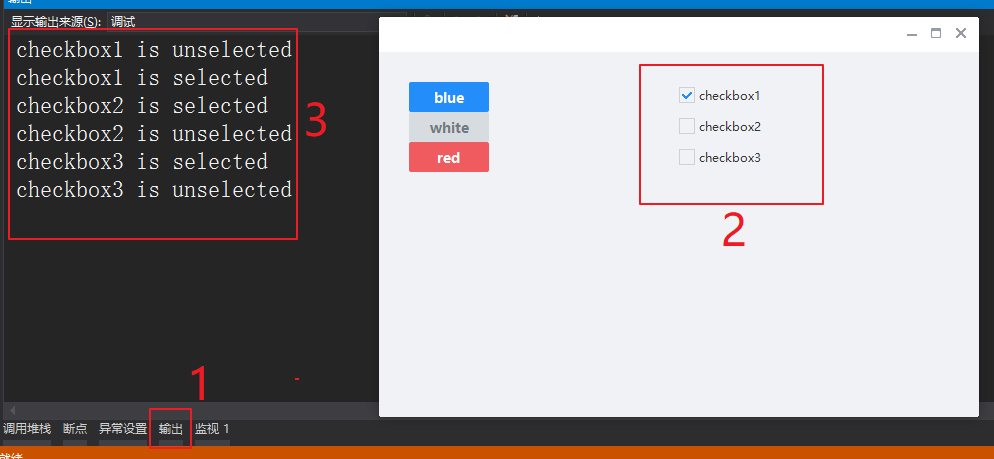
运行结果
当选中checkbox和反选时,VS的输出对话框中将输出我们设置的监听处理结果。
xml完整源码
<?xml version="1.0" encoding="UTF-8"?>

<Window size="600,400" caption="0,0,0,35">

  <VBox bkcolor="bk_wnd_darkcolor">

    <HBox width="stretch" height="35" bkcolor="bk_wnd_lightcolor">

      <Control />

        <Button class="btn_wnd_min" name="minbtn" margin="4,6,0,0" />

        <Box width="21" margin="4,6,0,0">

          <Button class="btn_wnd_max" name="maxbtn"/>

          <Button class="btn_wnd_restore" name="restorebtn" visible="false"/>

        </Box>

      <Button class="btn_wnd_close" name="closebtn" margin="4,6,8,0"/>

    </HBox>

    <!--下面是中间的控件-->

    <VBox padding="30, 30, 30, 30" >

      <HBox>

        <VBox>

          <!-- Buttons -->

          <Button class="btn_global_blue_80x30" name="btn_blue" text="blue" />

          <Button class="btn_global_white_80x30" name="btn_white" text="white"/>

          <Button class="btn_global_red_80x30" name="btn_red" text="red"/>

        </VBox>

        <!--checkbox-->

        <VBox>

          <CheckBox class="checkbox_font12" name="checkbox1" text="checkbox1" margin="0,5,0,10" selected="true"/>

          <CheckBox class="checkbox_font12" name="checkbox2" text="checkbox2" margin="0,5,0,10"/>

          <CheckBox class="checkbox_font12" name="checkbox3" text="checkbox3" margin="0,5,0,10"/>

        </VBox>

      </HBox>

    </VBox> <!--下面是中间的控件 结束-->

  </VBox>

</Window>
nim_duilib(4)之CheckBox的更多相关文章
- nim_duilib(1)之第一个dui executable(including configure setting in vs2017)
before starting clone nim_duilib: https://github.com/netease-im/NIM_Duilib_Framework 迁出github的源码即可. ...
- WPF CheckBox 样式
<Style x:Key="FocusVisual"> <Setter Property="Control.Template"> < ...
- 计算Div标签内Checkbox个数或已被disabled的个数
先看下面的html: 计算div内的checkbox个数:$('#divmod input[type="checkbox"]').length 计算div内checkbox被dis ...
- 前端开发:css技巧,如何设置select、radio 、 checkbox 、file这些不可直接设置的样式 。
前言: 都说程序员有三宝:人傻,钱多,死得早.博主身边的程序“猿”一大半应了这三宝,这从侧面说明了一个问题,只有理性是过不好日子的.朋友们应该把工作与生活分开,让生活变得感性,让工作变得理性,两者相提 ...
- Razor语法中绑定一个值给checkbox
在ASP.NET MVC开发中,需要绑定一个值给checkbox标签,如下面写法,它们运行时是没有问题,照样能跑. 看看上面的语法,在绑定时,它却出现绿浪线.提不绑定的值is not a valid ...
- Checkbox 模板和样式
<Style TargetType="{x:Type CheckBox}"> <Setter Property="FontFamily" Va ...
- RadioButton与CheckBox
笔者长期从事于数据库的开发,算了,不提当年了,因为一直用的是小语种(PowerBuilder),还是来说说这两个最常见的控件吧! RadioButton(单选)和CheckBox(多选) 先来看看继承 ...
- Listview的Item中有CheckBox、Button等的焦点处理
ListView的item布局中有CheckBox.Button等会获取焦点的控件会抢走焦点,造成ListView的item点击事件相应不了. 解决方法:控件设置 android:clickable= ...
- 实现CheckBox的三种选中状态(全选、半选、不选)在GridView中模拟树形的功能
度娘了很多帖子,只说三种状态要用图片替换来做,但没找到有用的例子,被逼自己写了一个 三方控件肯定是很多的,如jstree,可以直接用 由于公司的UDS限制,不能上传图片,只能文字说明了. 就是要在gr ...
随机推荐
- Linux系统的开机启动顺序
Linux系统的开机启动顺序加载BIOS–>读取MBR–>Boot Loader–>加载内核–>用户层init一句inittab文件来设定系统运行的等级(一般3或者5,3是多用 ...
- ggplot2 图例及分页参数
图例: 1 theme(legend.title =element_blank()) 2 guides(fill = guide_legend(title = NULL)) # 去掉图例title 3 ...
- 解决windows 10由于签名原因无法安装ADB driver 的问题
ADB Driver Installer (Automatically) In Windows 8 (8.1) or 10 64-bit you are unable to install unsig ...
- keybd_event模拟键盘按键,mouse_event怎么用
从 模仿UP主,用Python实现一个弹幕控制的直播间! - 蛮三刀酱 - 博客园 (cnblogs.com) 知道了 PyAutoGUI: * Moving the mouse and clicki ...
- A Child's History of England.3
So, Julius Caesar came sailing over to this Island of ours, with eighty vessels and twelve thousand ...
- day09 orm查询优化相关
day09 orm查询优化相关 今日内容概要 orm字段相关补充 orm查询优化相关 orm事务操作 图书管理系统练习 今日内容详细 orm事务操作 """ 事务:ACI ...
- 【vector的输出问题】 洛谷 P1996 约瑟夫问题
题目:P1996 约瑟夫问题 - 洛谷 | 计算机科学教育新生态 (luogu.com.cn) 可恶啊,本来是一道不算难的题,硬是因为cin,cout同步流卡了我一天qwq 关闭cin,cout同步流 ...
- 编程之美Q1
题目 和数书页有点类似,就直接数吧 #include<iostream> using namespace std; class q1 { public: size_t func(size_ ...
- 【Linux】【Basis】【网络】网络相关的内核参数
Linux系统内核设置优化tcp网络,# vi /etc/sysctl.conf,添加以下内容 net.ipv4.tcp_syncookies = 1 表示开启SYN Cookies.当出现SYN等待 ...
- 实现android自动化测试部署与运行Shell脚本分享
我的配置是linux 64, android4.2.2的sdk. 实现的细节都在代码注释里了,变量名以及echo的内容也是说明的一部分. 主流程为: 1.检测是否指定端口的模拟器已经运行,若有则关闭2 ...