
HDFS Balancer负载均衡器
1、背景
当我们的hadoop集群运行了一段时间之后,各个DataNode上的数据分布并不一定是均匀分布的。比如说: 我们向现有集群中添加了一个新的DataNode。

2、什么是平衡
此处是我自己的一个简单的理解
所谓的平衡指的是 每个DataNode的利用率 与 集群的利用率 之间相差不超过给定的阈值百分比。此处的平衡 指的是各个DataNode之间的平衡,同一个DataNode之间的各个磁盘是不会平衡的。
2.1 每个DataNode的利用率计算
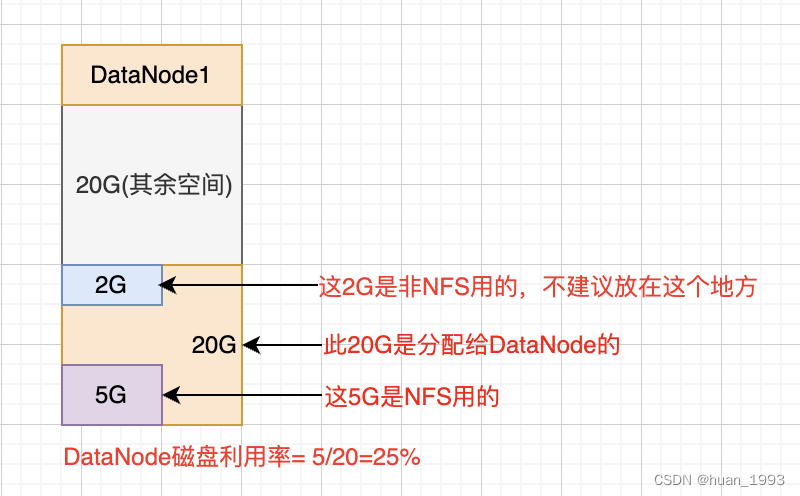
DataNode的利用率= dfs已用的空间 / 分配给dfs的空间。
注意: 分配给dfs的空间 不是磁盘的总空间。
2.2 集群的利用率
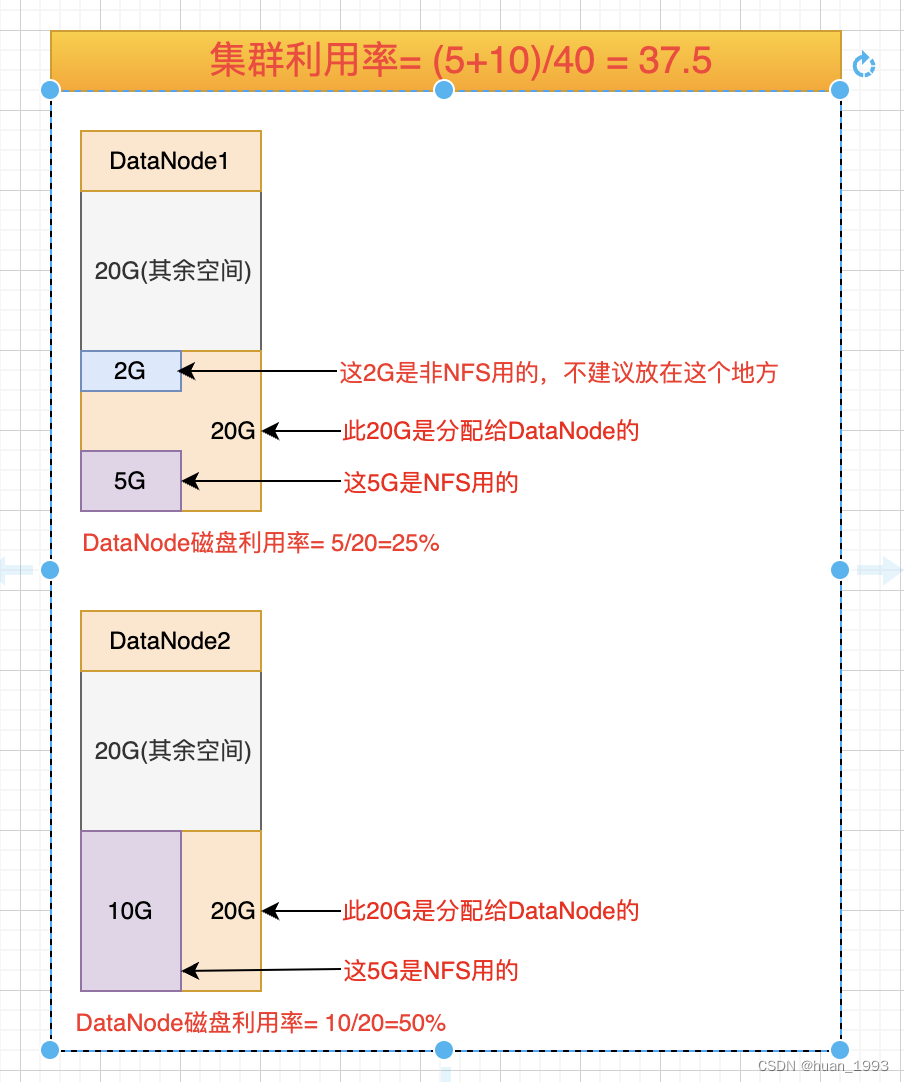
集群的利用率= 各datanode dfs已使用的空间 / 各datanode总空间
2.3 平衡
假设平衡的阈值是 5%,集群的利用率是 37.5,那么每个节点的利用率在32.5%到42.5%之间都认为是均衡的。也就是说,极端情况下,DataNode的利用率最大相差10%。
3、hdfs balancer语法
[hadoopdeploy@hadoop01 ~]$ hdfs balancer --help

Usage: hdfs balancer

	[-policy <policy>]	the balancing policy: datanode or blockpool

	[-threshold <threshold>]	Percentage of disk capacity

	[-exclude [-f <hosts-file> | <comma-separated list of hosts>]]	Excludes the specified datanodes.

	[-include [-f <hosts-file> | <comma-separated list of hosts>]]	Includes only the specified datanodes.

	[-source [-f <hosts-file> | <comma-separated list of hosts>]]	Pick only the specified datanodes as source nodes.

	[-blockpools <comma-separated list of blockpool ids>]	The balancer will only run on blockpools included in this list.

	[-idleiterations <idleiterations>]	Number of consecutive idle iterations (-1 for Infinite) before exit.

	[-runDuringUpgrade]	Whether to run the balancer during an ongoing HDFS upgrade.This is usually not desired since it will not affect used space on over-utilized machines.

	[-asService]	Run as a long running service.

Generic options supported are:

-conf <configuration file>        specify an application configuration file

-D <property=value>               define a value for a given property

-fs <file:///|hdfs://namenode:port> specify default filesystem URL to use, overrides 'fs.defaultFS' property from configurations.

-jt <local|resourcemanager:port>  specify a ResourceManager

-files <file1,...>                specify a comma-separated list of files to be copied to the map reduce cluster

-libjars <jar1,...>               specify a comma-separated list of jar files to be included in the classpath

-archives <archive1,...>          specify a comma-separated list of archives to be unarchived on the compute machines

The general command line syntax is:

command [genericOptions] [commandOptions]
| 参数 | 描述 |
|---|---|
| threshold | 磁盘容量的百分比。默认值为10%,表示上下浮动10%。 |
| policy | 平衡策略。 datanode(默认):当每一个DataNode是平衡的时候,集群就是平衡的。 blockpool:当每一个DataNode中的blockpool是平衡的,集群就是平衡的。 |
| exclude | 不参与平衡的DataNode节点 |
| include | 参与平衡的DataNode节点 |
| source | 仅选取指定的数据节点作为源节点 |
| blockpools | Balancer仅在指定的blockpools中运行 |
| idleiterations | 退出前的连续空闲迭代次数(-1表示无限) |
| -runDuringUpgrade | 是否在正在进行的HDFS升级过程中运行平衡器。通常不需要这样做,因为这不会影响过度使用的计算机上的已用空间。 |
| -asService | 作为长期运行的服务运行 |
4、运行一个简单的balance案例
4.1 设置平衡数据传输带宽
[hadoopdeploy@hadoop01 ~]$ hdfs dfsadmin  -setBalancerBandwidth 10485760

Balancer bandwidth is set to 10485760

[hadoopdeploy@hadoop01 ~]$
当我们的集群负载需要调低这个值,当我们的集群负载较低时,可以适当调高这个值。
4.2 执行banalce
[hadoopdeploy@hadoop01 ~]$ hdfs balancer -policy datanode -threshold 5

2023-03-26 14:10:09,785 INFO balancer.Balancer: Using a threshold of 5.0

2023-03-26 14:10:09,786 INFO balancer.Balancer: namenodes  = [hdfs://hadoop01:8020]

2023-03-26 14:10:09,786 INFO balancer.Balancer: parameters = Balancer.BalancerParameters [BalancingPolicy.Node, threshold = 5.0, max idle iteration = 5, #excluded nodes = 0, #included nodes = 0, #source nodes = 0, #blockpools = 0, run during upgrade = false]

2023-03-26 14:10:09,786 INFO balancer.Balancer: included nodes = []

2023-03-26 14:10:09,786 INFO balancer.Balancer: excluded nodes = []

2023-03-26 14:10:09,786 INFO balancer.Balancer: source nodes = []

Time Stamp               Iteration#  Bytes Already Moved  Bytes Left To Move  Bytes Being Moved  NameNode

2023-03-26 14:10:09,787 INFO balancer.NameNodeConnector: getBlocks calls for hdfs://hadoop01:8020 will be rate-limited to 20 per second

2023-03-26 14:10:10,392 INFO balancer.Balancer: dfs.namenode.get-blocks.max-qps = 20 (default=20)

2023-03-26 14:10:10,392 INFO balancer.Balancer: dfs.balancer.movedWinWidth = 5400000 (default=5400000)

2023-03-26 14:10:10,392 INFO balancer.Balancer: dfs.balancer.moverThreads = 1000 (default=1000)

2023-03-26 14:10:10,392 INFO balancer.Balancer: dfs.balancer.dispatcherThreads = 200 (default=200)

2023-03-26 14:10:10,392 INFO balancer.Balancer: dfs.balancer.getBlocks.size = 2147483648 (default=2147483648)

2023-03-26 14:10:10,392 INFO balancer.Balancer: dfs.balancer.getBlocks.min-block-size = 10485760 (default=10485760)

2023-03-26 14:10:10,392 INFO balancer.Balancer: dfs.datanode.balance.max.concurrent.moves = 100 (default=100)

2023-03-26 14:10:10,392 INFO balancer.Balancer: dfs.datanode.balance.bandwidthPerSec = 104857600 (default=104857600)

2023-03-26 14:10:10,395 INFO balancer.Balancer: dfs.balancer.max-size-to-move = 10737418240 (default=10737418240)

2023-03-26 14:10:10,395 INFO balancer.Balancer: dfs.blocksize = 134217728 (default=134217728)

2023-03-26 14:10:10,401 INFO net.NetworkTopology: Adding a new node: /default-rack/192.168.121.141:9866

2023-03-26 14:10:10,401 INFO net.NetworkTopology: Adding a new node: /default-rack/192.168.121.140:9866

2023-03-26 14:10:10,401 INFO net.NetworkTopology: Adding a new node: /default-rack/192.168.121.142:9866

2023-03-26 14:10:10,402 INFO balancer.Balancer: 0 over-utilized: []

2023-03-26 14:10:10,402 INFO balancer.Balancer: 0 underutilized: []

2023-3-26 14:10:10                0                  0 B                 0 B                0 B                  0  hdfs://hadoop01:8020

The cluster is balanced. Exiting...

2023-3-26 14:10:10       Balancing took 810.0 milliseconds

[hadoopdeploy@hadoop01 ~]$
5、参考文档
1、https://hadoop.apache.org/docs/current/hadoop-project-dist/hadoop-hdfs/HdfsUserGuide.html#Balancer
2、https://help.aliyun.com/document_detail/449686.html
HDFS Balancer负载均衡器的更多相关文章
- Hadoop记录-HDFS balancer配置
HDFS balancer配置(可通过CM配置)dfs.datanode.balance.max.concurrent.moves 并行移动的block数量,默认5 dfs.datanode.bala ...
- sudo -u hdfs hdfs balancer出现异常 No lease on /system/balancer.id
16/06/02 20:34:05 INFO balancer.Balancer: namenodes = [hdfs://dlhtHadoop101:8022, hdfs://dlhtHadoop1 ...
- 【转】HADOOP HDFS BALANCER介绍及经验总结
转自:http://www.aboutyun.com/thread-7354-1-1.html 集群平衡介绍 Hadoop的HDFS集群非常容易出现机器与机器之间磁盘利用率不平衡的情况,比如集群中添加 ...
- 【转载】漫谈HADOOP HDFS BALANCER
Hadoop的HDFS集群非常容易出现机器与机器之间磁盘利用率不平衡的情况,比如集群中添加新的数据节点.当HDFS出现不平衡状况的时候,将引发很多问题,比如MR程序无法很好地利用本地计算的优势,机器之 ...
- HADOOP HDFS BALANCER介绍及经验总结(转)
1.集群执行balancer命令,依旧不平衡的原因是什么?该如何解决? 2.尽量不在NameNode上执行start-balancer.sh的原因是什么? 集群平衡介绍 Hadoop的HDFS集群非常 ...
- CDH版HDFS Block Balancer方法
命令: sudo -u hdfs hdfs balancer 默认会检查每个datanode的磁盘使用情况,对磁盘使用超过整个集群10%的datanode移动block到其他datanode达到均衡作 ...
- HDFS 上传文件的不平衡,Balancer问题是过慢
至HDFS上传文件.假定从datanode开始上传文件,上传的数据将导致目前的当务之急是全datanode圆盘.这是一个分布式程序的执行是非常不利. 解决方案: 1.从其他非datanode节点上传 ...
- 【转载】HDFS 上传文件不均衡和Balancer太慢的问题
向HDFS上传文件,如果是从某个datanode开始上传文件,会导致上传的数据优先写满当前datanode的磁盘,这对于运行分布式程序是非常不利的. 解决的办法: 1.从其他非datanode节点上传 ...
- hdfs的balancer
参考: https://blog.csdn.net/mnasd/article/details/80369603 在CDH中选一个资源多的节点,安装 HDFS->添加角色到实例 启动后状态是灰的 ...
- Azure PowerShell (8) 使用PowerShell设置Azure负载均衡器规则
<Windows Azure Platform 系列文章目录> 注意:如果Azure面对的客户只是企业级客户,企业级客户使用NAT设备访问Internet的话,因为多个客户端使用相同的So ...
随机推荐
- 一键跳转组件所在的文件与具体行数,提升排查效率,分享几个 React Developer Tools 使用小技巧
壹 ❀ 引 React Developer Tools对于很多开发同学可能就是一个检查组件props传递对不对的工具,但事实上它的功能比我们想象的强大.比如我们日常排查问题,常常会遇到想知道某个页面某 ...
- VueRouter导航守卫
VueRouter导航守卫 vue-router提供的导航守卫主要用来通过跳转或取消的方式守卫导航,简单来说导航守卫就是路由跳转过程中的一些钩子函数,路由跳转是一个大的过程,这个大的过程分为跳转前中后 ...
- Js获取数据类型
Js获取数据类型 JavaScript有着七种基本类型String.Number.Boolean.Null.Undefined.Symbol.Object,前六种为基本数据类型,Object为引用类型 ...
- Js的GC机制
Js的GC机制 在Js七种基本类型中的引用类型Object的变量其占据内存空间大且大小不固定,在堆内存中实际存储对象,在栈内存中存储对象的指针,对于对象的访问是按引用访问的.在栈区中执行的变量等是通过 ...
- spring boot使用拦截器修改请求URL
假如我要将请求路径中/foobar都去掉? 1.定义拦截器 package com.laoxu.test.helloweb; import org.springframework.stereotype ...
- nmap top N端口获取
使用nmap 扫描时可能会扫描tcp top100 top1000 端口, 有时需要去配置文件提取,配置文件路径/usr/share/nmap/nmap-services, 具体根据实际安装情况调整: ...
- Vulnhub内网渗透DC-6靶场通关
个人博客 xzajyjs.cn IP DC-6: 192.168.168.4 Kali: 192.168.168.5 信息搜集 arp-scan -l # nmap -sn 192.168.168.0 ...
- 项目实战:Qt+Arm+Fpga医疗肾镜(又名内窥镜)(实时影像、冻结、拍照、白平衡、九宫格、录像、背光调整、硬件光源调整、光源手动自动调整、物理按键)
若该文为原创文章,转载请注明原文出处本文章博客地址:https://blog.csdn.net/qq21497936/article/details/111241205长期持续带来更多项目与技术分享, ...
- 鸿蒙开发学习(二)之ArkUI
目录 UI开发 布局 布局选择 布局位置 组件 容器组件 row.column RelativeContainer 列表 Tabs 子组件 页面路由 GitHub地址,欢迎star HmDemo: 鸿 ...
- 服务网关ZUUL过滤器
过滤器两个功能: 1.其中路由功能负责将外部请求转发到具体的微服务实例上,是实现外部访问统一入口的基础: 2.过滤器功能则负责对请求的处理过程进行预干预,是实现请求校验.服务聚合等功能的基础. 有4类 ...