
【原创】大数据基础之Ambari(2)通过Ambari部署ElasticSearch(ELK)
ambari2.7.3(hdp3.1) 安装 elasticsearch6.3.2
ambari的hdp中原生不支持elasticsearch安装,下面介绍如何通过mpack方式使ambari支持elasticsearch安装:
一 安装Service
1 下载
Mpack include version 6.3.2 of ElasticSearch, Logstash, Kibana, FileBeat, and MetricBeat
# wget https://community.hortonworks.com/storage/attachments/87416-elasticsearch-mpack-2600-9.tar.gz
2 安装mpack
# ambari-server install-mpack --mpack=/path/to/87416-elasticsearch-mpack-2600-9.tar.gz --verbose
3 重启ambari-server
# ambari-server restart
访问ambari页面发现services中并没有elasticsearch,检查mpack.json发现问题:
/var/lib/ambari-server/resources/mpacks/elasticsearch-ambari.mpack-6.3.2/mpack.json
{
"service_name" : "ELASTICSEARCH",
"service_version" : "6.3.2",
"applicable_stacks" : [
{
"stack_name" : "HDP",
"stack_version" : "2.3"
},
{
"stack_name" : "HDP",
"stack_version" : "2.4"
},
{
"stack_name" : "HDP",
"stack_version" : "2.5"
},
{
"stack_name" : "HDP",
"stack_version" : "2.6"
}
]
}
applicable_stacks表明service只应用到hdp2.3-2.6版本,没有3.1,手工加上;
mpack详细结构详见:https://cwiki.apache.org/confluence/display/AMBARI/Management+Packs
要注意直接修改mpack.json然后重启ambari-server不管用,需要重新install mpack:
1 卸载
ambari-server uninstall-mpack --mpack-name=elasticsearch-ambari.mpack
2 修改mpack.json并重新打包
elasticsearch_mpack-2.6.0.0-9.tar.gz
3 安装mpack(同上)
4 重启ambari-server(同上)
这时就可以在页面上看到ElasticSearch, Logstash, Kibana, FileBeat, and MetricBeat
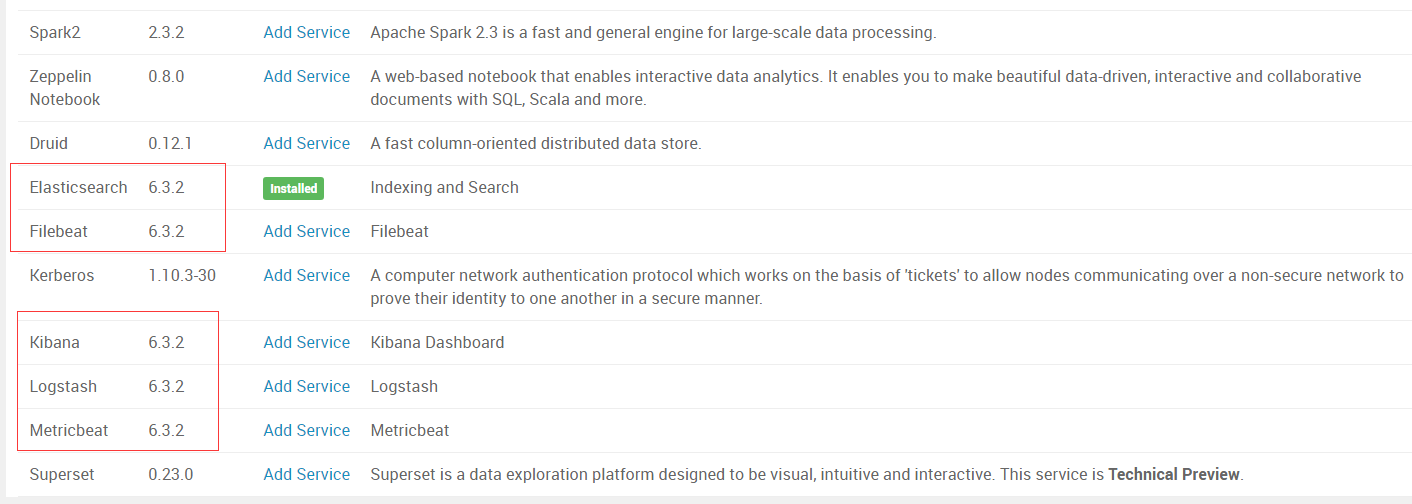
二 部署ElasticSearch
下面开始部署ElasticSearch,发现报错:
Traceback (most recent call last):
File "/var/lib/ambari-agent/cache/stack-hooks/before-ANY/scripts/hook.py", line 38, in <module>
BeforeAnyHook().execute()
File "/usr/lib/ambari-agent/lib/resource_management/libraries/script/script.py", line 352, in execute
method(env)
File "/var/lib/ambari-agent/cache/stack-hooks/before-ANY/scripts/hook.py", line 31, in hook
setup_users()
File "/var/lib/ambari-agent/cache/stack-hooks/before-ANY/scripts/shared_initialization.py", line 50, in setup_users
groups = params.user_to_groups_dict[user],
KeyError: u'elasticsearch'
Error: Error: Unable to run the custom hook script ['/usr/bin/python', '/var/lib/ambari-agent/cache/stack-hooks/before-ANY/scripts/hook.py', 'ANY', '/var/lib/ambari-agent/data/command-303.json', '/var/lib/ambari-agent/cache/stack-hooks/before-ANY', '/var/lib/ambari-agent/data/structured-out-303.json', 'INFO', '/var/lib/ambari-agent/tmp', 'PROTOCOL_TLSv1_2', '']
跟进报错的代码:
/var/lib/ambari-agent/cache/stack-hooks/before-ANY/scripts/shared_initialization.py
     35   should_create_users_and_groups = False

     36   if params.host_sys_prepped:

     37     should_create_users_and_groups = not params.sysprep_skip_create_users_and_groups

     38   else:

     39     should_create_users_and_groups = not params.ignore_groupsusers_create

     40

     41   if should_create_users_and_groups:

     42     for group in params.group_list:

     43       Group(group,

     44       )

     45

     46     for user in params.user_list:

     47       User(user,

     48            uid = get_uid(user) if params.override_uid == "true" else None,

     49            gid = params.user_to_gid_dict[user],

     50            groups = params.user_to_groups_dict[user],

     51            fetch_nonlocal_groups = params.fetch_nonlocal_groups,

     52            )
这时需要将配置ignore_groupsusers_create打开,查看和修改配置有两种方式:
1 命令行
# cd /var/lib/ambari-server/resources/scripts
# python configs.py -u admin -p admin -n $cluster_name -l $ambari_server -t 8080 -a get -c cluster-env |grep -i ignore_groupsusers_create
"ignore_groupsusers_create": "false",
# python configs.py -u admin -p admin -n $cluster_name -l $ambari_server -t 8080 -a set -c cluster-env -k ignore_groupsusers_create -v true
详细参数详见
# python configs.py --help
2 rest api
curl --user admin:admin -i -H 'X-Requested-By: ambari' -X GET "http://ambari.server:8080/api/v1/clusters/$cluster_name/configurations?type=cluster-env"
从返回的items中找到tag,然后再请求(增加tag参数):
curl --user admin:admin -i -H 'X-Requested-By: ambari' -X GET "http://ambari.server:8080/api/v1/clusters/$cluster_name/configurations?type=cluster-env&tag=$tag"
返回结果中包含所有的property
"properties" : {
"agent_mounts_ignore_list" : "",
"alerts_repeat_tolerance" : "1",
"enable_external_ranger" : "false",
"fetch_nonlocal_groups" : "true",
"hide_yarn_memory_widget" : "false",
"ignore_bad_mounts" : "false",
"ignore_groupsusers_create" : "false",
修改需要先将上面的配置保存到一个文件,比如/tmp/configurations.tmp,然后修改,然后再调用接口:
curl --user admin:admin -i -H 'X-Requested-By: ambari' -X PUT -d @/tmp/configurations.tmp http://ambari.server:8080/api/v1/clusters/$cluster_name
然后再部署即可;
三 启动ElasticSearch
启动elasticsearch,报错:
1)
File "/usr/lib/ambari-agent/lib/resource_management/libraries/script/config_dictionary.py", line 73, in __getattr__
raise Fail("Configuration parameter '" + self.name + "' was not found in configurations dictionary!")
resource_management.core.exceptions.Fail: Configuration parameter 'java_home' was not found in configurations dictionary!
需要返回ambari的elasticsearch config页面,将java_home修改为实际的java home路径:
# JAVA_HOME must be provided here for OS that use systemd service launch
JAVA_HOME={{java64_home}}
2)
File "/var/lib/ambari-agent/cache/common-services/ELASTICSEARCH/6.3.2/package/templates/elasticsearch.slave.yaml.j2", line 85, in top-level template code
gateway.expected_data_nodes: {{ expected_data_nodes }}
File "/usr/lib/ambari-agent/lib/resource_management/libraries/script/config_dictionary.py", line 73, in __getattr__
raise Fail("Configuration parameter '" + self.name + "' was not found in configurations dictionary!")
resource_management.core.exceptions.Fail: Configuration parameter 'hostname' was not found in configurations dictionary!
查看报错的文件
/var/lib/ambari-agent/cache/common-services/ELASTICSEARCH/6.3.2/package/templates/elasticsearch.slave.yaml.j2
/var/lib/ambari-agent/cache/common-services/ELASTICSEARCH/6.3.2/package/templates/elasticsearch.master.yaml.j2
发现报错的这行,是因为hostname没有赋值导致,直接去掉这行
node.name: {{ hostname }}
在ambari-server端对应的模板文件为:
# grep hostname /var/lib/ambari-server/resources/common-services/ELASTICSEARCH/6.3.2/package/templates/elasticsearch*
/var/lib/ambari-server/resources/common-services/ELASTICSEARCH/6.3.2/package/templates/elasticsearch.master.yaml.j2:node.name: {{ hostname }}
/var/lib/ambari-server/resources/common-services/ELASTICSEARCH/6.3.2/package/templates/elasticsearch.master.yaml.j2.5.6.2: name: {{hostname}}
/var/lib/ambari-server/resources/common-services/ELASTICSEARCH/6.3.2/package/templates/elasticsearch.slave.yaml.j2:node.name: {{ hostname }}
/var/lib/ambari-server/resources/common-services/ELASTICSEARCH/6.3.2/package/templates/elasticsearch.slave.yaml.j2.5.6.2: name: {{hostname}}
然后可以启动成功:

参考:
https://community.hortonworks.com/articles/215078/how-to-install-elk-stack-632-in-ambari.html
https://community.hortonworks.com/questions/212871/add-custom-service-via-ambari-error.html
https://community.hortonworks.com/articles/63557/how-to-edit-the-cluster-envxml-entries-using-ambar.html
【原创】大数据基础之Ambari(2)通过Ambari部署ElasticSearch(ELK)的更多相关文章
- 大数据基础环境--jdk1.8环境安装部署
1.环境说明 1.1.机器配置说明 本次集群环境为三台linux系统机器,具体信息如下: 主机名称 IP地址 操作系统 hadoop1 10.0.0.20 CentOS Linux release 7 ...
- 【原创】大数据基础之Zookeeper(2)源代码解析
核心枚举 public enum ServerState { LOOKING, FOLLOWING, LEADING, OBSERVING; } zookeeper服务器状态:刚启动LOOKING,f ...
- 【原创】大数据基础之Ambari(1)简介、编译安装、使用
官方:http://ambari.apache.org/ The Apache Ambari project is aimed at making Hadoop management simpler ...
- 【原创】大数据基础之Impala(1)简介、安装、使用
impala2.12 官方:http://impala.apache.org/ 一 简介 Apache Impala is the open source, native analytic datab ...
- 【原创】大数据基础之词频统计Word Count
对文件进行词频统计,是一个大数据领域的hello word级别的应用,来看下实现有多简单: 1 Linux单机处理 egrep -o "\b[[:alpha:]]+\b" test ...
- 【原创】大数据基础之Benchmark(2)TPC-DS
tpc 官方:http://www.tpc.org/ 一 简介 The TPC is a non-profit corporation founded to define transaction pr ...
- 大数据基础知识问答----hadoop篇
handoop相关知识点 1.Hadoop是什么? Hadoop是一个由Apache基金会所开发的分布式系统基础架构.用户可以在不了解分布式底层细节的情况下,开发分布式程序.充分利用集群的威力进行高速 ...
- 大数据基础知识:分布式计算、服务器集群[zz]
大数据中的数据量非常巨大,达到了PB级别.而且这庞大的数据之中,不仅仅包括结构化数据(如数字.符号等数据),还包括非结构化数据(如文本.图像.声音.视频等数据).这使得大数据的存储,管理和处理很难利用 ...
- 大数据基础知识问答----spark篇,大数据生态圈
Spark相关知识点 1.Spark基础知识 1.Spark是什么? UCBerkeley AMPlab所开源的类HadoopMapReduce的通用的并行计算框架 dfsSpark基于mapredu ...
随机推荐
- .Net Core应用框架Util介绍(五)
上篇简要介绍了Util在Angular Ts方面的封装情况,本文介绍Angular封装的另一个部分,即Html的封装. 标准组件与业务组件 对于管理后台这样的表单系统,你通常会使用Angular Ma ...
- HTTP常见错误返回状态代码
当⽤用户试图通过HTTP或FTP协议访问⼀一台运⾏行行主机上的内容时,Web服务器器返回⼀一个表示该请求的状态的数字代码.该状态代码记录在服务器器⽇日志中,同时也可能在Web 浏览器器或 FTP客户端 ...
- css清除默认样式,stylus学习
reset.css html, body, div, span, applet, object, iframe, h1, h2, h3, h4, h5, h6, p, blockquote, pre, ...
- poj2778(AC自动机+矩阵快速幂)
题意:给你n个字符串,问你长度为m的字符串且字符串中不含有那n个子串的字符串的数量 解题思路:这道题一开始就不太懂,还以为是组合数学的题目,后面看了别人的博客,才知道这是属于AC自动机的另一种用法,是 ...
- jsp篇 之 Jsp中的内置对象和范围对象
Jsp中的内置对象: 在jsp页面代码中不需要声明,直接可以使用的对象. 一共有[9个内置对象]可以直接使用. 对象类型 名字 PageContext pageC ...
- hdu 5536 Chip Factory (01 Trie)
链接:http://acm.hdu.edu.cn/showproblem.php?pid=5536 题面; Chip Factory Time Limit: 18000/9000 MS (Java/O ...
- 【BZOJ5499】[2019省队联测]春节十二响(贪心)
[BZOJ5499][2019省队联测]春节十二响(贪心) 题面 BZOJ 洛谷 题解 如果是一条折链,显然维护两侧的值,每次两个堆分别弹出一个\(max\)然后合并一下,最后再放回去就可以了. 那么 ...
- Linux常用硬盘分区工具简介
1.fdisk 查看当前硬盘分区: [root@yqtrack-zabbix /]# fdisk -l 2.cfdisk 查看当前硬盘分区: 3.sfdisk 查看当前分区: 4.parted 查看当 ...
- TypeScript体系调研报告
作者简介:aoto 蚂蚁金服·数据体验技术团队 Q:为什么要写这边文章?这篇文章要表达什么? A:我们考虑在SPA应用中使用TS作为开发语言,我们需要一篇系统性介绍TS本身及周边的文章来论证在项目中使 ...
- C#图片操作公共库
存一下,以后找起来方便 包括图片加载.压缩.base64等 public static class ImageFun { #region 图片 public static EncoderParamet ...