
十三.spring-boot使用spring-boot-thymeleaf
thymeleaf 比如freemaker的要高,thymeleaf是一个支持html原型的自然引擎,它在html 标签增加额外的属性来达到模板+数据的展示方式,由于 浏览器解释html时,忽略未定义的标签属性,因此thym eleaf的模板可以静态运行。
由于thymeleaf在内存缓存解析后的模板,解析后的模板 是基于tree的dom节点树,因此thymeleaf适用于一般 的web页面,不适合基于数据的xml。
thymeleaf 的context,即提供数据的地方,基于web 的context,即WebContext相对context增加 param,s ession,application变量,并且自动将request atttribu tes添加到context variable map,可以在模板直接访 问。
在模板处理前,thymeleaf还会增加一个变量execInf o,例:${execInfo.templateName},${execInfo.n ow}等。
数据访问模式: ${...},变量引用模式,例:${myBean.propert y},如果用springDialect,则使用的是spring EL,如 果不用spring,则用的ognl。
1、*{...},选择表达式,一般是th:object之后,直接取ob ject中的属性。当没有选取对象时,其功能等同${...},
2、* {firstName}也等同于${#object.firstName},#obje ct代表当前选择的对象。
3、@{...}链接url的表达式。th:href="@{/xxx/aa.do(I d=${o.id})",会自动进行urlencoding的处 理。
4、@{...}内部可以是需要计算的表达式,比如: th:href=”@{'/details/'+${user.login}(orderI d=${o.id})}"
后续我会补上thymeleaf 指令的是用法…
一、创建maven web project

二、编写测试类
1、新建一个sysuser类
package com.example.entry;

public class SysUser  {

    private Long id;

    private String name;

    private String Phone;

    public SysUser() {

    }

    public SysUser(Long id, String name, String phone) {

        this.id = id;

        this.name = name;

        Phone = phone;

    }

    public Long getId() {

        return id;

    }

    public void setId(Long id) {

        this.id = id;

    }

    public String getName() {

        return name;

    }

    public void setName(String name) {

        this.name = name;

    }

    public String getPhone() {

        return Phone;

    }

    public void setPhone(String phone) {

        Phone = phone;

    }

    @Override

    public String toString() {

        return "SysUser [id=" + id + ", name=" + name + ", Phone=" + Phone + "]";

    }

}
2、编写SysUserController类 :这里需要注意倒入的包
package com.example.controller;

import java.util.ArrayList;

import java.util.List;

import org.springframework.stereotype.Controller;

import org.springframework.ui.Model;

import org.springframework.web.bind.annotation.RequestMapping;

import org.springframework.web.bind.annotation.RestController;

import org.springframework.web.servlet.ModelAndView;

import com.example.entry.SysUser;

@Controller

@RequestMapping("sysUser")

public class SysUserController {

    @RequestMapping("index")

    public String index(Model m) {

        List<SysUser> sysUserList = new ArrayList<SysUser>();

        SysUser u1 = new SysUser(11L, "AAAAA", "123456");

        SysUser u2 = new SysUser(22L, "BBBBB", "123456");

        SysUser u3 = new SysUser(33L, "CCCCC", "123456");

        sysUserList.add(u1);

        sysUserList.add(u2);

        sysUserList.add(u3);

        m.addAttribute("sysUserList", sysUserList);

        m.addAttribute("message", sysUserList.hashCode());

        return "SysUser/list";

    }

}
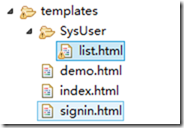
3、加入html文件 :这里使用的是bootstrap-3.3.7
<html xmlns:th="http://www.thymeleaf.org"

    xmlns:layout="http://www.ultraq.net.nz/web/thymeleaf/layout">

<head>

<meta content="text/html;charset=utf-8"></meta>

<meta name="viewport" content="width=device-width, initial-scale=1"></meta>

<script sec="../jquery-2.1.1/jquery.min.js"></script>

<link rel="stylesheet" href="../bootstrap-3.3.7/dist/css/bootstrap.min.css"></link>

<script sec="../bootstrap-3.3.7/dist/js/bootstrap.min.js"></script>

<title>用户</title>

</head>

<body>

    <div class="container">

        <table class="table">

            <div th:if="${message!=null}">

                <caption th:text="${message}"></caption>

            </div>

            <thead>

                <tr>

                    <th>First Name</th>

                    <th>Last Name</th>

                    <th>User Name</th>

                </tr>

            </thead>

            <tbody>

                <tr>

                    <td>aehyok</td>

                    <td>leo</td>

                    <td>@aehyok</td>

                </tr>

                <tr>

                    <td>lynn</td>

                    <td>thl</td>

                    <td>@lynn</td>

                </tr>

            </tbody>

            <tbody th:each="SysUser:${sysUserList}">

                <tr>

                    <td th:text="${SysUser.id}"></td>

                    <td th:text="${SysUser.name}"></td>

                    <td th:text="${SysUser.Phone}"></td>

                </tr>

            </tbody>

        </table>

    </div>

</body>

</html>
4、配置application.properties支持thymeleaf
spring.thymeleaf.suffix=.html

spring.thymeleaf.content-type=text/html

# set to false for hot refresh

spring.thymeleaf.cache=false

spring.resources.chain.strategy.content.enabled=true

spring.resources.chain.strategy.content.paths=/**
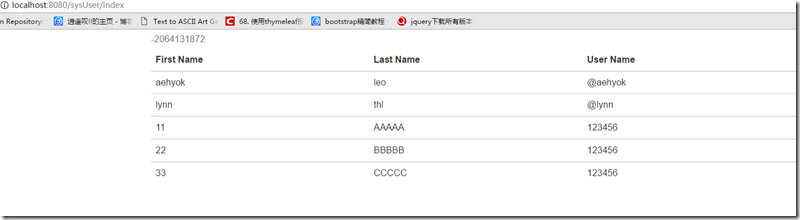
5、测试访问
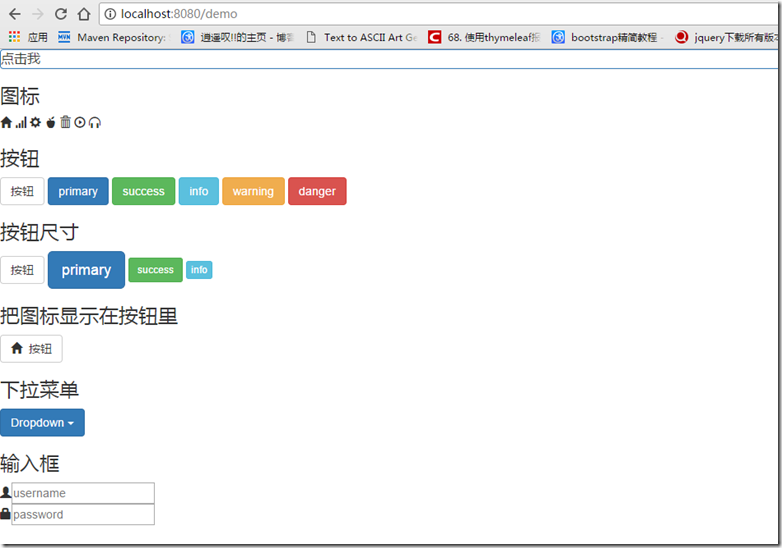
6、访问view层
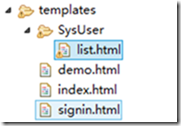
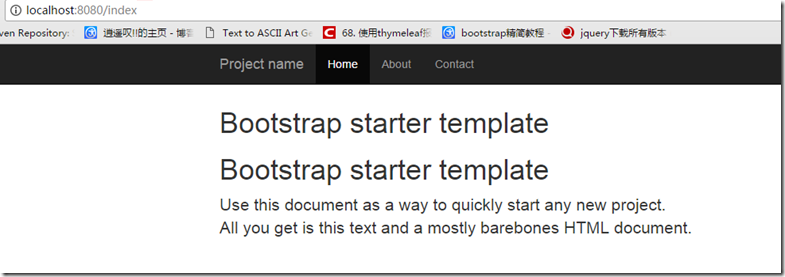
默认响应的view是的路径是templates这个目录
package com.example.controller;

import org.springframework.beans.factory.annotation.Autowired;

import org.springframework.stereotype.Controller;

import org.springframework.web.bind.annotation.ModelAttribute;

import org.springframework.web.bind.annotation.RequestMapping;

import org.springframework.web.servlet.ModelAndView;

import org.springframework.web.servlet.resource.ResourceUrlProvider;

@Controller

public class HelloController {

    @Autowired

    ResourceUrlProvider resourceUrlProvider;

    @RequestMapping("index")

    public ModelAndView index() {

        ModelAndView mv = new ModelAndView("index");

        return mv;

    }

    @RequestMapping("demo")

    public ModelAndView demo() {

        ModelAndView mv = new ModelAndView("demo");

        return mv;

    }

    @RequestMapping("signin")

    public ModelAndView signin() {

        ModelAndView mv = new ModelAndView("signin");

        return mv;

    }

}

十三.spring-boot使用spring-boot-thymeleaf的更多相关文章
- Spring boot(三)整合mybaties+thymeleaf实现基础crud
工程结构: 首先在pom文件中引入依赖 <?xml version="1.0" encoding="UTF-8"?> <project xml ...
- Spring Boot学习记录(二)--thymeleaf模板 - CSDN博客
==他的博客应该不错,没有细看 Spring Boot学习记录(二)--thymeleaf模板 - CSDN博客 http://blog.csdn.net/u012706811/article/det ...
- Spring Boot 2.0 整合Thymeleaf 模板引擎
本节将和大家一起实战Spring Boot 2.0 和thymeleaf 模板引擎 1. 创建项目 2. 使用Spring Initlizr 快速创建Spring Boot 应用程序 3. 填写项目配 ...
- Spring Boot + MyBatis + Druid + Redis + Thymeleaf 整合小结
Spring Boot + MyBatis + Druid + Redis + Thymeleaf 整合小结 这两天闲着没事想利用**Spring Boot**加上阿里的开源数据连接池**Druid* ...
- 在Spring MVC和Spring Boot中使用thymeleaf模板
Spring MVC: POM: <!-- thymeleaf模板 --> <!-- https://mvnrepository.com/artifact/org.thymeleaf ...
- 9、Spring Boot 2.x 集成 Thymeleaf
1.9 Spring Boot 2.x 集成 Thymeleaf 完整源码: Spring-Boot-Demos 1.9.1 在pom中引入依赖 <dependency> <grou ...
- Spring Boot 2.x教程-Thymeleaf 原理是什么
layout: post title: Spring Boot 2.x教程-Thymeleaf 原理是什么 categories: SpringBoot description: Spring Boo ...
- Spring Boot WebFlux-04——WebFlux 整合 Thymeleaf
第04课:WebFlux 整合 Thymeleaf 上一篇介绍的是用 MongoDB 来实现 WebFlux 对数据源的操作,那么有了数据需要渲染到前台给用户展示,这就是本文关心的 View 层,Vi ...
- Spring boot 整合spring Data JPA+Spring Security+Thymeleaf框架(上)
近期上班太忙所以耽搁了给大家分享实战springboot 框架的使用. 以下是spring boot 整合多个框架的使用. 首先是准备工作要做好. 第一 导入框架所需的包,我们用的事maven 进行 ...
- 一:Spring Boot、Spring Cloud
上次写了一篇文章叫Spring Cloud在国内中小型公司能用起来吗?介绍了Spring Cloud是否能在中小公司使用起来,这篇文章是它的姊妹篇.其实我们在这条路上已经走了一年多,从16年初到现在. ...
随机推荐
- 用JavaScript简单判断浏览器类型
判断浏览器类型 /** * 判断浏览器类型 * 返回表示浏览器类型的字符串 */ function whoIsMe(){ var explorer = navigator.userAgent; if( ...
- Hive SQL 常用日期
Hive SQL 常用日期 原文地址:Hive SQL常用日期函数 Hive SQL 常用日期 注意: MM DD MO TU等要大写 已知日期 要求日期 语句 结果 本周任意一天 本周一 selec ...
- Python 什么是ORM?
关系映射 性能比源生sql效率略差一些 操作性更简单,快捷 Django的orm和sqlalchamy 区别 sqlalchamy没有django的功能全,不支持双下划线的连表跨表操作 sqlalch ...
- python webpy 框架环境架设
前几年使用过 webpy做个些小东西,今天有个东西从拾webpy.但是基本上都忘记了,还是那句古话“好记性不如烂笔头”.这里把相应的步骤梳理下. 前提: 操作系统 windows 一.webpy 方面 ...
- nodejs调试基础【转载】
nodejs调试基础[转载] 看到了一片不错的文章: 作者:前端求生之路 链接:nodejs调试基础[转载]
- 封装ajax支持get、post
为什么要封装ajax,因为…… for(var i=0;i<20;i++){ $.ajax(……) } 的时候,整个页面都卡死了,于是,我开始找答案. 后来,找到了,就是jquery的ajax属 ...
- FZU 2297 Number theory【线段树/单点更新/思维】
Given a integers x = 1, you have to apply Q (Q ≤ 100000) operations: Multiply, Divide. Input First l ...
- LBP,LBP-TOP的MATLAB公开代码
http://www.cse.oulu.fi/CMV/Downloads http://www.cse.oulu.fi/wsgi/CMV/Downloads/LBPMatlab
- 洛谷——P1292 倒酒
P1292 倒酒 题目描述 Winy是一家酒吧的老板,他的酒吧提供两种体积的啤酒,a ml和b ml,分别使用容积为a ml和b ml的酒杯来装载. 酒吧的生意并不好.Winy发现酒鬼们都非常穷.有时 ...
- CSS排版常用值指南
高对比度是确保网页阅读无障碍的关键,但也往往会被过分强调. 白底黑子会让打断文本显得过分密集,反而影响可读性. 文字颜色 3b4348 链接颜色 235ea7 衬线字体 font-family: &q ...