
send_keys报错element not interactable
这两天要在阿里云日志中操作UI,以输入关键字搜索日志。
在send_keys时报错element not interactable。
iframe
第一个问题是iframe,通过切换iframe解决:
driver.switch_to.frame(0) # 索引从0开始
span
第二个问题是span。
F12查看html长这样:

①find_element(pre).click 有效,说明iframe切换成功了
②find_element(span2).send_keys报错
element not interactable
span不支持send_keys。
第一个方法,通过调js来解决,设置span的innerText
search_text = 'error'

log_search_span = driver.find_element_by_xpath(

        '//*[@id="queryEl"]/div[2]/div/div[6]/div[1]/div/div/div/div[5]/div/pre')

js = 'arguments[0].innerText=arguments[1];'

driver.execute_script(js, log_search_span, search_text)
第二个方法,添加属性contenteditable
search_text = 'error'

log_search_span = driver.find_element_by_xpath(

        '//*[@id="queryEl"]/div[2]/div/div[6]/div[1]/div/div/div/div[5]/div/pre')

js = 'arguments[0].setAttribute("contenteditable", "true");'

driver.execute_script(js, log_search_span)

log_search_span.send_keys(search_text)  # 可编辑后send_keys成功
不简单
虽然值设置成功了,但是不能用,在查询时,还是用空值在查询。
经过分析,得出以下线索:
- 设置的元素值是已经生成后的dom
- 程序真正的dom隐藏在js/后端中
- span是由js或后端动态生成的
- 要想模拟出来,需要分析js实现代码
- 控制台的js代码是加密混淆过的
- selenium的send_keys已经是模拟键盘输入了,不知道为啥没有触发相关代码,存值到dom
网上很多的方案是<input>标签,比较好解决,阿里的这个span还真有点不简单。
chrome console调试js
最后分享一下chrome console调试js的方法。
F12后,在元素上右键,选择Copy selector,复制selector
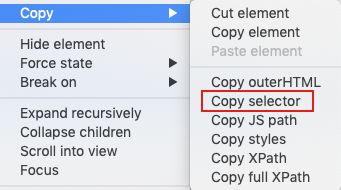
切换到console,输入即可定位到该元素:
document.querySelector('#queryEl > div.react-codemirror2 > div > div.CodeMirror-scroll > div.CodeMirror-sizer > div > div > div > div.CodeMirror-code > div > pre > span > span').innerText;
send_keys报错element not interactable的更多相关文章
- selenium报错Element is not clickable at point及四种解决方法
使用Selenium时,触发点击事件,经常报如下异常:Element is not clickable at point 1.未加载没加载出来就等待元素加载出来,再往下执行.可以使用python库ti ...
- 使用饿了么ui表单验证报错: [Element Warn][Form]model is required for validat
[Element Warn][Form]model is required for validat 如文末的完整例子: 该提示说的是 form表单需要一个绑定一个 对象(使用:model=" ...
- ReactJs 报错 Element type is invalid: expected a string (from built-in components) or a class/function (for composite components) but got: undefined. Check the render method of `Me`.
今天在重构一个页面的时候,碰到了一个error,具体的error信息如下图中所示: 最后经过一番查找定位,终于找到了问题所在,原因就是在父组件引用子组件时多加了一个大括号. import {Chart ...
- appium报错Message: Cannot set the element to ‘XXXX’. Did you interact with the correct element?
appium+python+android 在定位到模块输入内容的时候遇到了一个问题 send_keys报错 appium报错Message: Cannot set the element to 'X ...
- 解决eclipse spring配置报错:cvc-elt.1: Cannot find the declaration of element
解决eclipse spring配置报错:cvc-elt.1: Cannot find the declaration of element 'beans'.Referenced file conta ...
- web.xml文件报错:cvc-complex-type.2.4.a: Invalid content was found starting with element 'init-param'.
<?xml version="1.0" encoding="UTF-8"?> <web-app version="3.0" ...
- select2取值报错,Failed to read the 'selectionDirection' property from 'HTMLInputElement': The input element's type ('hidden') does not support selection.
用到了 select2 组件来多选收件人,用搜狗浏览器(6.2版高速模式)在执行到如下这句时报错(Uncaught InvalidStateError: Failed to read the 'sel ...
- 关于xpath语句完全正确,但是页面报错: no such element: Unable to locate element: {"method":"xpath","selector":"xpath"}
之前使用selenium-webdriver来写UI的自动化脚本,发现有一个元素一直无法定位,查看其源码,如下 利用xpathChecker验证了xpath语句的是正确的,但是控制台一直报错: no ...
- jQuery配合html2canvas 使用时 报错 Uncaught (in promise) Provided element is not within a Document
报错代码: 这个函数运行时 function download(){ var element = $("#demo"); //jquery 获取元素 //这里将会报错 html2c ...
随机推荐
- shell ## %% 变量内容的删除、替代和替换
这个写的很清楚: https://www.cnblogs.com/zhaosunwei/p/6831529.html 自己的理解:以后补充 从前向后删除 # 符合替换字符的“最短的”那个 ## 符合替 ...
- 精简Docker镜像的几个方法
一.使用更精简的镜像 常用的Linux系统镜像一般有 Debian.Ubuntu.CentOS和Alpine,其中Alpine是面向安全的轻量级Linux发行版本.Docker的Alpine镜像仅有不 ...
- java File I/O
File类: 常用方法: boolean exists( ):判断文件或目录是否存在 boolean isFile( ):判断是否是文件 boolean isDirectory( ):判断是否是目录 ...
- 用其他音乐源帮帮网易云,Ubuntu听歌利器
镜像文章 1.用其他音乐源帮帮网易云,Android听歌利器 2.用其他音乐源帮帮网易云,Windows听歌利器 众所周知,国内只有网易云推出了Linux的客户端,在Listen 1并不十分好用的基础 ...
- 用swith语句来键入一个整数输出对应是星期几
基本格式:switch(表达式) { //基本数据类型可以接收byte,short,char,int 引用数据类型可以接收枚举(JDK1.5)String字符串(JDK1.7) case 值1: 语句 ...
- kubernetes容器集群部署Flannel网络
Overlay Network:覆盖网络,在基础网络上叠加的一种虚拟网络技术模式,该网络中的主机通过虚拟链路连接起来. VXLAN:将源数据包封装到UDP中,并使用基础网络的IP/MAC作为外层报文头 ...
- DOM查询的其他方法
document.body 保存的是body的引用 documen.documentElement 保存的是html根标签 document.all 代表页面中所有的元素 getElementsByC ...
- IMU预积分
https://www.sohu.com/a/242760307_715754 http://www.sohu.com/a/243155537_715754 https://www.sohu.com/ ...
- #Ubuntu16.0.4 LTS 安装RabbitMQ
1.ubuntu下安装配置rabbitmq-server服务器环境:ubuntu16.0.4(向下兼容14.0.4)软件版本:RabbitMQ 3.7.5 .Erlang 20.1.7参考文档:htt ...
- Android 编译笔记20191205
gradle下载很慢 解决问题的方法如下: 使用文件管理器 打开用户主目录 windows平台: c:\Users\用户名\.gradle macos平台: /Users/用户名/.gradle li ...