
vue 的动画
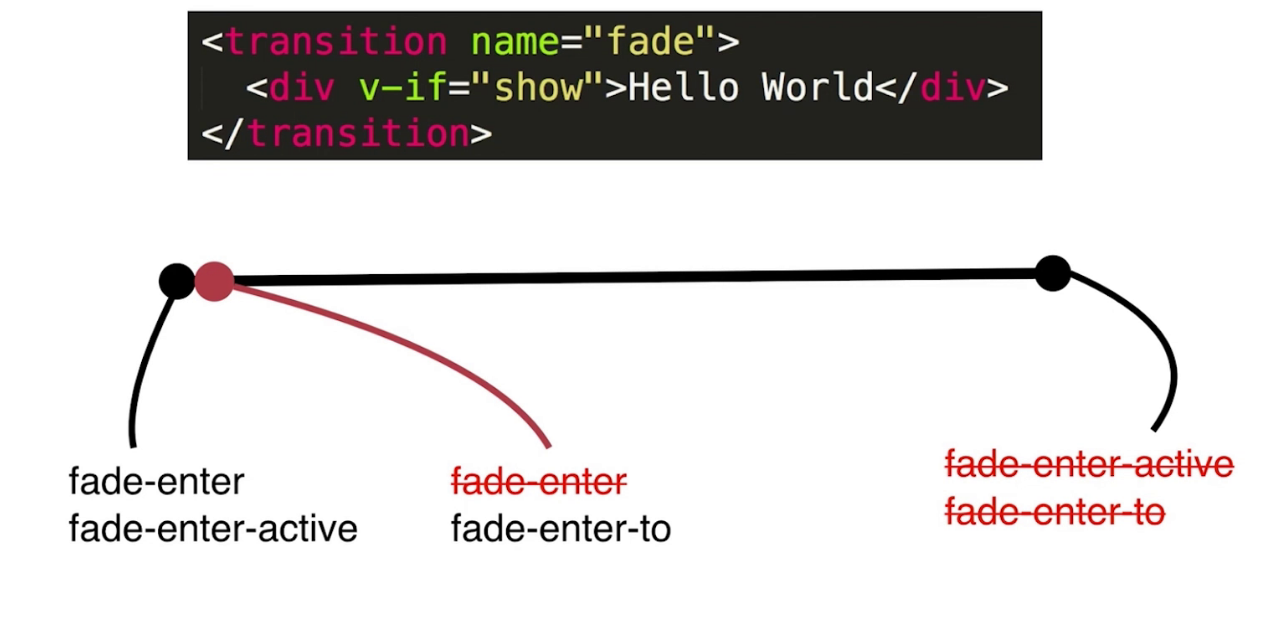
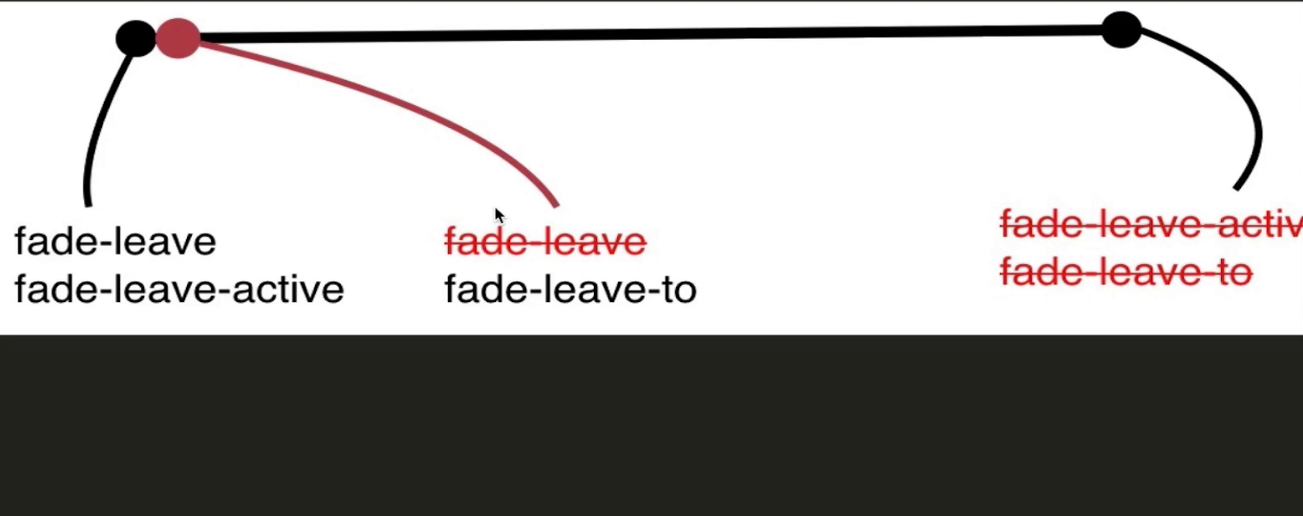
1、vue 的动画流程分为enter,和leave分别对应以下两幅图
<!doctype html>
<html lang="en">
<head>
    <meta charset="UTF-8">

    <meta name="viewport"

          content="width=device-width, user-scalable=no, initial-scale=1.0, maximum-scale=1.0, minimum-scale=1.0">

    <meta http-equiv="X-UA-Compatible" content="ie=edge">

    <title>动画</title>

    <link rel="stylesheet" href="./lib/bootstrap.css">

    <style>

        .yf-enter, .yf-leave-to {

            opacity: 0;

        }

        .yf-enter-active, .yf-leave-active {

            transition: opacity 2s;

        }

    </style>

    <script src="./lib/vue.js"></script>

    <script>

        window.onload = function () {

            let VM = new Vue({

                el: '#outdiv',

                data: {

                    content: 'this is test content',

                    show: false

                },

                methods: {

                    change() {

                        this.show = !this.show;

                    }

                }

            })

        }

    </script>

</head>

<body>

<div class="container" id="outdiv">

    <!--如果没有指定name那么默认为v-enter,v-enter-to,v-enter-active,v-leave,v-leave-to,v-leave-active-->

    <!--如果定义了name那么默认为name-enter,name-enter-to,name-enter-active,name-leave,name-leave-to,name-leave-active-->

    <!--当show为true的时候,即enter时opacity被赋值为0,随着动画的进行,yf-enter被删除掉那么opacity为1,同时定义的transition便起作用了-->

    <!--当show为false的时候,即leave时yf-leave的opacity为1,当动画进行时yf-leave-to的opacity为0,同时定义的transition便起作用了-->
   <!--如果要定义顺序,那么可以添加mode='in-out'或者mode='out-in'这个通常在多个组件之间切换时运用-->
    <transition name="yf">

        <div class="jumbotron" v-if="show">{{content}}</div>

    </transition>

    <input type="button" value="切换" class="btn btn-primary" @click="change">

</div>

</body>

</html>
2、如果添加自定义动画,如引入animate.css动画
<!doctype html>

<html lang="en">

<head>

    <meta charset="UTF-8">

    <meta name="viewport"

          content="width=device-width, user-scalable=no, initial-scale=1.0, maximum-scale=1.0, minimum-scale=1.0">

    <meta http-equiv="X-UA-Compatible" content="ie=edge">

    <title>test</title>

    <link rel="stylesheet" href="./lib/bootstrap.css">

    <link rel="stylesheet" href="./lib/animate.css">

    <style>

        v-enter, v-leave-to {

            opacity: 0;

        }

        v-enter-active, v-leave-active {

            transition: opacity 3s;

        }

    </style>

    <script src="./lib/vue.js"></script>

    <script>

        window.onload = function () {

            let VM = new Vue({

                el: '#outdiv',

                data: {

                    content: 'this is a text',

                    show: true

                },

                methods: {

                    change() {

                        this.show = !this.show;

                    }

                }

            })

        }

    </script>

</head>

<body>

<div class="container" id="outdiv">

    <!--添加自定义的类,那么enter-active-class与leave-active-class可以赋值自定义的类名-->

    <!--如果需要指定刷新页面时的动画,那么需要指定两个类,appear与appear-active-class,用法同enter-active-class一样-->

    <!--因为animate.css是keyframe动画,那么需要添加过渡动画,那么就需要添加默认的(name|v)-active-class这个类--->

    <!--指定动画时长,如果以transition的动画时长为主,那么可以指定一个type值为transition毕竟animate.css的动画时长只有1s-->

    <!--如果需要定义一个明确的动画时长,可以添加属性:duration="{enter:5000,leave:3000}"注意以毫秒为单位,更简单的写法就指定一个值表示进入和离开的时间:duration="3000"-->

    <transition

            type="transition"

            appear

            appear-active-class="animated zoomInDown v-enter-active"

            enter-active-class="animated zoomInDown v-enter-active"

            leave-active-class="animated zoomOutUp v-leave-active">

        <div class="jumbotron" v-if="show">{{content}}</div>

    </transition>

    <input type="button" value="点击" class="btn btn-primary" @click="change">

</div>

</body>

</html>
3、指定js的动画
通过transition这个标签的6个钩子函数执行动画before-enter,enter,after-enter,before-leave,leave,after-leave注意在每个enter或者leave的时候,会传入两个参数一个是执行动画的本体一个是函数,执行完动画后执行这个函数表示动画已经执行完毕,其余的只有一个函数表示动画执行的本体.
<!doctype html>

<html lang="en">

<head>

    <meta charset="UTF-8">

    <meta name="viewport"

          content="width=device-width, user-scalable=no, initial-scale=1.0, maximum-scale=1.0, minimum-scale=1.0">

    <meta http-equiv="X-UA-Compatible" content="ie=edge">

    <title>test</title>

    <link rel="stylesheet" href="./lib/bootstrap.css">

    <link rel="stylesheet" href="./lib/animate.css">

    <script src="./lib/vue.js"></script>

    <script src="./lib/jquery.js"></script>

    <script>

        window.onload = function () {

            let VM = new Vue({

                el: '#outdiv',

                data: {

                    show: true,

                    content: 'this is test content'

                },

                methods: {

                    change() {

                        this.show = !this.show;

                    },

                    beforeEnter(elem) {

                        $(elem).css('display', 'none');

                    },

                    handleEnter(elem, done) {

                        $(elem).fadeIn(400, () => {

                            done();

                        });

                    },

                    afterLeave(elem) {

                        console.log('this is leave');

                        console.log(arguments);

                    }

                }

            })

        }

    </script>

</head>

<body>

<div class="container" id="outdiv">

    <transition

            @before-enter="beforeEnter"

            @enter="handleEnter"

            @after-leave="afterLeave"

    >

        <div class="jumbotron" v-if="show">{{content}}</div>

    </transition>

    <div class="form-group">

        <div><input type="button" value="切换" class="btn btn-primary" @click="change"></div>

    </div>

</div>

</body>

</html>
4、如果是多个组件,那么可以使用transition-group这个标签来处理
<!doctype html>

<html lang="en">

<head>

    <meta charset="UTF-8">

    <meta name="viewport"

          content="width=device-width, user-scalable=no, initial-scale=1.0, maximum-scale=1.0, minimum-scale=1.0">

    <meta http-equiv="X-UA-Compatible" content="ie=edge">

    <title>test</title>

    <link rel="stylesheet" href="./lib/bootstrap.css">

    <link rel="stylesheet" href="./lib/animate.css">

    <script src="./lib/vue.js"></script>

    <script>

        window.onload = function () {

            Vue.component('yf-test', {

                props: {

                    list: {

                        type: Array,

                        required: false,

                        default() {

                            return []

                        }

                    }

                },

                template: '<ul class="list-group"><transition-group enter-active-class="animated zoomInUp"><li class="list-group-item" v-for="(value,index) of list" :key="index"><slot :data="value"></slot></li></transition-group></ul>'

            });

            let VM = new Vue({

                el: '#outdiv',

                data: {

                    count: 1,

                    list: []

                },

                methods: {

                    add() {

                        this.list.push(this.count++);

                    }

                }

            })

        }

    </script>

</head>

<body>

<div class="container" id="outdiv">

    <div class="jumbotron">

        <div class="row">

            <div class="col-md-6">

                <yf-test :list="list">

                    <template slot-scope="props">

                        <div>{{props.data}}</div>

                    </template>

                </yf-test>

            </div>

            <div class="col-md-6">

                <yf-test :list="list">

                    <template slot-scope="props">

                        <b>{{props.data}}</b>

                    </template>

                </yf-test>

            </div>

        </div>

    </div>

    <input type="button" value="增加" class="btn btn-primary" @click="add">

</div>

</body>

</html>
5、如果需要在vue项目是使用
import animated from 'animate.css' // npm install animate.css --save安装,在引入

Vue.use(animated)
vue 的动画的更多相关文章
- 从零开始学 Web 之 Vue.js(五)Vue的动画
大家好,这里是「 从零开始学 Web 系列教程 」,并在下列地址同步更新...... github:https://github.com/Daotin/Web 微信公众号:Web前端之巅 博客园:ht ...
- 049——VUE中使用animation与transform实现vue的动画效果
<!DOCTYPE html> <html lang="en"> <head> <meta charset="UTF-8&quo ...
- vue的动画组件(transition)
当插入或删除包含在 transition 组件中的元素时,Vue 将会做以下处理: 自动嗅探目标元素是否应用了 CSS 过渡或动画,如果是,在恰当的时机添加/删除 CSS 类名. v-enter: 定 ...
- vue学习指南:第十篇(详细) - Vue的 动画
Vue 提供了一些不同的过度效果,主要根 v-if v-show 动态组件 1. Vue给动画分了6个过程,在css中,扮演6个类, 1. .v-enter定义动画的开始状态 2. .v-ente ...
- Vue.js动画在项目使用的两个示例
欢迎大家关注腾讯云技术社区-博客园官方主页,我们将持续在博客园为大家推荐技术精品文章哦~ 李萌,16年毕业,Web前端开发从业者,目前就职于腾讯,喜欢node.js.vue.js等技术,热爱新技术,热 ...
- [原]浅谈vue过渡动画,简单易懂
在vue中什么是动画 开始先啰嗦一下,动画的解释(自我理解
- Vue.js 动画
transition 动画: 当插入或删除包含在 transition 组件中的元素时,Vue将会做以下处理: 1.自动嗅探目标元素是否应用了css过滤或动画,如果是,在恰当的时机添加/删除c ...
- vue过渡动画
概述 Vue 在插入.更新或者移除 DOM 时,提供多种不同方式的应用过渡效果.包括以下工具: 在 CSS 过渡和动画中自动应用 class 可以配合使用第三方 CSS 动画库,如 Animate.c ...
- router使用以及vue的动画效果
<!DOCTYPE html> <html> <head> <meta charset="utf-8"> <meta name ...
随机推荐
- DeepLearning.ai-Week2-Keras tutorial-the Happy House
1 - Import Packages import numpy as np from keras import layers from keras.layers import Input, Dens ...
- code forces 805B (水)
#include<stdio.h>#include<iostream>#include<algorithm>#include<string.h>#inc ...
- 手写代码注意点--java.util.Stack相关
1-Stack的基本函数为: 注意: 取栈顶的函数为peek(),不是top()... 测试stack是否为空的函数为empty(),不是isEmpty()...
- 海马玩模拟器——搭建React Native环境
Visual Studio Emulator for Android 模拟器国内这网络环境不太用,所以使用海马玩模拟器,给大家推荐一下! 下面开始配置环境: 1)下载1.8+JDK,配置JDK环境参考 ...
- C++ 11 snippets , 2
<1>auto ,initializer_list<T>,auto指向函数指针的简易,和typdef 定义的类型执行函数指针有多复杂. #include <iostrea ...
- web应用与http协议
web应用 Web应用程序是一种可以通过web访问的应用程序,程序的最大好处是用户很容易访问应用程序,用户只需要有浏览器即可,不需要再安装其他软件. 应用程序有两种模式C/S.B/S.C/S是客户端/ ...
- 【Android休眠】之PowerKey唤醒源实现【转】
转自:https://blog.csdn.net/u013686019/article/details/53677531 版权声明:本文为博主原创文章,未经博主允许不得转载. https://blog ...
- hibernate框架学习第四天:关联关系、外键、级联等
一对多关联关系表 一方 多方(外键)实体类 一方:TeacherModel 添加多方的集合Set 多方StudentModel 添加一方的对象一方配置关系 name:一方模型中描述多方的集合对象名 c ...
- httplib urllib urllib2 pycurl 比较
最近网上面试看到了有关这方面的问题,由于近两个月这些库或多或少都用过,现在根据自己的经验和网上介绍来总结一下. httplib 实现了HTTP和HTTPS的客户端协议,一般不直接使用,在python更 ...
- [转]POI大数据量Excel解决方案
全文转载自:jinshuaiwang的博客 目前处理Excel的开源javaAPI主要有两种,一是Jxl(Java Excel API),Jxl只支持Excel2003以下的版本.另外一种是Apach ...