
Python使用浏览器模拟访问页面之使用ip代理
最近需要使用浏览器模拟访问页面,同时需要使用不同的ip访问,这个时候就考虑到在使用浏览器的同时加上ip代理。
本篇工作环境为win10,python3.6.
Chorme
使用Chrome浏览器模拟访问,代码如下
import time

from selenium import webdriver

url = "https://www.cnblogs.com/"

driver = webdriver.Chrome("D:/tools/wedriver/chromedriver.exe")

driver.get(url)

time.sleep(2)

print(driver.title)

driver.close()
“D:/tools/wedriver/chromedriver.exe” 是下载的谷歌浏览器驱动,下载地址http://npm.taobao.org/mirrors/chromedriver/
chorme使用ip代理比较简单,使用如下代码即可
import time

from selenium import webdriver

url = "https://www.baidu.com/s?wd=ip"

proxy = "118.190.217.182:80"

chromeOptions = webdriver.ChromeOptions()  # 设置代理

chromeOptions.add_argument("--proxy-server=http://%s" % proxy)

driver = webdriver.Chrome("D:/tools/wedriver/chromedriver.exe", chrome_options=chromeOptions)

driver.get(url)

time.sleep(2)

print(driver.title)

driver.close()
得到的效果如下图:
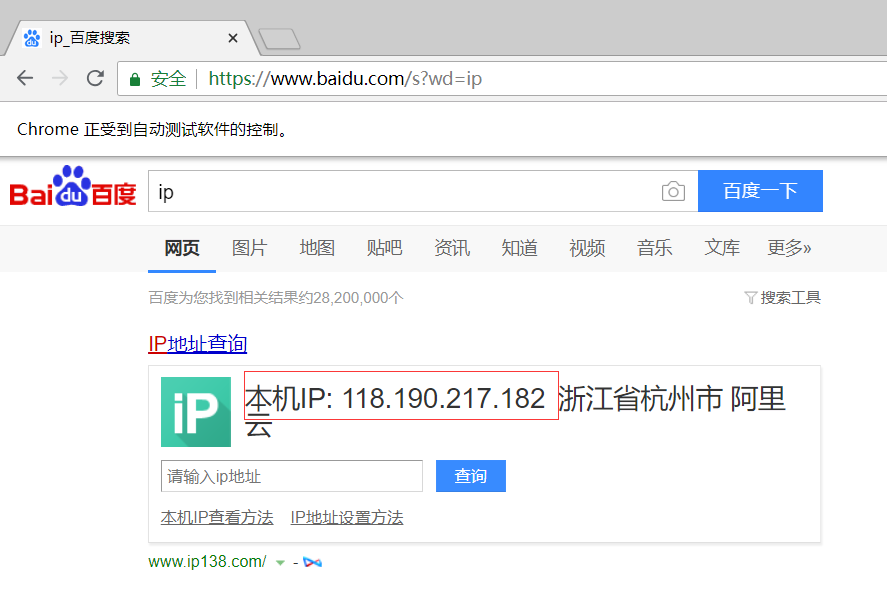
可以见到百度查询到的本机ip已经改变。Chrome的这种代理方式中,访问使用http、https的网站都代理了。
Firefox
使用Firefox访问网页,代码如下:
import time

from selenium import webdriver

url = "https://www.cnblogs.com/"

driver = webdriver.Firefox()

driver.get(url)

time.sleep(2)

print(driver.title)

driver.close()
直接这样运行会遇到以下错误:
selenium.common.exceptions.WebDriverException: Message: 'geckodriver' executable needs to be in PATH.
需要装geckodriver,下载地址https://github.com/mozilla/geckodriver/releases。使用方式为,将对应版本geckodriver.exe放到python.exe的同目录下。
装好之后再次运行即可访问网站。
Firefox的ip代理较为麻烦,需要设置一些参数,具体如下
import time

from selenium import webdriver

url = "https://www.baidu.com/s?wd=ip"

proxy = "118.190.217.182:80"

ip, port = proxy.split(':')

profile = webdriver.FirefoxProfile()

profile.set_preference('network.proxy.type', 1)

profile.set_preference('network.proxy.http', ip)    # 设置http代理

profile.set_preference('network.proxy.http_port', int(port))  # 注意端口一定要使用数字而非字符串

profile.set_preference('network.proxy.ssl', ip)     # 设置https代理

profile.set_preference('network.proxy.ssl_port', int(port))

profile.update_preferences()

driver = webdriver.Firefox(profile)

driver.get(url)

time.sleep(2)

print(driver.title)

driver.close()
这里有两个注意点:
1.当需要访问的网站为https时,一定要设置network.proxy.ssl参数才行
2.协议的端口号一定要是整数,不能直接使用字符串,如果拿到的是字符串就使用int转一下;我之前就是使用了字符串,一直代理不生效,以为哪里出了问题,磨了半天。。。
运行以上代码之后,得到的页面和上一张图相同,这里不再贴图。
整体代码如下:
# encoding=utf-8

# date: 2018/9/14

__Author__ = "Masako"

import time

from selenium import webdriver

def visit_web(url, proxy):

    # chrome

    # chromeOptions = webdriver.ChromeOptions() # 设置代理

    # chromeOptions.add_argument("--proxy-server=http://%s" % proxy)

    # driver = webdriver.Chrome("D:/tools/wedriver/chromedriver.exe", chrome_options=chromeOptions)

    # firefox

    ip, port = proxy.split(':')

    profile = webdriver.FirefoxProfile()

    profile.set_preference('network.proxy.type', 1)

    profile.set_preference('network.proxy.http', ip)

    profile.set_preference('network.proxy.http_port', int(port))  # 注意端口一定要使用数字而非字符串

    profile.set_preference('network.proxy.ssl', ip)

    profile.set_preference('network.proxy.ssl_port', int(port))

    profile.set_preference("network.proxy.share_proxy_settings", True)

    profile.update_preferences()

    driver = webdriver.Firefox(profile)

    driver.get(url)

    time.sleep(2)

    print(driver.title)

    driver.delete_all_cookies()  # 清除cookies

    driver.close()

    driver.quit()

if __name__ == "__main__":

    url = "https://www.baidu.com/s?wd=ip"

    proxy = "118.190.217.182:80"

    visit_web(url, proxy)
Python使用浏览器模拟访问页面之使用ip代理的更多相关文章
- chrome浏览器 模拟访问移动端
谷歌Chrome浏览器,可以很方便地用来当3G手机模拟器.在Windows的[开始]-->[运行]中输入以下命令,启动谷歌浏览器,即可模拟相应手机的浏览器去访问3G手机网页: 谷歌Android ...
- Win10 Edge浏览器 应用商店 IE浏览器 无法访问页面 0x8000FFFF 问题解决
- 基于Python, Selenium, Phantomjs无头浏览器访问页面
引言: 在自动化测试以及爬虫领域,无头浏览器的应用场景非常广泛,本文将梳理其中的若干概念和思路,并基于代码示例其中的若干使用技巧. 1. 无头浏览器 通常大家在在打开网页的工具就是浏览器,通过界面上输 ...
- Python爬虫常用之登录(二) 浏览器模拟登录
浏览器模拟登录的主要技术点在于: 1.如何使用python的浏览器操作工具selenium 2.简单看一下网页,找到帐号密码对应的框框,要知道python开启的浏览器如何定位到这些 一.使用selen ...
- python 跑服务器,访问自己制作的简单页面
1 python 跑服务器,访问自己制作的简单页面 2 # win+b出现一个网址http:/0.0.1:5000/复制到浏览器查看# http://127.0.0.1:5000/home 做这个首 ...
- Python使用mechanize模拟浏览器
Python使用mechanize模拟浏览器 之前我使用自带的urllib2模拟浏览器去进行訪问网页等操作,非常多站点都会出错误,还会返回乱码.之后使用了 mechanize模拟浏览器,这些情况都没出 ...
- python 使用selenium模块爬取同一个url下不同页的内容(浏览器模拟人工翻页)
页面翻页,下一页可能是一个新的url 也有可能是用js进行页面跳转,url不变,解决方法是实现浏览器模拟人工翻页 目标:爬取同一个url下不同页的数据(上述第二种情况) url:http://www. ...
- 在PC机上,如何用Chrome浏览器模拟查看和调试手机的HTML5页面?
如题,如何用PC机上的Chrome浏览器模拟查看和调试手机HTML5页面? 参考操作步骤如下: 第一步.用Chrome打开要调试的页面: 第二步.按F12,打开“开发者工具”,点击其右上角的“Dock ...
- RF使用ie浏览器访问页面,浏览器启动只显示This is the initial start page for the WebDriver server,页面访问失败
问题描述:启动ie浏览器后,页面显示如下: 问题定位: 1.IE页面缩放没有设置成100% 2.ie浏览器的安全模式设置是否都将“启动保护模式”勾选上 3.iedriver驱动版本号是否和seleni ...
随机推荐
- 设置div中的div居中显示
设置div中的div居中显示 方法一. <div class='big'> <div class='small'>box1</div> </div> s ...
- Area Learning
Area Learning区域学习 How it works它是如何工作的 With Motion Tracking alone, the device tracks its movement and ...
- Appium常用API(二)
接前面的常用API(一),本文接着介绍如下: 1.press_keycode press_keycode(self, keycode, metastate=None): Sends a keycode ...
- php CI框架输出空行问题排查
今天在使用 curl 命令行工具调试一个功能时,发现输出的内容总是会在最开始莫名其妙的多一行空行: 项目框架是 php 的 CodeIgniter,感觉这种问题在网上不好查找,因为可以确定这个是业务出 ...
- ZOJ3714:Java Beans
There are N little kids sitting in a circle, each of them are carrying some java beans in their hand ...
- 初尝2D骨骼动画编辑工具SPINE,并into Unity3D
一.SPINE使用 研究2D骨骼动画,CYou的朋友介绍我SPINE这个工具,开发自Esoteric Software的一款专门制作2D动画的软件,网络上的资料还很少,我这从半吊子美术技术的角度简单说 ...
- dxbarmanager生成传统下拉式样的菜单
传统菜单 //创建一个dxSubItem,相当于创建一个主菜单项 dxBarSubItem := TdxBarSubItem.Create(Self); dxBarSubItem.Caption := ...
- 遇到了IE10不能登录的问题,很早就有解决方案了
1..net 2.0 的程序,请打开项目,打开vs开发环境的工具菜单下的 Package Manager Console ,中文名:程序包管理控制台,在打开的控制台中输入如下命令:Install-P ...
- subprocess.Popen命令如何隐藏弹框
在用PYQT编写GUI界面时,代码中有用到subprocess.Popen(),打包exe后每次遇到subprocess语句是就会弹出命令框,很是头疼, 下面是解决的办法 import subproc ...
- 升级到Sharepoint 2013后页面打开速度慢
这个问题现在有了一些新的发现. 首先,我找到了重现客户那里出现的那个复杂SQL语句的方法.这个现象其实是这样的: 当WebApplication的“List View Threshold” 数量大于 ...