
SSD Trim Support -- 保护 SSD
今天同事告诉我,换了 ssd 之后需要做以下配置能使 ssd 寿命更长。原理是配置系统定期清理和回收 ssd 的资源。
最终效果:
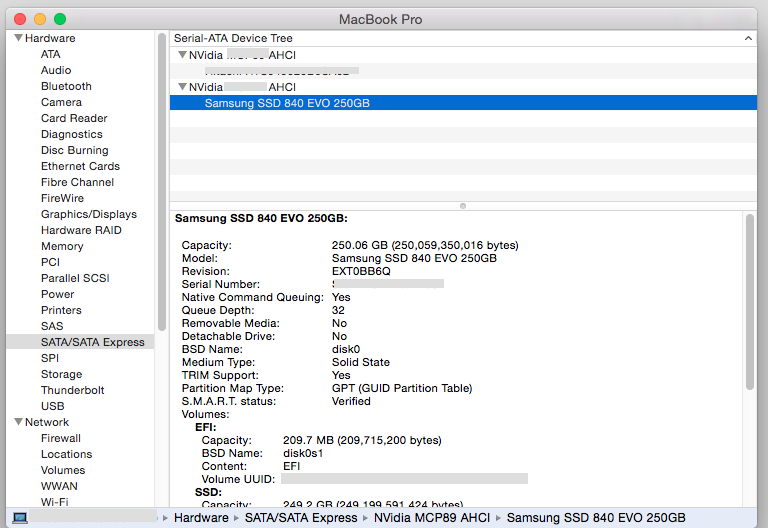
步骤:
1、下载 trim enabler: https://gist.github.com/return1/4058659
2、解压后内容如下:
#

# Original version by Grant Parnell is offline (http://digitaldj.net/2011/07/21/trim-enabler-for-lion/)

# Update July 2014: no longer offline, see https://digitaldj.net/blog/2011/11/17/trim-enabler-for-os-x-lion-mountain-lion-mavericks/

#

# Looks for "Apple" string in HD kext, changes it to a wildcard match for anything

#

# Alternative to http://www.groths.org/trim-enabler-3-0-released/

# Method behind this madness described: http://forums.macrumors.com/showthread.php?t=1409151&page=4

# See discussion in comments here: https://www.macupdate.com/app/mac/39654/lion-tweaks

# And here: http://forums.macrumors.com/showthread.php?t=1410459

# And here: http://forums.macrumors.com/showthread.php?t=1480302

#

# Yosemite: for recovering from stop sign on boot screen, please see http://www.cindori.org/update-on-trim-in-yosemite/

# backup patched file

sudo cp /System/Library/Extensions/IOAHCIFamily.kext/Contents/PlugIns/IOAHCIBlockStorage.kext/Contents/MacOS/IOAHCIBlockStorage /System/Library/Extensions/IOAHCIFamily.kext/Contents/PlugIns/IOAHCIBlockStorage.kext/Contents/MacOS/IOAHCIBlockStorage.original

# For Yosemite you have to disable driver signature check

sudo nvram boot-args="kext-dev-mode=1"

# !for Yosemite only! please reboot after settings the boot-args!

sudo shutdown -r now

# for Yosemite, Mavericks 10.9.5 and 10.9.4 (thanks Tobi)

sudo perl -pi -e 's|(^\x00{1,20})[^\x00]{9}(\x00{1,20}\x54)|$1\x00\x00\x00\x00\x00\x00\x00\x00\x00$2|sg' /System/Library/Extensions/IOAHCIFamily.kext/Contents/PlugIns/IOAHCIBlockStorage.kext/Contents/MacOS/IOAHCIBlockStorage

# !for Yosemite only! rebuild kext cache manually (could take a while)

sudo kextcache -m /System/Library/Caches/com.apple.kext.caches/Startup/Extensions.mkext /System/Library/Extensions

# for Mavericks and Mountain Lion from 10.8.3 to 10.9.3

#sudo perl -pi -e 's|(\x52\x6F\x74\x61\x74\x69\x6F\x6E\x61\x6C\x00{1,20})[^\x00]{9}(\x00{1,20}\x54)|$1\x00\x00\x00\x00\x00\x00\x00\x00\x00$2|sg' /System/Library/Extensions/IOAHCIFamily.kext/Contents/PlugIns/IOAHCIBlockStorage.kext/Contents/MacOS/IOAHCIBlockStorage

# for Mountain Lion from 10.8.1 to 10.8.2 and Lion 10.7.5

#sudo perl -pi -e 's|(\x52\x6F\x74\x61\x74\x69\x6F\x6E\x61\x6C\x00{1,20})[^\x00]{9}(\x00{1,20}\x4D)|$1\x00\x00\x00\x00\x00\x00\x00\x00\x00$2|sg' /System/Library/Extensions/IOAHCIFamily.kext/Contents/PlugIns/IOAHCIBlockStorage.kext/Contents/MacOS/IOAHCIBlockStorage

# for Mountain Lion 10.8.0 and Lion 10.7.4 BELOW

#sudo perl -pi -e 's|(\x52\x6F\x74\x61\x74\x69\x6F\x6E\x61\x6C\x00{1,20})[^\x00]{9}(\x00{1,20}\x51)|$1\x00\x00\x00\x00\x00\x00\x00\x00\x00$2|sg' /System/Library/Extensions/IOAHCIFamily.kext/Contents/PlugIns/IOAHCIBlockStorage.kext/Contents/MacOS/IOAHCIBlockStorage

sudo touch /System/Library/Extensions/

# now reboot!

sudo shutdown -r now
3、Terminal 输入:
1) 修改此文件属性 "chmod 777 该 .sh 文件保存路径"
2) 运行"该 .sh 文件路径",只时候电脑会自动重启。
3) 重启后,注释掉 .sh 文件的前三行,已经执行了的语句。再运行一次该 .sh 文件,电脑会再执行一次重启操作。
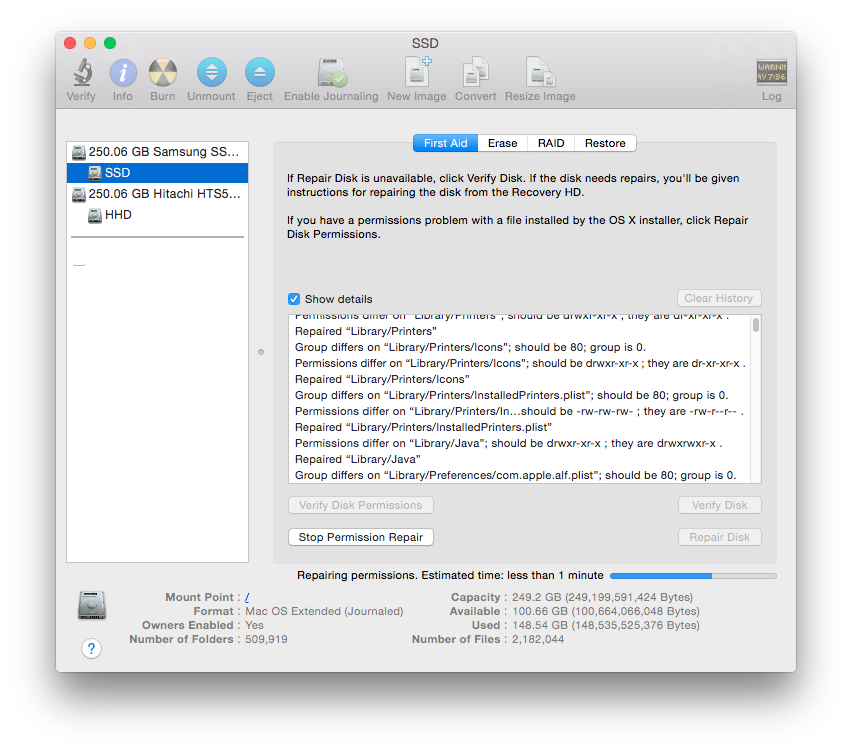
4、打开磁盘工具优化磁盘的使用:
SSD Trim Support -- 保护 SSD的更多相关文章
- 关于SSD Trim功能
TRIM指令是微软联合各大SSD厂商所开发的一项技术,属于ATA8-ACS规范的技术指令. TRIM是告诉NAND闪存固态存储设备要擦除哪些数据的SATA接口指令.当相关页面的数据可以被覆盖时,操 ...
- Yosemite 升级后第三方SSD TRIM失败不能进入系统处理
no zuo no die, 这把手欠升级到了Yosemite, 然后发现原来在Mavericks里已经激活的TRIM在这里不行了, 又提示trim enable软件不适于此版本. 然后,悲剧就开始了 ...
- SSD trim及4k对齐
trim可以帮助减小SSD的写放大WA问题,删除文件后不仅仅是将文件标记为删除,而是在SSD空闲的时候统一进行删除. Linux下的trim支持叫discard,修改fstab文件,在挂载参数中加上d ...
- SSD TRIM
SSD 在操作方式上与传统磁性驱动器不同,并且它们需要在软件上另行处理以达到功能优化.-- Don Watkins 编译自: https://opensource.com/article/17/1/s ...
- 保护SSD,设置Chrome浏览器临时文件夹到ramdisk分区
很多用低端/山寨SSD的朋友都用Ramdisk来保护硬盘,一般都把系统temp目录和IE浏览器临时文件夹目录设到Ramdisk分区了. 最近用谷歌的chrome浏览器,发现浏览网页时候硬盘灯 ...
- Vmware Vsan 部署中如何将非SSD 硬盘标识为SSD
通过SSH 登录ESXi主机 # esxcli storage nmp device list #查询ESXI 发现的存储设备 # esxcli storage nmp satp rule add ...
- Linux判断SSD或HDD + 模拟SSD
判断方法 方法一 判断cat /sys/block/*/queue/rotational的返回值(其中*为你的硬盘设备名称,例如sda等等),如果返回1则表示磁盘可旋转(HDD),返回0,则表示磁盘不 ...
- CentOS7 vs centos6
The CentOS Project has announced general availability of CentOS-7, the first release of the free Lin ...
- SSD 固态硬盘,Trim指令 ,查看状态、开启、关闭
一说到SSD 固态硬盘,经常会看到Trim指令这个名词,那什么是Trim? Trim是什么? 为了解决硬盘降速的问题,微软联合各大SSD厂商开发了一个新技术——Trim.Trim指令也叫disab ...
随机推荐
- poj1703_Find them, Catch them_并查集
Find them, Catch them Time Limit: 1000MS Memory Limit: 10000K Total Submissions: 42451 Accepted: ...
- NET微信公众号开发-5.0微信支付(待测试)
开发前准备. 1.0微信支付官方开发者文档 2.0官方demo下载 我们用c#所以选择.net版本 不过这个官方的demo根本跑步起来 3.0官方demo运行起来解决方案 4.0微信支付官方.net版 ...
- 响应式字体(js控制)
window.onload=function(x){if ('addEventListener' in document) {document.addEventListener('DOMContent ...
- C++ 基础知识复习(五)
UML建模部分 70. 什么是UML: 答: Unified Modeling Language, 统一建模语言,是一种标准的图形化建模语言.是面向对象分析和设计的标准表示. 71. UML有哪些图: ...
- <select> 默认选中
不多bb,直接上代码 html代码: <li><span>所属类别</span> <select id="cate" name=" ...
- 最大公约数和最小公倍数--java实现
代码: //最大公约数 public int gcd(int p,int q){ if(q == 0) return p; return gcd(q, p % q); } //最小公倍数 public ...
- 如何使用scikit—learn处理文本数据
答案在这里:http://www.tuicool.com/articles/U3uiiu http://scikit-learn.org/stable/modules/feature_extracti ...
- WIN32/API/SDK/MFC四者之间的联系和区别
上面大家都说Win32是一个子系统,这个当然是对的,不过我们有时候我们所说Win32通俗的就是指32位的Windows系统,从 windows95/98到NT/2000/XP都是32位Windows. ...
- 1.2 Quartz 2D 内存管理
本文并非最终版本,如有更新或更正会第一时间置顶,联系方式详见文末 如果觉得本文内容过长,请前往本人 “简书” 通过 Product -> Analyze 来进行静态分析 可以使用Quar ...
- uploadify前台上传文件,java后台处理的例子
1.先创建一个简单的web项目upload (如图1-1) 2.插件的准备 (1).去uploadify的官网下载一个uploadify插件,然后解压新建个js文件夹放进去(这个不强求,只要路径对了就 ...