
ElasticSearch的安装、使用、踩坑
最近博客写的少了。
本篇介绍在安装ElasticSearch和head插件的过程中遇到的小问题,和一些日常使用的操作(简单搜索语法、分片管理)。
ElasticSearch
它是一个实时分布式搜索和分析引擎。它让你以前!所!未!有!的速度处理大数据成为可能。废话略过,详情这里。
安装
因为elasticsearch是Java写的,所以先要保证Java运行环境。
1.先来安装ElasticSearch
下载:
curl -L -O https://artifacts.elastic.co/downloads/elasticsearch/elasticsearch-5.*.*.zip

unzip elasticsearch-5.*.*.zip

或者

https://www.elastic.co/downloads/elasticsearch,直接下载并解压
运行elasticsearch,(这里下载的是5.0.1版本,5.*以后的版本对head插件的支持有所改变,后面说明):
➜ elasticsearch-5.0. ./bin/elasticsearch
相关执行命令:
➜  elasticsearch-5.0. ./bin/elasticsearch --help

starts elasticsearch

Option                Description

------                -----------

-E <KeyValuePair>     Configure a setting

-V, --version         Prints elasticsearch version information and exits

-d, --daemonize       Starts Elasticsearch in the background

-h, --help            show help

-p, --pidfile <Path>  Creates a pid file in the specified path on start

-q, --quiet           Turns off standard ouput/error streams logging in console

-s, --silent          show minimal output

-v, --verbose         show verbose output
* 注意,elasticsearch没有关闭服务命令,只能通过kill -9。
修改相关配置文件(配置文件详情):
➜  elasticsearch-5.0. vim config/elasticsearch.yml

cluster.name: zhengbin-application

http.port:

#以上两项可改可不改
现在可以浏览器或者curl方式访问http://127.0.0.1:9200这个地址:
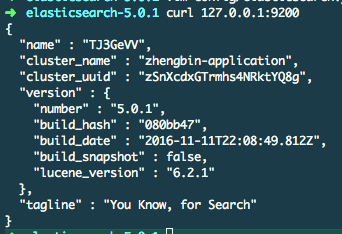
You Know, for Search~
2.再来安装ElasticSearch-head
网上很多博客的安装方式都是:
./bin/plugin install mobz/elasticsearch-head
但是5.*版本以上就不再支持这种方式,详情可以看elasticsearch-head官方README
下面按照这个README来:
git clone git://github.com/mobz/elasticsearch-head.git

cd elasticsearch-head

npm install

grunt server

open http://localhost:9100/
由于我用的是OSX,npm、grunt本身没有,下面安装这两个命令:
➜  elasticsearch-head git:(master) brew install node

➜  elasticsearch-head git:(master) npm install

➜  elasticsearch-head git:(master) npm install grunt

➜  elasticsearch-head git:(master) npm install -g grunt-cli

#验证一下:

➜  elasticsearch-head git:(master) grunt --version

grunt-cli v1.2.0

grunt v1.0.1
好了,准备就绪,在执行grunt server之前,需要修改elasticsearch.yml文件:
#增加对head插件的支持

http.cors.enabled: true

http.cors.allow-origin: "*"
打开浏览器,或直接命令:
➜  elasticsearch-head git:(master) grunt server

Running "connect:server" (connect) task

Waiting forever...

Started connect web server on http://localhost:9100
➜ elasticsearch-5.0. open http://127.0.0.1:9100
ES的日常使用
这里写的很清楚,不再啰嗦。
ES分片的管理
啥是分片?这里
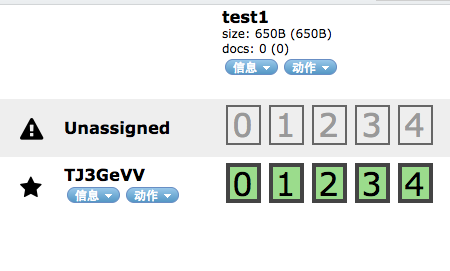
但是当我在线上环境创建索引后,发现分片并没有被自动分配到主、从节点上。
就像下图所示,索引test1有5个主分片,每个主分片对应一个副本分片,现在主分片都在创建索引的时候自动分配到了TJ3GeVV这个节点,但是还有5个副本分片没有利用,也就显示Unassigned状态。
如何在创建索引后动态分配分片:
http://10.4.245.71:9200/_cluster/reroute/

{

  "commands": [

    {

      "allocate": {

        "index": "wm_godview_disorderstatus",

        "shard": ,

        "node": "waimai-dev233",

        "allow_primary": true

      }

    }

  ]

}
通过上面的方式可以分配未分配的分片。
reroute还有移动-‘move’,取消-‘cancel’参数可选:
"commands" : [ {

        "move" :

            {

              "index" : "test", "shard" : ,

              "from_node" : "node1", "to_node" : "node2"

            }

        },

       "cancel" :

            {

              "index" : "test", "shard" : , "node" : "node1"

            }

        },

        {

          "allocate" : {

              "index" : "test", "shard" : , "node" : "node3"

          }

        }

    ]
ES新建模板
通过head插件:

相关链接
ElasticSearch的安装、使用、踩坑的更多相关文章
- CentOS7.4安装MySQL踩坑记录
CentOS7.4安装MySQL踩坑记录 time: 2018.3.19 CentOS7.4安装MySQL时网上的文档虽然多但是不靠谱的也多, 可能因为版本与时间的问题, 所以记录下自己踩坑的过程, ...
- ubuntu 下安装docker 踩坑记录
ubuntu 下安装docker 踩坑记录 # Setp : 移除旧版本Docker sudo apt-get remove docker docker-engine docker.io # Step ...
- sqlserver安装和踩坑经历
sqlserver安装和踩坑经历 下载 下载 安装 大致是按照这个来的 安装教程 出错 windows系统安装软件弹出"Windows installer service could not ...
- linux centos7环境下安装apache2.4+php5.6+mysql5.6 安装及踩坑集锦(三)
linux centos7环境下安装apache2.4+php5.6+mysql5.6 安装及踩坑集锦(三) 安装PHP 1.yum方式安装PHP方法同安装apache一样传送门:linux cent ...
- linux centos7环境下安装apache2.4+php5.6+mysql5.6 安装及踩坑集锦
linux centos7环境下安装apache2.4+php5.6+mysql5.6 安装及踩坑集锦(一) 一.Linux下安装MySQL 1.下载 下载地址:http://dev.mysql.co ...
- linux centos7环境下安装apache2.4+php5.6+mysql5.6 安装及踩坑集锦(二)
linux centos7环境下安装apache2.4+php5.6+mysql5.6 安装及踩坑集锦(二) 安装apache web容器 . yum方式安装apache 注意apache在linux ...
- MySQL 5.7版本安装教程-踩坑总结
下载 MySQL下载地址 选择下载64位(看自己电脑是32位还是64位) 点击下载之后,它会让你登录,没有Oracle账户,跟着它的步骤注册一个就好了. 安装 打开下载好的压缩包解压到你的某一目录下, ...
- OpenCV+Qt+CMake安装+十种踩坑
平台:win10 x64+opencv-3.4.1 + qt-x86-5.9.0 + cmake3.13.4 x64 OpenCV+Qt+CMake安装,及目前安装完后打包:mingw32-make时 ...
- Linux Mint安装Docker踩坑指南
我家的服务器选用的Linux Mint系统,最近安装Docker的时候踩了一些小坑,但是总体还算顺利. 我们都知道Linux Mint系统是基于Ubuntu的,说实话用起来感觉还是很不错的,安装Doc ...
- MAC下STF安装及踩坑
[Mac OS X]brew: command not found ruby -e"$(curl -fsSL https://raw.githubusercontent.com/Homebr ...
随机推荐
- MySQL-慢查询日志
慢查询日志功能默认不开启,其记录了执行时间超过参数long_query_time的值(默认是10),且访问的行数超过了参数min_examined_row_limit的值得SQL语句. mysql&g ...
- SharePoint 2013 Backup Farm Automatically With a Powershell and Windows Task Schedule
In this post,I will show you SharePoint 2013 How to Backup Farm Automatically with a PowerShell and ...
- win10 docker 安装部署
Docker 安装教程: https://blog.csdn.net/hunan961/article/details/79484098 安装docker前需要首先开启虚拟服务:重启电脑-->F ...
- python标准库介绍——36 popen2 模块详解
==popen2 模块== ``popen2`` 模块允许你执行外部命令, 并通过流来分别访问它的 ``stdin`` 和 ``stdout`` ( 可能还有 ``stderr`` ). 在 pyth ...
- Centos 二进制安装node.js
一.登录node的官网查看最新的稳定版,以及需要下载的Linux版本,你可以有多种Linux安装方式(源码安装,二进制安装等). 二.Node安装及配置 1.创建安装目录:创建目录node.js [r ...
- 使用Method swizzling (也就是运行时交换两个方法的imp ,实现重写方法)
贴上资源.很简单 https://gist.github.com/rudyjahchan/2191796 http://itony.me/592.html http://stackoverflow.c ...
- JDK1.5新特性,基础类库篇,线程类(Thread)增强了哪些
java.lang.Thread类增强特性如下: 线程优先级已经更改.java.lang.Thread.MIN_PRIORITY = 1 java.lang.Thread.NORM_PRIORITY ...
- CentOS与RedHat的关系
一.CentOS 与 RedHat 的关系 RedHat 在发行的时候,有两种方式:二进制的发行方式以及源代码的发行方式.无论是哪一种发行方式,你都可以免费获得(例如从网上下载),并再次发布.但如果你 ...
- 使用android-resource-remover优化资源使用率和lint-result.xml如果导出
安装教程:http://blog.csdn.net/mlj1668956679/article/details/38643145 按照上面教程中.下载了 get-pip.py.后一运行出现这个问题 ...
- 绑定sql server数据库的用户与登录名
服务器重装系统,重新安装上sql server,附加上以前的数据库, 然后以前是每个数据库都有一个登录用于操作该数据库,其他数据库不能操作的, 附加上数据库后该数据库安全性里的用户能看到以前建立好的用 ...