
response status is 500 https://localhost:7129/swagger/v1/swagger.json
SwaggerGeneratorException: Conflicting method/path combination "GET Test" for actions - TodoApi.Controllers.TestController.get (TodoApi),TodoApi.Controllers.TestController.Table (TodoApi). Actions require a unique method/path combination for Swagger/OpenAPI 3.0. Use ConflictingActionsResolver as a workaround
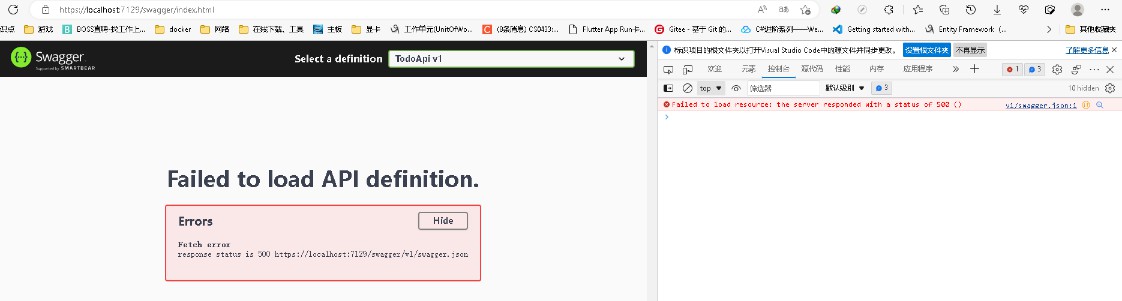
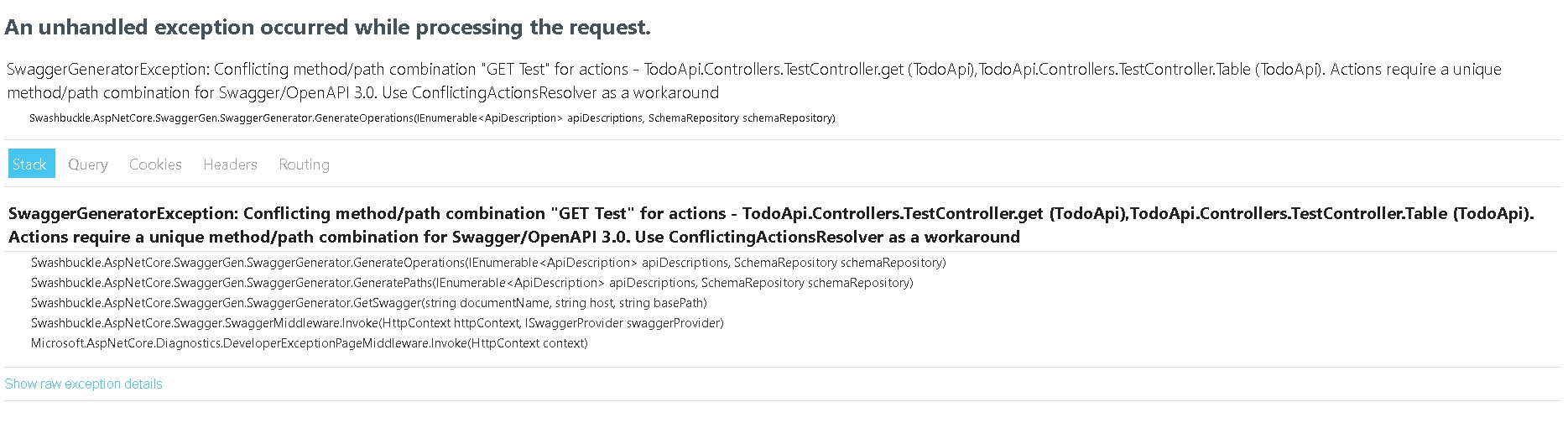
错误原因
TestCooontroller中GetTest出现路径重命名引起冲突
错误重现VisualStudio,新建ASP.NET Core WebAPI,http路径重复运行
using Microsoft.AspNetCore.Mvc;

using TodoApi.Model;

using TodoApi.Server;

namespace TodoApi.Controllers

{

    [ApiController]

    [Route("[controller]")]

    public class TestController :ControllerBase

    {

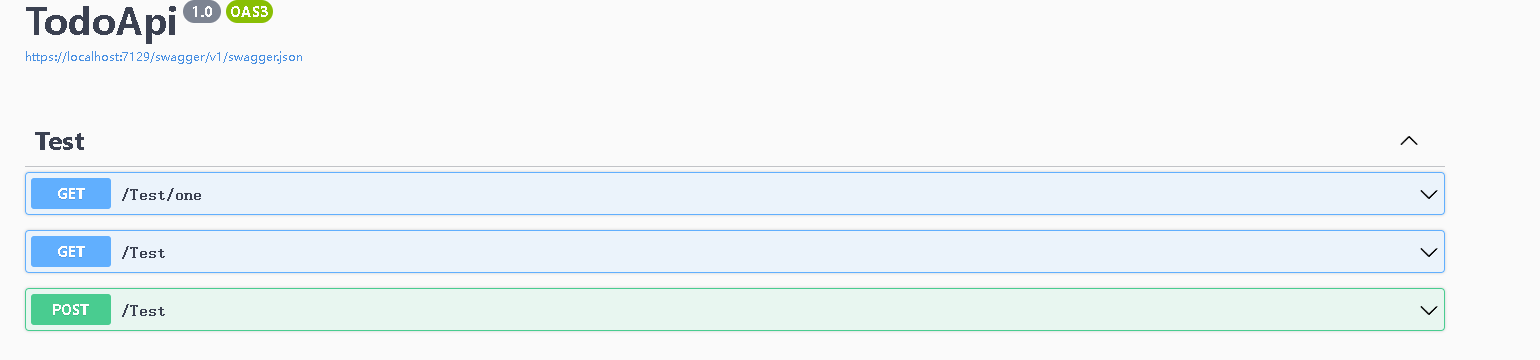
        [HttpGet("one")]//(“xxx”)与HttpGet做区分

        public int get()

        {

            var server = new TestServer();

            server.table();

            return 1;

        }

        [HttpGet]

        public List<Table_1> Table()

        {

            var server = new TestServer();

            var r=server.table();

            return r;

        }

        [HttpPost(Name = "post")]

        public  int Get1()

        {

            var server =  new TestServer();

            var conut =  server.Conut();

            return conut;

        }

    }

}
response status is 500 https://localhost:7129/swagger/v1/swagger.json的更多相关文章
- springboot - 映射HTTP Response Status Codes 到 静态 HTML页面
1.总览 2.代码 1).pom.xml <dependencies> <dependency> <groupId>org.springframework.boot ...
- springboot - 映射 HTTP Response Status Codes 到自定义 JSP Error 页面
1.总览 2.代码 1).pom.xml <dependencies> <dependency> <groupId>org.springframework.boot ...
- C#、JAVA操作Hadoop(HDFS、Map/Reduce)真实过程概述。组件、源码下载。无法解决:Response status code does not indicate success: 500。
一.Hadoop环境配置概述 三台虚拟机,操作系统为:Ubuntu 16.04. Hadoop版本:2.7.2 NameNode:192.168.72.132 DataNode:192.168.72. ...
- https://localhost:1158/em运行不正常
1.页面无法打开 一般是由于网站安全问题直接挂掉,可以更换浏览器,如Google Chrome.Fire Fox等.不建议使用IE Google浏览器使用如下, 直接继续 接着以用户sys,密码cha ...
- docker登录报错Error response from daemon: Get https://192.168.30.10/v1/users/: dial tcp 192.168.30.10:443: connect: connection refused
背景描述: 登录docker报错: [root@localhost sysconfig]# docker login 192.168.30.10 Username (newcs06): newcs06 ...
- 解决报错Error response from daemon: Get https://registry-1.docker.io/v2/: net/http: TLS handshaketimeout
报错: [root@localhost /]# sudo docker pull ubuntuError response from daemon: Get https://registry-1.do ...
- 学习SpringMVC 文件上传 遇到的问题,403:returned a response status of 403 Forbidden ,409文件夹未找到
问题一: 409:文件夹没有创建好,找不到指定的文件夹,创建了即可. 问题二: 403:returned a response status of 403 Forbidden 我出现这个错误的原因是因 ...
- Https网站搭建——通过https://localhost:8443访问tomcat首页
图片大致介绍了Https浏览器与服务器握手的过程,涉及到的名词:证书.Hash算法.随机数密码.公钥加密.私钥解密.握手消息.hash验证.摘要 tomcat服务器配置可以实现https双向认证,简单 ...
- returned a response status of 403 OR 409
当我们使用jersy把图片上传到我们的图片服务器中[tomcat],我们可能会有以下的错误: returned a response status of 403 OR 409 403和409我都遇到过 ...
- RobotFramework下的http接口自动化Get Response Status 关键字的使用
Get Response Status 关键字用来获取http请求返回的http状态码. 示例1:访问苏宁易购网站上的http推荐接口,使用Get Response Status 关键字来获取返回的h ...
随机推荐
- mysql 数据库的一些参数,常用模版和调优方式
innodb_buffer_pool_size :这个参数是Mysql数据库最重要的参数之一,表示InnoDB类型的 表 和索引的最大缓存 .它不仅仅缓存 索引数据 ,还会缓存 表的数据 .这个值越大 ...
- 访问不通github的解决办法
访问不通github, 在hosts文件中手动加下域名IP 在hosts里添加github的ip 140.82.113.3 github.com #不要.199.232.5.194 github.gl ...
- Android获取获取悬浮窗一下的view办法
getwindows可以获取当前手机屏幕所有有交互功能的view getactitywindows只能获取最顶层有交互的view
- RuntimeError: CUDA error: device-side assert triggered
调试diffusion模型时在loss处报错,报错位置: `acc_train_loss += loss.item()` RuntimeError: CUDA error: device-side a ...
- tp save()的用法
save()方法可以新增数据,也可以修改数据 但是要注意,在第二次save()的时候会默认修改 需 model('Keyword')->isUpdate(false)->save($dat ...
- Loading Methods
Datasets datasets.list_datasets return:List all the datasets scripts available on the Hugging Face H ...
- element-ui upload自定义formdata上传文件和参数
<el-upload list-type="text" action="" :http-request="HandleHttpRequest ...
- System.IO.FileNotFoundException: Could not load file or assembly 'System.IO.Compression.FileSystem系统找不到指定的文件
错误:System.IO.FileNotFoundException: Could not load file or assembly 'System.IO.Compression.FileSyste ...
- Linux Conda 使用activate无法进入环境,但list中有环境的路径
安装OpenFace时装了个miniconda,之后就进不去anaconda的其它环境了: (pfld) .....$ conda env list # conda environments: # / ...
- win10 系统修复IE11方法
我也是手贱卸载了IE11,启用或关闭Windows功能里也没有Internet Explorer 11,今天意外发现了解决办法. 设置--应用--应用和功能--管理可选功能--添加功能--Intern ...