
在Jupyter Notebook 中输出 HTML
在刚开始使用 Jupyter Notebook 时,我总想使输出结果更使人满意,而不是只把结果打印出来。在我知道可以用 HTML 输出之前,我是这样输出一个表格的(数据来源:软科中国大学排名)。
中国大学排名(主榜)  年份:2022

                              办    学    办   师资    人    科    服    高   重大    国

                        总     学    科    学   规模    才    学    务    端   项目   际竞

                        得     层    水    资   与结    培    研    社    人   与成    争

 排名     学校名称      省份    分     次    平    源    构    养    究    会    才    果    力

----   ------     ---  ---   ---  ---  ---  ---  ---  ---  ---  ---  ---  ---

  1     清华大学      北京    999.4    37.6   73.6   50.0   51.7  334.6  101.3   48.4   89.8  126.8   85.7

  2     北京大学      北京    912.5    34.4   73.0   34.5   52.2  322.7   97.7   19.4   91.4  108.1   79.2

  3     浙江大学      浙江    825.3    34.1   64.7   34.3   50.0  294.0  103.4   30.5   68.2   89.0   57.0

  4    上海交通大学     上海    783.3    35.5   52.9   31.1   47.9  266.8  110.4   32.3   67.3   93.3   45.7

  5     复旦大学      上海    697.8    35.9   48.0   23.8   50.2  262.8   87.9   15.3   62.5   61.6   49.6

  6     南京大学      江苏    683.4    37.7   48.7   12.5   49.1  279.9   77.7   14.0   58.6   68.0   37.3

  7   中国科学技术大学    安徽    609.9    40.0   37.4   16.4   46.6  234.6   75.8    9.4   55.1   41.7   53.0

  8    华中科技大学     湖北    609.3    32.3   44.0   14.9   47.8  248.7   83.3   12.1   36.2   49.0   41.1

  9     武汉大学      湖北    607.1    32.8   49.0   14.5   48.4  270.6   65.2   12.0   36.6   44.5   33.4

  10    西安交通大学     陕西    570.2    34.2   41.0   16.7   47.6  258.8   57.0   19.4   25.9   40.4   29.3
输出部分的代码如下:
def output(cnt, extended_data):

    rank_name, year, ind_map, k, univ_data = extended_data

    output_data = univ_data[:max(0, min(cnt, len(univ_data)))]

    # 打印表头

    print(rank_name, f' 年份:{year}')

    print(' ' * 19 + ' ' * 9, end='')

    ik = list(map(lambda o: strB2Q(o.replace('(', '/').replace(')', '').strip()), k))

    ip = ['\n                        总   ', '\n                        得   ', '\n 排名     学校名称      省份    分   ', '\n----   ------     ---  ---  ', '']

    for j in range(4):

        for i in ik:

            i_len = len(i) + 1

            print(f' {i[j * i_len // 4:(j + 1) * i_len // 4]: ^3} ', end='')

        print(ip[j], end='')

    for i in ik:

        print(f' {"---": ^3} ', end='')

    print()

    # 打印数据

    for i in output_data:

        print(f"{i['ranking']:>3}  {i['univNameCn']: ^10} {i['province']: >4}    {i['score']:>5} ", end='')

        for j in k:

            print(f"{i['indData'][ind_map[j]]:>7}", end='')

        print()
这样输出一个表格十分麻烦,要手动调整列宽等,而且输出结果也不十分美观。
但是我不知道有什么办法可以提升输出的质量,直到我使用 PyEcharts 时,我发现 PyEcharts 中的一个 render_notebook() 方法可以把结果用 HTML 的形式输出出来。
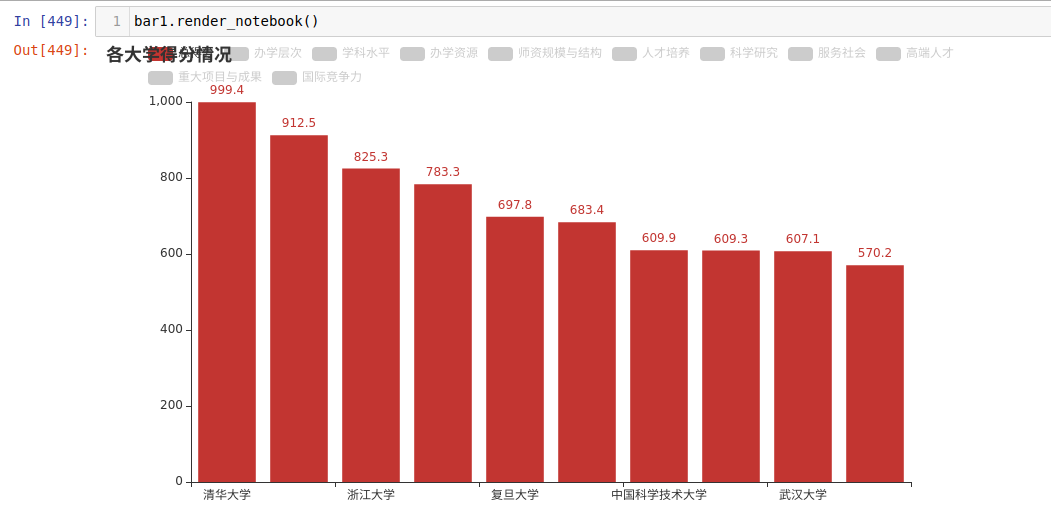
我也想让自己的输出结果更优雅,于是就开始扒拉 PyEcharts 的代码,最后我是用这样的方式知道如何输出 HTML 的:
dir(Bar().render_notebook())
上面这行代码输出了下面这些内容:
['__class__',

 '__delattr__',

 '__dict__',

 '__dir__',

 '__doc__',

 '__eq__',

 '__format__',

 '__ge__',

 '__getattribute__',

 '__gt__',

 '__hash__',

 '__html__',

 '__init__',

 '__init_subclass__',

 '__le__',

 '__lt__',

 '__module__',

 '__ne__',

 '__new__',

 '__reduce__',

 '__reduce_ex__',

 '__repr__',

 '__setattr__',

 '__sizeof__',

 '__str__',

 '__subclasshook__',

 '__weakref__',

 '_repr_html_',

 'data']
我注意到了一个 _repr_html_ 方法,于是我编写了一个测试类,其中声明了一个 _repr_html_方法,然后实例化它:
class Test:

   def _repr_html_(self):

       return '<div style="width:20px;height:20px;background-color:red"></div>'

Test()
果不其然,它正常工作了。下图是它的输出结果。

后来我发现不止有 _repr_html_,还有 _repr_png_、_repr_markdown_ 等,用这个方式可以让这类方法们显露无疑:
class ShowMeTheMethods:

    def __getattr__(self, attr):

        print(attr)

ShowMeTheMethods()
上面的代码输出结果如下:
_ipython_canary_method_should_not_exist_

_ipython_display_

_ipython_canary_method_should_not_exist_

_repr_mimebundle_

_ipython_canary_method_should_not_exist_

_repr_html_

_ipython_canary_method_should_not_exist_

_repr_markdown_

_ipython_canary_method_should_not_exist_

_repr_svg_

_ipython_canary_method_should_not_exist_

_repr_png_

_ipython_canary_method_should_not_exist_

_repr_pdf_

_ipython_canary_method_should_not_exist_

_repr_jpeg_

_ipython_canary_method_should_not_exist_

_repr_latex_

_ipython_canary_method_should_not_exist_

_repr_json_

_ipython_canary_method_should_not_exist_

_repr_javascript_
可以看到 Jupyter Notebook 调用了许多方法。除了 repr 开头的方法,还有一个 _ipython_display_ 方法和 一个 _ipython_canary_method_should_not_exist_ 变量。经过测试,如果类中存在 _ipython_canary_method_should_not_exist_,则不会调用以上的这些方法。关于 _ipython_display_ 方法,我没有深入研究过,在此就不展开说明了。
除了 _repr_html_ 之外,_repr_png_ 我也很常用。关于这个方法,其实我最早是在 PIL 库的 Image 对象中发现的。
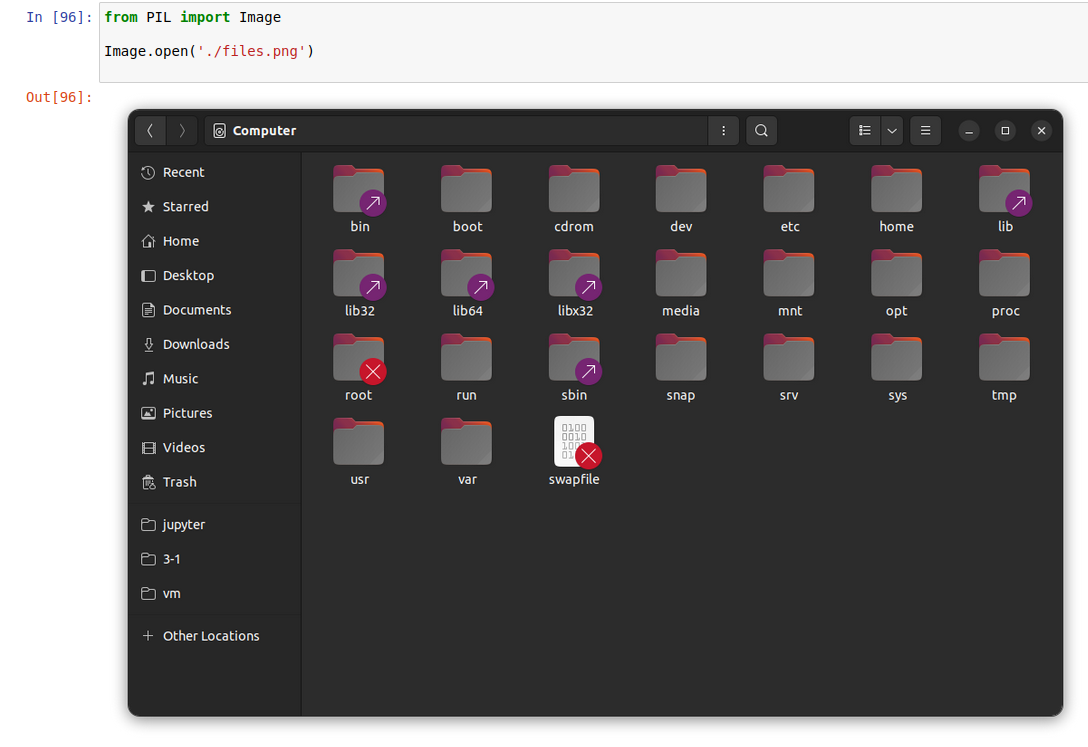
dir(Image.open(./files.png))可以看到有一个_repr_png_方法。
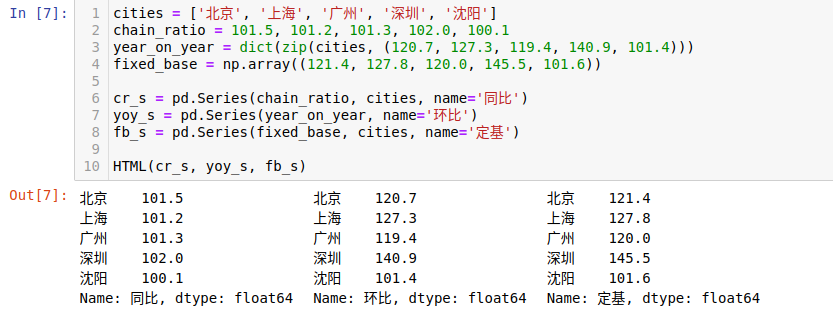
现在我经常使用 HTML 的方式输出,写了一些输出的工具类,在这里做一个分享:
from base64 import b64encode

# 自定义输出类,让内容平铺而不是独占一行

class HTML:

    __class_ind: int = 0

    def __init__(self, *df):

        class_ind = 'c' + str(HTML.__class_ind)

        HTML.__class_ind += 1

        self.html = '<div class="' + class_ind + '"><style scoped>.' + class_ind + '>pre,.' + class_ind + \

            '>img,.' + class_ind + '>div{display:inline-block;margin-right:20px !important}</style>'

        if len(df) == 1:

            df = df[0]

        for d in df:

            if hasattr(d, '_repr_html_'):

                self.html += '<div>' + d._repr_html_() + '</div>'

            elif hasattr(d, '_repr_png_'):

                self.html += '<img src="data:image/png;base64,' + b64encode(d._repr_png_()).decode() + '</img>'

            else:

                self.html += '<pre>' + str(d) + '</pre>'

        self.html += '</div>'

    def _repr_html_(self):

        return self.html
效果:
# 可以切换输出显示的内容

class HTMLTab:

    __id = 0

    def __init__(self, *argv):

        HTMLTab.__id += 1

        id_ = str(HTMLTab.__id)

        switcher = '<div class="switcher' + id_ + '">'

        container = ''

        cnt = 0

        if len(argv) == 1:

            argv = argv[0]

        for i in argv:

            switcher += '<button id="btn_' + str(cnt) + '__' + id_ + '">' + str(i[0]) + '</button>'

            container += '<div class="container' + id_ + '" id="con_' + str(cnt) + '__' + id_ + '">' + \

            (i[1]._repr_html_() if hasattr(i[1], '_repr_html_') else ('<pre>' + str(i[1]) + '</pre>')) + '</div>'

            cnt += 1

        switcher += '</div>'

        java_script = (

            '<script>var c' + id_ + '=document.querySelectorAll(".container' + id_ + '[id^=con_]"),b' + id_ + '=doc'

            'ument.querySelectorAll(".switcher' + id_ + '>[id^=btn_]"),f' + id_ + '=()=>{for(let i of c' + id_ + ')'

            '{i.style.display="none"}};f' + id_ + '();for(let i of b' + id_ + '){i.onclick=function(){f' + id_ + '('

            ');for(let i of b' + id_ + '){i.style.color="#000"}this.style.color="#44f";window["con_"+this.id.substr'

            '(4)].style.display="inline"}}b' + id_ + '[0].onclick()</script>'

        )

        self.__html = switcher + container + java_script

    def _repr_html_(self):

        return self.__html
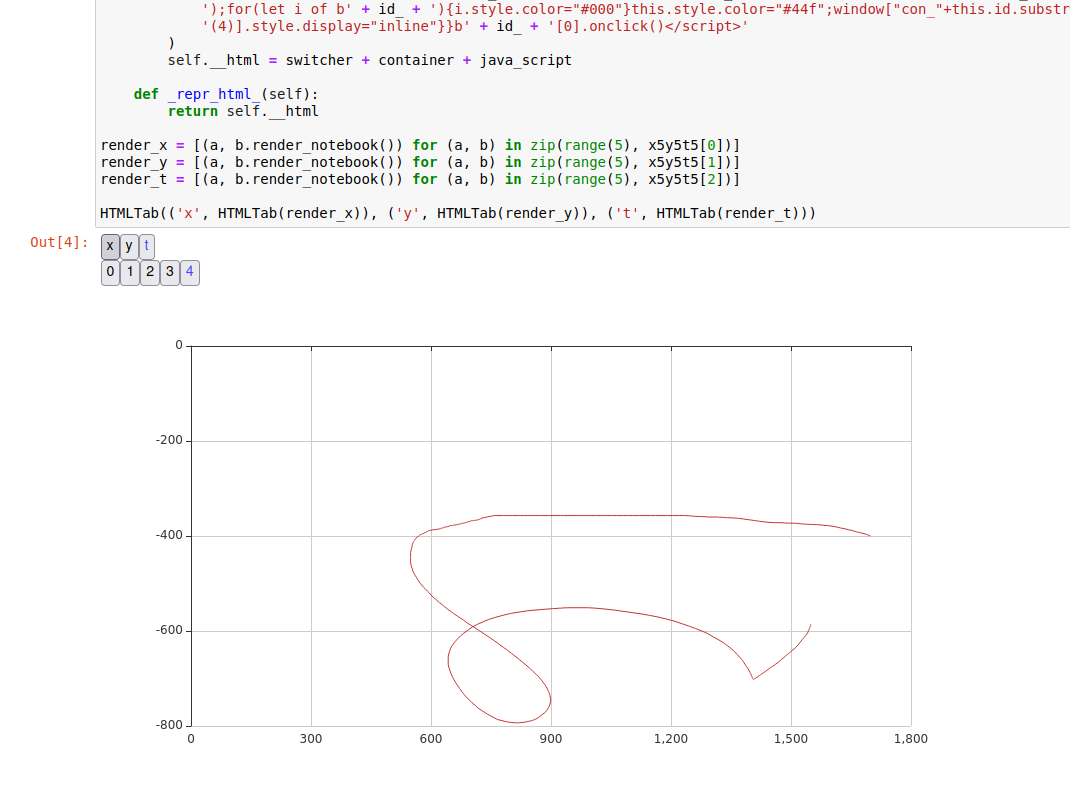
效果:
在Jupyter Notebook 中输出 HTML的更多相关文章
- 机器学习:Jupyter Notebook中numpy的使用
一.Jupyter Notebook的魔法命令 # 模块/方法 + ?或者help(模块/方法):查看模块/方法的解释文档: 1)%run # 机械学习中主要应用两个魔法命令:%run.%timeit ...
- 非线性函数的最小二乘拟合及在Jupyter notebook中输入公式 [原创]
突然有个想法,能否通过学习一阶RC电路的阶跃响应得到RC电路的结构特征——时间常数τ(即R*C).回答无疑是肯定的,但问题是怎样通过最小二乘法.正规方程,以更多的采样点数来降低信号采集噪声对τ估计值的 ...
- [转载]Jupyter Notebook中自动补全代码
原文地址:https://yq.aliyun.com/articles/667928 在公众号之前的文章中,已经介绍了在Jupyter Notebook中设置主题以及输出代码文件到pdf文件中,本文来 ...
- 在jupyter notebook中同时安装python2和python3
之前讨论过在anaconda下安装多个python版本,本期来讨论下,jupyter notebook中怎样同时安装python2.7 和python3.x. 由于我之前使用的jupyter note ...
- jupyter notebook中No module named 'tensorflow'
当我们在jupyter notebook中运行时可能会遇见没有某个包的情况,如下: ---------------------------------------------------------- ...
- 解决在jupyter notebook中遇到的ImportError: matplotlib is required for plotting问题
昨天学习pandas和matplotlib的过程中, 在jupyter notebook遇到ImportError: matplotlib is required for plotting错误, 以下 ...
- 在jupyter notebook中运行R语言
要想在jupyter notebook中运行R语言其实非常简单,按顺序安装下面扩展包即可: install.package('repr','IRdisplay','evaluate','crayon' ...
- 在jupyter notebook 中同时使用安装不同版本的python内核-从而可以进行切换
在安装anaconda的时候,默认安装的是python3.6 但是cs231n课程作业是在py2.7环境下运行的.所以需要在jupyter notebook中安装并启用python2.7版本 方法: ...
- jupyter notebook中出现ValueError: signal only works in main thread 报错 即 长时间in[*] 解决办法
我在jupyter notebook中新建了一个基于py3.6的kernel用来进行tensorflow学习 但是在jupyter notebook中建立该kernel时,右上角总是显示 服务正在启动 ...
- 在jupyter notebook 中编辑公式
jupyter notebook是一个python的交互式开发环境,广泛应用于数据分析的场景下. 在jupyter notebook中,还可以很方便的编辑数学公式. 1.Markdown状态 编辑公式 ...
随机推荐
- 使用git下载文件时提示身份验证失败
鼠标右键打开Git Bash Here窗口 输入git clone + 网址 后出现身份报错提示信息 需要重新修改一下用户名和邮箱就可以了 git config --global --replace- ...
- 一、MySQL 函数
1.MySQL 字符串函数 函数 描述 实例 结果展示 说明 REPLACE(s,s1,s2) 将字符串s2代替字符串s中的字符串s1 SELECT REPLACE(ccc.contract_no,& ...
- WPF绑定(4)
什么是绑定(Binding)? 在winform中, 我们常常会用到各种类型的赋值, 例如: button1.Text="Hello"; label.Text="Hell ...
- dockerfile实践学习
一.dockerfile简介 镜像是分层存储的,每一层在前一层的基础上进行修改. 容器也是分层存储,已经向为基础层,在其他基础上加一层作为容器运行的存储层. 创建镜像的另种两种方法 手动修改容器内容, ...
- 微信公众号 H5授权登录
首先微信公众号 必须是服务号,订阅号没有 "网页授权获取用户基本信息" 没有这个权限.服务号也必须认证后才有这个权限
- C# Linq将DataTable中的某列转换成数组或者List
// 获取到的数据 DataTable picDt = GetPdmPoroductModelPictureData(productModelCode); // 将productCode列转数组 st ...
- 命令行编译、运行带包(package)的java源码
首先安装好JDK,过程略. 准备一个源码Main.java,如下 1 package com.compiltetest; 2 3 public class Main { 4 5 public stat ...
- C语言-链表流星雨(EsayX)
刷B站看到的,做个玩玩.IDE:Visual Studio 2022.依赖EsayX图形库 1-效果 2-程序 /* 链表流星雨单文件版本 依赖EsayX图形库 */ #include <std ...
- ubuntu20.0.4 安装influxdb
官网:https://docs.influxdata.com/influxdb/v2.3/install/?t=Linux1.命令:# Ubuntu/Debian wget https://dl.in ...
- lg9035题解
考虑枚举\(a_{n-1}=l\),根据题意\(l\leq a_n\leq k+1-l\),这说明\(a_n\)有\(k+1-2l\)种取值. 令\(b_i=a_i-a_{i-1}\),则\(b_1\ ...