
蓝牙 GameKit
一.准备工作
1.搭建UI
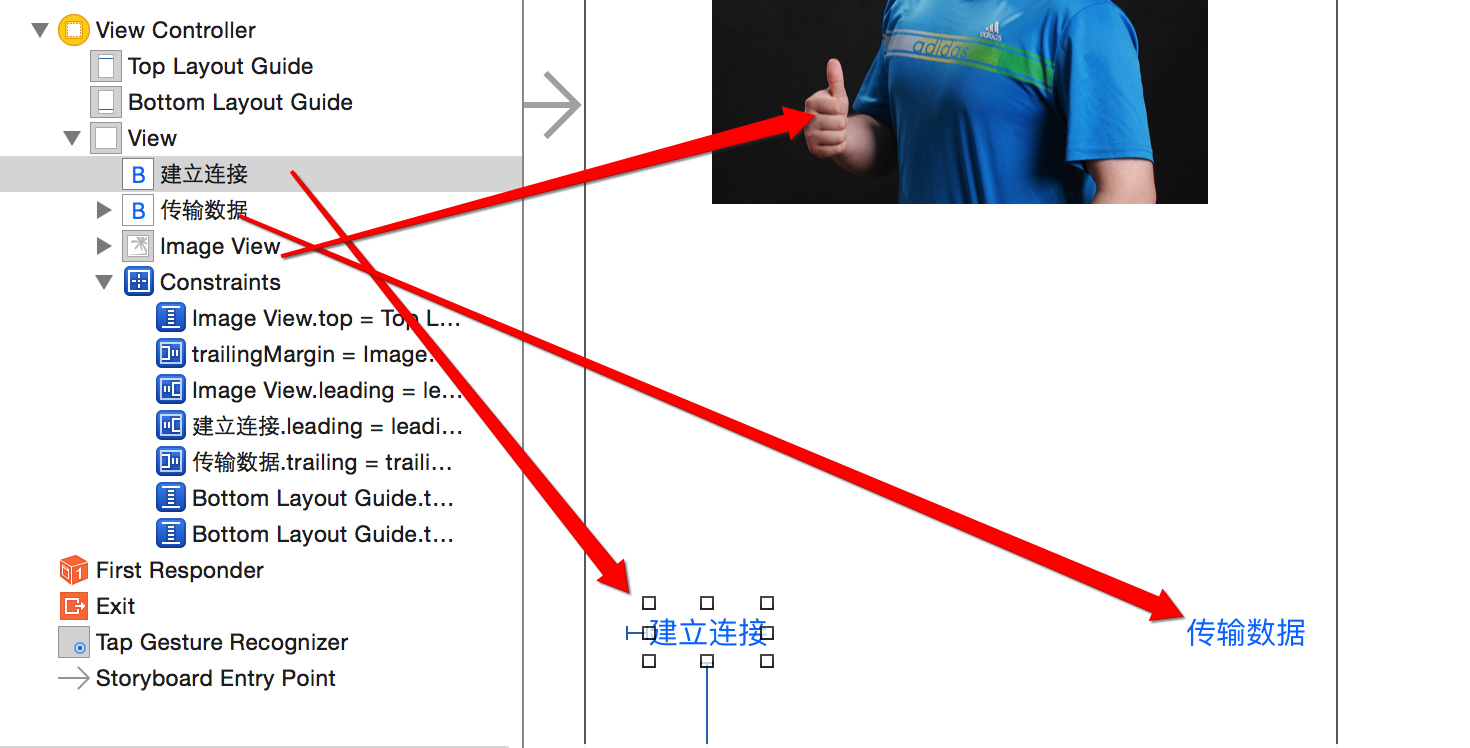
2.拖线
// 图片

@property (weak, nonatomic) IBOutlet UIImageView *imageView;

// 建立连接

- (IBAction)buildConnect:(id)sender{}

// 发送数据

- (IBAction)sendData:(id)sender{}
二.连接蓝牙
- 显示可以连接的蓝牙设备列表
- (IBAction)buildConnect:(id)sender {

    // 创建弹窗

    GKPeerPickerController *ppc = [[GKPeerPickerController alloc] init];

    // 设置代理  @interface ViewController () <GKPeerPickerControllerDelegate>

    ppc.delegate = self;

    // 展示

    [ppc show];

}
- 监听蓝牙的连接
#pragma mark -GKPeerPickerControllerDelegate

// 连接成功就会调用

- (void)peerPickerController:(GKPeerPickerController *)picker // 弹窗

              didConnectPeer:(NSString *)peerID // 连接到的蓝牙设备号

                   toSession:(GKSession *)session // 连接会话(通过它进行数据交互)

{

    NSLog(@"%s, line = %d", __FUNCTION__, __LINE__);

    // 弹窗消失

    [picker dismiss];

}
三.利用蓝牙传输数据
- 点击图片从相册中选择一张显示本机
- 可以修改imaV为Btn,也可以为imaV添加手势
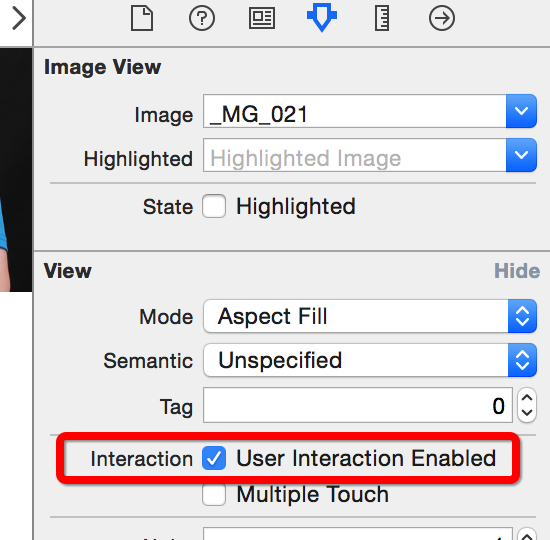
- 1.修改imageView的用户交互
- 2.添加手势到图片上
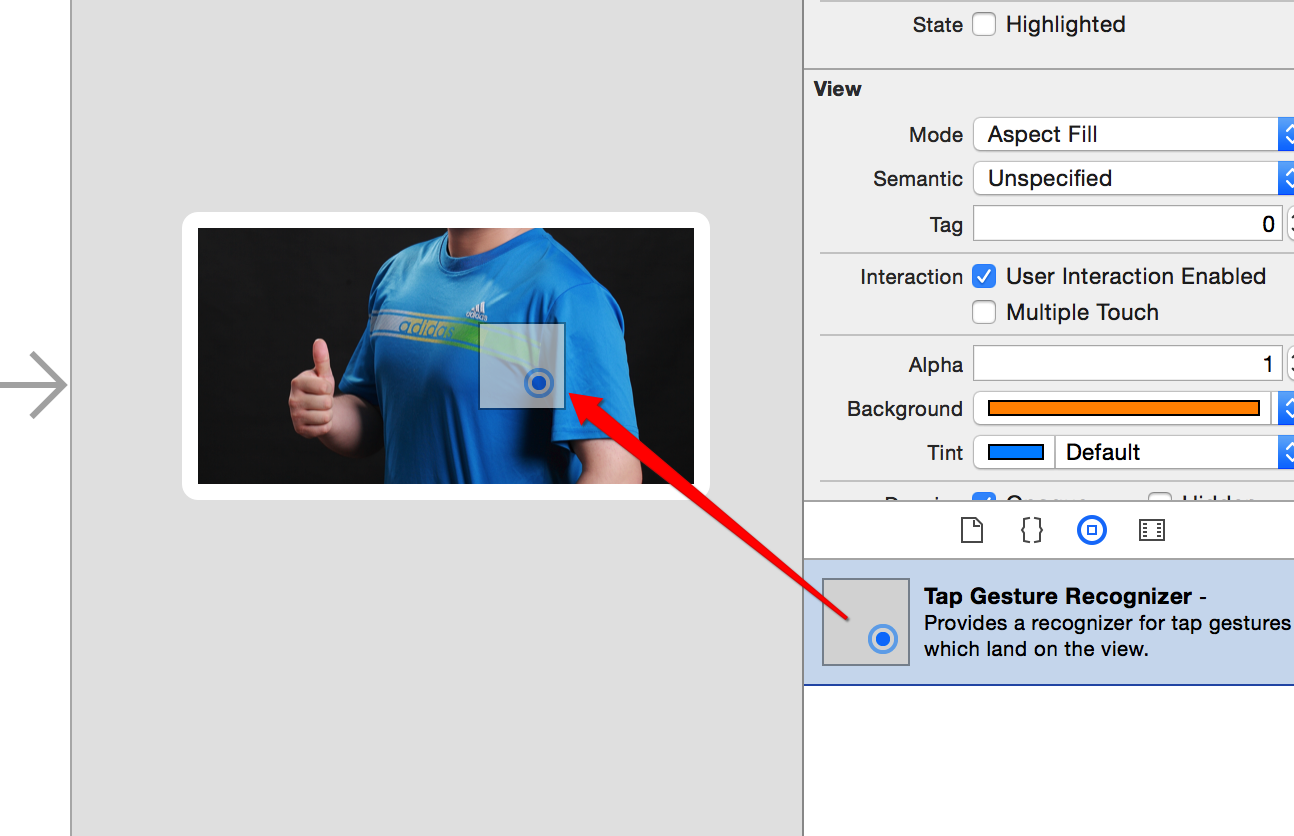
- 3.拖出手势的响应事件

- 4.完善相册选择图片代码
- 1.修改imageView的用户交互
- 可以修改imaV为Btn,也可以为imaV添加手势
    // 手势-点击从相册中选一张照片

- (IBAction)tapImage:(UITapGestureRecognizer *)sender {

    NSLog(@"%s, line = %d", __FUNCTION__, __LINE__);

    // 先判断是否有相册

    if (![UIImagePickerController isSourceTypeAvailable:UIImagePickerControllerSourceTypePhotoLibrary]) {

        return;

    }

    // 创建弹出的控制器

    UIImagePickerController *ipc = [[UIImagePickerController alloc] init];

    // 设置图片来源为相册

    ipc.sourceType = UIImagePickerControllerSourceTypePhotoLibrary;

    // 设置代理 @interface ViewController () <UINavigationControllerDelegate, UIImagePickerControllerDelegate>

    ipc.delegate = self;

    // modal出来

    [self presentViewController:ipc animated:YES completion:nil];

}

#pragma mark - UINavigationControllerDelegate, UIImagePickerControllerDelegate

// 选中某图片后调用

- (void)imagePickerController:(UIImagePickerController *)picker didFinishPickingMediaWithInfo:(NSDictionary<NSString *,id> *)info

{

    // 控制器返回

    [picker dismissViewControllerAnimated:YES completion:nil];

    // 设置图片

    self.imageView.image = info[UIImagePickerControllerOriginalImage];

}
- 点击发送数据完成图片显示到另一个蓝牙机器上
- 1.分析需要通过GKSession对象来传递数据,所以在
peerPickerController:didConnectPeer:didConnectPeer:的方法中保存session会话
- 1.分析需要通过GKSession对象来传递数据,所以在
@property (nonatomic, strong) GKSession *session; /**< 蓝牙连接会话 */

// 连接成功就会调用

- (void)peerPickerController:(GKPeerPickerController *)picker // 弹窗

              didConnectPeer:(NSString *)peerID // 连接到的蓝牙设备号

                   toSession:(GKSession *)session // 连接会话(通过它进行数据交互)

{

    NSLog(@"%s, line = %d", __FUNCTION__, __LINE__);

    // 弹窗消失

    [picker dismiss];

    // 保存会话

    self.session = session;

}
- 发送
// 发送数据

- (IBAction)sendData:(id)sender {

    if (self.imageView.image == nil) return; // 有图片才继续执行

    // 通过蓝牙链接会话发送数据到所有设备

    [self.session sendDataToAllPeers:UIImagePNGRepresentation(self.imageView.image) // 数据

                        withDataMode:GKSendDataReliable // 枚举:发完为止

                               error:nil];

}
- 接收
// 连接成功就会调用

- (void)peerPickerController:(GKPeerPickerController *)picker // 弹窗

              didConnectPeer:(NSString *)peerID // 连接到的蓝牙设备号

                   toSession:(GKSession *)session // 连接会话(通过它进行数据交互)

{

    NSLog(@"%s, line = %d", __FUNCTION__, __LINE__);

    // 弹窗消失

    [picker dismiss];

    // 保存会话

    self.session = session;

    // 处理接收到的数据[蓝牙设备接收到数据时,就会调用 [self receiveData:fromPeer:inSession:context:]]

    // 设置数据接受者为:self

    [self.session setDataReceiveHandler:self

                       withContext:nil];

}

#pragma mark - 蓝牙设备接收到数据时,就会调用

- (void)receiveData:(NSData *)data // 数据

           fromPeer:(NSString *)peer // 来自哪个设备

          inSession:(GKSession *)session // 连接会话

            context:(void *)context

{

    NSLog(@"%s, line = %d", __FUNCTION__, __LINE__);

    // 显示

    self.imageView.image = [UIImage imageWithData:data];

    // 写入相册

    UIImageWriteToSavedPhotosAlbum(self.imageView.image, nil, nil, nil);

}
四.注意
- 只能用于iOS设备之间的链接
- 只能用于同一个应用程序之间的连接
- 最好别利用蓝牙发送比较大的数据
蓝牙 GameKit的更多相关文章
- iOS 蓝牙(GameKit CoreBluetooth)
利用GameKit框架实现ios设备的蓝牙通讯,导入框架:#import <GameKit/GameKit.h> , 注意: 此框架只能用于ios设置间蓝牙通讯 如今苹果开放了接口来实现 ...
- IOS 蓝牙(GameKit、Core Bluetooth)
GameKit的蓝牙开发注意 ● 只能用于iOS设备之间的连接 ● 只能用于同一个应用程序之间的连接 ● 最好别利用蓝牙发送比较大的数据 /* 关于蓝牙的数据传输 1. 一次性传送,没有中间方法,所 ...
- 蓝牙实现对等网络连接 <GameKit/GameKit.h>
/* 1.设置UI界面 2.引入框架 3.点击选择照片 4.连接蓝牙设备 5.实现蓝牙的代理方法 6.发送照片 */ #import "ViewController.h" #imp ...
- iOS 蓝牙的GameKit用法
一.连接蓝牙 显示可以连接的蓝牙设备列表 - (IBAction)buildConnect:(id)sender { // 创建弹窗 GKPeerPickerController *ppc = [[G ...
- iOS开发系列--通讯录、蓝牙、内购、GameCenter、iCloud、Passbook系统服务开发汇总
--系统应用与系统服务 iOS开发过程中有时候难免会使用iOS内置的一些应用软件和服务,例如QQ通讯录.微信电话本会使用iOS的通讯录,一些第三方软件会在应用内发送短信等.今天将和大家一起学习如何使用 ...
- iOS--通讯录、蓝牙、内购、GameCenter、iCloud、Passbook等系统服务开发汇总
iOS开发过程中有时候难免会使用iOS内置的一些应用软件和服务,例如QQ通讯录.微信电话本会使用iOS的通讯录,一些第三方软件会在应用内发送短信等.今天将和大家一起学习如何使用系统应用.使用系统服务: ...
- iOS蓝牙开发CoreBluetooth快速入门
在iOS开发中,实现蓝牙通信有两种方式,一种是使用传统的GameKit.framework,另一种就是使用在iOS 5中加入的CoreBluetooth.framework. 利用CoreBlueto ...
- 2.OC蓝牙功能
一. 最早的蓝牙框架是GameKit,iOS7之前用的比较多,它有只能支持iOS设备间的传输,但是使用步骤简单,我们只需要搞清楚两个类就可以了. GKPeerPickerController:熟称浏 ...
- iOS开发——高级技术&蓝牙服务
蓝牙服务 蓝牙 随着蓝牙低功耗技术BLE(Bluetooth Low Energy)的发展,蓝牙技术正在一步步成熟,如今的大部分移动设备都配备有蓝牙4.0,相比之前的蓝牙技术耗电量大大降低.从iOS的 ...
随机推荐
- vs2013下git的使用
一.将VS2013项目托管到Git 现在的开源项目越来越多,我们会注意到这些开源项目大多共享在GitHub上面,包括微软开源的项目也在Github上,当然,如果你用过Git后,会发现Git确实不错,其 ...
- Apache下安装配置mod_pagespeed模块,轻松完成网站提速
mod_pagespeed是一个开源的Apache module,它由谷歌开发,通过优化你的网页来减少响应延迟和带宽占用.作用参考ngx_pagespeed功能:http://blog.linuxey ...
- KVC, KVO实现原理剖析
iPhone程序开发 KVO/KVC实现机理分析是本文要介绍的内容,不多说,直接进入话题.我们来看详细内容. Objective-C里面的Key-Value Observing (KVO)机制,非常不 ...
- Objective-C Autorelease Pool 的实现原理
内存管理一直是学习 Objective-C 的重点和难点之一,尽管现在已经是 ARC 时代了,但是了解 Objective-C 的内存管理机制仍然是十分必要的.其中,弄清楚 autorelease 的 ...
- Oracle中遍历Ref Cursor示例
示例编写环境 数据库:Oracle Database 12c Enterprise Edition Release 12.1.0.1.0 - 64bit Production 登陆用户:Scott O ...
- jqueryui.position.js源代码分析
近期要写前端组件了.狂砍各种组件源代码,这里分析一款jqueryui中的posistion插件,注意,它不是jqueryui widget,首先看下源代码整体结构图 1.看到$.fn.position ...
- Android 百度地图API 定位 导航
看看这个利用百度地图定位并实现目的地导航的Demo. 首先看实现效果: 进 入后首先会得到当前位置,在地图上显示出来.在输入框中输入目的地后,就会在地 ...
- ubuntu安装mysql后不能远程访问的方法
ubuntu安装mysql后不能远程访问的方法1.mysql>GRANT ALL PRIVILEGES ON *.* TO 'myuser'@'%' IDENTIFIED BY 'mypassw ...
- Yii中CDbCriteria常用方法
最近在使用Yii 下面是常用到的方法,这里保存一下方便查看 $criteria =newCDbCriteria; $criteria->addCondition("id=1" ...
- 写给新入IT的新人们
IT=挨踢,这是IT人的自嘲,进入IT行业是有四五年了,也算得上是一个"老人"了吧,见了不少新人,面试了不少新人,也带了一些新人,多多少少还是有点发言权的. 关于书本 新人们经常会 ...