
Apache Lucene学习笔记
Hadoop概述
Apache lucene:
全球第一个开源的全文检索引擎工具包
完整的查询引擎和搜索引擎
部分文本分析引擎
开发人员在此基础建立完整的全文检索引擎
以下为转载:http://www.cnblogs.com/xing901022/p/3933675.htm
首先呢,学习任何一门新的亦或是旧的开源技术,百度其中一二是最简单的办法,先了解其中的大概,思想等等。这里就贡献一个讲解很到位的ppt。已经被我转成了PDF,便于搜藏。
其次,关于第一次编程初探,建议还是查看官方资料。百度到的资料,目前Lucene已经更新到4.9版本,这个版本需要1.7以上的JDK,所以如果还用1.6甚至是1.5的小盆友,请参考低版本,由于我用的1.6,因此在使用Lucene4.0。
这是Lucene4.0的官网文档:http://lucene.apache.org/core/4_0_0/core/overview-summary.html
这里非常佩服Lucene的开元贡献者,可以阅读Lucene in Action,作者最初想要写软件赚钱,最后贡献给了Apache,跑题了。
最后,提醒学习Lucene的小盆友们,这个开源软件的版本更新不慢,版本之间的编程风格亦是不同,所以如果百度到的帖子,可能这段代码,用了4.0或者3.6就会不好使。
比如,以前版本的申请IndexWriter时,是这样的:
IndexWriter indexWriter = new IndexWriter(indexDir,luceneAnalyzer, true );
但是4.0,我们需要配置一个conf,把配置内容放到这个对象中:
    IndexWriterConfig config = new IndexWriterConfig(Version.LUCENE_CURRENT, analyzer);

    IndexWriter iwriter = new IndexWriter(directory, config);
所以,请一定要参考官方文档的编程风格,进行代码的书写。
最后的最后,从官网上面下载下来的文件,已经上传至百度网盘,欢迎下载。

这是其中最常用的五个文件:
第一个,也是最重要的,Lucene-core-4.0.0.jar,其中包括了常用的文档,索引,搜索,存储等相关核心代码。
第二个,Lucene-analyzers-common-4.0.0.jar,这里面包含了各种语言的词法分析器,用于对文件内容进行关键字切分,提取。
第三个,Lucene-highlighter-4.0.0.jar,这个jar包主要用于搜索出的内容高亮显示。
第四个和第五个,Lucene-queryparser-4.0.0.jar,提供了搜索相关的代码,用于各种搜索,比如模糊搜索,范围搜索,等等。
废话说到这里,下面我们简单的讲解一下什么是全文检索。
比如,我们一个文件夹中,或者一个磁盘中有很多的文件,记事本、world、Excel、pdf,我们想根据其中的关键词搜索包含的文件。例如,我们输入Lucene,所有内容含有Lucene的文件就会被检查出来。这就是所谓的全文检索。
因此,很容易的我们想到,应该建立一个关键字与文件的相关映射,盗用ppt中的一张图,很明白的解释了这种映射如何实现。
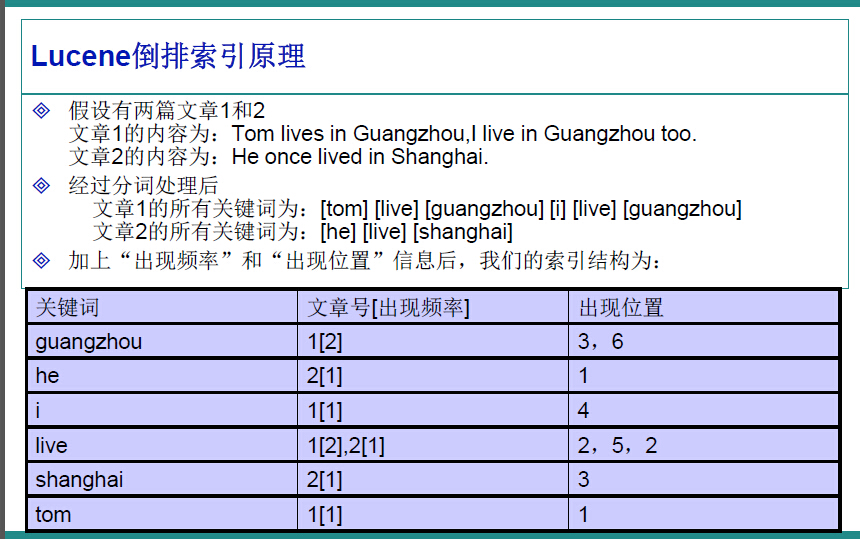
在Lucene中,就是使用这种“倒排索引”的技术,来实现相关映射。
有了这种映射关系,我们就来看看Lucene的架构设计。
下面是Lucene的资料必出现的一张图,但也是其精髓的概括。
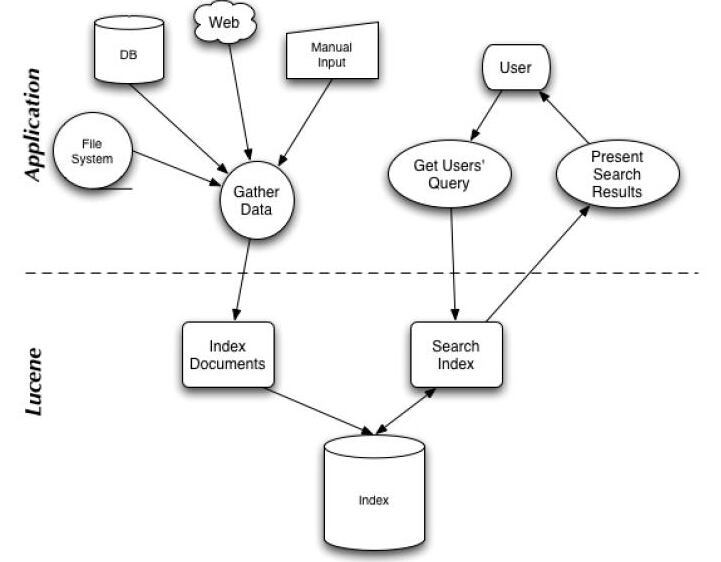
我们可以看到,Lucene的使用主要体现在两个步骤:
1 创建索引,通过IndexWriter对不同的文件进行索引的创建,并将其保存在索引相关文件存储的位置中。
2 通过索引查寻关键字相关文档。
下面针对官网上面给出的一个例子,进行分析:

 1   Analyzer analyzer = new StandardAnalyzer(Version.LUCENE_CURRENT);

 2

 3     // Store the index in memory:

 4     Directory directory = new RAMDirectory();

 5     // To store an index on disk, use this instead:

 6     //Directory directory = FSDirectory.open("/tmp/testindex");

 7     IndexWriterConfig config = new IndexWriterConfig(Version.LUCENE_CURRENT, analyzer);

 8     IndexWriter iwriter = new IndexWriter(directory, config);

 9     Document doc = new Document();

10     String text = "This is the text to be indexed.";

11     doc.add(new Field("fieldname", text, TextField.TYPE_STORED));

12     iwriter.addDocument(doc);

13     iwriter.close();

14

15     // Now search the index:

16     DirectoryReader ireader = DirectoryReader.open(directory);

17     IndexSearcher isearcher = new IndexSearcher(ireader);

18     // Parse a simple query that searches for "text":

19     QueryParser parser = new QueryParser(Version.LUCENE_CURRENT, "fieldname", analyzer);

20     Query query = parser.parse("text");

21     ScoreDoc[] hits = isearcher.search(query, null, 1000).scoreDocs;

22     assertEquals(1, hits.length);

23     // Iterate through the results:

24     for (int i = 0; i < hits.length; i++) {

25       Document hitDoc = isearcher.doc(hits[i].doc);

26       assertEquals("This is the text to be indexed.", hitDoc.get("fieldname"));

27     }

28     ireader.close();

29     directory.close();
索引的创建
首先,我们需要定义一个词法分析器。
比如一句话,“我爱我们的中国!”,如何对他拆分,扣掉停顿词“的”,提取关键字“我”“我们”“中国”等等。这就要借助的词法分析器Analyzer来实现。这里面使用的是标准的词法分析器,如果专门针对汉语,还可以搭配paoding,进行使用。
1 Analyzer analyzer = new StandardAnalyzer(Version.LUCENE_CURRENT);
参数中的Version.LUCENE_CURRENT,代表使用当前的Lucene版本,本文环境中也可以写成Version.LUCENE_40。
第二步,确定索引文件存储的位置,Lucene提供给我们两种方式:
1 本地文件存储
Directory directory = FSDirectory.open("/tmp/testindex");
2 内存存储
Directory directory = new RAMDirectory();
可以根据自己的需要进行设定。
第三步,创建IndexWriter,进行索引文件的写入。
IndexWriterConfig config = new IndexWriterConfig(Version.LUCENE_CURRENT, analyzer);

IndexWriter iwriter = new IndexWriter(directory, config);
这里的IndexWriterConfig,据官方文档介绍,是对indexWriter的配置,其中包含了两个参数,第一个是目前的版本,第二个是词法分析器Analyzer。
第四步,内容提取,进行索引的存储。
Document doc = new Document();

String text = "This is the text to be indexed.";

doc.add(new Field("fieldname", text, TextField.TYPE_STORED));

iwriter.addDocument(doc);

iwriter.close();
第一行,申请了一个document对象,这个类似于数据库中的表中的一行。
第二行,是我们即将索引的字符串。
第三行,把字符串存储起来(因为设置了TextField.TYPE_STORED,如果不想存储,可以使用其他参数,详情参考官方文档),并存储“表明”为"fieldname".
第四行,把doc对象加入到索引创建中。
第五行,关闭IndexWriter,提交创建内容。
这就是索引创建的过程。
关键字查询:
第一步,打开存储位置
DirectoryReader ireader = DirectoryReader.open(directory);
第二步,创建搜索器
IndexSearcher isearcher = new IndexSearcher(ireader);
第三步,类似SQL,进行关键字查询
QueryParser parser = new QueryParser(Version.LUCENE_CURRENT, "fieldname", analyzer);

Query query = parser.parse("text");

ScoreDoc[] hits = isearcher.search(query, null, 1000).scoreDocs;

assertEquals(1, hits.length);

for (int i = 0; i < hits.length; i++) {

    Document hitDoc = isearcher.doc(hits[i].doc);

    assertEquals("This is the text to be indexed.",hitDoc.get("fieldname"));

}
这里,我们创建了一个查询器,并设置其词法分析器,以及查询的“表名“为”fieldname“。查询结果会返回一个集合,类似SQL的ResultSet,我们可以提取其中存储的内容。
关于各种不同的查询方式,可以参考官方手册,或者推荐的PPT
第四步,关闭查询器等。
ireader.close();

directory.close();
最后,博猪自己写了个简单的例子,可以对一个文件夹内的内容进行索引的创建,并根据关键字筛选文件,并读取其中的内容。
创建索引:
/**

     * 创建当前文件目录的索引

     * @param path 当前文件目录

     * @return 是否成功

     */

    public static boolean createIndex(String path){

        Date date1 = new Date();

        List<File> fileList = getFileList(path);

        for (File file : fileList) {

            content = "";

            //获取文件后缀

            String type = file.getName().substring(file.getName().lastIndexOf(".")+1);

            if("txt".equalsIgnoreCase(type)){

                content += txt2String(file);

            }else if("doc".equalsIgnoreCase(type)){

                content += doc2String(file);

            }else if("xls".equalsIgnoreCase(type)){

                content += xls2String(file);

            }

            System.out.println("name :"+file.getName());

            System.out.println("path :"+file.getPath());

//            System.out.println("content :"+content);

            System.out.println();

            try{

                analyzer = new StandardAnalyzer(Version.LUCENE_CURRENT);

                directory = FSDirectory.open(new File(INDEX_DIR));

                File indexFile = new File(INDEX_DIR);

                if (!indexFile.exists()) {

                    indexFile.mkdirs();

                }

                IndexWriterConfig config = new IndexWriterConfig(Version.LUCENE_CURRENT, analyzer);

                indexWriter = new IndexWriter(directory, config);

                Document document = new Document();

                document.add(new TextField("filename", file.getName(), Store.YES));

                document.add(new TextField("content", content, Store.YES));

                document.add(new TextField("path", file.getPath(), Store.YES));

                indexWriter.addDocument(document);

                indexWriter.commit();

                closeWriter();

            }catch(Exception e){

                e.printStackTrace();

            }

            content = "";

        }

        Date date2 = new Date();

        System.out.println("创建索引-----耗时:" + (date2.getTime() - date1.getTime()) + "ms\n");

        return true;

    }
进行查询:
/**

     * 查找索引,返回符合条件的文件

     * @param text 查找的字符串

     * @return 符合条件的文件List

     */

    public static void searchIndex(String text){

        Date date1 = new Date();

        try{

            directory = FSDirectory.open(new File(INDEX_DIR));

            analyzer = new StandardAnalyzer(Version.LUCENE_CURRENT);

            DirectoryReader ireader = DirectoryReader.open(directory);

            IndexSearcher isearcher = new IndexSearcher(ireader);

            QueryParser parser = new QueryParser(Version.LUCENE_CURRENT, "content", analyzer);

            Query query = parser.parse(text);

            ScoreDoc[] hits = isearcher.search(query, null, 1000).scoreDocs;

            for (int i = 0; i < hits.length; i++) {

                Document hitDoc = isearcher.doc(hits[i].doc);

                System.out.println("____________________________");

                System.out.println(hitDoc.get("filename"));

                System.out.println(hitDoc.get("content"));

                System.out.println(hitDoc.get("path"));

                System.out.println("____________________________");

            }

            ireader.close();

            directory.close();

        }catch(Exception e){

            e.printStackTrace();

        }

        Date date2 = new Date();

        System.out.println("查看索引-----耗时:" + (date2.getTime() - date1.getTime()) + "ms\n");

    }
全部代码:
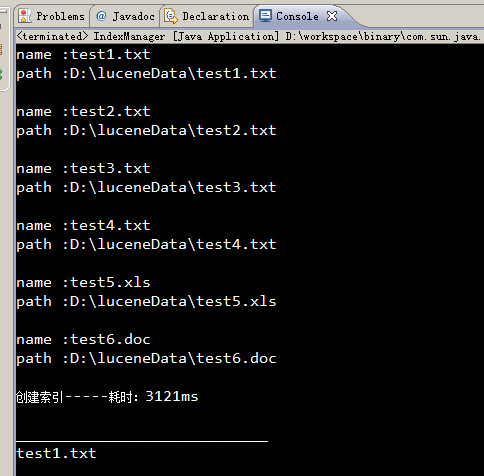
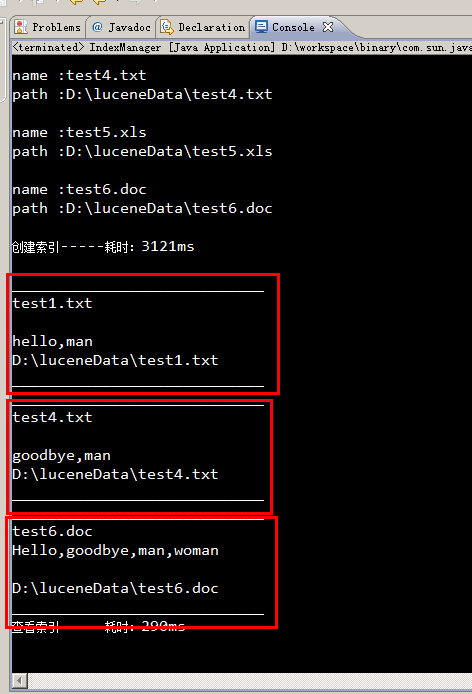
运行结果:
所有包含man关键字的文件,都被筛选出来了。
Apache Lucene学习笔记的更多相关文章
- Lucene学习笔记(更新)
1.Lucene学习笔记 http://www.cnblogs.com/hanganglin/articles/3453415.html
- Apache Flink学习笔记
Apache Flink学习笔记 简介 大数据的计算引擎分为4代 第一代:Hadoop承载的MapReduce.它将计算分为两个阶段,分别为Map和Reduce.对于上层应用来说,就要想办法去拆分算法 ...
- Lucene学习笔记
师兄推荐我学习Lucene这门技术,用了两天时间,大概整理了一下相关知识点. 一.什么是Lucene Lucene即全文检索.全文检索是计算机程序通过扫描文章中的每一个词,对每一个词建立一个索引,指明 ...
- Apache OFBiz 学习笔记 之 服务引擎 二
加载服务定义文件 ofbiz-component.xml:所有的服务定义文件在每个组件的ofbi-component.xml文件中 加载服务定义 例:framework/common/ofbi ...
- Lucene学习笔记1(V7.1)
Lucene是一个搜索类库,solr.nutch和elasticsearch都是基于Lucene.个人感觉学习高级搜索引擎应用程序之前 有必要了解Lucene. 开发环境:idea maven spr ...
- Lucene学习笔记:基础
Lucence是Apache的一个全文检索引擎工具包.可以将采集的数据存储到索引库中,然后在根据查询条件从索引库中取出结果.索引库可以存在内存中或者存在硬盘上. 本文主要是参考了这篇博客进行学习的,原 ...
- Apache Ignite 学习笔记(一): Ignite介绍、部署安装和REST/SQL客户端使用
Apache Ignite 介绍 Ignite是什么呢?先引用一段官网关于Ignite的描述: Ignite is memory-centric distributed database, cachi ...
- lucene学习笔记:三,Lucene的索引文件格式
Lucene的索引里面存了些什么,如何存放的,也即Lucene的索引文件格式,是读懂Lucene源代码的一把钥匙. 当我们真正进入到Lucene源代码之中的时候,我们会发现: Lucene的索引过程, ...
- Lucene学习笔记: 四,Lucene索引过程分析
对于Lucene的索引过程,除了将词(Term)写入倒排表并最终写入Lucene的索引文件外,还包括分词(Analyzer)和合并段(merge segments)的过程,本次不包括这两部分,将在以后 ...
随机推荐
- PC使用网线上网的条件下,通过PC的Wifi共享提供手机上网教程
场景和目标 你有一个笔记本(或装有无线网卡的PC),可以通过网线上网,但是没有无线路由器.现在想要通过笔记本的无线网,让手机也能共享wifi上网. 环境 Win7 操作系统.带有无线网卡的PC或笔记本 ...
- 论HTML5 Audio 标签歌词同步的实现
HTML5草案里面其实有原生的字幕标签(<track> Tag)的,但使用的是vtt格式的文件,非常规的字幕(.sub, .srt)或歌词文件(.lrc). 用法如下(代码来自W3Scho ...
- Castle中AdditionalInterfaces用法介绍
首先见下图(图一),其中FooController是一个没有实现任何Interface的空类.需要实现的效果是:通过FooController对象调用FooService的Do方法.设置这一不常见的场 ...
- EMC学习之电磁辐射
我们在接触新鲜事物的时候,通常习惯用自己熟悉的知识去解释自己不熟悉的事物.EMC知识更多的涉及到微波和射频,对于像我这种专注于信号完整性而 对EMC知识知之甚少的菜鸟来说,最初也只能用SI的一些基础知 ...
- FASTJSON
package com.hanqi.test; import java.util.ArrayList;import java.util.Date;import java.util.List; impo ...
- Spring<bean>标签是反射来实现的
- jquery 拖拽,框选的一点积累
拖拽draggable,框选 selectable,按ctrl多选,临近辅助对齐,从工具栏拖工具 等,和jqueryui的selectable不同,是在一个父div里框选子div(类似框选文件),一 ...
- jQuery源码分析系列(33) : AJAX中的前置过滤器和请求分发器
jQuery1.5以后,AJAX模块提供了三个新的方法用于管理.扩展AJAX请求,分别是: 1.前置过滤器 jQuery. ajaxPrefilter 2.请求分发器 jQuery. ajaxTran ...
- scikit-learn决策树算法类库使用小结
之前对决策树的算法原理做了总结,包括决策树算法原理(上)和决策树算法原理(下).今天就从实践的角度来介绍决策树算法,主要是讲解使用scikit-learn来跑决策树算法,结果的可视化以及一些参数调参的 ...
- 【记录】ASP.NET MVC MapRoute .htm 不起作用
RegisterRoutes 注册路由示例配置: public static void RegisterRoutes(RouteCollection routes) { routes.IgnoreRo ...