
OpenShift 如何获取bearer Token以便进行各种API调用
Openshift 需要通过bearer token的方式和API进行调用,比如基于Postman就可以了解到,输入bearer token后
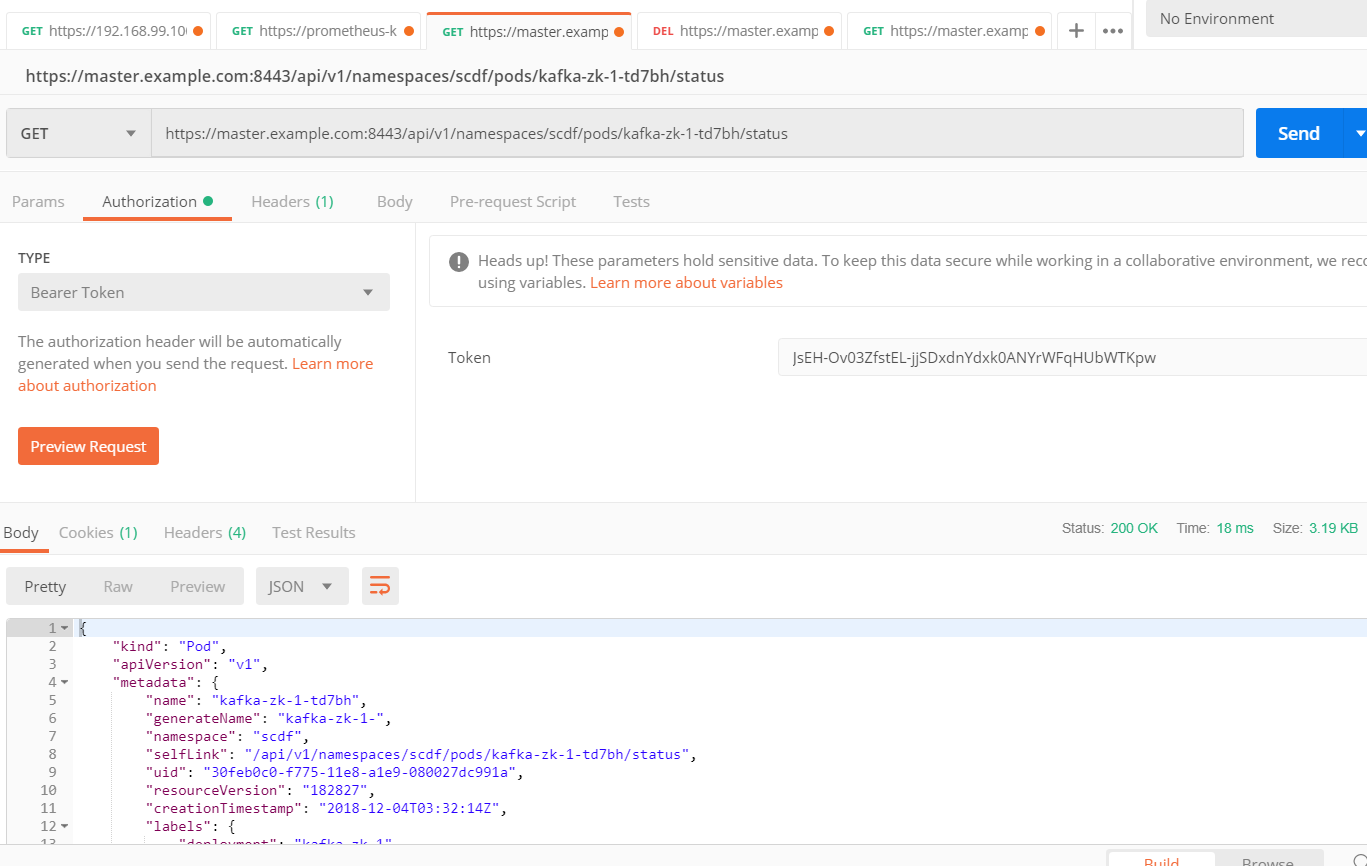
1.如何获取Bearer Token
但Bearer Token如何获取是个巨大的问题,一般来说有两种方式
1.基于oc命令行,如
[root@master ~]# oc login -u admin

Logged into "https://master.example.com:8443" as "admin" using existing credentials.

You have access to the following projects and can switch between them with 'oc project <projectname>':

  * default

    kube-public

    kube-service-catalog

    kube-system

    management-infra

    openshift

    openshift-ansible-service-broker

    openshift-console

    openshift-infra

    openshift-logging

    openshift-monitoring

    openshift-node

    openshift-sdn

    openshift-template-service-broker

    openshift-web-console

    scdf

Using project "default".

[root@master ~]# oc whoami -t

9GLqCn9yL61TyzRjidM2GRgL-S10z0JSato9Puie70I
2.基于curl命令
[root@node1 ~]# curl -u admin:welcome1 -kv  -H "X-CSRF-Token: xxx" 'https://master.example.com:8443/oauth/authorize?client_id=openshift-challenging-client&response_type=token'

* About to connect() to master.example.com port  (#)

*   Trying 192.168.56.103...

* Connected to master.example.com (192.168.56.103) port  (#)

* Initializing NSS with certpath: sql:/etc/pki/nssdb

* skipping SSL peer certificate verification

* NSS: client certificate not found (nickname not specified)

* SSL connection using TLS_ECDHE_RSA_WITH_CHACHA20_POLY1305_SHA256

* Server certificate:

*     subject: CN=172.30.0.1

*     start date: Nov  ::  GMT

*     expire date: Nov  ::  GMT

*     common name: 172.30.0.1

*     issuer: CN=openshift-signer@

* Server auth using Basic with user 'admin'

> GET /oauth/authorize?client_id=openshift-challenging-client&response_type=token HTTP/1.1

> Authorization: Basic YWRtaW46d2VsY29tZTE=

> User-Agent: curl/7.29.

> Host: master.example.com:

> Accept: */*

> X-CSRF-Token: xxx

>

< HTTP/1.1 302 Found

< Cache-Control: no-cache, no-store, max-age=0, must-revalidate

< Expires: Fri, 01 Jan 1990 00:00:00 GMT

< Location: https://master.example.com:8443/oauth/token/implicit#access_token=iVwykQc-qqsO245VJ9TIZq_lIL31G1mTM2GJHTPFfkI&expires_in=86400&scope=user%3Afull&token_type=Bearer

< Pragma: no-cache

< Set-Cookie: ssn=MTU0NDAyNDU1OXxnZV9UaWN5QlpFZ2RULW5vY3o2dVp4SU5WVWZkbWxNd0xfUnFCVzlmRndBSS1Wb2JzY3ZJZHFYb1BPWDNqTWVMV2FjbkJ0bmtlemRMMnpDZ3FSLWUtb0lieVBJQjF0dS1nSWJiZUJrYlFLSngxYVZBa085MUN3VVJkZHJyM2FiNjU1MWkwa3RwcGtHdmJvSmhreWpfRW1MQlFuanYyeEdTcTAybDVuREtEcl9mMHhlXzVYdE5LdG5vNHpKa2QxeGMzczRKRHhzOXzT_k_wyIvwJz72RH5SJor7WYJ3lasYsoVFcdQ6phk75g==; Path=/; HttpOnly; Secure

< Date: Wed, 05 Dec 2018 15:42:39 GMT

< Content-Length: 0

<

* Connection #0 to host master.example.com left intact
一直想通过rest去掉通,尝试很久,最后得到的是如下错误
You have reached this page by following a redirect Location header from an OAuth authorize request.

If a response_type=token parameter was passed to the /authorize endpoint, that requested an

"Implicit Grant" OAuth flow (see https://tools.ietf.org/html/rfc6749#section-4.2).

That flow requires the access token to be returned in the fragment portion of a redirect header.

Rather than following the redirect here, you can obtain the access token from the Location header

(see https://tools.ietf.org/html/rfc6749#section-4.2.2):

  . Parse the URL in the Location header and extract the fragment portion

  . Parse the fragment using the "application/x-www-form-urlencoded" format

  . The access_token parameter contains the granted OAuth access token
解决办法:
通过运行一个java程序,通过后端的shell去获取,代码如下:
import java.io.InputStreamReader;

public class getToken {

    public void getocpToken() {

        try {

        //Process process = Runtime.getRuntime().exec("curl -u admin:welcome1 -kv -H \"X-CSRF-Token: xxx\" 'https://master.example.com:8443/oauth/authorize?client_id=openshift-challenging-client&response_type=token'");

        Process process = Runtime.getRuntime().exec("/root/curl.sh");

        BufferedReader input = new BufferedReader(new InputStreamReader(process.getInputStream()));

        String line = "";

        while ((line = input.readLine()) != null) {

            System.out.println(line);

        }

        input.close();

        } catch (Exception e){

            e.printStackTrace();

        }

    }

    public static void main(String[] args) {

        // TODO Auto-generated method stub

        getToken sample = new getToken();

        sample.getocpToken();

    }

}
简单说就是调用了curl.sh脚本,这个脚本是长下面这个样的
[root@master ~]# cat curl.sh

curl -u admin:welcome1 -kv --silent -H "X-CSRF-Token: xxx" 'https://master.example.com:8443/oauth/authorize?client_id=openshift-challenging-client&response_type=token' >& | grep access_token | awk -F '=' '{print $2}' | awk -F '&' '{print $1}'
运行结果如下:
[root@master ~]# java getToken

oWcKCjuSfbDaJqbLNeLCP67GuR-lAXmjSPyBplWRbvE
这种方式最大的好处是通过http去获取,这样不需要依赖于oc等命令和环境变量,正是因为通过http,而且用curl,所以也可以进行容器化,在容器中运行。
2.通过代码去删除Pod
需要注意事项
- 搞定免证书的SSL调用
- 传入bearer token
一切就很顺利了,贴一下代码
HttpDemo.java
import java.io.BufferedReader;

import java.io.IOException;

import java.io.InputStream;

import java.io.InputStreamReader;

import java.io.UnsupportedEncodingException;

import java.net.HttpURLConnection;

import java.net.MalformedURLException;

import java.net.URL;

import java.util.LinkedHashMap;

import java.util.Map;

import javax.net.ssl.HttpsURLConnection;

import org.apache.commons.codec.binary.Base64;

public class HttpDemo {

    private static final String SYS_VULLN_URL_JSON="https://master.example.com:8443/api/v1/namespaces/scdf/pods/kafka-broker-1-9qdqn";

    public static void httpGet(){

        StringBuffer tempStr = new StringBuffer();

        String responseContent="";

       HttpURLConnection conn = null;

        try {

            URL url = new URL(SYS_VULLN_URL_JSON);

            if("https".equalsIgnoreCase(url.getProtocol())){

                SslUtils.ignoreSsl();

            }

            HttpsURLConnection https = (HttpsURLConnection)url.openConnection();

            https.setRequestMethod("DELETE");

            https.setRequestProperty("Authorization", "Bearer 9GLqCn9yL61TyzRjidM2GRgL-S10z0JSato9Puie70I");

            String result = getReturn(https);

            System.out.println(result);

         } catch (UnsupportedEncodingException e) {

            e.printStackTrace();

        } catch (MalformedURLException e) {

            e.printStackTrace();

        } catch (IOException e) {

            e.printStackTrace();

        } catch(Exception e){

            e.printStackTrace();

        }

    }

    /**

 * Trust every server - dont check for any certificate

 */

    public static String getReturn(HttpURLConnection connection) throws IOException{

        StringBuffer buffer = new StringBuffer();

        try(InputStream inputStream = connection.getInputStream();

            InputStreamReader inputStreamReader = new InputStreamReader(inputStream, "UTF-8");

            BufferedReader bufferedReader = new BufferedReader(inputStreamReader);){

            String str = null;

            while ((str = bufferedReader.readLine()) != null) {

                buffer.append(str);

            }

            String result = buffer.toString();

            return result;

        }

    }

    private static void printResponseHeader(HttpURLConnection http) throws UnsupportedEncodingException {

        Map<String, String> header = getHttpResponseHeader(http);

        for (Map.Entry<String, String> entry : header.entrySet()) {

            String key = entry.getKey() != null ? entry.getKey() + ":" : "";

            System.out.println(key + entry.getValue());

        }

    }

    private static Map<String, String> getHttpResponseHeader(

            HttpURLConnection http) throws UnsupportedEncodingException {

        Map<String, String> header = new LinkedHashMap<String, String>();

        for (int i = ;; i++) {

            String mine = http.getHeaderField(i);

            if (mine == null)

                break;

            header.put(http.getHeaderFieldKey(i), mine);

        }

        return header;

    }

    public static void main(String[] args) {

        httpGet();

    }

}
SslUtils.java
import java.security.cert.CertificateException;

import java.security.cert.X509Certificate;

import javax.net.ssl.HostnameVerifier;

import javax.net.ssl.HttpsURLConnection;

import javax.net.ssl.SSLContext;

import javax.net.ssl.SSLSession;

import javax.net.ssl.TrustManager;

import javax.net.ssl.X509TrustManager;

public class SslUtils {

    private static void trustAllHttpsCertificates() throws Exception {

        TrustManager[] trustAllCerts = new TrustManager[];

        TrustManager tm = new miTM();

        trustAllCerts[] = tm;

        SSLContext sc = SSLContext.getInstance("SSL");

        sc.init(null, trustAllCerts, null);

        HttpsURLConnection.setDefaultSSLSocketFactory(sc.getSocketFactory());

    }

    static class miTM implements TrustManager,X509TrustManager {

        public X509Certificate[] getAcceptedIssuers() {

            return null;

        }

        public boolean isServerTrusted(X509Certificate[] certs) {

            return true;

        }

        public boolean isClientTrusted(X509Certificate[] certs) {

            return true;

        }

        public void checkServerTrusted(X509Certificate[] certs, String authType)

                throws CertificateException {

            return;

        }

        public void checkClientTrusted(X509Certificate[] certs, String authType)

                throws CertificateException {

            return;

        }

    }

    /**

     * 忽略HTTPS请求的SSL证书,必须在openConnection之前调用

     * @throws Exception

     */

    public static void ignoreSsl() throws Exception{

        HostnameVerifier hv = new HostnameVerifier() {

            public boolean verify(String urlHostName, SSLSession session) {

                return true;

            }

        };

        trustAllHttpsCertificates();

        HttpsURLConnection.setDefaultHostnameVerifier(hv);

    }

}
好了,有了token,又不需要证书,大家就可以愉快的玩耍了。
OpenShift 如何获取bearer Token以便进行各种API调用的更多相关文章
- OAuth 2.0: Bearer Token Usage
Bearer Token (RFC 6750) 用于HTTP请求授权访问OAuth 2.0资源,任何Bearer持有者都可以无差别地用它来访问相关的资源,而无需证明持有加密key.一个Bearer代表 ...
- SharePoint Online 使用 adal js 获取access token
最近在写一些SharePoint 的sample code, 有兴趣的小伙伴可以查看我的GitHub. 今天给大家介绍SharePoint Framework (SPFx )web part 当中怎 ...
- 接口认证方式:Bearer Token
因为HTTP协议是开放的,可以任人调用.所以,如果接口不希望被随意调用,就需要做访问权限的控制,认证是好的用户,才允许调用API. 目前主流的访问权限控制/认证模式有以下几种: 1),Bearer T ...
- 接口认证:Bearer Token(Token 令牌)
因为HTTP协议是开放的,可以任人调用.所以,如果接口不希望被随意调用,就需要做访问权限的控制,认证是好的用户,才允许调用API. 目前主流的访问权限控制/认证模式有以下几种: 1)Bearer To ...
- asp.net core使用identity+jwt保护你的webapi(二)——获取jwt token
前言 上一篇已经介绍了identity在web api中的基本配置,本篇来完成用户的注册,登录,获取jwt token. 开始 开始之前先配置一下jwt相关服务. 配置JWT 首先NuGet安装包: ...
- 基于DotNetOpenAuth的OAuth实现示例代码: 获取access token
1. 场景 根据OAuth 2.0规范,该场景发生于下面的流程图中的(D)(E)节点,根据已经得到的authorization code获取access token. 2. 实现环境 DotNetOp ...
- Authentication with SignalR and OAuth Bearer Token
Authentication with SignalR and OAuth Bearer Token Authenticating connections to SignalR is not as e ...
- ASP.NET Core Web API 集成测试中使用 Bearer Token
在 ASP.NET Core Web API 集成测试一文中, 我介绍了ASP.NET Core Web API的集成测试. 在那里我使用了测试专用的Startup类, 里面的配置和开发时有一些区别, ...
- 工作笔记—新浪微博Oauth2.0授权 获取Access Token (java)
java发送新浪微博,一下博客从注册到发布第一条微博很详细 利用java语言在eclipse下实现在新浪微博开发平台发微博:http://blog.csdn.net/michellehsiao/art ...
随机推荐
- day4装饰器
Python装饰器 1.必备 def foo(): print(foo) <function foo at 0x7f62db093f28> >>> foo <fun ...
- plan-6.17周末
喷完了自己,浑身舒爽. 搞个计划,最近要学东西,以提交博客为准,提交了才认为ok. 1.python的新书<<Fluent python>>不错,老的python资料已经满足不 ...
- 原生js粘贴复制【源码】
<html> <head> <meta charset="UTF-8"> <title>9行代码实现复制内容至剪切板</tit ...
- HadoopMR-Spark-HBase-Hive
 YARN资源调度: 三种 FIFO 大任务独占 一堆小任务独占 capacity 弹性分配 :计算任务较少时候可以利用全部的计算资源,当队列的任务多的时候会按照比例进行资源平衡. 容量保证:保证队 ...
- 【Java】 String和char[]类型间的相互转化
(1)String类型转char[] 类型,使用String类型的toCharArray()方法: (2)char[] 类型转String类型,使用String.valueOf()方法: public ...
- Xcode 7.0正式版发布了
Xcode 7.0正式版发布了 下载地址:链接: http://pan.baidu.com/s/1FNkPS 密码: ee42 本文由大学霸整理,转载请注明出处,尊重IT人!
- 【BZOJ 3289】 3289: Mato的文件管理 (莫队)
3289: Mato的文件管理 Time Limit: 40 Sec Memory Limit: 128 MBSubmit: 2819 Solved: 1185 Description Mato同 ...
- 贪心:zoj3953 Intervals
Description Chiaki has n intervals and the i-th of them is [li, ri]. She wants to delete some interv ...
- 【bzoj1875】【JZYZOJ1354】[SDOI2009]HH去散步 矩阵快速幂 点边转换
http://172.20.6.3/Problem_Show.asp?id=1354 http://www.lydsy.com/JudgeOnline/problem.php?id=1875 题意: ...
- bzoj 1014 LCP 二分 Hash 匹配
求同一字符串的两个后缀的最长公共前缀. 将字符串按位置放到Splay中维护(每个节点还维护一下该子树的hash),然后二分前缀的长度,用splay计算出指定范围的hash,按hash是否相等来判断是否 ...