
.net remoting 实现通用消息处理窗口
.net remoting 实现通用消息处理窗口
- 实现机制是制作一个cmd窗口作为信息展示窗口,主程序将需要展示的信息抛出到cmd窗口显示,以此方式做到消息的展示。
以下是cmd窗口的代码,cmd窗体作为一个消息接收的server
  static void Main(string[] args)

         {

             try

             {

                 //声明一个TCP通道指定端口8085

                 TcpChannel channel = new TcpChannel();

                 //注册通道

                 ChannelServices.RegisterChannel(channel, false);

                 //从哪个类,发出消息

                 RemotingConfiguration.RegisterWellKnownServiceType(typeof(ToolFunction.ConsoleMessage), "ConsoleMessage", WellKnownObjectMode.SingleCall);

                 System.Console.WriteLine("Server:Press Enter key to exit");

                 //等待输入

                 System.Console.ReadLine();

             }

             catch (Exception)

             {

                 throw;

             }

         }
- 初始化client
 using System;

 using System.Collections.Generic;

 using System.Text;

 using System.Runtime.Remoting.Channels.Tcp;

 using System.Runtime.Remoting.Channels;

 using System.Runtime.Remoting;

 namespace ToolFunction

 {

     public class RemoteMessage

     {

         public static IMessage obj = null;

         /// <summary>

         /// 初始化客户端

         /// </summary>

         public static void InitClient()

         {

             if (obj == null)

             {

                 TcpChannel channel = new TcpChannel();

                 ChannelServices.RegisterChannel(channel, false);

                 IMessage _obj = (IMessage)Activator.GetObject(typeof(IMessage), "tcp://localhost:8085/ConsoleMessage");

                 obj = _obj;

             }

         }

         /// <summary>

         /// 发送消息

         /// </summary>

         /// <param name="p_strMess"></param>

         public static void SendMessage(string p_strMess)

         {

             try

             {

                 if (obj == null)

                 {

                     Console.WriteLine("Could not locate TCP server");

                 }

                 obj.ShowMess(p_strMess);

             }

             catch (Exception ex)

             {

                 CommonFunction.WriteError(ex.ToString());

             }

         }

     }

 }
- 此类要实现一个接口MarshalByRefObject只有实现此接口才能实现remoting操作
 using System;

 using System.Collections.Generic;

 using System.Text;

 namespace ToolFunction

 {

     public interface IMessage

     {

         void ShowMess(string p_strMess);

     }

     public class ConsoleMessage : MarshalByRefObject, IMessage

     {

         #region IMessage 成员

         public void ShowMess(string p_strMess)

         {

             Console.WriteLine(p_strMess);

         }

         #endregion

     }

 }
- 调用示例
//打开cmd程序

string _strExePath = Application.StartupPath + @"\MessagePlatform.exe";

            Process.Start(_strExePath);

            RemoteMessage.InitClient();
- 发送消息
RemoteMessage.SendMessage("测试消息" );
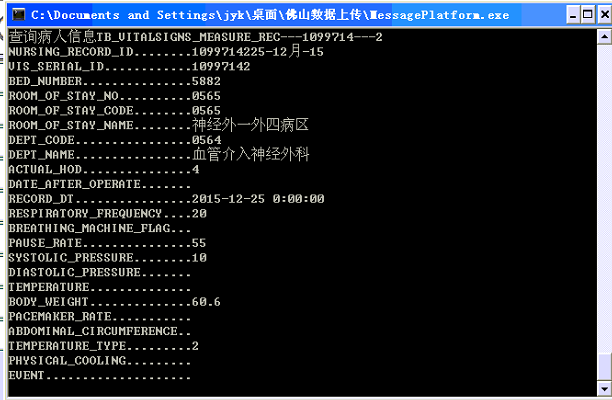
- 最后 的样子是这样的
.net remoting 实现通用消息处理窗口的更多相关文章
- Winform应用程序实现通用消息窗口
记得我之前发表过一篇文章<Winform应用程序实现通用遮罩层>,是实现了透明遮罩的消息窗口,功能侧重点在动图显示+消息提醒,效果看上去比较的炫,而本篇我又来重新设计通用消息窗口,功能重点 ...
- 浅析 Android 的窗口
来源:http://bugly.qq.com/bbs/forum.php?mod=viewthread&tid=555&fromuid=6 一.窗口的概念 在开发过程中,我们经常会 ...
- Unity3d UGUI 通用Confirm确认对话框实现(Inventory Pro学习总结)
背景 曾几何时,在Winform中,使用MessageBox对话框是如此happy,后来还有人封装了可以选择各种图标和带隐藏详情的MessageBox,现在Unity3d UGui就没有了这样的好事情 ...
- Android中将布局文件/View添加至窗口过程分析 ---- 从setContentView()谈起
本文主要内容是讲解一个视图View或者一个ViewGroup对象是如何添加至应用程序窗口中的.下文中提到的窗口可泛指我们能看到的界面,包括一个Activity呈现的界面(我们可以将之理解为应用程序窗口 ...
- 浅析Android的窗口
一.窗口的概念 在开发过程中,我们经常会遇到,各种跟窗口相关的类,或者方法.但是,在 Android 的框架设计中,到底什么是窗口?窗口跟 Android Framework 中的 Window 类又 ...
- Winform应用程序实现通用遮罩层二
之前先后发表过:<Winform应用程序实现通用遮罩层>.<Winform应用程序实现通用消息窗口>,这两款遮罩层其实都是基于弹出窗口的,今天为大家分享一个比较简单但界面相对友 ...
- 8-Flink中的窗口
戳更多文章: 1-Flink入门 2-本地环境搭建&构建第一个Flink应用 3-DataSet API 4-DataSteam API 5-集群部署 6-分布式缓存 7-重启策略 8-Fli ...
- electron_window 创建窗口
/** * 窗口基类,封装通用的窗口操作 */ const { BrowserWindow } = require('electron'); /** * 基本窗口样式 * @type {{width: ...
- Windoows窗口程序一
编写窗口程序的步骤: .定义WinMain入口函数 .定义窗口处理函数(处理消息)WindowProc .注册窗口类RegisterClass .创建窗口(在内存中创建窗口)CreateWindow ...
随机推荐
- Ansible10:Playbook的角色与包含【转】
当单个playbook文件越来越大的时候,我们就需要重新来组织Playbooks了.我们可以将一个大的playbook拆成若干个小的playbook文件,然后通过include的方式,在主配置文件中将 ...
- pro文件常用内容
qmake生成的pro文件中常用变量 SUBDIRS 指定子目录 TARGET 指定生成的应用程序名(默认为项目名) DEPENDPATH 指定程序编译时依赖的相关路径 INCLUDEPATH 指定头 ...
- IntelliJ IDEA 2016.1.3激活【亲测可用】
测试日期:2016.6.24 License server: http://www.iteblog.com/idea/key.php // ========================= 更多技术 ...
- linux 命令汇总
一 Grep 命令 各种参数: -i:ignore-case忽略大小写 -c :打印匹配的行数 -l :从多个文件中查找包含匹配项 -v :查找不包含匹配项的行 -n :打印包含匹配项的行和行标 -w ...
- Day02——widow对象
window - 计时器 1、setTimeout()可以用来在指定的时间之后单次调用函数. setTimeount(f,1000);//一秒后调用函数f clearTimeout();取消函数的执行 ...
- ios中点语法、property跟synthesize用法
一:OC中得点语法 1> 点语法的基本使用: ·使用 对象.成员变量 可以实现设置成员变量值,和获取成员变量的值 2> 点语法的本质 (点语法是Xcode编译器自己帮我们完成的一个 ...
- Newly Setting up a CentOS-7 system
yum install -y epel-release glibc.i686 libtools vim clang git autoconf automake w3m glibc screen the ...
- javascript语句语义大全(2)
1. 四则运算相关 +,-,*,/,% 分别是加减乘除和取余 2.Math.pow(a,b) a的b次方 3.toFixed(a) 四舍五入为指定小数位数的数字 4. k++; ++K 看似相同但是在 ...
- 【转载】最全的面试题目整理(HTML+CSS部分)
转载自 知乎 @西点王子 https://www.zhihu.com/people/F211/answers 1. 常用那几种浏览器测试?有哪些内核(Layout Engine)? (Q1) 浏览器: ...
- .bat批处理命令的介绍
HUC = = D组 http://www.cnhonkerarmy.com/ 63707869 =====================================开始============ ...