
Pytest学习(20)- allure之@allure.step()、allure.attach的详细使用
一、@allure.step的用法
- 可以理解为我们编写测试用例中的每一步操作步骤,而在allure中表示对每个测试用例进行非常详细的步骤说明
- 通过 @allure.step(),可以让测试用例在allure报告中显示更详细的测试过程
示例代码
# -*- coding: utf-8 -*-

# @Time    : 2020/12/12 8:34

# @Author  : longrong.lang

# @FileName: test_allure.py

# @Software: PyCharm

# @Cnblogs :https://www.cnblogs.com/longronglang

import allure

@allure.step("打开网站首页")

def open():

    pass

@allure.step("输入账号、密码")

def input_UsernameAndPassWord():

    sendAndClickLogin("xiaoqiang", "1")

@allure.step("输入账号、密码{arg1},{arg2},并点击登录")

def sendAndClickLogin(arg1, arg2):

    pass

@allure.step("验证登录过程")

def test_login():

    open()

    input_UsernameAndPassWord()
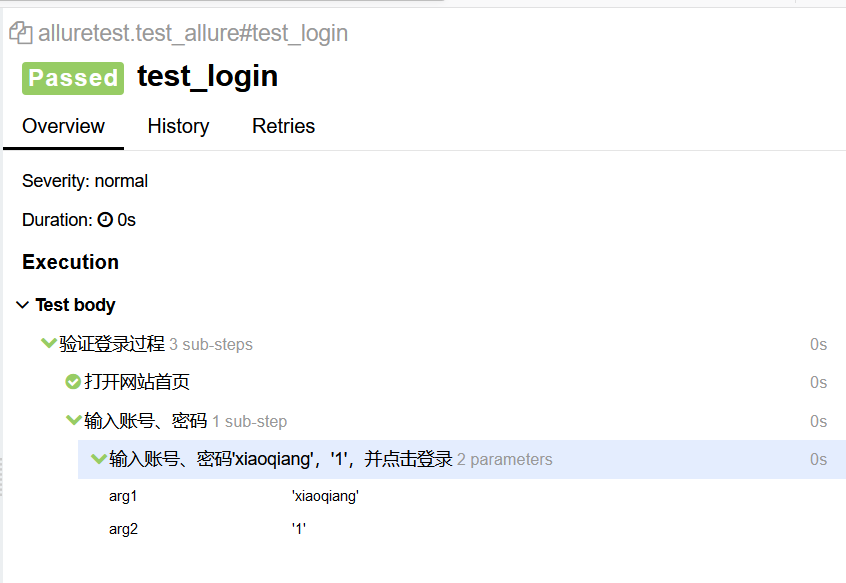
测试用例在allure的显示
小结
- step(参数),参数就是标题,你传什么,在allure上的步骤名就显示什么
- 支持位置参数和关键字参数 {arg1},{arg2},可参考报告中“ 输入账号、密码'xiaoqiang','1',并点击登录”处,如果函数的参数没有匹配成功就会报错
二、allure.attach的用法
作用: allure报告还支持显示许多不同类型的附件,可以补充测试结果;可根据自身情况进行调整
语法: allure.attach(body, name, attachment_type, extension)
参数列表
body:要显示的内容(附件)
name:附件名字
attachment_type:附件类型,是 allure.attachment_type 里面的其中一种
extension:附件的扩展名(比较少用)
allure.attachment_type提供了哪些附件类型?

语法二: allure.attach.file(source, name, attachment_type, extension)
source:文件路径,相当于传一个文件
示例代码如下:
# 添加附件案例

def test_attachments():

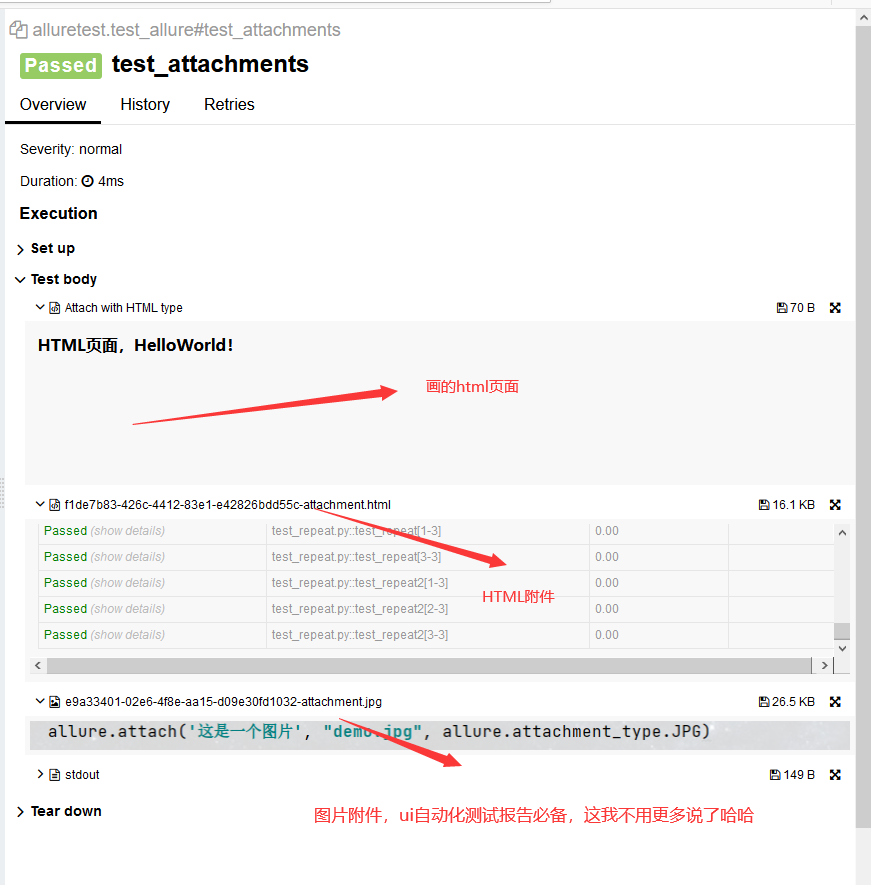
    # 在测试报告中画了一个html页面

    allure.attach('<head></head><body><strong>HTML页面,HelloWorld!</strong> </body>', 'Attach with HTML type', allure.attachment_type.HTML)

    # 添加一个html附件

    allure.attach.file('./report.html', attachment_type=allure.attachment_type.HTML)

    # 添加一个图片附件

    allure.attach.file('./demo.jpg', attachment_type=allure.attachment_type.JPG)
在allure报告中展示如下:
Pytest学习(20)- allure之@allure.step()、allure.attach的详细使用的更多相关文章
- Pytest 学习(二十五)- allure 命令行参数【转】
先看看 allure 命令的帮助文档 cmd 敲 allure -h allure 命令的语法格式 allure [options] [command] [command options] optio ...
- Pytest 学习(二十七)- Jenkins+Allure+Pytest的持续集成
一.配置 allure 环境变量 1.下载 allure是一个命令行工具,可以去 github 下载最新版:https://github.com/allure-framework/allure2/re ...
- Pytest系列(20)- allure结合pytest,allure.step()、allure.attach的详细使用
如果你还想从头学起Pytest,可以看看这个系列的文章哦! https://www.cnblogs.com/poloyy/category/1690628.html 前言 allure除了支持pyte ...
- Pytest 系列(28)- 参数化 parametrize + @allure.title() 动态生成标题
如果你还想从头学起Pytest,可以看看这个系列的文章哦! https://www.cnblogs.com/poloyy/category/1690628.html 前言 参数化 @pytest.ma ...
- Pytest系列(23)- allure打标记,@allure.feature()、@allure.story()、@allure.severity()的详细使用
如果你还想从头学起Pytest,可以看看这个系列的文章哦! https://www.cnblogs.com/poloyy/category/1690628.html 前言 前面几篇文章主要介绍了all ...
- Pytest 系列(29)- 详解 allure.dynamic 动态生成功能
如果你还想从头学起Pytest,可以看看这个系列的文章哦! https://www.cnblogs.com/poloyy/category/1690628.html 前言 @allure.title ...
- Pytest学习笔记10-生成html报告
前言 在pytest中,如何生成html测试报告呢,pytest提供了pytest-html插件,可以帮助我们生成测试报告,当然,如果希望生成更加精美的测试报告,我们还可以使用allure生成报告,下 ...
- Pytest学习(三) - setup和teardown的使用
一.前言 从文章标题可以看出,就是初始化和释放的操作,根据我的java习惯来学习pytest,个人感觉没差太多,理解上也不是很难. 哦,对了,差点跑题了,这个框架是基于Python语言的,在学习的时候 ...
- OpenCV学习(20) grabcut分割算法
http://www.cnblogs.com/mikewolf2002/p/3330390.html OpenCV学习(20) grabcut分割算法 在OpenCV中,实现了grabcut分割算法, ...
随机推荐
- history命令的优化
前言 默认的history记录的信息有限,我们对这个进行一定的扩充 我们看下大概哪几个需求 记录用户登陆的ip 记录用户的名称 记录执行命令的时间 具体实现 我们看下应该怎么做这个,尽量在不改变用户的 ...
- 有关String的那点事
(1)String str1 = "abc"; System.out.println(str1 == "abc"); 步骤: 1) 栈中开辟一块空间存放引用st ...
- Gulp自动化构建的基本使用
Study Notes 本博主会持续更新各种前端的技术,如果各位道友喜欢,可以关注.收藏.点赞下本博主的文章. Gulp 用自动化构建工具增强你的工作流程! gulp 将开发流程中让人痛苦或耗时的任务 ...
- ubuntu16.04搭建vulhub环境
简介 Vulhub官方中文教程https://github.com/vulhub/vulhub/blob/master/README.zh-cn.md 环境:ubuntu16.04.5 python3 ...
- Guitar Pro吉他指弹入门——双手泛音
曾经有一段时间在琴行里经常遇到有人来试琴,很多人试弹得曲子就是郑成河的<Flaming>,直译过来就是热情的意思.这首曲子里面有很多泛音存在,吉他泛音类似于钟鸣或者摇铃的声音,是一种令人耳 ...
- LGOJ5022 旅行 noip tg 2018
旅行 标签(空格分隔): noip2018 提高组 今天我给大家带来一份题解. 题目的大大致意思是这样的: $$ 有一颗 树/基环树 求最小遍历顺序 $$ 树的情况自然不必多讲.做一些末端的微处理(将 ...
- 太干了!一张图整理了 Python 所有内置异常
在编写程序时,可能会经常报出一些异常,很大一方面原因是自己的疏忽大意导致程序给出错误信息,另一方面是因为有些异常是程序运行时不可避免的,比如在爬虫时可能有几个网页的结构不一致,这时两种结构的网页用同一 ...
- P2592 [ZJOI2008]生日聚会
容易发现已经结束掉的一个子串只要合法就对后面没有影响,所以可以令 \(f_{i,j,p,q}\) 表示前 \(i+j\) 个人有 \(i\) 个男孩,\(j\) 个女孩,所有后缀中男孩最多比女孩多 \ ...
- 蓝桥杯——螺旋折线(2018JavaB组第7题19分)
螺旋折线(18JB-7-19') 如图p1.pgn所示的螺旋折线经过平面上所有整点恰好一次. 对于整点(X, Y),我们定义它到原点的距离dis(X, Y)是从原点到(X, Y)的螺旋折线段的长度. ...
- CentOS下解压缩
1 #gz 2 //压缩gz格式文件 3 gzip aa 4 //解压缩gz格式文件 5 gunzip -d aa.gz 6 //查看 7 Gunzip -l aa.gz 8 9 #bz 10 //压 ...