
uiautomator2 获取APP Toast内容
前言:appium必须是1.6以上的版本
环境(安装和安装都可以运行成功,我也不确定要不要这个):
1、抓到toast需要安装uiautomator2,安装npm:npm install -g cnpm --registry=https://registry.npm.taobao.org
2、 然后通过这个命令: cnpm install appium-uiautomator2-driver 安装uiautomator2的配置文件
一、先看看toast

二、代码实现:
#coding= utf-8

from appium import webdriver

from selenium.webdriver.support.ui import WebDriverWait

from selenium.webdriver.support import expected_conditions as EC

from selenium.webdriver.common.by import By

import time

desired_caps = {

                'platformName':"Android",

                'deviceName':"R8V5T15930002010",

                'platformVersion':"5.0.1",

                'appPackage':"com.yuedan",

                'appActivity':"com.yuedan.ui.Activity_Splash",

                'unicodeKeyboard': True,#使用unicode编码方式发布字符串

                'resetKeyboard': True , #屏蔽软键盘,

                'automationName': 'uiautomator2',

                'noReset':True

                }

driver = webdriver.Remote('http://127.0.0.1:4723/wd/hub', desired_caps)

# 等主页面activity出现

time.sleep(20)

print(driver.current_activity)

driver.wait_activity(".ui.MainActivity", 20)

search_view = WebDriverWait(driver,10,0.1).until(EC.presence_of_element_located((By.ID, "com.yuedan:id/search_view")))

search_view.click()

search= WebDriverWait(driver,10,0.1).until(EC.presence_of_element_located((By.ID, "com.yuedan:id/iv_search")))

search.click()

toast_message = "请输入搜索关键字"

message ='//*[@text=\'{}\']'.format(toast_message)

# 获取toast提示框内容

toast_element = WebDriverWait(driver,5).until(lambda x:x.find_element_by_xpath(message))

print(toast_element.text)

driver.quit()
运行结果:
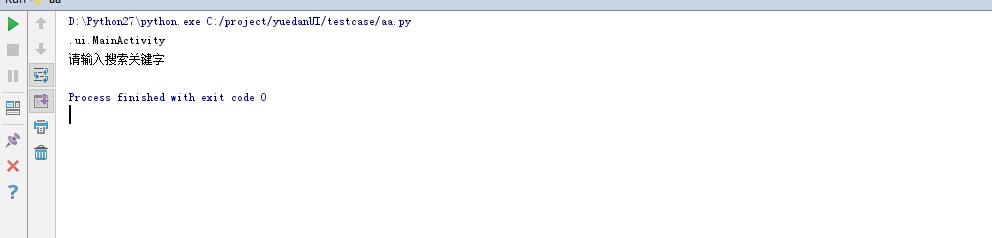
三、代码实现
#coding= utf-8

from appium import webdriver

from selenium.webdriver.support.ui import WebDriverWait

from selenium.webdriver.support import expected_conditions as EC

from selenium.webdriver.common.by import By

import time

desired_caps = {

                'platformName':"Android",

                'deviceName':"R8V5T15930002010",

                'platformVersion':"5.0.1",

                'appPackage':"com.yuedan",

                'appActivity':"com.yuedan.ui.Activity_Splash",

                'unicodeKeyboard': True,#使用unicode编码方式发布字符串

                'resetKeyboard': True , #屏蔽软键盘,

                'automationName': 'uiautomator2'

                }

driver = webdriver.Remote('http://127.0.0.1:4723/wd/hub', desired_caps)

time.sleep(2)

driver.find_element_by_id("com.yuedan:id/login").click()

time.sleep(2)

driver.find_element_by_id("com.yuedan:id/btnQuickLogin").click()

driver.find_element_by_id("com.yuedan:id/et_name").send_keys("")

driver.find_element_by_id("com.yuedan:id/tv_re_sent").click()

# 定位toast元素

toast_message = "手机号码格式错误"

message ='//*[@text=\'{}\']'.format(toast_message)

# 获取toast提示框内容

toast_element = WebDriverWait(driver,5,0.1).until(lambda x:x.find_element_by_xpath(message))

print(toast_element.text)

driver.quit()
运行结果:
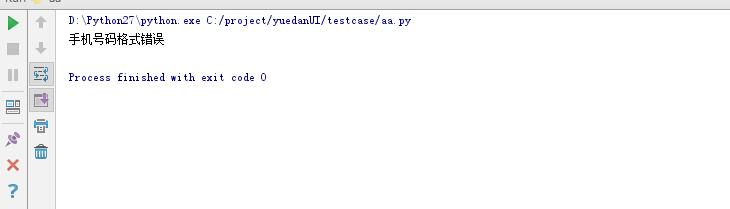
uiautomator2 获取APP Toast内容的更多相关文章
- 如何获取app配置文件内容
App.config: <appSettings> <add key="FCPConnection" value="Data Source=192.16 ...
- appium获取Toast内容的方法
做自动化测试的时候,可能需要根据弹出的Toast提示来做下一步判断.这里记录一下获取Toast内容的方法,同时巩固一下显示等待的方法之一WebDriverWait. from selenium.web ...
- python 全栈开发,Day127(app端内容播放,web端的玩具,app通过websocket远程遥控玩具播放内容,玩具管理页面)
昨日内容回顾 1. 小爬爬 内容采集 XMLY 的 儿童频道 requests 2. 登陆 注册 自动登陆 退出 mui.post("请求地址",{数据},function(){} ...
- app端内容播放,web端的玩具,app通过websocket远程遥控玩具播放内容,玩具管理页面
一.app端内容播放 下载代码 https://github.com/987334176/Intelligent_toy/archive/v1.0.zip 注意:由于涉及到版权问题,此附件没有图片和音 ...
- Android中实现APP文本内容的分享发送与接收方法简述
谨记(指定选择器Intent.createChooser()) 开始今天的内容前,先闲聊一下: (1)突然有一天头脑风暴,对很多问题有了新的看法和见解,迫不及待的想要分享给大家,文档已经写好了,我需要 ...
- iOS开发之集成iOS9中的Core Spotlight Framework搜索App的内容
Spotlight在iOS9上做了一些新的改进, 也就是开放了一些新的API, 通过Core Spotlight Framework你可以在你的app中集成Spotlight.集成Spotlight的 ...
- koa1.x获取原始body内容
Node版本比较老,koa1.x配合koa-body-parser,默认koa-body-parser会把请求数据转成json对象, 然而有的时候需要获取原始的内容,不要转换,看波koa-body-p ...
- robotframework + appium 获取android toast
android toast 获取主要方式是在出现toast的时候查找元素:xpath=//*[contains(@text,'记同步')] ,该xpath 表示为toast信息含有 "记 ...
- python开发_tkinter_获取文本框内容_给文本框添加键盘输入事件
在之前的blog中有提到python的tkinter中的菜单操作 python开发_tkinter_窗口控件_自己制作的Python IDEL_博主推荐 python开发_tkinter_窗口控件_自 ...
随机推荐
- use . adb . get wifi
adb shell 连接手机获取root权限,如果返回的字符串中不包含root字样,再输入su命令回车 继续输入cat /data/misc/wifi/*.conf命令,将会把文件打印出来 ssid表 ...
- GitHub学习三-远程版本库更新与提交
1.远程版本库更新 一般来说,将本地与远程相关联之后,首先将数据从远程更新下来再上传比较好. 输入 git pull origin master 如果新建版本库的话勾选了初始化包含readme.md, ...
- hibernate建表默认为UTF-8编码
一.问题: hibernate自动建表的编码应该是数据默认的编码格式,一般也不是utf-8.所以想要建表默认的编码是UTF-8,应该怎么做呢? 二.解决方法: 拿mysql举例: (一).修改hibe ...
- java后台判断浏览器的版本
public static void main(String[] args) { String agent=request.getHeader("User-Agen ...
- docker 安装nginx、php-fpm
运行环境: 创建目录: mkdir -p /Users/sui/docker/nginx/conf.d && mkdir /Users/sui/www && cd /U ...
- 解决linux环境下qt groupbox 边框不显示问题
ps:实践是检验真理的唯一标准真的是没错,以为很简单一件事情,往往被自己搞的很复杂,这里记录下 在windows环境中Qt创建一个groupbox自动显示边框, 效果如下 然而在linux环境中Qt创 ...
- python3实现的rtsp客户端脚本
一.说明 此客户端使用python3编写 此客户端实现RTSP的OPTIONS, DESCRIBE, SETUP , PLAY, GET_PARAMETER,TEARDOWN方法,未实现ANNOUNC ...
- 查验身份证 (15 分) 一个合法的身份证号码由17位地区、日期编号和顺序编号加1位校验码组成。校验码的计算规则如下: 首先对前17位数字加权求和,权重分配为:{7,9,10,5,8,4,2,1,6,3,7,9,10,5,8,4,2};然后将计算的和对11取模得到值Z;最后按照以下关系对应Z值与校验码M的值:
// test4.cpp : 此文件包含 "main" 函数.程序执行将在此处开始并结束.// #include "pch.h"#include <ios ...
- ubuntu16.10 中安装mysql
1.安装MYSQL: root@ubuntu:~# sudo apt-get install mysql-server root@ubuntu:~# apt isntall mysql-client ...
- linux系统管理 基本指令
命令提示符 [root@ssgao1987 ~]# 'root' 当前登陆用户 'ssgao1987' 主机名 '~' 当前所在目录(home目录) '#' 超级用户的提示符 '$' 普通用户的命令提 ...