
iOS开发手记-iOS8中使用定位服务解决方案
问题描述:
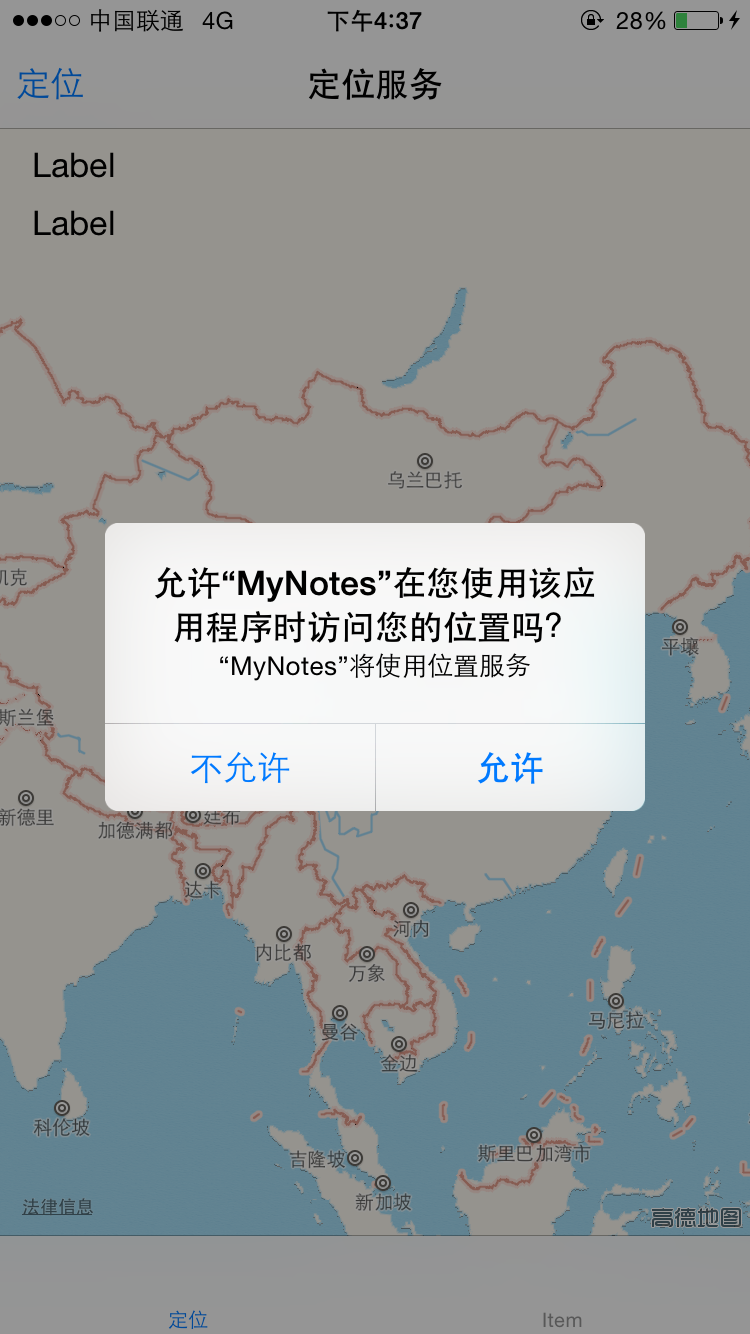
在iOS8之前,app第一次开始定位服务时,系统会弹出一个提示框来让用户选择是否允许使用定位信息。但iOS8后,app将不会出现这个弹窗。第一次运行之后,在设置->隐私->定位服务中,你的app没有任何设置,既不是“永不”,也不是“始终”。
代码如下:
#import "XYZFirstViewController.h"

@interface XYZFirstViewController ()

- (IBAction)LocateButtonClick:(id)sender;

@end

@implementation XYZFirstViewController

- (void)viewDidLoad {

    [super viewDidLoad];

    // Do any additional setup after loading the view.

    [[NSNotificationCenter defaultCenter] addObserver:self selector:@selector(startLocate) name:@"startLocateNotification" object:nil];

    _locationManager=[[CLLocationManager alloc] init];

    _locationManager.delegate=self;

    _locationManager.desiredAccuracy=kCLLocationAccuracyBest;

    _locationManager.distanceFilter=1000.0f;

    _mapView.mapType=MKMapTypeStandard;

    _mapView.delegate=self;

}

- (void)didReceiveMemoryWarning {

    [super didReceiveMemoryWarning];

    // Dispose of any resources that can be recreated.

}

-(void) viewWillAppear:(BOOL)animated{

    [super viewWillAppear:animated];

    [_locationManager startUpdatingLocation];

}

-(void) viewWillDisappear:(BOOL)animated

{

    [super viewWillDisappear:animated];

    [_locationManager stopUpdatingLocation];

}

-(void) locationManager:(CLLocationManager *)manager didUpdateLocations:(NSArray *)locations

{

    CLLocation *currentLocation=[locations lastObject];

    _currentLocation=currentLocation;

    self.currentLocationLabel.text=[NSString stringWithFormat:@"%3.5f,%3.5f,%3.5f", currentLocation.coordinate.longitude,currentLocation.coordinate.latitude,currentLocation.altitude];

    MKCoordinateRegion region=MKCoordinateRegionMakeWithDistance(currentLocation.coordinate, , );

    [_mapView setRegion:region animated:YES];

    MKPointAnnotation *point=[[MKPointAnnotation alloc] init];

    point.coordinate=_currentLocation.coordinate;

    point.title=@"my location";

    [_mapView addAnnotation:point];

}

-(void) locationManager:(CLLocationManager *)manager didFailWithError:(NSError *)error

{

    NSLog(@"error:%@",error);

}

/*

#pragma mark - Navigation

// In a storyboard-based application, you will often want to do a little preparation before navigation

- (void)prepareForSegue:(UIStoryboardSegue *)segue sender:(id)sender {

    // Get the new view controller using [segue destinationViewController].

    // Pass the selected object to the new view controller.

}

*/

- (IBAction)LocateButtonClick:(id)sender {

    [[NSNotificationCenter defaultCenter] postNotificationName:@"startLocateNotification" object:self ];

}

-(void) startLocate

{

    CLGeocoder *geocoder=[[CLGeocoder alloc]init];

    [geocoder reverseGeocodeLocation:_currentLocation completionHandler:^(NSArray *placeMarks, NSError *error)

     {

        if([placeMarks count]>)

        {

            NSLog(@"%@",placeMarks);

            CLPlacemark *placeMark=placeMarks[];

            NSDictionary *addressDictonary=placeMark.addressDictionary;

            _currentAddressLabel.text=[NSString stringWithFormat:@"%@,%@,%@",[addressDictonary objectForKey:(NSString *)kABPersonAddressStateKey],[addressDictonary objectForKey:(NSString *)kABPersonAddressCityKey],[addressDictonary objectForKey:(NSString *) kABPersonAddressStreetKey] ];

        }

     }];

}

@end
解决方案:
以上代码在iOS8之后需要手动调用CLLocationManager对象的requestAlwaysAuthorization/
requestWhenInUseAuthorization方法。 调用该方法需要在Info.plist中设置NSLocationAlwaysUsageDescription/NSLocationWhenInUseUsageDescription的值,这个值会显示在系统提示框中。
代码如下:
-(void) viewWillAppear:(BOOL)animated{

    [super viewWillAppear:animated];

    [_locationManager requestWhenInUseAuthorization];

    [_locationManager startUpdatingLocation];

}
info.plist设置如下:

允许效果:

iOS开发手记-iOS8中使用定位服务解决方案的更多相关文章
- iOS8中的定位服务
iOS8中的定位服务 My app that worked fine in iOS 7 doesn't work with the iOS 8 SDK. CLLocationManager doesn ...
- iOS开发雕虫小技之傻瓜式定位神器-超简单方式解决iOS后台定时定位
1.概述 由于公司一款产品的需求,最近一直在研究iOS设备的后台定位.主要的难点就是,当系统进入后台之后,程序会被挂起,届时定时器.以及代码都不会Run~ 所以一旦用户将我的App先换到了后台,我的定 ...
- iOS开发之动画中的时间(概况)
一.引言 在iOS开发中使用动画时,可以通过设置动画的duration.speed.begintime.offset属性,来设置动画的时长.速度.起始时间及起始偏移. 用一个简单的例子来说明各个参数的 ...
- CentOS6.5(4)----宿主机无法访问虚拟机中的web服务解决方案
宿主机无法访问虚拟机中的web服务 在Windows7宿主机中的VMware虚拟机中安装了CentOS6.5操作系统,并且基于Nginx搭建了Web服务器,网页刚刚搭建好的时候,通过宿主机的浏览器可以 ...
- iOS开发手记 - iOS9.3 UINavigationController添加后不显示storyboard中viewcontroller里的控件的解决方法
我原先是这么做的,通常也是这么做 - (BOOL)application:(UIApplication *)application didFinishLaunchingWithOptions:(NSD ...
- (转)iOS 开发,工程中混合使用 ARC 和非ARC
[前提知识] ARC:Automatic Reference Counting,自动引用计数 在开发 iOS 3 以及之前的版本的项目时我们要自己负责使用引用计数来管理内存,比如要手动 retain. ...
- iOS 开发,工程中混合使用 ARC 和非ARC(转)
[前提知识] ARC:Automatic Reference Counting,自动引用计数 在开发 iOS 3 以及之前的版本的项目时我们要自己负责使用引用计数来管理内存,比如要手动 retain. ...
- iOS8 无法设置定位服务
针对iOS8系统,需要在plist文件中添加这两个参数 NSLocationAlwaysUsageDescription = YES NSLocationWhenInUseUsageDescripti ...
- iOS开发关于xcode中souceControl的苹果文档翻译(节选)
Subversion 1.7 provides many benefits: svn1.7版本有以下好处: Improved performance. Increased speed for many ...
随机推荐
- Eclipse中配置约束
一.本地配置schema约束(xsd文件): 1.比如配置spring的applicationContext.xml中的约束条件: 复制applicationContext.xml中如图: 2.win ...
- Java,数据库中的数据导入到Excel
private static void executeMethod(JobExecutionContext arg0) throws Exception{ try { TContrastService ...
- OOP中的六种关系以及和JDK或框架中源码进行匹配对应
前言:这六种关系里:泛化=实现>组合>聚合>关联>依赖:其中组合-聚合-关联这三个如果只是给出一段代码是无法判断具体是什么关系的,需要配合语义或说业务场景来能进行区分(和设计模 ...
- MySQL修改root密码的3种方法
方法1: 用SET PASSWORD命令 mysql -u rootmysql> SET PASSWORD FOR 'root'@'localhost' = PASSWORD('newpass' ...
- 各版本.NET委托的写法回顾(转)
转自:http://www.csharpwin.com/csharpspace/7548r2766.shtml 在<关于最近面试的一点感想>一文中,Michael同学谈到他在面试时询问对方 ...
- webService之helloword(java)
webservice 远程数据交互技术 1.导入jar包(如果是 maven项目导入项目坐标) 2.创建服务 3.测试服务 我们使用maven来做测试服务 pom.xml文件 <project ...
- JavaScript相关基础知识点
JavaScript简介: JavaScript是脚本语言,是一种轻量级的编程语言,是可插入 HTML 页面的编程代码,插入 HTML 页面后,可由所有的现代浏览器执行. JavaScript使用: ...
- noip第25课作业
1. 求一个有向图所有顶点入度的和 输入有向图的顶点个数,边数以及各顶点之间的关联情况,要求求出这个有向图的所有顶点入度的总和. [输入格式] 第1行:2个空格分开的整数n(2<=n< ...
- Hdu2255 奔小康赚大钱(二分图最大权匹配KM算法)
奔小康赚大钱 Problem Description 传说在遥远的地方有一个非常富裕的村落,有一天,村长决定进行制度改革:重新分配房子. 这可是一件大事,关系到人民的住房问题啊.村里共有n间房间,刚好 ...
- POJ2270&&Hdu1808 Halloween treats 2017-06-29 14:29 40人阅读 评论(0) 收藏
Halloween treats Time Limit: 2000MS Memory Limit: 65536K Total Submissions: 8565 Accepted: 3111 ...