
axios和vuex
0.babel
将es6代码转换成各个浏览器都能识别的代码
一.axios
1.官方网站
https://www.kancloud.cn/yunye/axios/234845
2.引用:
(1)cdn
<script src="https://unpkg.com/axios/dist/axios.min.js"></script>
(2)下载到当前项目***
npm install axios
3.用法
(1)get请求
 // 为给定 ID 的 user 创建请求

 axios.get('/user?ID=12345')

   .then(function (response) {

     console.log(response);

   })

   .catch(function (error) {

     console.log(error);

   });

 // 可选地,上面的请求可以这样做

 axios.get('/user', {

     params: {

       ID: 12345

     }

   })

   .then(function (response) {

     console.log(response);

   })

   .catch(function (error) {

     console.log(error);

   });
(2)post请求
axios.post('/user', {

     firstName: 'Fred',

     lastName: 'Flintstone'  })

.then(function (response) {

     console.log(response);

})

.catch(function (error) {

console.log(error);

});
4.使用实例
在main.js中,将Axios挂载到 Vue原型上,每一个子组件都能够使用
 import Axios from 'axios'

 Vue.prototype.$https = Axios

 Axios.defaults.baseURL = 'https://www.luffycity.com/api/v1/';
二.vuex
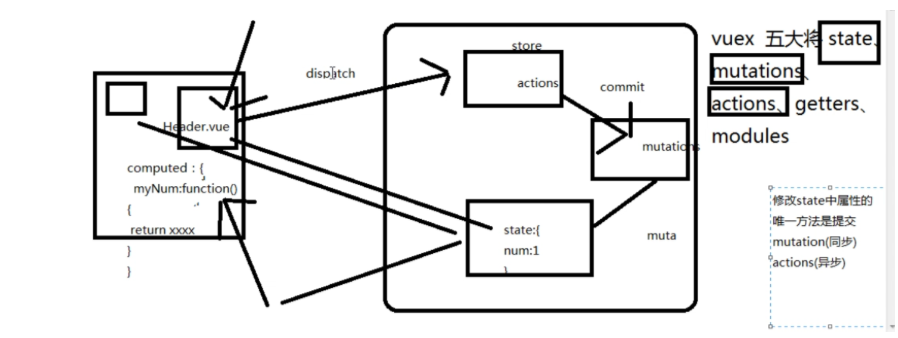
作用:组件之间的传值,任何一个组件都能共享state中的数据
下载vuex到该组件:npm i vuex -S
1.vuex商店的创建
在main.js中
 import Vue from 'vue'

 import App from './App'

 import router from './router/index'

 //1.引入

 import Vuex from "vuex"

 //2.组件使用要use

 Vue.use(Vuex)

 //3.创建一个store实例

 const store=new Vuex.Store({

   state:{},

   mutations:{},

   actions:{},

 })

 new Vue({

   el: '#app',

   router,

   //4.挂载store实例

   store,

   components: { App},

   template: '<div><App></App></div>'

 })
2.值的使用
 <template>

   <div class="">

     //2.使用

     <h3>我是主页,我是父组件中的{{ num }}</h3>

   </div>

 </template>

 <script>

 export default {

   name: 'Home',

   data () {

     return {

     }

   },

   //监听

   computed:{

   //1.定义方法,调用store,返回store中的值

        num:function(){

             return this.$store.state.num

        }

   }

 }

 </script>

 <style >

 </style>
3.值的同步修改
在main.js
 import Vue from 'vue'

 import App from './App'

 import router from './router/index'

 // Vue.config.productionTip = false

 import Vuex from "vuex"

 Vue.use(Vuex)

 const store=new Vuex.Store({

   state:{num:111},

   mutations:{

       //1.定义如何修改

     setNum(state,val){

       state.num+=val

     }

     },

   actions:{},

 });

 new Vue({

   el: '#app',

   router,

   //4.挂载store实例

   store,

   components: { App},

   template: '<div><App></App></div>'

 });
在Course.vue中
 <template>

   <div>我是课程

   <button @click="setnum">+1按钮</button>

     我是父组件中的{{ num }}

   </div>

 </template>

 <script>

   export default{

   methods:{

       //2.确定修改

       setnum(){

         this.$store.commit("setNum",1)

       }

     },

   computed:{

        num:function(){

             return this.$store.state.num

        }

   }

   }

 </script>

 <style></style>
4.值的异步修改
在main.js中
 import Vue from 'vue'

 import App from './App'

 import router from './router/index'

 import Vuex from "vuex"

 Vue.use(Vuex)

 const store=new Vuex.Store({

   state:{num:111},

   mutations:{

     setMutaNum(state,val){

       state.num+=val

     },

     setMutaAsync:function(state,val){

       state.num+=val

     }

     },

   actions:{

     setActionNum(context,val){

       context.commit('setMutaNum',val)

     },

     setActionAsync(context,val){

       setTimeout(()=>{

         context.commit('setMutaAsync',val)

       })

     }

   },

 });

 new Vue({

   el: '#app',

   router,

   //4.挂载store实例

   store,

   components: { App},

   template: '<div><App></App></div>'

 });
在course.vue中
 <template>

   <div>我是课程

   <button @click="setnum">同步+1按钮</button>

   <button @click="setAsynanum">异步 +5按钮</button>

     我是父组件中的{{ num }}

   </div>

 </template>

 <script>

   export default{

   methods:{

       setnum(){

         this.$store.dispatch("setActionNum",1)

       },

       setAsynanum(){

         this.$store.dispatch("setActionAsync",5)

       }

     },

   computed:{

        num:function(){

             return this.$store.state.num

        }

   }

   }

 </script>

 <style></style>
流程如下
axios和vuex的更多相关文章
- day 84 Vue学习六之axios、vuex、脚手架中组件传值
Vue学习六之axios.vuex.脚手架中组件传值 本节目录 一 axios的使用 二 vuex的使用 三 组件传值 四 xxx 五 xxx 六 xxx 七 xxx 八 xxx 一 axios的 ...
- day 87 Vue学习六之axios、vuex、脚手架中组件传值
本节目录 一 axios的使用 二 vuex的使用 三 组件传值 四 xxx 五 xxx 六 xxx 七 xxx 八 xxx 一 axios的使用 Axios 是一个基于 promise 的 HT ...
- Vue(5)- axios、vuex
一.内容回顾 1.webpack(前端中工作,项目上线之前对整个前端项目优化) - entry:整个项目的程序入口(main.js或index.js): - output:输出的出口: - loade ...
- Vue2基于Axios Ajax Vuex的Loading组件
1. 定义根state:ajaxIsLoading2. 在Axios拦截器中commit不同的状态实现状态切换3. 组件中通过getter获取ajaxIsLoading状态 Axios 拦截器配置 i ...
- Vue 5 -- axios、vuex
一.内容回顾 1.webpack(前端中工作,项目上线之前对整个前端项目优化) - entry:整个项目的程序入口(main.js或index.js): - output:输出的出口: - loade ...
- 【实战】Vue全家桶(vue + axios + vue-router + vuex)搭建移动端H5项目
使用Vue全家桶开发移动端页面. 本博文默认已安装node.js. github链接 一.准备工作 安装vue npm install vue 安装脚手架vue-cli npm install -g ...
- [前端] VUE基础 (9) (element-ui、axios、Vuex)
一.element-ui的使用 官方网页:https://element.eleme.cn/#/zh-CN 1.安装element-ui (venv) D:\pycharm_workspace\vue ...
- Vuex与axios介绍
Vuex集中式状态管理里架构 axios (Ajax) Vuex集中式状态管理架构 -简单介绍: vuex是一个专门为Vue.js设计的集中式状态管理架构. 我们把它理解为在data中需要共享给其他组 ...
- vue-x和axios的学习
axios的使用 使用原因:因为vue本身就带有处理dom的功能,不希望再有其他操作dom的插件,所以用axios代替了jquery 功能:发送xhr请求 下载: $ npm install axio ...
随机推荐
- Android菜鸟的成长笔记(19)——Service的生命周期
前面两篇文章介绍了关于Service的两种启动方式,简要总结如下: Context.startService() Context.bindService() 1. startService()的目的是 ...
- java 读取项目外面配置文件的方法
public static void loadProps(String propertiesUrl) { props = new Properties(); InputStream in = null ...
- C/C++ 常量的定义与应用(编程中的常量)
常量一般定义为全局变量,且大写: 1. 字符串常量 const string EXPAND_X = "X+YF"; const string EXPAND_Y = "FX ...
- WPF动态加载3D 放大-旋转-平移
第一步:新建WavefrontObjLoader.cs using System; using System.Collections.Generic; using System.Windows; us ...
- WPF中动态加载XAML中的控件
原文:WPF中动态加载XAML中的控件 using System; using System.Collections.Generic; using System.Linq; using System. ...
- JS简单验证password强度
<input type="password" id="password" value=""/><button id=&qu ...
- 微信公众平台消息接口开发(31)微信浏览器HTTP_USER_AGENT判断
微信公众平台开发 微信公众平台开发者 微信公众平台开发模式 微信浏览器 HTTP_USER_AGENT作者:方倍工作室 原文:http://www.cnblogs.com/txw1958/archiv ...
- 简明Python3教程 10.模块
简介 现在你已经知道通过定义函数可以在你的程序中复用代码.但当你想在你编写的其他程序中复用大量函数怎么办呢? 也许你可以猜到了,办法就是利用模块. 有各种编写模块的方式,但最简单的方式是创建一个以.p ...
- Haroopad 安装到 Mac OSX
打开Terminal 控制台 粘贴运行代码安装换cask: ruby -e "$(curl -fsSL https://raw.githubusercontent.com/Homebrew/ ...
- 用WPF实现在ListView中的鼠标悬停Tooltip显示
原文:用WPF实现在ListView中的鼠标悬停Tooltip显示 一.具体需求描述 在WPF下实现,当鼠标悬停在ListView中的某一元素的时候能弹出一个ToolTip以显示需要的信息. 二.代码 ...