
spring boot 使用redis进行发布订阅
异步消息的方式有很多,这篇博客介绍如何使用redis进行发布订阅,
完成这个示例只需要三个文件
1.redis消息监听配置
@Configuration

public class RedisListenerConfig {

    /**

     * redis消息监听器容器

     * 可以添加多个监听不同话题的redis监听器,只需要把消息监听器和相应的消息订阅处理器绑定,该消息监听器

     * 通过反射技术调用消息订阅处理器的相关方法进行一些业务处理

     * @param connectionFactory

     * @param listenerAdapter

     * @return

     */

    @Bean

    RedisMessageListenerContainer container(RedisConnectionFactory connectionFactory,

                                            MessageListenerAdapter listenerAdapter

    ) {

        RedisMessageListenerContainer container = new RedisMessageListenerContainer();

        container.setConnectionFactory(connectionFactory);

        //可以添加多个 messageListener

        container.addMessageListener(listenerAdapter, new PatternTopic("index"));

        return container;

    }

    /**

     * 消息监听器适配器,绑定消息处理器,利用反射技术调用消息处理器的业务方法

     * @param redisReceiver

     * @return

     */

    @Bean

    MessageListenerAdapter listenerAdapter(RedisReceiver redisReceiver) {

        System.out.println("消息适配器进来了");

        return new MessageListenerAdapter(redisReceiver, "receiveMessage");

    }

    //使用默认的工厂初始化redis操作模板

    @Bean

    StringRedisTemplate template(RedisConnectionFactory connectionFactory) {

        return new StringRedisTemplate(connectionFactory);

    }

}
2.消息处理
@Service

public class RedisReceiver {

    public void receiveMessage(String message) {

        System.out.println("消息来了:"+message);

        //这里是收到通道的消息之后执行的方法

    }

}
3.一个发送消息的定时器
//定时器

@EnableScheduling

@Component

public class TestSenderController {

    @Autowired

    private StringRedisTemplate stringRedisTemplate;

    //向redis消息队列index通道发布消息

    @Scheduled(fixedRate = 3000)

    public void sendMessage(){

        stringRedisTemplate.convertAndSend("index",String.valueOf(Math.random()));

    }

}
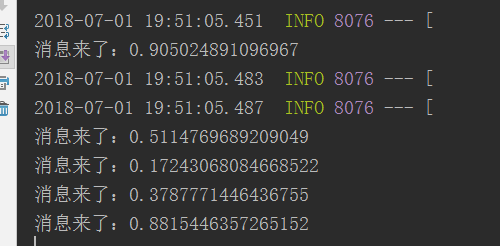
运行结果如图
本篇博客地址:https://gitee.com/zhao-baolin/redis-message
spring boot 使用redis进行发布订阅的更多相关文章
- 【spring boot】【redis】spring boot 集成redis的发布订阅机制
一.简单介绍 1.redis的发布订阅功能,很简单. 消息发布者和消息订阅者互相不认得,也不关心对方有谁. 消息发布者,将消息发送给频道(channel). 然后是由 频道(channel)将消息发送 ...
- spring boot: 用redis的消息订阅功能更新应用内的caffeine本地缓存(spring boot 2.3.2)
一,为什么要更新caffeine缓存? 1,caffeine缓存的优点和缺点 生产环境中,caffeine缓存是我们在应用中使用的本地缓存, 它的优势在于存在于应用内,访问速度最快,通常都不到1ms就 ...
- Spring Boot使用Redis进行消息的发布订阅
今天来学习如何利用Spring Data对Redis的支持来实现消息的发布订阅机制.发布订阅是一种典型的异步通信模型,可以让消息的发布者和订阅者充分解耦.在我们的例子中,我们将使用StringRedi ...
- netty-socketio(二)整合redis实现发布订阅
1.Redis 发布订阅 参考:https://www.runoob.com/redis/redis-pub-sub.html Redis 发布订阅(pub/sub)是一种消息通信模式:发送者(pub ...
- 【redis】spring boot利用redis的Keyspace Notifications实现消息通知
前言 需求:当redis中的某个key失效的时候,把失效时的value写入数据库. github: https://github.com/vergilyn/RedisSamples 1.修改redis ...
- Springboot+Redis(发布订阅模式)跨多服务器实战
一:redis中发布订阅功能(http://www.redis.cn/commands.html#pubsub) PSUBSCRIBE pattern [pattern -]:订阅一个或者多个符合pa ...
- redis 实现发布订阅的功能
redis 除了作为缓存的功能外还可以用作消息中间件的功能,这片博客主要是介绍一下 redis 整合spring 实现消息的发布和订阅功能: 1:redis依赖,依赖两个包,redis 包, spri ...
- 玩转spring boot——结合redis
一.准备工作 下载redis的windows版zip包:https://github.com/MSOpenTech/redis/releases 运行redis-server.exe程序 出现黑色窗口 ...
- redis的发布订阅模式
概要 redis的每个server实例都维护着一个保存服务器状态的redisServer结构 struct redisServer { /* Pubsub */ // 字典,键为频道, ...
随机推荐
- 练习2-1 Programming in C is fun!
练习2-1 Programming in C is fun! 一 问题描述 本题要求编写程序,输出一个短句“Programming in C is fun!”. 输入格式: 本题目没有输入. 输出格式 ...
- jquery for循环
第一种: for(var i=0,len=$len.length; i<len; i++){//alert($len.eq(i).html());$zongshu=$zongshu+$len.e ...
- Php中文件下载功能实现超详细流程分析
浏览器发送一个请求,请求访问服务器中的某个网页(如:down.php),该网页的代码如下 客户端从服务端下载文件的流程分析: 浏览器发送一个请求,请求访问服务器中的某个网页(如:down.php) ...
- ionic基于GPS定位并通过百度地图获取定位详细信息
相信所有的前端攻城狮都会碰到移动端App.里面获取用户定位信息. 那么问题来了,怎么获取用户的定位信息(经纬度)呢. 当然方法有很多,通过百度地图API 以及 高德地图 API都是可以的.但是两个获取 ...
- Go smtp发送邮件,带附件
package main import ( "net/smtp" "bytes" "time" "io/ioutil" ...
- Redis安装、命令以及设置密码遇到的问题
一.下载Redis 如果没有 安装wget先安装wget和gcc(使用make的时候会用上) wget http://download.redis.io/releases/redis-4.0.8.ta ...
- js数组和对象相等判断、拷贝详解(结合几个现象讲解引用数据类型的趣事)
序言 最近遇到几个js引用数据类型造成的bug,今天结合bug详细分析一下,避免以后再犯,也希望能帮大家提个醒,强化js基本功. 目录 1.浅拷贝.深拷贝,解决变量赋值相互影响问题 2.判断2个数组. ...
- 常用的js效果
使用jquery实现鼠标悬停显示层 <!DOCTYPE html> <html> <head> <meta charset="utf-8" ...
- hello1和hello2代码分析
1.hello1代码分析 hello.java package javaeetutorial.hello1; import javax.enterprise.context.RequestScoped ...
- Redis安装完整步骤
安装: 1.获取redis资源 wget http://download.redis.io/releases/redis-4.0.8.tar.gz 2.解压 tar xzvf redis-4.0.8. ...