
Centos610无桌面安装VSFTP
1.检查可以安装的VSFTP版本
yum search vsftp
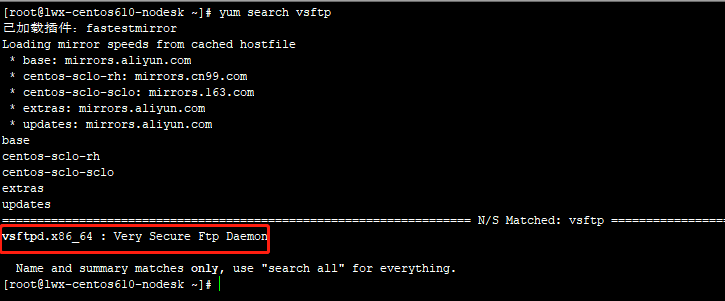
2.开始安装VSFTP
yum install -y vsftpd

3.配置说明
cd /etc/vsftpd
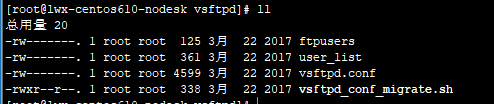
vsftpd.conf 主配置
cd /var/ftp 默认ftp共享目录
vsftpd.conf 配置参考:
# Example config file /etc/vsftpd/vsftpd.conf

#

# The default compiled in settings are fairly paranoid. This sample file

# loosens things up a bit, to make the ftp daemon more usable.

# Please see vsftpd.conf. for all compiled in defaults.

#

# READ THIS: This example file is NOT an exhaustive list of vsftpd options.

# Please read the vsftpd.conf. manual page to get a full idea of vsftpd's

# capabilities.

#

# Allow anonymous FTP? (Beware - allowed by default if you comment this out).

anonymous_enable=NO

# set ftp port

listen_port=

#

# Uncomment this to allow local users to log in.

local_enable=YES

#

# Uncomment this to enable any form of FTP write command.

write_enable=YES

#

# Default umask for local users is . You may wish to change this to ,

# if your users expect that ( is used by most other ftpd's)

local_umask=

#

# Uncomment this to allow the anonymous FTP user to upload files. This only

# has an effect if the above global write enable is activated. Also, you will

# obviously need to create a directory writable by the FTP user.

#anon_upload_enable=YES

#

# Uncomment this if you want the anonymous FTP user to be able to create

# new directories.

#anon_mkdir_write_enable=YES

#

# Activate directory messages - messages given to remote users when they

# go into a certain directory.

dirmessage_enable=YES

#

# The target log file can be vsftpd_log_file or xferlog_file.

# This depends on setting xferlog_std_format parameter

xferlog_enable=YES

#

# Make sure PORT transfer connections originate from port  (ftp-data).

connect_from_port_20=YES

#

# If you want, you can arrange for uploaded anonymous files to be owned by

# a different user. Note! Using "root" for uploaded files is not

# recommended!

#chown_uploads=YES

#chown_username=whoever

#

# The name of log file when xferlog_enable=YES and xferlog_std_format=YES

# WARNING - changing this filename affects /etc/logrotate.d/vsftpd.log

#xferlog_file=/var/log/xferlog

#

# Switches between logging into vsftpd_log_file and xferlog_file files.

# NO writes to vsftpd_log_file, YES to xferlog_file

xferlog_std_format=YES

#

# You may change the default value for timing out an idle session.

#idle_session_timeout=

#

# You may change the default value for timing out a data connection.

#data_connection_timeout=

#

# It is recommended that you define on your system a unique user which the

# ftp server can use as a totally isolated and unprivileged user.

#nopriv_user=ftpsecure

#

# Enable this and the server will recognise asynchronous ABOR requests. Not

# recommended for security (the code is non-trivial). Not enabling it,

# however, may confuse older FTP clients.

#async_abor_enable=YES

#

# By default the server will pretend to allow ASCII mode but in fact ignore

# the request. Turn on the below options to have the server actually do ASCII

# mangling on files when in ASCII mode.

# Beware that on some FTP servers, ASCII support allows a denial of service

# attack (DoS) via the command "SIZE /big/file" in ASCII mode. vsftpd

# predicted this attack and has always been safe, reporting the size of the

# raw file.

# ASCII mangling is a horrible feature of the protocol.

#ascii_upload_enable=YES

#ascii_download_enable=YES

#

# You may fully customise the login banner string:

ftpd_banner=Welcome to blah FTP service.

#

# You may specify a file of disallowed anonymous e-mail addresses. Apparently

# useful for combatting certain DoS attacks.

#deny_email_enable=YES

# (default follows)

#banned_email_file=/etc/vsftpd/banned_emails

#

# You may specify an explicit list of local users to chroot() to their home

# directory. If chroot_local_user is YES, then this list becomes a list of

# users to NOT chroot().

chroot_local_user=YES

#chroot_list_enable=YES

# (default follows)

#chroot_list_file=/etc/vsftpd/chroot_list

#

# You may activate the "-R" option to the builtin ls. This is disabled by

# default to avoid remote users being able to cause excessive I/O on large

# sites. However, some broken FTP clients such as "ncftp" and "mirror" assume

# the presence of the "-R" option, so there is a strong case for enabling it.

#ls_recurse_enable=YES

#

# When "listen" directive is enabled, vsftpd runs in standalone mode and

# listens on IPv4 sockets. This directive cannot be used in conjunction

# with the listen_ipv6 directive.

listen=YES

#

# This directive enables listening on IPv6 sockets. To listen on IPv4 and IPv6

# sockets, you must run two copies of vsftpd with two configuration files.

# Make sure, that one of the listen options is commented !!

#listen_ipv6=YES

pam_service_name=vsftpd

userlist_enable=YES

tcp_wrappers=YES

# async ftp date and os date

use_localtime=YES

# pasv mode

pasv_enable=YES

pasv_min_port=

pasv_max_port=
4.账号设置
添加账号 ftptest
useradd -d /home/ftptest -s /sbin/nologin ftptest
设置密码
passwd ftptest (回车根据提示输入密码)
由于CentOS的FTP是不允许实体帐号登录取得用户目录数据的,需要进行设置
getsebool -a | grep ftp
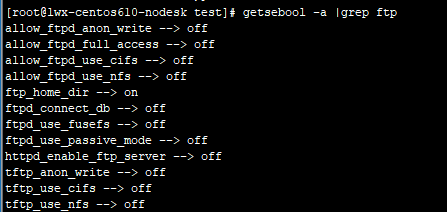
setsebool -P ftp_home_dir=1
setsebool -P ftpd_use_passive_mode=1
service vsftpd start
5.自动启动
chkconfig --add vsftpd
chkconfig vsftpd on
service vsftpd start
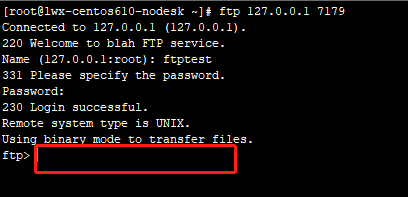
6.连接测试
yum install ftp
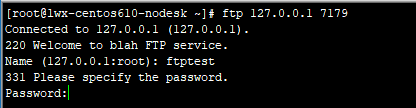
连接成功
7.上传测试
设置访问控制权限
setsebool allow_ftpd_full_access=1
设置ftptest所在目录为主目录
chown ftp:ftptest /home/ftptest
设置文件存储目录权限
chmod -R 777 /home/ftptest
在win10上面ftp上传测试
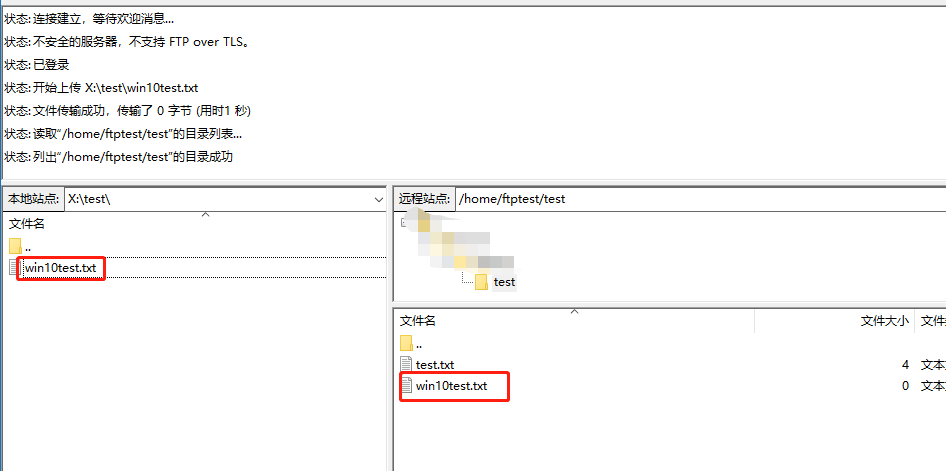
文件上传成功
8.只显示自身目录
vi /etc/fdfs/vsftpd.conf
chroot_local_user=YES
保存退出
service vsftpd restart
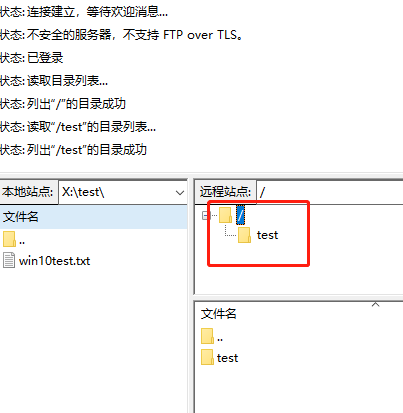
如上截图所示,在ftp客户端只能看到当前ftp用户所在目录
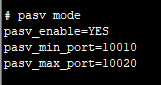
9.被动模式
所你需要被动模式,设置参考下图
vi /etc/fdfs/vsftpd.conf
service vsftpd restart
至此设置Ok
Centos610无桌面安装VSFTP的更多相关文章
- centos610无桌面安装libreoffice
Centos610系列配置 #安装文件 yum -y install libreoffice #安装中文包 yum -y install libreoffice-langpack-zh-Han* #安 ...
- centos610无桌面安装JDK
Centos610系列配置 1.使用yum查找jdk: yum search java|grep jdk 2.选择安装截图中选中的版本 yum install java-1.8.0-openj ...
- centos610无桌面安装openoffice
Centos610系列配置卸载yum remove libreoffice*yum remove openoffice* 安装yum install openoffice.org-writer yu ...
- Centos610无桌面安装Docker-内核升级
1.查看当前操作系统和系统内核 (此处只需要注意一项centos6的docker源只有64位的,x86_64,32位的直接换系统吧) 查看当前内核版本uname -r 2.6.32-754.el6.x ...
- centos610无桌面安装libreoffice缺失字体
1.安装libreoffice 2.安装fontconfig yum -y install fontconfig 3.安装ttmkfdir yum -y install ttmkfdir 4.检查已有 ...
- centos610无桌面安装tomcat8
1.下载安装包 wget https://www-us.apache.org/dist/tomcat/tomcat-8/v8.5.43/bin/apache-tomcat-8.5.43.tar.gz ...
- Centos610无桌面安装Docker-安装
1.必备环境 设定docker源yum-config-manager --add-repo https://download.docker.com/linux/centos/docker-ce.rep ...
- VMWare虚拟机中Ubuntu 16.04 (linux无桌面)配置静态IP上网
1. 基础环境说明 虚拟机: VMWare 12.5.2 操作系统: Ubuntu 16.04 (无桌面) 物理主机操作系统: win 7 旗舰版 2. 摸底 VMware在安装之后,会创建2个虚拟的 ...
- 使用Qt Creator作为Linux IDE,代替Vim:实现两台Linux电脑远程部署和gdb调试(一台电脑有桌面系统,一台电脑无桌面系统)
版权声明:本文为博主原创文章,未经博主允许不得转载. https://blog.csdn.net/libaineu2004/article/details/62423830 尊重作者,支持原创,如 ...
随机推荐
- js基础之--变量 作用域和内存问题
基本类型:Undefind Null Boolean Number String 引用类型: 对象 在操作对象时,实际上实在操作对象的引用而不是实际的对象.为此,引用类型的值是按引用访问的. 从一个变 ...
- Git 添加远程github仓库的时候提示错误:fatal: remote origin already exists.
1.先删除远程 Git 仓库 $ git remote rm origin 2.再添加远程 Git 仓库 $ git remote add origin git@github.com:wsydxian ...
- Bootstrap框架学习
Bootstrap框架个人总结 https://blog.csdn.net/To_Front_End/article/details/51142716 Bootstrap 教程 https://www ...
- totensor方法和normalize方法 数值映射和归一化
totensor方法和normalize方法 数值映射和归一化 待办 ToTensor是指把PIL.Image(RGB) 或者numpy.ndarray(H x W x C) 从0到255的值映射到0 ...
- python logging 总结
基本用法: import sys # 获取logger实例,如果参数为空则返回root logger logger = logging.getLogger("AppName" ...
- MySQL数据库 | 数据库和数据表的基本操作
第一篇博文,一个小小的纪念仪式^-^ 以下正文 一.数据库的基本操作 --数据库的操作 --连接数据库 mysql -uroot -p密码 mysql -uroot -pmysql --退出数据库 e ...
- PHP随机生成名字 电话号码
封装函数 随机生成电话号码 function generate_name($count,$type="array",$white_space=false) {$arr = arra ...
- b 解题报告
本题已收录至2019/9/15 本周总结 题目 [问题描述] Hja有一棵\(n\)个点的树,树上每个点有点权,每条边有颜色.一条路径的权值是这条路径上所有点的点权和,一条合法的路径需要满足该路径上任 ...
- linux中systemctl详细理解及常用命令
linux中systemctl详细理解及常用命令 https://blog.csdn.net/skh2015java/article/details/94012643 一.systemctl理解 Li ...
- Pandas 数据分析——超好用的 Groupby 详解
在日常的数据分析中,经常需要将数据根据某个(多个)字段划分为不同的群体(group)进行分析,如电商领域将全国的总销售额根据省份进行划分,分析各省销售额的变化情况,社交领域将用户根据画像(性别.年龄) ...