
Springboot学习:核心配置文件
核心配置文件介绍
SpringBoot使用一个全局配置文件,配置文件名是固定的
- application.properties
- application.yml
配置文件的作用:修改SpringBoot自动配置的默认值;SpringBoot在底层都给我们自动配置好;
YML的基本语法
YAML(YAML Ain't Markup Language)
- YAML A Markup Language
- YAML isn't Markup Language
标记语言:
- 以前的配置文件,大多都是使用的是xxx.xml做配置文件
- YAML:以数据为中心,比其他类型更适合做配置文件
举例,yaml配置服务器端口号:
server:

  port: 8081
基本语法
k:(空格)v:表示一对键值对(空格必须有);
以空格的缩进来控制层级关系;只要是左对齐的一列数据,都是同一个层级的
属性和值也是大小写敏感;
值的写法
字面量:普通的值(数字,字符串,布尔)
k: v:字面直接来写;
字符串默认不用加上单引号或者双引号;
"":双引号;不会转义字符串里面的特殊字符;特殊字符会作为本身想表示的意思
name: "zhangsan \n lisi":输出;zhangsan 换行 lisi
'':单引号;会转义特殊字符,特殊字符最终只是一个普通的字符串数据
name: ‘zhangsan \n lisi’:输出;zhangsan \n lisi
对象、Map(属性和值)(键值对):
k: v:在下一行来写对象的属性和值的关系;注意缩进
对象还是k: v的方式
kv方式:
friends:

  lastName: zhangsan

  age: 20
行内写法:
friends: {lastName: zhangsan,age: 18}
数组写法
用- 值表示数组中的一个元素
pets:

 - cat

 - dog

 - pig
行内写法
pets: [cat,dog,pig]
属性注入的方式
有一个配置:
person:

    lastName: hello

    age: 18

    boss: false

    birth: 2017/12/12

    maps: {k1: v1,k2: 12}

    lists:

      - lisi

      - zhaoliu

    dog:

      name: 小狗

      age: 12
有一个javaBean:(定义了get和set方法)
/**

 * 将配置文件中配置的每一个属性的值,映射到这个组件中

 * @ConfigurationProperties:告诉SpringBoot将本类中的所有属性和配置文件中相关的配置进行绑定;

 *      prefix = "person":配置文件中哪个下面的所有属性进行一一映射

 *

 * 只有这个组件是容器中的组件,才能容器提供的@ConfigurationProperties功能;

 *

 */

@Component

@ConfigurationProperties(prefix = "person")

public class Person {

    private String lastName;

    private Integer age;

    private Boolean boss;

    private Date birth;

    private Map<String,Object> maps;

    private List<Object> lists;

    private Dog dog;
我们可以导入配置文件处理器,以后编写配置就有提示了
<!--导入配置文件处理器,配置文件进行绑定就会有提示-->

<dependency>

    <groupId>org.springframework.boot</groupId>

    <artifactId>spring-boot-configuration-processor</artifactId>

    <optional>true</optional>

</dependency>
@Value获取值和@ConfigurationProperties获取值比较
| @ConfigurationProperties | @Value | |
|---|---|---|
| 功能 | 批量注入配置文件中的属性 | 一个个指定 |
| 松散绑定(松散语法) | 支持 | 不支持 |
| SpEL | 不支持 | 支持 |
| JSR303数据校验 | 支持 | 不支持 |
| 复杂类型封装 | 支持 | 不支持 |
配置文件yml还是properties他们都能获取到值;
如果说,我们只是在某个业务逻辑中需要获取一下配置文件中的某项值,使用@Value;
如果说,我们专门编写了一个javaBean来和配置文件进行映射,我们就直接使用@ConfigurationProperties;
配置文件注入值数据校验
@Component

@ConfigurationProperties(prefix = "person")

@Validated

public class Person {

    /**

     * <bean class="Person">

     *      <property name="lastName" value="字面量/${key}从环境变量、配置文件中获取值/#{SpEL}"></property>

     * <bean/>

     */

   //lastName必须是邮箱格式

    @Email

    //@Value("${person.last-name}")

    private String lastName;

    //@Value("#{11*2}")

    private Integer age;

    //@Value("true")

    private Boolean boss;

    private Date birth;

    private Map<String,Object> maps;

    private List<Object> lists;

    private Dog dog;
@PropertySource&@ImportResource&@Bean
@PropertySource:加载指定的配置文件;
/**

 * 将配置文件中配置的每一个属性的值,映射到这个组件中

 * @ConfigurationProperties:告诉SpringBoot将本类中的所有属性和配置文件中相关的配置进行绑定;

 *      prefix = "person":配置文件中哪个下面的所有属性进行一一映射

 *

 * 只有这个组件是容器中的组件,才能容器提供的@ConfigurationProperties功能;

 *  @ConfigurationProperties(prefix = "person")默认从全局配置文件中获取值;

 *

 */

@PropertySource(value = {"classpath:person.properties"})

@Component

@ConfigurationProperties(prefix = "person")

//@Validated

public class Person {

    /**

     * <bean class="Person">

     *      <property name="lastName" value="字面量/${key}从环境变量、配置文件中获取值/#{SpEL}"></property>

     * <bean/>

     */

   //lastName必须是邮箱格式

   // @Email

    //@Value("${person.last-name}")

    private String lastName;

    //@Value("#{11*2}")

    private Integer age;

    //@Value("true")

    private Boolean boss;
@ImportResource:导入Spring的配置文件,让配置文件里面的内容生效;
Spring Boot里面没有Spring的配置文件,我们自己编写的配置文件,也不能自动识别;
想让Spring的配置文件生效,加载进来;@ImportResource标注在一个配置类上
@ImportResource(locations = {"classpath:beans.xml"})

导入Spring的配置文件让其生效
不来编写Spring的配置文件
<?xml version="1.0" encoding="UTF-8"?>

<beans xmlns="http://www.springframework.org/schema/beans"

       xmlns:xsi="http://www.w3.org/2001/XMLSchema-instance"

       xsi:schemaLocation="http://www.springframework.org/schema/beans http://www.springframework.org/schema/beans/spring-beans.xsd">

    <bean id="helloService" class="com.atguigu.springboot.service.HelloService"></bean>

</beans>
SpringBoot推荐给容器中添加组件的方式;推荐使用全注解的方式
1、配置类@Configuration------>Spring配置文件
2、使用@Bean给容器中添加组件
/**

 * @Configuration:指明当前类是一个配置类;就是来替代之前的Spring配置文件

 *

 * 在配置文件中用<bean><bean/>标签添加组件

 *

 */

@Configuration

public class MyAppConfig {

    //将方法的返回值添加到容器中;容器中这个组件默认的id就是方法名

    @Bean

    public HelloService helloService02(){

        System.out.println("配置类@Bean给容器中添加组件了...");

        return new HelloService();

    }

}
配置文件占位符
随机数
${random.value}、${random.int}、${random.long}

${random.int(10)}、${random.int[1024,65536]}
占位符获取之前配置的值,如果没有可以是用:指定默认值
person.last-name=张三${random.uuid}

person.age=${random.int}

person.birth=2017/12/15

person.boss=false

person.maps.k1=v1

person.maps.k2=14

person.lists=a,b,c

person.dog.name=${person.hello:hello}_dog

person.dog.age=15
Profile
我们在主配置文件编写的时候,文件名可以是 application-{profile}.properties/yml
默认使用application.properties的配置;
yml支持多文档块方式:
server:

  port: 8081

spring:

  profiles:

    active: prod

---

server:

  port: 8083

spring:

  profiles: dev

---

server:

  port: 8084

spring:

  profiles: prod  #指定属于哪个环境
激活指定profile
1、在配置文件中指定 spring.profiles.active=dev
2、命令行:
java -jar spring-boot-02-config-0.0.1-SNAPSHOT.jar --spring.profiles.active=dev;
可以直接在测试的时候,配置传入命令行参数
3、虚拟机参数;
-Dspring.profiles.active=dev
配置文件加载位置
springboot 启动会扫描以下位置的application.properties或者application.yml文件作为Spring boot的默认配置文件
–file:./config/

–file:./

–classpath:/config/

–classpath:/

优先级由高到底,高优先级的配置会覆盖低优先级的配置;
SpringBoot会从这四个位置全部加载主配置文件;互补配置;
我们还可以通过spring.config.location来改变默认的配置文件位置
项目打包好以后,我们可以使用命令行参数的形式,启动项目的时候来指定配置文件的新位置;指定配置文件和默认加载的这些配置文件共同起作用形成互补配置;
java -jar spring-boot-02-config-02-0.0.1-SNAPSHOT.jar --spring.config.location=G:/application.properties
外部配置加载顺序
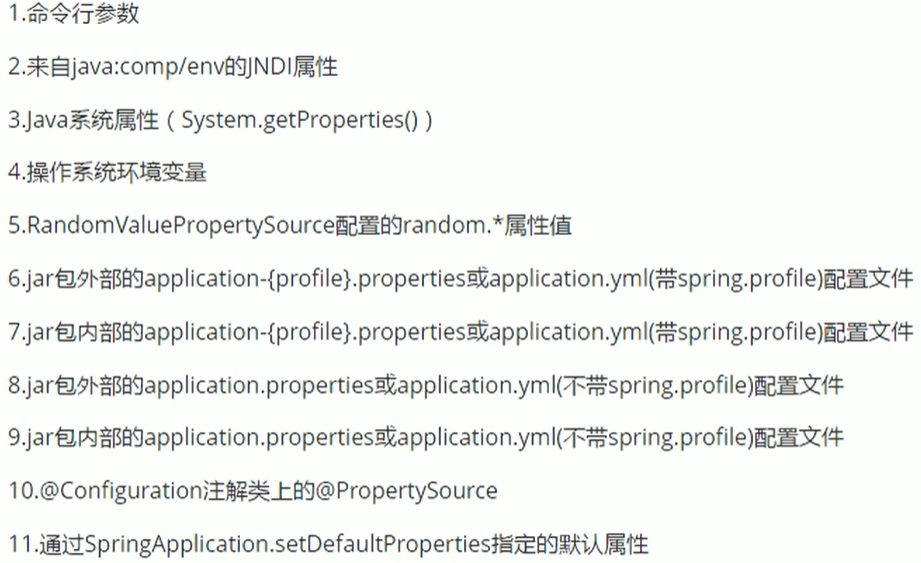
所有支持的配置加载来源;
参考官方文档
**==SpringBoot也可以从以下位置加载配置; 优先级从高到低;高优先级的配置覆盖低优先级的配置,所有的配置会形成互补配置==**

**1.命令行参数**

所有的配置都可以在命令行上进行指定

java -jar spring-boot-02-config-02-0.0.1-SNAPSHOT.jar --server.port=8087  --server.context-path=/abc

多个配置用空格分开; --配置项=值

2.来自java:comp/env的JNDI属性

3.Java系统属性(System.getProperties())

4.操作系统环境变量

5.RandomValuePropertySource配置的random.*属性值

==**由jar包外向jar包内进行寻找;**==

==**优先加载带profile**==

**6.jar包外部的application-{profile}.properties或application.yml(带spring.profile)配置文件**

**7.jar包内部的application-{profile}.properties或application.yml(带spring.profile)配置文件**

==**再来加载不带profile**==

**8.jar包外部的application.properties或application.yml(不带spring.profile)配置文件**

**9.jar包内部的application.properties或application.yml(不带spring.profile)配置文件**

10.@Configuration注解类上的@PropertySource

11.通过SpringApplication.setDefaultProperties指定的默认属性
自动配置原理
配置文件到底能写什么?怎么写?自动配置原理;
配置文件能配置的属性参照
自动配置原理:
- 1)、SpringBoot启动的时候加载主配置类,开启了自动配置功能 @EnableAutoConfiguration
- 2)、@EnableAutoConfiguration 作用:**
- 利用EnableAutoConfigurationImportSelector给容器中导入一些组件?
- 可以查看selectImports()方法的内容;
- List configurations = getCandidateConfigurations(annotationMetadata, attributes);获取候选的配置
SpringFactoriesLoader.loadFactoryNames()
扫描所有jar包类路径下 META-INF/spring.factories
把扫描到的这些文件的内容包装成properties对象
从properties中获取到EnableAutoConfiguration.class类(类名)对应的值,然后把他们添加在容器中
**==将 类路径下  META-INF/spring.factories 里面配置的所有EnableAutoConfiguration的值加入到了容器中;==**

```properties

# Auto Configure

org.springframework.boot.autoconfigure.EnableAutoConfiguration=\

org.springframework.boot.autoconfigure.admin.SpringApplicationAdminJmxAutoConfiguration,\

org.springframework.boot.autoconfigure.aop.AopAutoConfiguration,\

org.springframework.boot.autoconfigure.amqp.RabbitAutoConfiguration,\

org.springframework.boot.autoconfigure.batch.BatchAutoConfiguration,\

org.springframework.boot.autoconfigure.cache.CacheAutoConfiguration,\

org.springframework.boot.autoconfigure.cassandra.CassandraAutoConfiguration,\

org.springframework.boot.autoconfigure.cloud.CloudAutoConfiguration,\

org.springframework.boot.autoconfigure.context.ConfigurationPropertiesAutoConfiguration,\

org.springframework.boot.autoconfigure.context.MessageSourceAutoConfiguration,\

org.springframework.boot.autoconfigure.context.PropertyPlaceholderAutoConfiguration,\

org.springframework.boot.autoconfigure.couchbase.CouchbaseAutoConfiguration,\

org.springframework.boot.autoconfigure.dao.PersistenceExceptionTranslationAutoConfiguration,\

org.springframework.boot.autoconfigure.data.cassandra.CassandraDataAutoConfiguration,\

org.springframework.boot.autoconfigure.data.cassandra.CassandraRepositoriesAutoConfiguration,\

org.springframework.boot.autoconfigure.data.couchbase.CouchbaseDataAutoConfiguration,\

org.springframework.boot.autoconfigure.data.couchbase.CouchbaseRepositoriesAutoConfiguration,\

org.springframework.boot.autoconfigure.data.elasticsearch.ElasticsearchAutoConfiguration,\

org.springframework.boot.autoconfigure.data.elasticsearch.ElasticsearchDataAutoConfiguration,\

org.springframework.boot.autoconfigure.data.elasticsearch.ElasticsearchRepositoriesAutoConfiguration,\

org.springframework.boot.autoconfigure.data.jpa.JpaRepositoriesAutoConfiguration,\

org.springframework.boot.autoconfigure.data.ldap.LdapDataAutoConfiguration,\

org.springframework.boot.autoconfigure.data.ldap.LdapRepositoriesAutoConfiguration,\

org.springframework.boot.autoconfigure.data.mongo.MongoDataAutoConfiguration,\

org.springframework.boot.autoconfigure.data.mongo.MongoRepositoriesAutoConfiguration,\

org.springframework.boot.autoconfigure.data.neo4j.Neo4jDataAutoConfiguration,\

org.springframework.boot.autoconfigure.data.neo4j.Neo4jRepositoriesAutoConfiguration,\

org.springframework.boot.autoconfigure.data.solr.SolrRepositoriesAutoConfiguration,\

org.springframework.boot.autoconfigure.data.redis.RedisAutoConfiguration,\

org.springframework.boot.autoconfigure.data.redis.RedisRepositoriesAutoConfiguration,\

org.springframework.boot.autoconfigure.data.rest.RepositoryRestMvcAutoConfiguration,\

org.springframework.boot.autoconfigure.data.web.SpringDataWebAutoConfiguration,\

org.springframework.boot.autoconfigure.elasticsearch.jest.JestAutoConfiguration,\

org.springframework.boot.autoconfigure.freemarker.FreeMarkerAutoConfiguration,\

org.springframework.boot.autoconfigure.gson.GsonAutoConfiguration,\

org.springframework.boot.autoconfigure.h2.H2ConsoleAutoConfiguration,\

org.springframework.boot.autoconfigure.hateoas.HypermediaAutoConfiguration,\

org.springframework.boot.autoconfigure.hazelcast.HazelcastAutoConfiguration,\

org.springframework.boot.autoconfigure.hazelcast.HazelcastJpaDependencyAutoConfiguration,\

org.springframework.boot.autoconfigure.info.ProjectInfoAutoConfiguration,\

org.springframework.boot.autoconfigure.integration.IntegrationAutoConfiguration,\

org.springframework.boot.autoconfigure.jackson.JacksonAutoConfiguration,\

org.springframework.boot.autoconfigure.jdbc.DataSourceAutoConfiguration,\

org.springframework.boot.autoconfigure.jdbc.JdbcTemplateAutoConfiguration,\

org.springframework.boot.autoconfigure.jdbc.JndiDataSourceAutoConfiguration,\

org.springframework.boot.autoconfigure.jdbc.XADataSourceAutoConfiguration,\

org.springframework.boot.autoconfigure.jdbc.DataSourceTransactionManagerAutoConfiguration,\

org.springframework.boot.autoconfigure.jms.JmsAutoConfiguration,\

org.springframework.boot.autoconfigure.jmx.JmxAutoConfiguration,\

org.springframework.boot.autoconfigure.jms.JndiConnectionFactoryAutoConfiguration,\

org.springframework.boot.autoconfigure.jms.activemq.ActiveMQAutoConfiguration,\

org.springframework.boot.autoconfigure.jms.artemis.ArtemisAutoConfiguration,\

org.springframework.boot.autoconfigure.flyway.FlywayAutoConfiguration,\

org.springframework.boot.autoconfigure.groovy.template.GroovyTemplateAutoConfiguration,\

org.springframework.boot.autoconfigure.jersey.JerseyAutoConfiguration,\

org.springframework.boot.autoconfigure.jooq.JooqAutoConfiguration,\

org.springframework.boot.autoconfigure.kafka.KafkaAutoConfiguration,\

org.springframework.boot.autoconfigure.ldap.embedded.EmbeddedLdapAutoConfiguration,\

org.springframework.boot.autoconfigure.ldap.LdapAutoConfiguration,\

org.springframework.boot.autoconfigure.liquibase.LiquibaseAutoConfiguration,\

org.springframework.boot.autoconfigure.mail.MailSenderAutoConfiguration,\

org.springframework.boot.autoconfigure.mail.MailSenderValidatorAutoConfiguration,\

org.springframework.boot.autoconfigure.mobile.DeviceResolverAutoConfiguration,\

org.springframework.boot.autoconfigure.mobile.DeviceDelegatingViewResolverAutoConfiguration,\

org.springframework.boot.autoconfigure.mobile.SitePreferenceAutoConfiguration,\

org.springframework.boot.autoconfigure.mongo.embedded.EmbeddedMongoAutoConfiguration,\

org.springframework.boot.autoconfigure.mongo.MongoAutoConfiguration,\

org.springframework.boot.autoconfigure.mustache.MustacheAutoConfiguration,\

org.springframework.boot.autoconfigure.orm.jpa.HibernateJpaAutoConfiguration,\

org.springframework.boot.autoconfigure.reactor.ReactorAutoConfiguration,\

org.springframework.boot.autoconfigure.security.SecurityAutoConfiguration,\

org.springframework.boot.autoconfigure.security.SecurityFilterAutoConfiguration,\

org.springframework.boot.autoconfigure.security.FallbackWebSecurityAutoConfiguration,\

org.springframework.boot.autoconfigure.security.oauth2.OAuth2AutoConfiguration,\

org.springframework.boot.autoconfigure.sendgrid.SendGridAutoConfiguration,\

org.springframework.boot.autoconfigure.session.SessionAutoConfiguration,\

org.springframework.boot.autoconfigure.social.SocialWebAutoConfiguration,\

org.springframework.boot.autoconfigure.social.FacebookAutoConfiguration,\

org.springframework.boot.autoconfigure.social.LinkedInAutoConfiguration,\

org.springframework.boot.autoconfigure.social.TwitterAutoConfiguration,\

org.springframework.boot.autoconfigure.solr.SolrAutoConfiguration,\

org.springframework.boot.autoconfigure.thymeleaf.ThymeleafAutoConfiguration,\

org.springframework.boot.autoconfigure.transaction.TransactionAutoConfiguration,\

org.springframework.boot.autoconfigure.transaction.jta.JtaAutoConfiguration,\

org.springframework.boot.autoconfigure.validation.ValidationAutoConfiguration,\

org.springframework.boot.autoconfigure.web.DispatcherServletAutoConfiguration,\

org.springframework.boot.autoconfigure.web.EmbeddedServletContainerAutoConfiguration,\

org.springframework.boot.autoconfigure.web.ErrorMvcAutoConfiguration,\

org.springframework.boot.autoconfigure.web.HttpEncodingAutoConfiguration,\

org.springframework.boot.autoconfigure.web.HttpMessageConvertersAutoConfiguration,\

org.springframework.boot.autoconfigure.web.MultipartAutoConfiguration,\

org.springframework.boot.autoconfigure.web.ServerPropertiesAutoConfiguration,\

org.springframework.boot.autoconfigure.web.WebClientAutoConfiguration,\

org.springframework.boot.autoconfigure.web.WebMvcAutoConfiguration,\

org.springframework.boot.autoconfigure.websocket.WebSocketAutoConfiguration,\

org.springframework.boot.autoconfigure.websocket.WebSocketMessagingAutoConfiguration,\

org.springframework.boot.autoconfigure.webservices.WebServicesAutoConfiguration
每一个这样的 xxxAutoConfiguration类都是容器中的一个组件,都加入到容器中;用他们来做自动配置;
3)、每一个自动配置类进行自动配置功能;
4)、以HttpEncodingAutoConfiguration(Http编码自动配置)为例解释自动配置原理;
@Configuration   //表示这是一个配置类,以前编写的配置文件一样,也可以给容器中添加组件

@EnableConfigurationProperties(HttpEncodingProperties.class)  //启动指定类的ConfigurationProperties功能;将配置文件中对应的值和HttpEncodingProperties绑定起来;并把HttpEncodingProperties加入到ioc容器中

@ConditionalOnWebApplication //Spring底层@Conditional注解(Spring注解版),根据不同的条件,如果满足指定的条件,整个配置类里面的配置就会生效;    判断当前应用是否是web应用,如果是,当前配置类生效

@ConditionalOnClass(CharacterEncodingFilter.class)  //判断当前项目有没有这个类CharacterEncodingFilter;SpringMVC中进行乱码解决的过滤器;

@ConditionalOnProperty(prefix = "spring.http.encoding", value = "enabled", matchIfMissing = true)  //判断配置文件中是否存在某个配置  spring.http.encoding.enabled;如果不存在,判断也是成立的

//即使我们配置文件中不配置pring.http.encoding.enabled=true,也是默认生效的;

public class HttpEncodingAutoConfiguration {

  	//他已经和SpringBoot的配置文件映射了

  	private final HttpEncodingProperties properties;

   //只有一个有参构造器的情况下,参数的值就会从容器中拿

  	public HttpEncodingAutoConfiguration(HttpEncodingProperties properties) {

		this.properties = properties;

	}

    @Bean   //给容器中添加一个组件,这个组件的某些值需要从properties中获取

	@ConditionalOnMissingBean(CharacterEncodingFilter.class) //判断容器没有这个组件?

	public CharacterEncodingFilter characterEncodingFilter() {

		CharacterEncodingFilter filter = new OrderedCharacterEncodingFilter();

		filter.setEncoding(this.properties.getCharset().name());

		filter.setForceRequestEncoding(this.properties.shouldForce(Type.REQUEST));

		filter.setForceResponseEncoding(this.properties.shouldForce(Type.RESPONSE));

		return filter;

	}
根据当前不同的条件判断,决定这个配置类是否生效?
一但这个配置类生效;这个配置类就会给容器中添加各种组件;这些组件的属性是从对应的properties类中获取的,这些类里面的每一个属性又是和配置文件绑定的;
5)、所有在配置文件中能配置的属性都是在xxxxProperties类中封装者‘;配置文件能配置什么就可以参照某个功能对应的这个属性类
@ConfigurationProperties(prefix = "spring.http.encoding")  //从配置文件中获取指定的值和bean的属性进行绑定

public class HttpEncodingProperties {

   public static final Charset DEFAULT_CHARSET = Charset.forName("UTF-8");
精髓:
1)、SpringBoot启动会加载大量的自动配置类
2)、我们看我们需要的功能有没有SpringBoot默认写好的自动配置类;
3)、我们再来看这个自动配置类中到底配置了哪些组件;(只要我们要用的组件有,我们就不需要再来配置了)
4)、给容器中自动配置类添加组件的时候,会从properties类中获取某些属性。我们就可以在配置文件中指定这些属性的值;
xxxxAutoConfigurartion:自动配置类;
给容器中添加组件
xxxxProperties:封装配置文件中相关属性;
细节
@Conditional派生注解(Spring注解版原生的@Conditional作用)
作用:必须是@Conditional指定的条件成立,才给容器中添加组件,配置配里面的所有内容才生效;
| @Conditional扩展注解 | 作用(判断是否满足当前指定条件) |
|---|---|
| @ConditionalOnJava | 系统的java版本是否符合要求 |
| @ConditionalOnBean | 容器中存在指定Bean; |
| @ConditionalOnMissingBean | 容器中不存在指定Bean; |
| @ConditionalOnExpression | 满足SpEL表达式指定 |
| @ConditionalOnClass | 系统中有指定的类 |
| @ConditionalOnMissingClass | 系统中没有指定的类 |
| @ConditionalOnSingleCandidate | 容器中只有一个指定的Bean,或者这个Bean是首选Bean |
| @ConditionalOnProperty | 系统中指定的属性是否有指定的值 |
| @ConditionalOnResource | 类路径下是否存在指定资源文件 |
| @ConditionalOnWebApplication | 当前是web环境 |
| @ConditionalOnNotWebApplication | 当前不是web环境 |
| @ConditionalOnJndi | JNDI存在指定项 |
自动配置类必须在一定的条件下才能生效;
我们怎么知道哪些自动配置类生效;
我们可以通过启用 debug=true属性;来让控制台打印自动配置报告,这样我们就可以很方便的知道哪些自动配置类生效;
=========================

AUTO-CONFIGURATION REPORT

=========================

Positive matches:(自动配置类启用的)

-----------------

   DispatcherServletAutoConfiguration matched:

      - @ConditionalOnClass found required class 'org.springframework.web.servlet.DispatcherServlet'; @ConditionalOnMissingClass did not find unwanted class (OnClassCondition)

      - @ConditionalOnWebApplication (required) found StandardServletEnvironment (OnWebApplicationCondition)

Negative matches:(没有启动,没有匹配成功的自动配置类)

-----------------

   ActiveMQAutoConfiguration:

      Did not match:

         - @ConditionalOnClass did not find required classes 'javax.jms.ConnectionFactory', 'org.apache.activemq.ActiveMQConnectionFactory' (OnClassCondition)

   AopAutoConfiguration:

      Did not match:

         - @ConditionalOnClass did not find required classes 'org.aspectj.lang.annotation.Aspect', 'org.aspectj.lang.reflect.Advice' (OnClassCondition)
如何修改SpringBoot的默认配置
模式:
1)、SpringBoot在自动配置很多组件的时候,先看容器中有没有用户自己配置的(@Bean、@Component)如果有就用用户配置的,如果没有,才自动配置;如果有些组件可以有多个(ViewResolver)将用户配置的和自己默认的组合起来;
2)、在SpringBoot中会有非常多的xxxConfigurer帮助我们进行扩展配置
3)、在SpringBoot中会有很多的xxxCustomizer帮助我们进行定制配置
Springboot学习:核心配置文件的更多相关文章
- SpringBoot(二) - 核心配置文件
1.application.properties 和 application.yml 配置文件格式区别 1.1 文件格式 application.properties # 端口号 server.por ...
- 尚硅谷springboot学习7-yaml配置文件
SpringBoot使用一个全局的配置文件,配置文件名是固定的: application.properties application.yml 配置文件的作用:修改SpringBoot自动配置的默认值 ...
- SpringBoot学习(二):配置文件
1.配置文件 SpringBoot使用一个全局的配置文件,配置文件名是固定的: •application.properties •application.yml 配置文件的作用:修改SpringBoo ...
- springboot的核心配置文件
一.springboot主要配置文件种类 1.bootstrap (.yml或.properties) 2.application(.yml或.properties) 二.bootstrap与appl ...
- Java开发学习(三十六)----SpringBoot三种配置文件解析
一. 配置文件格式 我们现在启动服务器默认的端口号是 8080,访问路径可以书写为 http://localhost:8080/books/1 在线上环境我们还是希望将端口号改为 80,这样在访问的时 ...
- SpringBoot学习(五)-->SpringBoot的核心
SpringBoot的核心 1.入口类和@SpringBootApplication Spring Boot的项目一般都会有*Application的入口类,入口类中会有main方法,这是一个标准的J ...
- MyBatis学习总结(二)——MyBatis核心配置文件与输入输出映射
在上一章中我们学习了<MyBatis学习总结(一)——ORM概要与MyBatis快速起步>,这一章主要是介绍MyBatis核心配置文件.使用接口+XML实现完整数据访问.输入参数映射与输出 ...
- SpringBoot学习笔记:读取配置文件
SpringBoot学习笔记:读取配置文件 配置文件 在以往的项目中,我们主要通过XML文件进行框架配置,业务的相关配置会放在属性文件中,然后通过一个属性读取的工具类来读取配置信息.在SpringBo ...
- SpringBoot(二) SpringBoot核心配置文件application.yml/properties
我们都知道在Spring中有着application.xml文件对Spring进行相关配置,通过web.xml中的contextConfigLocation指定application.xml文件所在位 ...
随机推荐
- C++-POJ1015-Jury Compromise
Java实现会MLE那我也没办法了 //辩方总分和控方总分之差简称为“辩控差” //辩方总分和控方总分之和简称为“辩控和” //现用f(j, k)表示,取j 个候选人,使其辩控差为k 的所有方案中,辩 ...
- IDEAVIM 常用快捷键总结和使用说明
---title: ideavim常用快捷键总结和使用tags: grammar_cjkRuby: true--- #### `待办` ideavim用于编程的常用快捷键说明 常用快捷键 插入(光标前 ...
- scss(sass)
- bzoj 3669: [Noi2014]魔法森林 (LCT & kruskal)
这道题呢, 首先按照关键字a排序,然后不断地加边,用lct维护这个过程 具体实现: 先按照关键字a排序,枚举每一条边,判断两点是否已经联通(kruskal 部分)如果联通,就在两点路径间寻找最大的b, ...
- Apache Kafka(四)- 使用 Java 访问 Kafka
1. Produer 1.1. 基本 Producer 首先使用 maven 构建相关依赖,这里我们服务器kafka 版本为 2.12-2.3.0,pom.xml 文件为: <?xml vers ...
- 寒假安卓app开发学习记录(6)
今天把之前学过的内容复习了一遍,然后用了大概一个小时的时间看了看教学视频. 学到的主要内容是如何调试Android程序,以及Android的应用以及打包过程. 调试: 依次点击Run“-”Atta ...
- zabbix_agentd无法启动,cannot open log 错误
最近有一台服务器的zabbix启动异常,看日志有如下报错 zabbix_agentd []: cannot open log: cannot create semaphore ] No space l ...
- NW.js构建桌面应用
最近要做个桌面的应用,用起来也方便.找了一圈发现NW.js挺容易上手,分享给大家. NW.js 官网https://nwjs.io/ 1.下载适合当前版本的js [这里下载的SDK版本,方便后续调试] ...
- 【红黑树】的详细实现(C++)
红黑树的介绍 红黑树(Red-Black Tree,简称R-B Tree),它一种特殊的二叉查找树.红黑树是特殊的二叉查找树,意味着它满足二叉查找树的特征:任意一个节点所包含的键值,大于等于左孩子的键 ...
- 6_14 Abbott的复仇(UVa816)<图的最短路BFS>
1999次世界总决赛的比赛包括一个骰子迷宫问题.在这个问题被写的时候,法官们无法发现骰子迷宫概念的原始来源.不久之后的比赛,但是,罗伯特先生雅培,无数的迷宫和对作者的创造者主题,联系大赛评委,自称是骰 ...