
Unity使用C++作为游戏逻辑脚本的研究
文章申明:本文来自JacksonDunstan的博客系列文章内容摘取和翻译,版权归其所有,附上原文的链接,大家可以有空阅读原文:C++ Scripting( in Unity)
一、C#和C++的通信
前面我的文章写过c#/c/lua是如何交互的,通过将c#的函数和属性,注册到lua虚拟机中,可以实现通过c来互相交互。
而c#和c++的交互,也是非常类似的,c#可以直接的通过P/Invoke的方式来调用c++的函数,而C++调用C#的函数,C++的函数是被封装成DLL来放在Unity的工程文件中的Plugins中,则需要基于.NET来操作,利用Marshal.GetFunctionPointerForDelegate来获取函数的指针,然后传递到c++中进行操作。
二、编辑器下实现实时的编译和脚本更新
在Unity中,我们可以在打开的Unity中,直接编译c#的文件,这样不需要每次都关闭工程再打开来执行编译,而C++由于通过DLL来调用,每次更新的C++都需要关闭工程,然后更新DLL,然后打开工程,这样的操作,对于编辑器下的开发是极其耗费的。
对于上面提到的反复开关工程执行DLL的更新,可以利用[DllImport]的属性来实现在编辑器下的更新:
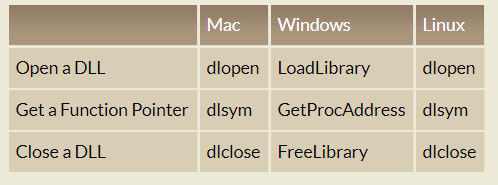
该属性是基于OS的,所以不会存在跨平台的问题。
三、示例代码展示
show the code
c# code part:
using System;

using System.IO;

using System.Runtime.InteropServices;

using UnityEngine;

class TestScript:MonoBehaviour

{

#if UNITY_EDITOR

    // pointer handle to the C++ DLL

    public IntPtr libarayHandle;

    public delegate void InitDelegate(IntPtr gameObjectNew,

    IntPtr gameObjectGetTransform, IntPtr transformSetPosition);

#endif

}

#if UNITY_EDITOR_OSX || UNITY_EDITOR_LINUX

    //OSX 和Linux下的导入

    [DLLImport("__Internal")]

    public static extern IntPtr dlopen(string path, int flag);

    [DllImport("__Internal")]

    public static extern IntPtr dlsym(IntPtr handle, string symbolName);

    [DllImport("__Internal")]

    public static extern int dlclose(IntPtr handle);

    public static IntPtr OpenLibrary(string path)

    {

        IntPtr handle = dlopen(path, );

        if(handle == IntPtr.Zero)

        {

           throw new Exception("Couldn't open native library: "+ path);

        }

        return handle;

    }

    public static void CloseLibrary(IntPtr libraryHandle)

    {

         dlclose(libraryHandle);

    }

    public static T GetDelegate<T>(IntPtr libraryHandle, string functionName)

    where T: class

    {

         IntPtr symbol = dlsym(libraryHandle, functionName);

         if(symbol == IntPtr.Zero)

         {

            throw new Exception("Couldn't get function:" + functionName);

         }

         return Marshal.GetDelegateForFunctionPointer(symbol, typeof(T)) as T;

    }

#elif UNITY_EDITOR_WIN

    // win 编辑器下

    [DllImport("kernel32")]

    public static extern IntPtr LoadLibrary(string path);

    [DllImport("kernel32")]

    public static extern IntPtr GetProcAddress(IntPtr libraryHandle,

    string symbolName);

    [DllImport("kernel32)]

    public static extern bool FreeLibrary(IntPtr libraryHandle);

    public static IntPtr OpenLibrary(string path)

    {

        IntPtr handle = LoadLibrary(path);

        if(handle == IntPtr.Zero)

        {

           throw new Exception("Couldn't open native library: "+ path);

        }

        return handle;

    }

    public static void CloseLibrary(IntPtr libraryHandle)

    {

         FreeLibrary(libraryHandle);

    }

    public static T GetDelegate<T>(IntPtr libraryHandle, string functionName)

    where T: class

    {

         IntPtr symbol = GetProcAddress(libraryHandle, functionName);

         if(symbol == IntPtr.Zero)

         {

            throw new Exception("Couldn't get function:" + functionName);

         }

         return Marshal.GetDelegateForFunctionPointer(symbol, typeof(T)) as T;

    }

#else

    //本地加载

    [DllImport("NativeScript")]

    static extern void Init(IntPtr gameObjectNew,

    IntPtr gameObjectGetTransform, IntPtr transformSetPosition);

    [DllImport("NativeScript")]

    static extern void MonoBehaviourUpdate();

#endif

    delegate int GameObjectNewDelegate();

    delegate int GameObjectGetTransformDelegate(int thisHandle);

    delegate void TransformSetPositionDelegate(int thisHandle, Vector3 position);

#if UNITY_EDITOR_OSX

    const string LIB_PATH = "/NativeScript.bundle/Contents/MacOS/NativeScript";

#elif UNITY_EDITOR_LINUX

    const string LIB_PATH = "/NativeScript.so";

#elif UNITY_EDITOR_WIN

    const string LIB_PATH = "/NativeScript.dll";

#endif

    void Awake()

   {

#if UNITY_EDITOR

     //open the native library

     libraryHandle = OpenLibrary(Application.dataPath + LIB_PATH);

     InitDelegate Init = GetDelegate<InitDelegate>(libraryHandle, "Init");

     MonoBehaviourUpdate = GetDelegate<MonoBehaviourUpdateDelegate>(

     libraryHandle,"MonoBehaviourUpdate");

#endif

     //init the C++ Library

     ObjectStore.Init();

     Init(

     Marshal.GetFunctionPointerForDelegate(new GameObjectNewDelegate(GameObjectNew)),

     Marshal.GetFunctionPointerForDelegate(new GameObjectGetTransformDelegate(GameObjectGetTransform)),

     Marshal.GetFunctionPointerForDelegate(new TransformSetPositionDelegate(TransformSetPosition))

    );

    }

    void Update()

    {

        MonoBehaviourUpdate();

    }

    void OnApplicationQuit()

    {

#if UNITY_EDITOR

       CloseLibrary(libraryHandle);

       libraryHandle = IntPtr.Zero;

#endif

    }

    //c# function for c++ call

    static int GameObjectNew()

    {

        GameObject go = new GameObject();

        return ObjectStore.Store(go);

    }

    static int GameObjectGetTransform(int thisHandle)

    {

        GameObject go = (GameObject)ObjectStore.Get(thisHandle);

        Transform transform = go.transform;

         return ObjectStore.Store(transform);

    }

    static void TransformSetPosition(int handle, Vector3 position)

    {

         Transform t =(Transform)ObjectStore.Get(handle);

         t.position = position;

    }

}
c++ code part:
#ifdef _WIN32

   #define DLLEXPORT __declspec(dllexport)

#else

   #define DLLEXPORT

#endif

extern "C"

{

    //C# VECTOR STRUCT

   struct Vector3

   {

       float x;

       float y;

       float z;

   }

   //c# function for c++ to call

   int(*GameObjectNew)();

   int(*GameObjectGetTransform)(int thisHandle);

   void(*TransformSetPosition)(int thisHandle, Vector3 position);

   //c++ functions for c# to call

   int numCreated;

   DLLExport void Init(

   int(*gameObjectNew)(),

   int(*gameObjectGetTrasform)(int),

   void(*transformSetPosition)(int, Vector3)

)

{

      GameObjectNew = gameObjectNew;

      GameObjectGetTransform = gameObjectGetTransform;

      TransformSetPosition = trasformSetPosition;

      numCreated = ;

}

    //

    DLLEXPORT void MonoBehaviourUpdate(int thisHandle)

    {

        if( numCreated < )

        {

             //获取函数handle,然后操作

             int goHandle = GameObjectNew();

             int transformHandle = GameObejctGetTransform(goHandle);

             float comp = 10.0f * (float)numCreated;

             Vector3 position = {comp, comp, comp};

             TransformSetPosition(transformHandle, position);

             numCreated++;

        }

    }

}
四、总结
C#和C++的相互交互,是基于.NET和P/Invoke,那么我们可以同理退出c#和lua的操作,其实质就是对handle进行包装,然后进行相关的操作,这个在后续的文章中在研究,先写到这儿,祝大家五一快乐,我也回家过节去了,哈哈~
Unity使用C++作为游戏逻辑脚本的研究的更多相关文章
- Unity使用C++作为游戏逻辑脚本的研究(二)
文章申明:本文来自JacksonDunstan的博客系列文章内容摘取和翻译,版权归其所有,附上原文的链接,大家可以有空阅读原文:C++ Scripting( in Unity) 上一篇文章写完,有同学 ...
- Unity 2D游戏开发教程之使用脚本实现游戏逻辑
Unity 2D游戏开发教程之使用脚本实现游戏逻辑 使用脚本实现游戏逻辑 通过上一节的操作,我们不仅创建了精灵的动画,还设置了动画的过渡条件,最终使得精灵得以按照我们的意愿,进入我们所指定的动画状态. ...
- 使用Unity创建塔防游戏(Part1)
How to Create a Tower Defense Game in Unity - Part1 原文作者:Barbara Reichart 文章原译:http://www.cnblogs.co ...
- 使用Unity创建塔防游戏(Part3)—— 项目总结
之前我们完成了使用Unity创建塔防游戏这个小项目,在这篇文章里,我们对项目中学习到的知识进行一次总结. Part1的地址:http://www.cnblogs.com/lcxBlog/p/60759 ...
- 使用Unity做2.5D游戏教程(二)
最近在研究Unity 3D,看了老外Marin Todorov写的教程很详细,就翻译过来以便自己参考,翻译不好的地方请多包涵. 这是使用Unity 游戏开发工具制作一个简单的2.5D 游戏系列教程的第 ...
- 使用Unity做2.5D游戏教程(一)
最近在研究Unity 3D,看了老外Marin Todorov写的教程很详细,就翻译过来以便自己参考,翻译不好的地方请多包涵. 如果你不了解2.5D游戏是什么,它基本上是个3D游戏而你可以想象是压扁的 ...
- 使用Unity创建塔防游戏(Part2)
How to Create a Tower Defense Game in Unity – Part 2 原文地址:https://www.raywenderlich.com/107529/unity ...
- 【转载】U3D 游戏引擎之游戏架构脚本该如何来写
原文:http://tech.ddvip.com/2013-02/1359996528190113.html Unity3D 游戏引擎之游戏架构脚本该如何来写 2013-02-05 00:48:4 ...
- cocos2dx3.0 超级马里奥开发笔记(两)——正确的规划游戏逻辑
我将不得不拿出一个完整的开发笔记.由于个人原因.代码已OK该,博客,那么就不要粘贴代码,直接解释了整个游戏设计,更确切地说,当新手应该注意的地方发展. 1.继承类和扩展作用的权----展阅读(MVC) ...
随机推荐
- jedis配置
public interface IJedisClientFactory { Jedis getJedis(); } JedisClientFactoryImpl.java @Service publ ...
- power designer 连接mysql提示“connection test failed”
本机环境: win10 64位 jdk8 64位 问题: 测试连接时,总是提示 根据网上搜索: 根源在于:PowerDesigner based on 32 bit JVM kernel 参考: ht ...
- HRBUST1522【单调队列+DP】
题目:输入一个长度为n的整数序列(A1,A2,--,An),从中找出一段连续的长度不超过m的子序列,使得这个子序列的和最大. #include<stdio.h> #include<s ...
- python 异常 反射
异常 反射 一.异常处理: AttributeError 试图访问一个对象没有的树形,比如foo.x,但是foo没有属性x IOError 输入/输出异常:基本上是无法打开文件 ImportError ...
- Spring Cloud之——Config(配置中心)
Spring Cloud Config(配置中心) 大家好,有一段时间没有写技术博客了.由于工作上的事情,这方面很难分配时间.近几年随着服务化的兴起,一批服务化的框架应运而生,像dubbo,thrif ...
- 云计算 IaaS,SaaS,PaaS的区别?一个通俗易懂的吃货文章
来自一篇吃货文章了: ———————————————————— <img src="https://pic2.zhimg.com/a55676f8e1b084a398f8cd5 ...
- html的特点及结构
html 语言就是开发网页的基础语言: html(超文本标记语言) 标记 : 该门语言是有标签来构成的. 学习html不用怎么去理解,只要需要记住标签的作用即可. html语言的特点: 1. html ...
- 减小APK大小
本篇文章翻译自Reduce APK Size 用户通常不会去下载体积过大的应用程序,特别是当自己的设备连接的是 2G/3G 或者按字节付费的网络.这篇文章描述了如何缩减 APK 的体积大小,以使得更多 ...
- linux搭建node环境超详细教程
linux 环境搭建详细步骤 1.访问官方网址:https://nodejs.org/en/download/ 2.选择和你服务器版本相关的压缩包,复制下载链接 3.服务器登录ssh,(这里我用的服务 ...
- Spring-Cloud(三)Eureka注册中心实现高可用
前言: spring-cloud为基础的微服务架构,所有的微服务都需要注册到注册中心,如果这个注册中心阻塞或者崩了,那么整个系统都无法继续正常提供服务,所以,这里就需要对注册中心进行集群,换言之,高可 ...