
Windows + IDEA 手动开发MapReduce程序
- 参见马士兵老师的博文:map_reduce
环境配置
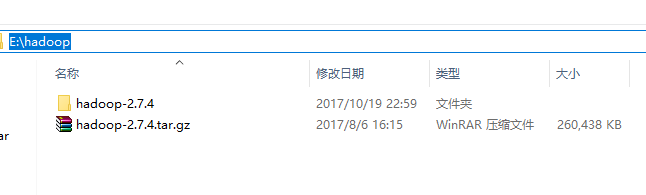
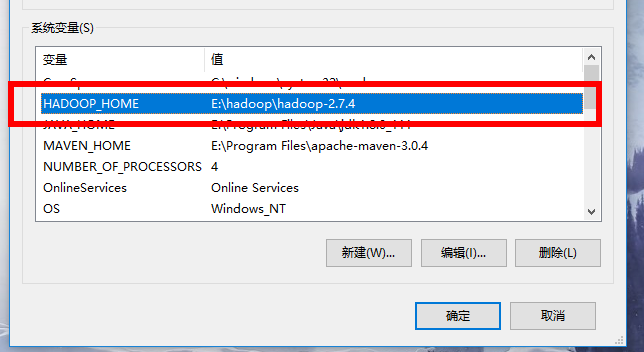
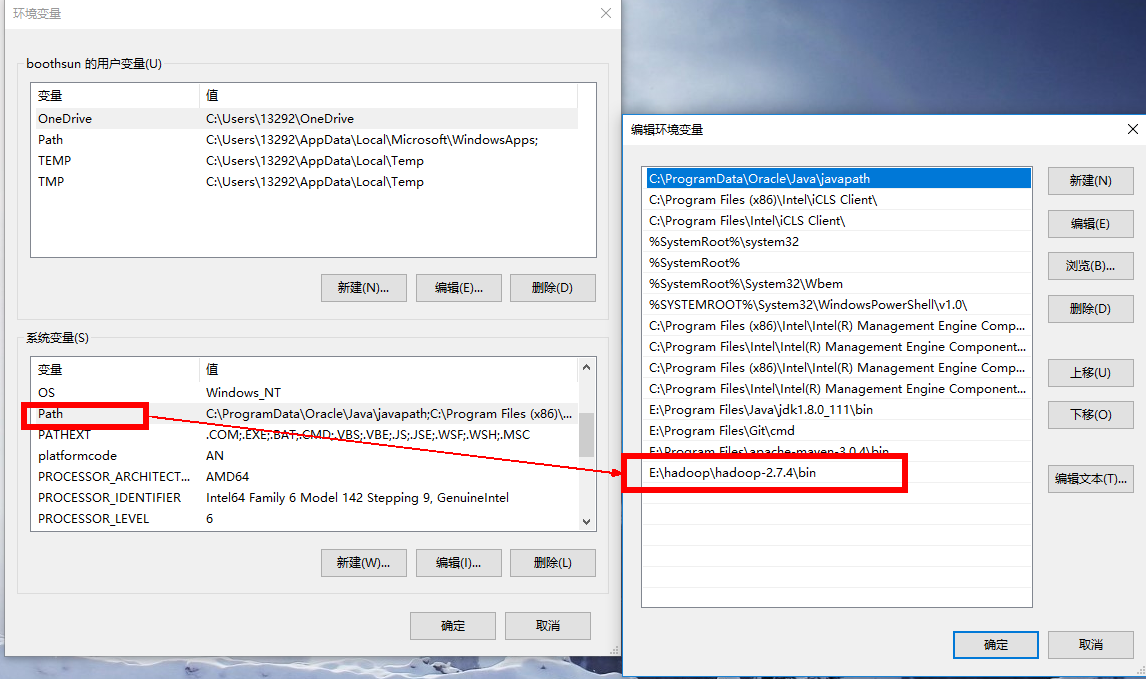
Windows本地解压Hadoop压缩包,然后像配置JDK环境变量一样在系统环境变量里配置HADOOP_HOME和path环境变量。注意:hadoop安装目录尽量不要包含空格或者中文字符。
形如:
添加windows环境下依赖的库文件
- 把盘中(盘地址 提取码:s6uv)共享的bin目录覆盖HADOOP_HOME/bin目录下的文件。
- 如果还是不行,把其中hadoop.dll复制到C:\windows\system32目录下,可能需要重启机器。
- 注意:配置好之后不需要启动Windows上的Hadoop
pom.xml
 <!-- hadoop start -->

    <dependency>

      <groupId>org.apache.hadoop</groupId>

      <artifactId>hadoop-minicluster</artifactId>

      <version>2.7.4</version>

    </dependency>

    <dependency>

      <groupId>org.apache.hadoop</groupId>

      <artifactId>hadoop-client</artifactId>

      <version>2.7.4</version>

    </dependency>

    <dependency>

      <groupId>org.apache.hadoop</groupId>

      <artifactId>hadoop-assemblies</artifactId>

      <version>2.7.4</version>

    </dependency>

    <dependency>

      <groupId>org.apache.hadoop</groupId>

      <artifactId>hadoop-maven-plugins</artifactId>

      <version>2.7.4</version>

    </dependency>

    <dependency>

      <groupId>org.apache.hadoop</groupId>

      <artifactId>hadoop-common</artifactId>

      <version>2.7.4</version>

    </dependency>

    <dependency>

      <groupId>org.apache.hadoop</groupId>

      <artifactId>hadoop-hdfs</artifactId>

      <version>2.7.4</version>

    </dependency>

    <!-- hadoop end -->
代码
WordMapper:
public class WordMapper extends Mapper<Object,Text,Text,IntWritable> {

    private final  static  IntWritable one = new IntWritable(1);

    private Text word = new Text();

    @Override

    public void map(Object key , Text value , Context context) throws IOException, InterruptedException{

        StringTokenizer itr = new StringTokenizer(value.toString()) ;

        while (itr.hasMoreTokens()) {

            word.set(itr.nextToken());

            context.write(word,one);

        }

    }

}
WordReducer::
public class WordReducer extends Reducer<Text,IntWritable,Text,IntWritable> {

    private IntWritable result = new IntWritable() ;

    public void reduce(Text key , Iterable<IntWritable> values, Context context) throws IOException , InterruptedException {

        int sum = 0 ;

        for (IntWritable val : values) {

            sum += val.get();

        }

        result.set(sum);

        context.write(key,result);

    }

}
本地计算 + 本地HDFS文件
public static void main(String[] args) throws Exception{

    //如果配置好环境变量,没有重启机器,然后报错找不到hadoop.home  可以手动指定

   // System.setProperty("hadoop.home.dir","E:\\hadoop\\hadoop-2.7.4");

    List<String> lists = Arrays.asList("E:\\input","E:\\output");

    Configuration configuration = new Configuration();

    Job job = new Job(configuration,"word count") ;

    job.setJarByClass(WordMain.class); // 主类

    job.setMapperClass(WordMapper.class); // Mapper

    job.setCombinerClass(WordReducer.class); //作业合成类

    job.setReducerClass(WordReducer.class); // reducer

    job.setOutputKeyClass(Text.class); // 设置作业输出数据的关键类

    job.setOutputValueClass(IntWritable.class); // 设置作业输出值类

    FileInputFormat.addInputPath(job,new Path(lists.get(0))); //文件输入

    FileOutputFormat.setOutputPath(job,new Path(lists.get(1))); // 文件输出

    System.exit(job.waitForCompletion(true) ? 0 : 1); //等待完成退出

}
本地计算 + 远程HDFS文件
把远程HDFS文件系统中的文件拉到本地来运行。
相比上面的改动点:
FileInputFormat.setInputPaths(job, "hdfs://master:9000/wcinput/");

FileOutputFormat.setOutputPath(job, new Path("hdfs://master:9000/wcoutput2/"));
注意这里是把HDFS文件拉到本地来运行,如果观察输出的话会观察到jobID带有local字样,同时这样的运行方式是不需要yarn的(自己停掉jarn服务做实验)。
远程计算 + 远程HDFS文件
这个方式是将文件打成一个jar文件,通过Hadoop Client自动上传到Hadoop集群,然后使用远程HDFS文件进行计算。
java代码:
public static void main(String[] args) throws Exception{

    Configuration configuration = new Configuration();

    configuration.set("fs.defaultFS", "hdfs://master:9000/");

    configuration.set("mapreduce.job.jar", "target/wc.jar");

    configuration.set("mapreduce.framework.name", "yarn");

    configuration.set("yarn.resourcemanager.hostname", "master");

    configuration.set("mapreduce.app-submission.cross-platform", "true");

    Job job = new Job(configuration,"word count") ;

    job.setJarByClass(WordMain2.class); // 主类

    job.setMapperClass(WordMapper.class); // Mapper

    job.setCombinerClass(WordReducer.class); //作业合成类

    job.setReducerClass(WordReducer.class); // reducer

    job.setCombinerClass(WordReducer.class); //作业合成类

    job.setOutputKeyClass(Text.class); // 设置作业输出数据的关键类

    job.setOutputValueClass(IntWritable.class); // 设置作业输出值类

    FileInputFormat.setInputPaths(job, "/opt/learning/hadoop/wordcount/*.txt");

    FileOutputFormat.setOutputPath(job, new Path("/opt/learning/output7/"));

    System.exit(job.waitForCompletion(true) ? 0 : 1); //等待完成退出

}
如果运行过程中遇到权限问题,配置执行时的虚拟机参数 -DHADOOP_USER_NAME=root 。
形如下图:

Windows + IDEA 手动开发MapReduce程序的更多相关文章
- windows环境下Eclipse开发MapReduce程序遇到的四个问题及解决办法
按此文章<Hadoop集群(第7期)_Eclipse开发环境设置>进行MapReduce开发环境搭建的过程中遇到一些问题,饶了一些弯路,解决办法记录在此: 文档目的: 记录windows环 ...
- [MapReduce_add_1] Windows 下开发 MapReduce 程序部署到集群
0. 说明 Windows 下开发 MapReduce 程序部署到集群 1. 前提 在本地开发的时候保证 resource 中包含以下配置文件,从集群的配置文件中拷贝 在 resource 中新建 ...
- 本地idea开发mapreduce程序提交到远程hadoop集群执行
https://www.codetd.com/article/664330 https://blog.csdn.net/dream_an/article/details/84342770 通过idea ...
- [b0010] windows 下 eclipse 开发 hdfs程序样例 (二)
目的: 学习windows 开发hadoop程序的配置 相关: [b0007] windows 下 eclipse 开发 hdfs程序样例 环境: 基于以下环境配置好后. [b0008] Window ...
- 在Eclipse中开发MapReduce程序
一.Eclipse的安装与设置 1.在Eclipse官网上下载eclipse-jee-oxygen-3a-linux-gtk-x86_64.tar.gz文件并将其拷贝到/home/jun/Resour ...
- [b0007] windows 下 eclipse 开发 hdfs程序样例
目的: 学习使用hdfs 的java命令操作 相关: 进化: [b0010] windows 下 eclipse 开发 hdfs程序样例 (二) [b0011] windows 下 eclipse 开 ...
- [b0011] windows 下 eclipse 开发 hdfs程序样例 (三)
目的: 学习windows 开发hadoop程序的配置. [b0007] windows 下 eclipse 开发 hdfs程序样例 太麻烦 [b0010] windows 下 eclipse 开发 ...
- Windows平台开发Mapreduce程序远程调用运行在Hadoop集群—Yarn调度引擎异常
共享原因:虽然用一篇博文写问题感觉有点奢侈,但是搜索百度,相关文章太少了,苦苦探寻日志才找到解决方案. 遇到问题:在windows平台上开发的mapreduce程序,运行迟迟没有结果. Mapredu ...
- hadoop开发MapReduce程序
准备工作: 1.设置HADOOP_HOME,指向hadoop安装目录 2.在window下,需要把hadoop/bin那个目录替换下,在网上搜一个对应版本的 3.如果还报org.apache.hado ...
随机推荐
- 洛谷 P2324 [SCOI2005]骑士精神 解题报告
P2324 [SCOI2005]骑士精神 题目描述 输入输出格式 输入格式: 第一行有一个正整数T(T<=10),表示一共有N组数据.接下来有T个5×5的矩阵,0表示白色骑士,1表示黑色骑士,* ...
- 【计数】【UVA11401】 Triangle Counting
传送门 Description 把1……n这n个数中任取3个数,求能组成一个三角形的方案个数 Input 多组数据,对于每组数据,包括: 一行一个数i,代表前i个数. 输入结束标识为i<3. O ...
- 负载均衡配置(基于Nginx)
以下是基于nginx进行负载均衡配置的流程: 服务器配置如下: 1. 安装nginx的服务器:192.168.1.1 2. nginx配置负载均衡位置及端口:192.168.1.1 80端口 3. ...
- Codeforces Round #393 (Div. 2) (8VC Venture Cup 2017 - Final Round Div. 2 Edition)A 水 B 二分 C并查集
A. Petr and a calendar time limit per test 2 seconds memory limit per test 256 megabytes input stand ...
- 中频IF
Intermediate 频率是指中频. 一般RF射频有三个频率,基带频率,中频,射频. 射频是发射到空中的频率,也就是我们一般说的2.4G, Sub-1G.但这个频率太高,不利于放大器做增益控制.所 ...
- C语言数组与指针总结
寒假要开始猛刷<剑指offer>,先回顾一下C语言基础做个热身. 指针 相信大家对下面的代码不陌生: ; int *p; p=&i; 这是最简单的指针应用,也是最基本的用法.再来熟 ...
- [技巧篇]10.那些年我们一起优化过的MyEclipse8.6
这里里面是针对于四海的给位学生预留的视频,请自行下载,我希望对大家有所帮助 我这里使用了百度网盘,这里的东西还是比较多的!如果喜欢请关注我,当好胖先生的粉丝 链接:http://pan.baidu.c ...
- UVALive-3263 That Nice Euler Circuit (几何欧拉定理)
https://vjudge.net/problem/UVALive-3263 平面上有一个n个端点的一笔画,第n个端点总是和第一个端点重合,因此图示一条闭合曲线. 组成一笔画的线段可以相交,但不会部 ...
- 51Nod 1007 正整数分组 | DP (01背包)
Input示例 5 1 2 3 4 5 Output示例 1 分析:2组的差最小,那么每一组都要接近sum/2,这样就转化成了普通的0 - 1背包了 #include <bits/stdc++. ...
- rabbitmq使用命令创建交换机、队列及绑定
http://www.jusene.me/2018/02/20/rabbitmq-2/