
本地idea开发mapreduce程序提交到远程hadoop集群执行
https://www.codetd.com/article/664330

https://blog.csdn.net/dream_an/article/details/84342770
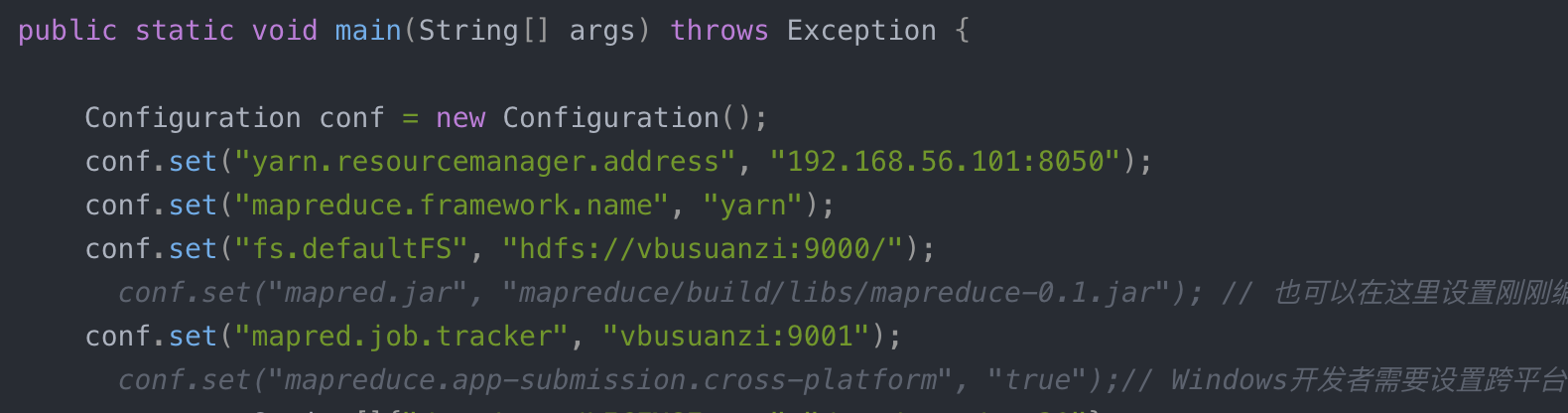
通过idea开发mapreduce程序并直接run,提交到远程hadoop集群执行mapreduce。
简要流程:本地开发mapreduce程序–>设置yarn 模式 --> 直接本地run–>远程集群执行mapreduce程序;
完整的流程:本地开发mapreduce程序——> 设置yarn模式——>初次编译产生jar文件——>增加 job.setJar("mapreduce/build/libs/mapreduce-0.1.jar");——>直接在Idea中run——>远程集群执行mapreduce程序;
一图说明问题: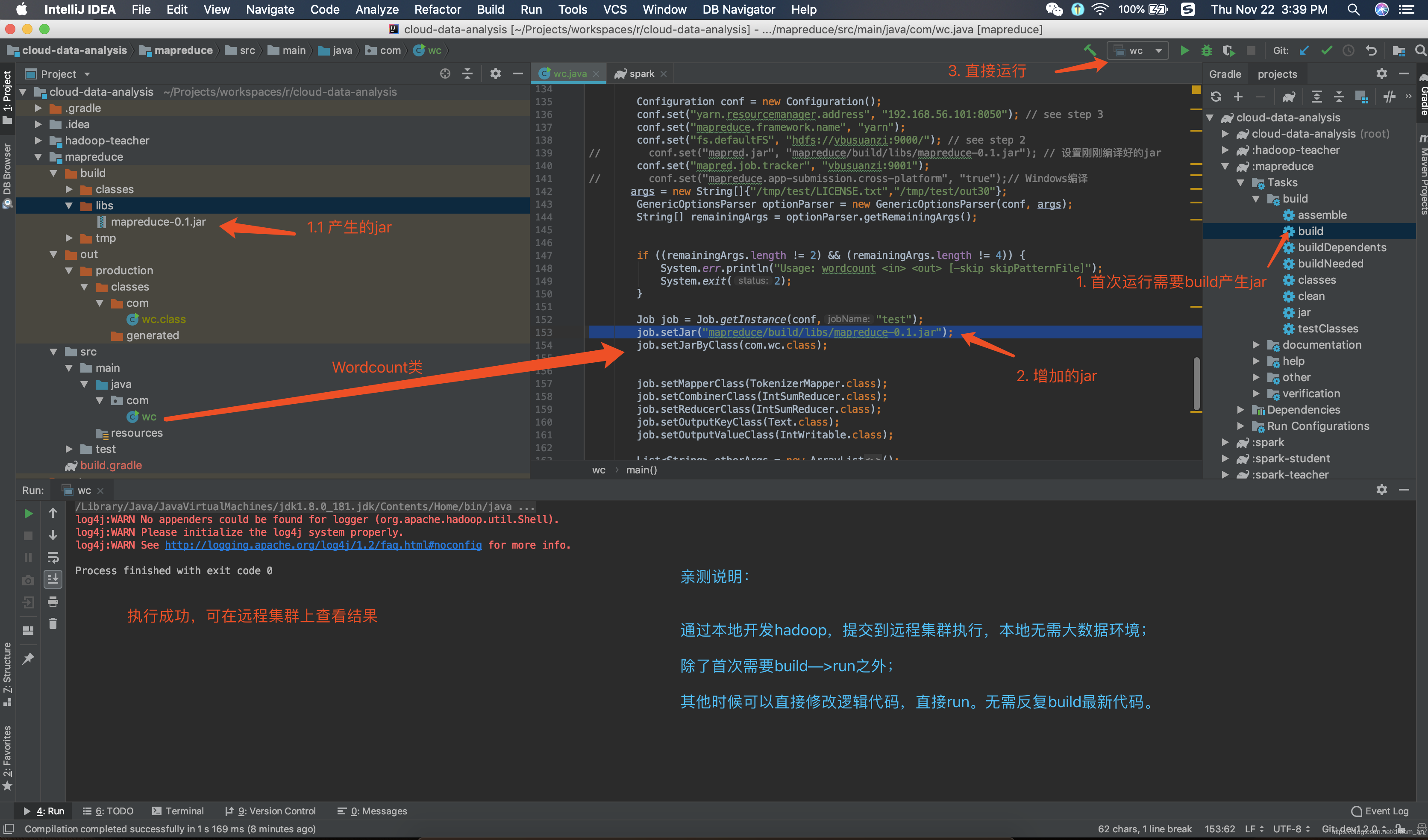
源码
build.gradle
plugins {

    id 'java'

}

group 'com.ruizhiedu'

version '0.1'

sourceCompatibility = 1.8

repositories {

    mavenCentral()

}

dependencies {

    compile group: 'org.apache.hadoop', name: 'hadoop-common', version: '3.1.0'

    compile group: 'org.apache.hadoop', name: 'hadoop-mapreduce-client-core', version: '3.1.0'

    compile group: 'org.apache.hadoop', name: 'hadoop-mapreduce-client-jobclient', version: '3.1.0'

    testCompile group: 'junit', name: 'junit', version: '4.12'

}
java文件
输入、输出已经让我写死了,可以直接run。不需要再运行时候设置idea运行参数
wc.java
package com;

import org.apache.hadoop.conf.Configuration;

import org.apache.hadoop.fs.Path;

import org.apache.hadoop.io.IntWritable;

import org.apache.hadoop.io.Text;

import org.apache.hadoop.mapreduce.Counter;

import org.apache.hadoop.mapreduce.Job;

import org.apache.hadoop.mapreduce.Mapper;

import org.apache.hadoop.mapreduce.Reducer;

import org.apache.hadoop.mapreduce.lib.input.FileInputFormat;

import org.apache.hadoop.mapreduce.lib.output.FileOutputFormat;

import org.apache.hadoop.util.GenericOptionsParser;

import org.apache.hadoop.util.StringUtils;

import java.io.BufferedReader;

import java.io.FileReader;

import java.io.IOException;

import java.net.URI;

import java.util.*;

/**

 * @author wangxiaolei(王小雷)

 * @since 2018/11/22

 */

public class wc {

    public static class TokenizerMapper

            extends Mapper<Object, Text, Text, IntWritable> {

        static enum CountersEnum { INPUT_WORDS }

        private final static IntWritable one = new IntWritable();

        private Text word = new Text();

        private boolean caseSensitive;

        private Set<String> patternsToSkip = new HashSet<String>();

        private Configuration conf;

        private BufferedReader fis;

        @Override

        public void setup(Context context) throws IOException,

                InterruptedException {

            conf = context.getConfiguration();

            caseSensitive = conf.getBoolean("wordcount.case.sensitive", true);

            if (conf.getBoolean("wordcount.skip.patterns", false)) {

                URI[] patternsURIs = Job.getInstance(conf).getCacheFiles();

                for (URI patternsURI : patternsURIs) {

                    Path patternsPath = new Path(patternsURI.getPath());

                    String patternsFileName = patternsPath.getName().toString();

                    parseSkipFile(patternsFileName);

                }

            }

        }

        private void parseSkipFile(String fileName) {

            try {

                fis = new BufferedReader(new FileReader(fileName));

                String pattern = null;

                while ((pattern = fis.readLine()) != null) {

                    patternsToSkip.add(pattern);

                }

            } catch (IOException ioe) {

                System.err.println("Caught exception while parsing the cached file '"

                        + StringUtils.stringifyException(ioe));

            }

        }

        @Override

        public void map(Object key, Text value, Context context

        ) throws IOException, InterruptedException {

            String line = (caseSensitive) ?

                    value.toString() : value.toString().toLowerCase();

            for (String pattern : patternsToSkip) {

                line = line.replaceAll(pattern, "");

            }

            StringTokenizer itr = new StringTokenizer(line);

            while (itr.hasMoreTokens()) {

                word.set(itr.nextToken());

                context.write(word, one);

                Counter counter = context.getCounter(CountersEnum.class.getName(),

                        CountersEnum.INPUT_WORDS.toString());

                counter.increment();

            }

        }

    }

    public static class IntSumReducer

            extends Reducer<Text,IntWritable,Text,IntWritable> {

        private IntWritable result = new IntWritable();

        public void reduce(Text key, Iterable<IntWritable> values,

                           Context context

        ) throws IOException, InterruptedException {

            int sum = ;

            for (IntWritable val : values) {

                sum += val.get();

            }

            result.set(sum);

            context.write(key, result);

        }

    }

    public static void main(String[] args) throws Exception {

        Configuration conf = new Configuration();

        conf.set("yarn.resourcemanager.address", "192.168.56.101:8050");

        conf.set("mapreduce.framework.name", "yarn");

        conf.set("fs.defaultFS", "hdfs://vbusuanzi:9000/");

//        conf.set("mapred.jar", "mapreduce/build/libs/mapreduce-0.1.jar"); // 也可以在这里设置刚刚编译好的jar

        conf.set("mapred.job.tracker", "vbusuanzi:9001");

//        conf.set("mapreduce.app-submission.cross-platform", "true");// Windows开发者需要设置跨平台

       args = new String[]{"/tmp/test/LICENSE.txt","/tmp/test/out30"};

        GenericOptionsParser optionParser = new GenericOptionsParser(conf, args);

        String[] remainingArgs = optionParser.getRemainingArgs();

        if ((remainingArgs.length != ) && (remainingArgs.length != )) {

            System.err.println("Usage: wordcount <in> <out> [-skip skipPatternFile]");

            System.exit();

        }

        Job job = Job.getInstance(conf,"test");

        job.setJar("mapreduce/build/libs/mapreduce-0.1.jar");

        job.setJarByClass(com.wc.class);

        job.setMapperClass(TokenizerMapper.class);

        job.setCombinerClass(IntSumReducer.class);

        job.setReducerClass(IntSumReducer.class);

        job.setOutputKeyClass(Text.class);

        job.setOutputValueClass(IntWritable.class);

        List<String> otherArgs = new ArrayList<String>();

        for (int i=; i < remainingArgs.length; ++i) {

            if ("-skip".equals(remainingArgs[i])) {

                job.addCacheFile(new Path(remainingArgs[++i]).toUri());

                job.getConfiguration().setBoolean("wordcount.skip.patterns", true);

            } else {

                otherArgs.add(remainingArgs[i]);

            }

        }

        FileInputFormat.addInputPath(job, new Path(otherArgs.get()));

        FileOutputFormat.setOutputPath(job, new Path(otherArgs.get()));

        job.waitForCompletion(true);

        System.exit(job.waitForCompletion(true) ?  : );

    }

}
本地idea开发mapreduce程序提交到远程hadoop集群执行的更多相关文章
- eclipse连接远程hadoop集群开发时权限不足问题解决方案
转自:http://blog.csdn.net/shan9liang/article/details/9734693 eclipse连接远程hadoop集群开发时报错 Exception in t ...
- eclipse连接远程hadoop集群开发时0700问题解决方案
eclipse连接远程hadoop集群开发时报错 错误信息: Exception in thread "main" java.io.IOException:Failed to se ...
- 在windows远程提交任务给Hadoop集群(Hadoop 2.6)
我使用3台Centos虚拟机搭建了一个Hadoop2.6的集群.希望在windows7上面使用IDEA开发mapreduce程序,然后提交的远程的Hadoop集群上执行.经过不懈的google终于搞定 ...
- 本地Pycharm将spark程序发送到远端spark集群进行处理
前言 最近在搞hadoop+spark+python,所以就搭建了一个本地的hadoop环境,基础环境搭建地址hadoop2.7.7 分布式集群安装与配置,spark集群安装并集成到hadoop集群, ...
- Eclipse提交任务至Hadoop集群遇到的问题
环境:Windows8.1,Eclipse 用Hadoop自带的wordcount示例 hadoop2.7.0 hadoop-eclipse-plugin-2.7.0.jar //Eclipse的插件 ...
- idea打jar包-MapReduce作业提交到hadoop集群执行
https://blog.csdn.net/jiaotangX/article/details/78661862 https://liushilang.iteye.com/blog/2093173
- Eclipse远程提交hadoop集群任务
文章概览: 1.前言 2.Eclipse查看远程hadoop集群文件 3.Eclipse提交远程hadoop集群任务 4.小结 1 前言 Hadoop高可用品台搭建完备后,参见<Hadoop ...
- IntelliJ IDEA编写的spark程序在远程spark集群上运行
准备工作 需要有三台主机,其中一台主机充当master,另外两台主机分别为slave01,slave02,并且要求三台主机处于同一个局域网下 通过命令:ifconfig 可以查看主机的IP地址,如下图 ...
- Hadoop集群(第7期)_Eclipse开发环境设置
1.Hadoop开发环境简介 1.1 Hadoop集群简介 Java版本:jdk-6u31-linux-i586.bin Linux系统:CentOS6.0 Hadoop版本:hadoop-1.0.0 ...
随机推荐
- PPT如何一页多张打印且铺满整个页面
最近由于工作需要,有些ppt材料想打印出来学习,但是ppt页数较多,ppt单页打印有些浪费纸张,而且也不能拿到外面打印店去打印,所以只能自己动手设置一页多张打印,并且最后双面打印,这样就做够节省纸张了 ...
- CSS继承元素属性
CSS继承的元素属性 所有元素可继承: visibility和cursor 内联元素和块级元素可继承: letter-spacing.word-spacing.white-space.line-hei ...
- WPF进阶之接口(4):ICommand实现详解
上一章WPF进阶之接口():INotifyPropertyChanged,ICommand中我们遗留了几个问题,我将在本节中做出解释.在详细解释ICommand实现之前,我们现在关注一下什么是:弱引用 ...
- 160512、nginx+多个tomcat集群+session共享(windows版)
第一步:下载nginx的windows版本,解压即可使用,点击nginx.exe启动nginx 或cmd命令 1.启动: D:\nginx+tomcat\nginx-1.9.3>start ng ...
- 关于redux适用的情况
最近在包子在学习redux.redux是一个状态管理的东西.里面有状态树.最开始设计这个redux是为了方便去管理.因为随着web/移动端开发的越来越多元化,都是倾向于组件形式的.但是多个组件她们如果 ...
- R中利用SQL语言读取数据框(sqldf库的使用)
熟悉MySQL的朋友可以使用sqldf来操作数据框 # 引入sqldf库(sqldf) library(sqldf) # 释放RMySQL库的加载(针对sqldf报错) #detach("p ...
- 使用 MySQL 管理层次结构的数据
概述 我们知道,关系数据库的表更适合扁平的列表,而不是像 XML 那样可以直管的保存具有父子关系的层次结构数据. 首先定义一下我们讨论的层次结构,是这样的一组数据,每个条目只能有一个父条目,可以有零个 ...
- upstream模块实现反向代理的功能
nginx平台初探(100%) — Nginx开发从入门到精通 http://tengine.taobao.org/book/chapter_02.html#id6 nginx的模块化体系结构¶ ng ...
- 给input文本框添加灰色提示文字,三种方法.
1.这个是HTML5的属性. h5的好简单.... placeholder="这里输入文字" 2.HTML的: value="你的提示文字" onFocus=& ...
- react es6语法 之 “ ... ” (扩展运算符)
扩展运算符(…)用于取出参数对象中的所有可遍历属性,拷贝到当前对象之中 let bar = { a: 1, b: 2 }; let baz = { ...bar }; // { a: 1, b: 2 ...